

OT devices are the one class of asset your client can't hand you a straight list of. PLCs, HMIs, RTUs, historians, safety instrumented systems, plus the switches and vendor remote access boxes wired between them. Ask for the inventory and you'll get a spreadsheet that's two years stale and missing a large share of what's plugged in right now.
That gap is the whole problem. Every control you'd sell after this point assumes the list is right.
Here's the uncomfortable version.
You can't segment a network you can't draw. You can't patch a device you don't know exists. And the last person who genuinely knew what was on that plant network retired several years ago.
MSP Pentesting runs OT asset discovery channel-only, behind your brand. It's the engagement we tell partners to lead with, because it's the one a plant manager says yes to without convening a committee.
What counts as an OT device
Start with the definition, because scope arguments burn the first week of every engagement. An OT device is anything that senses, controls or reports on a physical process, plus the network gear dedicated to carrying that traffic. Here's what turns up on a typical site.
| Device class | What it does | Why it goes missing |
|---|---|---|
| PLC | Runs the control logic for a machine or line | Bought as part of a machine, tracked as capital equipment, not as IT |
| HMI or operator panel | Local screen an operator uses to run the line | Often an embedded Windows box counted as a panel, not as a computer |
| RTU | Collects field data at a remote site, common in water and energy | Sits at a pump station miles away on a modem nobody billed to IT |
| SCADA or DCS server | Supervises and coordinates multiple controllers | The primary is known. The redundant pair and the dev copy aren't |
| Process historian | Time-series database of everything the process did | Straddles OT and IT, so each side assumes the other owns it |
| Safety instrumented system | Independent layer that trips the process to a safe state | Deliberately kept separate, then treated as a safety asset, not a network asset |
| Engineering workstation | Holds project files and vendor programming software | Frequently a laptop in a drawer, powered on only during maintenance |
| Industrial switch or gateway | Carries plant traffic, converts serial to Ethernet | Unmanaged units get installed by integrators with no change record |
| Protection relay, VFD, robot controller | Purpose-built devices that grew their own IP stacks | Nobody thinks of a drive as a network device until it exposes a web interface |
| Vendor remote access appliance | Lets an OEM dial in to support a specific machine | Installed under a service contract, invisible to IT, sometimes on its own uplink |
Look at the pattern in that right-hand column. Almost none of this is missing because somebody was careless.
It's missing because it was bought and installed by a function that isn't IT, on a capital cycle IT never saw.
Why nobody has an accurate inventory
Six structural reasons. Only one of them is fixable with tooling.
- The asset was a machine, not a computer. A stamping press with four PLCs, a safety controller and an HMI arrives on a purchase order as one line item. Finance tracks one asset. The network sees six.
- Integrators commission and leave. The systems integrator built the cell network, documented it in a drawing set, handed over a binder and never touched a CMDB. Three line changes later, the binder is fiction.
- Your existing tooling can't see it. RMM and EDR cover whatever accepts an agent. A PLC won't. So a plant with dozens of live devices reports a handful, and the dashboard looks green.
- Active scanning is off the table. The standard IT discovery method is banned here for good reason, so in practice most sites never discover anything.
- Nobody owns the seam. IT says the plant floor belongs to operations. Operations says networks belong to IT. The historian and the engineering workstation live exactly in that gap.
- Serial and non-routable gear doesn't appear at all. Devices on Modbus RTU, PROFIBUS or HART sit behind a gateway. An IP-based sweep sees the gateway and nothing behind it.
That last point matters more than people expect. On plenty of sites a large share of endpoints have no IP address at all, which means an inventory built purely from network data is wrong before you start.

Why you can't secure what you haven't enumerated
That isn't a slogan. It's a dependency chain, and every meaningful OT control sits downstream of the register.
- Zones and conduits. IEC 62443-3-2 asks you to group assets into zones by risk and define the conduits between them. That's an inventory exercise before it's an architecture exercise.
- Vulnerability management. A CISA ICS advisory names a vendor, a product family and a firmware range. If you don't know your client owns three of those, the advisory is noise.
- Segmentation. Firewall rules written from an incomplete map produce one of two outcomes. Either you break production, or somebody writes a permissive rule to stop the breakage and the project quietly dies.
- Incident response. During an event the first question is what else talks to the thing that's misbehaving. If assembling that answer takes six hours, the plant is down for six hours.
- Questionnaires and insurance. Do you maintain an inventory of OT assets is a standard line item now. Answering yes without one is a decision your client regrets at claim time.
NIST SP 800-82 Rev. 3 and CIS Control 1 both put asset inventory first, for the same reason. It's the control every other control is priced against.
A discovery approach that won't take the line down
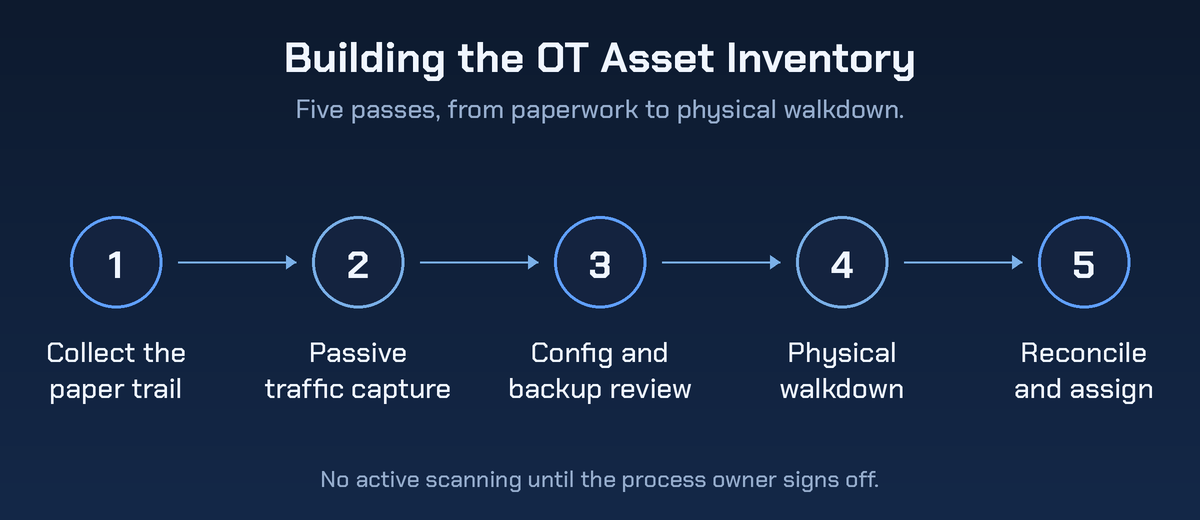
Five passes, run in this order. Treat the order as non-negotiable.
Pass four is what makes passes one through three honest.
1. Paper first
Before a single packet, collect the network diagrams, P and ID drawings, integrator handover binders, maintenance records, OEM service contracts and the purchasing history for capital equipment.
Purchase orders are badly underrated. Every machine on that floor was bought by somebody, and the PO usually names the control platform inside it.
2. Passive network capture
Get a span port or a passive tap at the core plant switch and at each cell switch you can reach. Capture long enough to cover a full production cycle, including a shift change and ideally a weekend, because devices that only speak during a batch won't show up in a short window.
Parsing that traffic gives you addresses, the protocols in use (Modbus TCP, EtherNet/IP, PROFINET, S7comm, DNP3, OPC UA) and a conversation map of who talks to whom. No packets go onto the process network. The only change you make is the SPAN configuration itself, which is why a TAP is the better option wherever one can be fitted.
3. Configuration and backup review
Pull the switch configurations, firewall rule sets, DHCP reservations and the controller project files from the engineering workstation.
Project files are the best source in the building. A PLC program typically enumerates every I/O module, drive and remote rack it addresses, including gear that never generates routable traffic.
4. Physical walkdown
Walk the floor with the maintenance lead and open the panels. Photograph the nameplates.
This is the only pass that finds the serial devices, the unmanaged five-port switch zip-tied inside an enclosure, and the cellular router an OEM left behind after a commissioning visit. Budget a full day per production area, and don't send a junior alone into a live plant.
5. Reconcile, then assign an owner
Merge the four sources into one record per device: make, model, firmware, addresses, physical location, zone, the process it supports and who to call when it fails.
Then get a named person to own the update process, tied into the site's management of change procedure. An inventory without an owner is stale within a quarter, and a stale one is worse than none, because people trust it.
Active scanning gets its own rule. If you have to scan, do it inside an agreed maintenance window, rate-limited, with the process owner present and an abort signal agreed beforehand. Some OT-aware platforms run safe active queries using the device's own protocol rather than generic port sweeps, which is gentler.
Gentler isn't free. And get the machine vendor's written sign-off before anything touches a controller still under warranty.
What the client gets at the end
The output of a discovery engagement isn't a screenshot of a scanner console. It's four artifacts the client can act on and an auditor can read.
- The asset register. One row per device with the fields above. Exportable, because it'll be pasted into a customer questionnaire within a month.
- The communication map. Who talks to whom, over which protocol, across which boundary. This is the artifact that becomes a segmentation design.
- The exposure list. Every path from outside the plant to inside it. Vendor VPNs, cellular modems, dual-homed workstations, the wireless bridge somebody ran to the warehouse.
- The gap register. Unsupported firmware, default credentials, flat zones and anything carrying an open CISA advisory, ranked by consequence to the process rather than by CVSS score alone.
That gap register feeds straight into an OT risk assessment, which is the natural second engagement. Package all of it under your own brand. If you'd rather not build the capability in-house, a pentest partner that works channel-only can run the fieldwork behind your logo, invisible to the client.
Frequently asked questions
What are OT devices?
OT devices are the hardware that monitors or controls a physical process. The main classes are PLCs, HMIs and operator panels, RTUs at remote sites, SCADA and DCS servers, process historians, safety instrumented systems, engineering workstations, and the industrial switches and gateways connecting them. If it changes or reports what happens on the plant floor, it counts.
Can we just run our normal network scanner across the OT network?
No. Legacy controllers have documented failure modes when they're hit with unexpected or high-rate traffic, and some will stop responding or fault outright. Past the technical risk, unauthorized scanning can void an OEM support agreement. Passive capture first. Active work only inside an agreed window, with operations watching.
How long does OT asset discovery take?
For a single mid-size manufacturing site, plan on two to four weeks end to end. The passive capture runs for a week or two, the walkdown is a day or two per area, and reconciliation takes about as long as the fieldwork. Multi-site clients should be phased one site at a time.
Who at the client should we be talking to?
The maintenance or controls lead, not the IT manager. The IT manager will hand you a spreadsheet. The controls lead knows which panel has the modem in it. Get the plant manager to sponsor the work so you get floor access, and keep the safety team informed if anything you're planning goes near the SIS.
How often does the inventory need refreshing?
Continuously in principle, with a formal reconciliation annually and an immediate update after any line change or new commissioning. Tie the update trigger into the site's management of change process and the register largely maintains itself. Bolt it on as a separate task and it won't survive the year.
Lead with the walkdown
Every OT security proposal you write rests on knowing what's out there, and almost none of your clients do. Don't hold it against them. The gear was bought as machinery and installed by integrators, and keeping a list of it was never anybody's job.
Which makes discovery the easiest first sale in this category. It's fixed scope, it's low risk to the process, and it produces the findings that justify everything you'd want to sell next.
Start with the walkdown. If you want the fieldwork and the reporting delivered under your brand, get a pentest quote and we'll size the first plant with you.
.png)
.avif)
.png)
.png)
.png)

