

A client passes its compliance review on Friday. On Monday, someone plugs a $40 wireless router into an open wall jack to “fix” a dead spot. Now there is an unapproved path into the network that sits outside your controls, outside your monitoring, and squarely inside your liability.
That is why rogue access points matter to MSPs. A rogue AP can turn a clean security stack into a failed client outcome, a painful incident call, and a contract renewal problem. If the breach starts through an unauthorized wireless device, your client will not care that the firewall rules looked good or that the checklist was complete. They will care that the environment was exposed and nobody caught it.
For MSP owners, this is not just a Wi-Fi issue. It is a margin issue, a trust issue, and a compliance issue. One missed rogue AP can trigger incident response costs, audit findings, insurance friction, and hard questions about whether your managed security program actually covers the client’s real attack surface.
If you need a quick refresher on what a wireless access point is, start there. Then focus on the part that affects your business. Unauthorized wireless devices create blind spots that standard remote monitoring, vulnerability scans, and policy reviews often miss.
The fix is straightforward. Treat rogue AP exposure as a testing problem, not just a policy problem. MSPs that add wireless-focused pentesting and clear remediation guidance protect client environments, reduce compliance risk, and strengthen retention without building an expensive in-house specialty team.
What Exactly Is a Rogue Access Point
A rogue access point is a wireless access point installed on a network without explicit authorization from the network administrator. The simple version is this. Your client built a secured building with guarded doors, then someone opened a side window and forgot to tell security.

If you need a quick refresher on what a wireless access point is, review that first. Then come back to the difference that matters. An authorized AP is managed, monitored, and secured by IT. A rogue AP isn’t.
How they show up
Some rogue APs are planted by attackers. A lot are created by regular employees who want convenience.
A user plugs in a home router under a desk. Someone adds a Wi-Fi-enabled printer or smart TV and cables it into the network. A branch office tries to “fix coverage” without telling IT. The intent might be harmless. The result isn’t.
Why MSPs should care
A rogue AP creates an unmonitored entry point that can bypass the controls you spent time and money deploying. Firewalls, NAC rules, segmentation, logging, and endpoint policies don’t help much if someone creates a side path around them.
Practical rule: If a device gives wireless access to the internal network and IT didn’t approve it, treat it like a security incident first and a convenience problem second.
This isn’t just an infrastructure issue. It’s a trust issue. If your client assumes you’re managing their environment, but unauthorized wireless gear is sitting on the network, you have a visibility problem with revenue consequences.
How Rogue APs Create Major Security Holes
Rogue APs create two different problems, and MSPs need to handle both with the same level of urgency. Rootshell Security breaks them into two categories: wired rogues, which are physically connected to the client network, and evil twins, which copy a legitimate wireless network to trick users into joining (Rootshell Security).
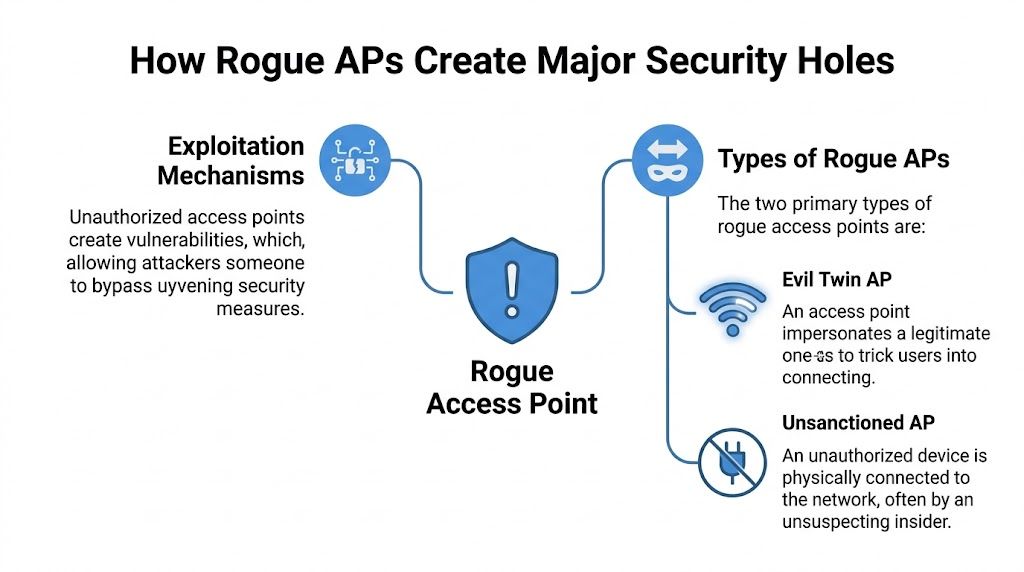
Wired rogues create the worst exposure inside client environments
A wired rogue is the bigger threat for most MSPs because it gives wireless users a direct path into the internal network. Someone plugs in a cheap router, extender, printer, or all-in-one office device, and suddenly your client has an unapproved access path that sits outside normal oversight.
That one mistake can undercut the controls your team sold, deployed, and documented.
Once a wired rogue is active, anyone nearby may be able to connect and start:
- Scanning internal systems for exposed services and weak hosts
- Accessing shares and management interfaces that were never meant to be reachable over guest-style wireless
- Capturing traffic on poorly segmented or misconfigured network segments
- Moving laterally toward servers, backups, or user devices
- Bypassing perimeter defenses built for threats coming from the internet, not from inside the building
For an MSP, this is not a minor wireless misconfiguration. It is a direct challenge to your security visibility, your compliance story, and your credibility with the client.
Evil twins target users, credentials, and trust
An evil twin attacks from a different angle. It does not need a cable into the office. The attacker clones the name of a trusted Wi-Fi network and waits for a user device to connect.
Once that happens, the attacker can intercept logins, session tokens, browser traffic, and anything else the victim sends over that connection. This is how a simple Wi-Fi spoofing setup turns into account compromise, mailbox access, VPN abuse, or a foothold for broader client intrusion.
Public spaces make this easy. An employee working from an airport, hotel, client site, or coffee shop sees a familiar-looking SSID and connects without checking it closely. That one click can hand credentials to an attacker and send the cleanup bill back to your help desk, your security team, and your client account manager.
Quick comparison
| Type | Connected to internal network | Main risk |
|---|---|---|
| Wired rogue | Yes | Backdoor access, internal scanning, lateral movement, data exposure |
| Evil twin | No | Credential theft, traffic interception, session hijacking |
A rogue AP does not need to be complex to cause damage. It only needs to create a path your team is not monitoring.
Real-World Risks for MSPs and Their Clients
Your client passes an audit in March. In April, someone plugs in a $60 wireless router under a desk, and by June you are explaining to the client, their auditor, and their cyber insurer why an unapproved access path sat inside the network without anyone catching it.
That is the core problem with rogue APs. They turn a small hardware mistake into a contract risk, a compliance problem, and a revenue hit for the MSP responsible for the environment.
Verizon’s 2025 Data Breach Investigations Report notes that wireless threats still show up in real breach patterns, and the business cost of a breach remains high (Verizon DBIR 2025). You do not need a shaky benchmark to make the point. If wireless access falls outside your testing scope, you are leaving a gap that attackers, auditors, and frustrated clients will all find sooner or later.
Compliance exposure gets expensive fast
Rogue APs break the story your client is telling about control.
For SOC 2, that means your client may struggle to prove that access to systems and data is restricted, approved, and monitored. For HIPAA, an unknown wireless path near systems that handle protected health information raises obvious questions about safeguards and unauthorized access. For PCI DSS, unauthorized wireless devices around the cardholder data environment can trigger findings, remediation work, and added scrutiny during assessments. GRC consultants and CPAs then inherit a mess they did not create but still have to explain.
The business impact is immediate. Audit delays. Corrective action plans. Extra evidence requests. Client leadership asking why their MSP never tested the wireless layer in the first place.
A professional Wi-Fi scan helps, but scanning alone is not enough. MSPs need validation that shows whether an unauthorized AP can be used to reach client systems, bypass segmentation, or weaken compliance controls. That is why partner-ready Wi-Fi penetration testing for MSPs makes sense. It gives you proof, not assumptions.
MSP revenue is on the line
Clients do not split hairs here. If you manage security, infrastructure, or compliance support, they will treat a rogue AP incident as your failure to find a known class of risk.
That leads to three expensive outcomes:
- Client churn after a breach or failed assessment damages trust
- Unplanned response work that eats engineer hours and kills margin
- Sales friction when prospects ask what controls you use to find hidden wireless exposure across managed environments
The worst part is how preventable this looks from the client side. They see an unauthorized device, a missed assessment gap, and a provider who should have caught it.
Rogue APs are not a side issue for mature MSPs. They threaten retention, compliance credibility, and expansion revenue. The smart fix is simple. Add wireless testing to your security program and use a white-labeled pentesting partner that can deliver it at a price your clients will approve.
Detecting and Finding Rogue Access Points
A client passes a compliance review on Monday. By Friday, someone has plugged in a cheap wireless router under a desk, and your team has no alert, no inventory record, and no proof the device stayed isolated. That is how MSPs get blamed for risks they never tested well enough.
Detection starts with ownership. If you cannot show which access points are approved, where they are located, who owns them, and which SSIDs and BSSIDs belong on-site, you are guessing. Guessing is not a security control. It is a liability.

Start with an inventory that your team can defend
Build a current list of authorized APs, approved SSIDs, BSSIDs, switch ports, device owners, and physical locations. Review it on a schedule, not after an incident. The moment an unknown device appears, treat it as a security event and verify whether it is merely unauthorized or actively exposing client systems.
That matters for business reasons as much as technical ones. If a client asks how you know an access point in their office is legitimate, "we ran a scan once" is not a defensible answer.
Use layered detection, not one tool
Rogue APs are missed when MSPs rely on a single data source. You need wireless visibility, wired-side validation, and physical verification.
- Wireless scanning tools such as Kismet or Airodump-ng to identify nearby broadcast activity
- WIDS or WIPS to flag unauthorized APs, evil twin behavior, and suspicious associations
- Switch port reviews to find devices connected where no AP should exist
- MAC and OUI checks to spot consumer hardware inside business networks
- Traffic analysis to catch odd DHCP activity, unexpected routes, or lateral movement tied to wireless entry points
- Physical inspection of offices, closets, shared spaces, and conference rooms where hidden gear often sits for months
A professional Wi-Fi scan is a useful operational baseline. It helps you find what is in the air. It does not prove whether a rogue device can reach sensitive systems, bypass client policy, or create a reportable compliance gap.
Validate exposure with wireless pentesting
This is the part many MSPs skip, and it is the gap clients notice after an incident.
Vulnerability scans do not test the wireless path the way an attacker would. Your team needs to verify whether an unauthorized AP can join the wired network, weaken segmentation, capture credentials, or create a foothold that turns into billable cleanup and client distrust. That is why adding white-labeled Wi-Fi penetration testing for MSPs is the smart move. It gives you evidence you can put in front of clients, auditors, and prospects.
Do not leave unknown wireless devices in a backlog queue. Find them fast, validate the risk, and close the gap before it costs you a client.
Mitigation and Essential Penetration Testing Checks
A rogue AP becomes a business problem the moment it creates a path around the controls your client is paying you to manage. If that path leads to cardholder data, patient records, or internal admin systems, the fallout is not limited to a security ticket. It turns into failed audits, contract risk, emergency remediation, and hard questions about why the MSP did not catch it sooner.
Start with prevention at the wired edge. Rogue APs live or die based on whether someone can plug them in, authenticate, and reach anything useful.
What solid mitigation looks like
Your baseline should include:
- 802.1X and NAC to restrict what can connect to the network
- Approved AP whitelists with scheduled review and removal of stale entries
- Network segmentation that keeps guest, user, VoIP, server, and management traffic separated
- Wireless monitoring tied to response procedures so alerts trigger action, not dashboard clutter
- Written employee policy that bans personal routers, hotspots, and unsanctioned wireless gear
- Locked switch ports and port security to stop unauthorized hardware from gaining a foothold
These controls reduce exposure. They do not prove the client is safe.
That proof comes from testing the exact failure points attackers use. Your team should verify whether a rogue AP can reach internal VLANs, bypass NAC through a misconfigured port, bridge guest traffic into production, capture credentials through weak onboarding flows, or give an attacker a stable foothold after business hours. That is why a targeted internal penetration testing assessment belongs in the scope. It shows whether the wired network, segmentation rules, and identity controls hold up under real abuse, not just policy review.
Why pentesting closes the gap
A proper test around rogue AP risk should answer a short list of questions that matter to MSPs and their clients:
- Can an unauthorized AP get onto the wired network at all
- If it does, what systems can it reach
- Can an attacker use it to harvest credentials or session traffic
- Do controls contain the exposure fast enough to avoid a reportable incident
- Would the findings create a compliance problem for frameworks the client already claims to meet
That last point matters more than many providers admit. Rogue AP exposure can undermine the segmentation, access control, and monitoring claims clients rely on during compliance reviews. If you manage regulated environments, you need evidence, not assumptions. Pentesting gives you something defensible to show clients, auditors, and prospects. It also protects your revenue by reducing the chance that a preventable wireless gap turns into churn, unpaid cleanup time, or a damaged client relationship.
Partner for Affordable White-Labeled Pentesting
A lot of providers talk about rogue APs badly because they blur two different issues. Some unauthorized wireless devices are just interference. Others are connected to the wired network and create a direct path around firewalls. That distinction matters, and security reporting often misses it. JumpCloud specifically notes this gap and why reports should clearly separate wired-connected rogue APs from wireless-only interferers (JumpCloud).
That’s exactly why MSPs shouldn’t bolt together low-cost scans and call it penetration testing. Your clients need a real answer, not a generic report. They need to know whether a rogue AP creates noise, or whether it creates direct data exfiltration risk.
The smart model is simple. Use a channel-only partner that supports your brand, doesn’t compete for your accounts, and delivers affordable, manual pentesting fast. That matters for MSPs, vCISOs, CPAs, compliance firms, and resellers that need credible testing without building a full in-house team.
Look for teams with OSCP, CEH, and CREST credentials. Look for white label delivery. Look for quick turnaround. And look for reporting that a client can understand and use in a risk assessment, compliance review, or board conversation.
If you want a partner-built option for white label pentesting, start here: https://www.msppentesting.com/pentest-partner
If you need a fast, affordable, white-labeled way to test wireless risk, internal exposure, and compliance gaps without competing with your own clients, talk to us about external network pentesting alongside your wireless and internal scopes. Our OSCP, CEH, and CREST-certified team delivers manual pentests with quick turnaround, so you can strengthen client security and grow revenue under your own brand. Contact us today.

.avif)
.png)
.png)
.png)

