
Most MSPs sell an active directory security assessment as a hygiene report. Stale accounts, weak password policy, group memberships nobody cleaned up since the 2019 migration. That's an audit, it's worth doing, and it isn't what your client is buying.
What they're actually asking is simpler and harder: if somebody phishes one accountant, how far do they get?
MSP Pentesting builds this deliverable channel-only, so the answer ships with your logo on it.
The difference between the two products is a graph.
A hygiene report lists objects. An assessment draws the shortest route from a standard user account to the domain controller, names every hop, and tells your client which single change collapses the most paths at once.
Assessment, penetration test, or monitoring
Three things get sold under overlapping names and your clients can't tell them apart. Here's the split we use in proposals.
| Deliverable | What it does | Exploitation | Cadence |
|---|---|---|---|
| AD security assessment | Enumerates objects and permissions, graphs every path to tier zero | Read only, paths verified by hand | Annual, plus after a merger |
| AD penetration test | Walks the path with real credentials and proves the outcome | Yes, inside agreed rules of engagement | Annual, or when the client needs evidence |
| ITDR tooling | Watches identity telemetry for the attack happening now | None, it is detection | Continuous |
They stack. The assessment tells you which paths exist, the pentest proves the important ones are real, and identity threat detection and response tells you when somebody starts walking one. Sell the assessment first, because there's no point alerting on a path you never knew you had.
You need all three eventually. You need the graph first.
The attack paths that show up in nearly every domain
Domains differ. The findings barely do. Here's what your assessment should be hunting for.
Credential material sitting in the directory
Kerberoasting. Any authenticated user can request a service ticket for any account with a service principal name. The ticket comes back encrypted with a key derived from that account's password, and it cracks offline where no lockout policy applies.
RC4 tickets crack fastest, AES slows it down, and neither saves a service account with a twelve character password set by a vendor in 2019.
AS-REP roasting. Same idea, different door. Accounts flagged with "Do not require Kerberos preauthentication" hand out crackable material to an unauthenticated attacker who only knows the username.
Group Policy Preferences passwords. The static AES key is in Microsoft's own MS-GPPREF protocol documentation, so "encrypted" means nothing here.
MS14-025 stopped anyone setting new ones back in 2014, but it deliberately left the existing XML in place, which is why those files are still sitting in SYSVOL in environments that have been migrated twice.
Every domain user can read SYSVOL. That's the finding.
Go and look in your client's SYSVOL. Today.
Coercion and relay
LLMNR, NBT-NS and mDNS answer name lookups that DNS didn't. An attacker on the same broadcast domain answers them first, catches NTLM authentication, and either cracks it or relays it somewhere useful.
Relay is the dangerous half, and SMB signing is what stops it. Recent Windows builds require SMB signing by default, but assessments keep finding servers that predate those defaults or had signing turned off for a performance complaint nobody documented.
Then there's coercion, which skips the waiting. PetitPotam abuses the MS-EFSRPC interface and the printer bug abuses MS-RPRN to make a machine, sometimes a domain controller, authenticate to an attacker's host on demand.
Combine coercion with a relay target and you have a path that doesn't need a single cracked password.
Delegation
Unconstrained delegation is the loud one. A host configured for it holds forwardable tickets in memory, so compromising that host means harvesting whoever authenticated to it. Coerce a domain controller into authenticating there and you're done.
Resource-based constrained delegation is the quiet one, and it's the finding you'll miss most often. If an attacker can write the msDS-AllowedToActOnBehalfOfOtherIdentity attribute on a computer object, and they control any machine account, they can request tickets as any user to that machine.
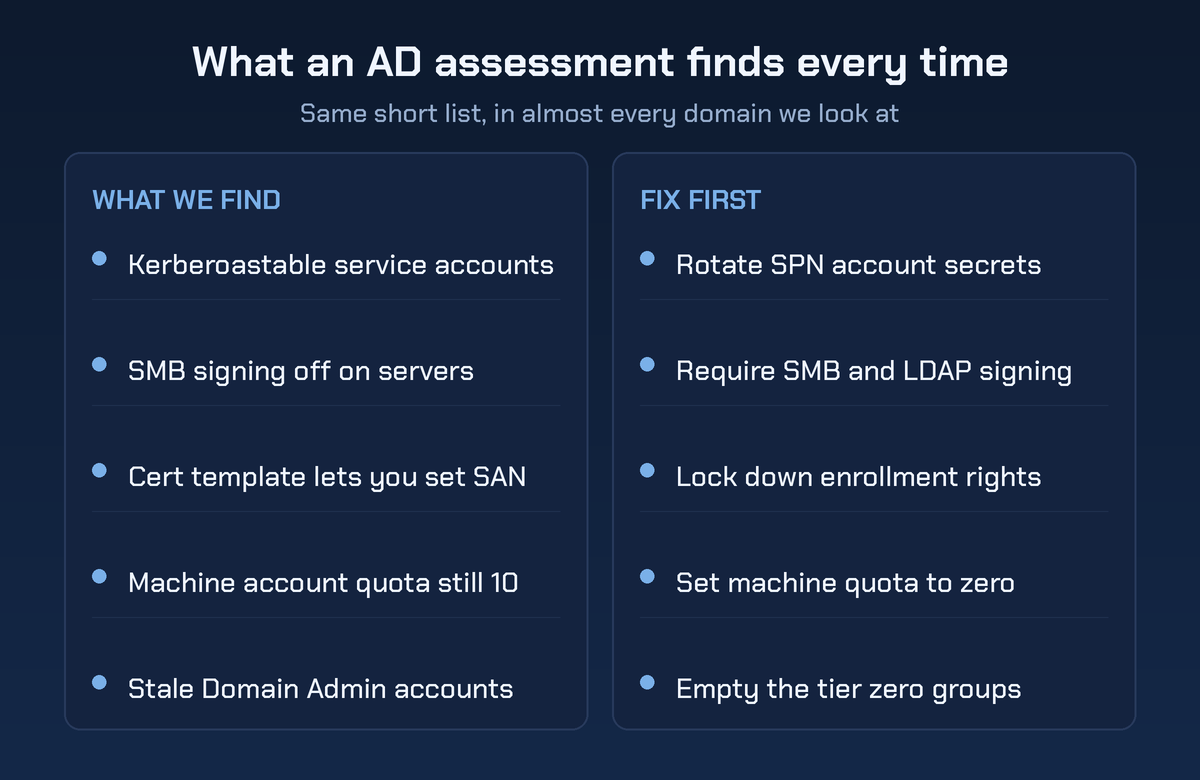
Getting a machine account is usually trivial, because ms-DS-MachineAccountQuota defaults to 10 and lets every authenticated user create their own.
Set that quota to zero.
It costs nothing and it removes the prerequisite for a whole family of escalations.
Nobody audits delegation. That's why it works.
Certificate services
If your client runs an internal certificate authority, that's often the shortest path in the environment. SpecterOps published "Certified Pre-Owned" in 2021 and named eight escalation scenarios, ESC1 through ESC8. The taxonomy has since grown past ESC16 as researchers found more.
ESC1 is the classic: a template that allows client authentication, lets the requester supply the subject alternative name, doesn't require manager approval, and can be enrolled by domain users. That's a certificate for any account you like, including a domain admin.
ESC8 relays NTLM authentication straight to the web enrollment endpoint. ESC13 abuses issuance policies linked to groups through msDS-OIDToGroupLink. ESC16 disables the security extension at the CA level instead of per template.
Nobody is guessing at these. They're enumerable, and any assessment that doesn't cover AD CS is leaving the fastest route unchecked.
Put AD CS in your scope.
Permissions nobody meant to grant
ACL findings are where the graph earns its money. GenericAll, GenericWrite, WriteDACL, WriteOwner and AddMember edges chain into escalation paths that no human reads out of a permissions dump.
The DCSync pattern is the ugly end of it: an account holding both Replicating Directory Changes and Replicating Directory Changes All can pull every hash in the domain without ever touching a domain controller's disk.
Group nesting hides most of this. The helpdesk group is a member of a group that's a member of a group with reset rights on tier zero accounts, and the org chart says nothing about it.
The org chart lies to you. The graph doesn't.
The newer stuff
Delegated managed service accounts arrived with Windows Server 2025, and Akamai's BadSuccessor research showed the msDS-ManagedAccountPrecededByLink attribute could be used to inherit a privileged account's access.
Before the fix, Akamai found that in most environments they examined, users well outside Domain Admins already held the permissions to pull it off. Microsoft patched it as CVE-2025-53779 in August 2025, so your assessment question is now a build-level one.
Are the client's Windows Server 2025 domain controllers on 26100.4946 or later? Follow-on research keeps finding variants, so check the current state before you write it into a client report.
Tools get you to the inventory, not the answer
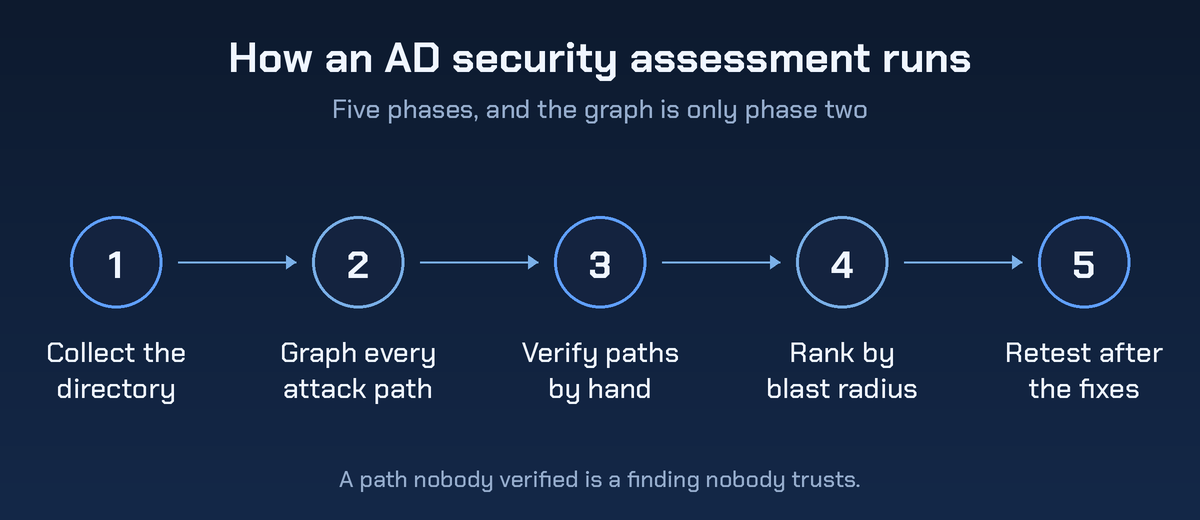
Every active directory security assessment tool on the market does roughly the same first job. It collects objects, permissions, sessions and trusts, then scores or graphs them.
The active directory security tools worth having in the kit are unglamorous.
- BloodHound with SharpHound for the graph and the path queries.
- PingCastle for a fast scored baseline that clients can read.
- Purple Knight for a second opinion on indicators.
- Certipy or Certify for certificate services.
- ADeleg for delegation the standard consoles hide.
None of that draws the path. You still have to look.
Here's the part vendors skip. All of them produce more findings than your client will fix, ranked by a generic severity that has no idea which server holds the general ledger.
So the human work is triage. Which of these paths reaches tier zero, which ones are reachable from a single phished account, and which one fix kills the most edges?
That's your call, not the tool's.
A twelve page report answering that beats a 400 row export every time. If you want to see how we lay that out, take a look at the pentest report template.
How MSPs should package it
You already run the directory. That's a conflict for testing, which is why the assessment goes out under a white-labeled pentesting arrangement, but it's an advantage for everything after the report.
Package it in three parts. The assessment itself, a fixed price remediation sprint that you deliver, and a retest that proves the paths closed. That third piece is what converts a one time project into an annual line item, because your client wants the graph to keep getting shorter.
Price the assessment as a discrete engagement, not as an hour bucket. Clients who buy hours ask what you did with them. Clients who buy a graph ask what changed since last year.
Questions MSPs ask before scoping a domain
Is an active directory security assessment the same as an AD audit?
No. An audit checks configuration against a standard and produces a compliance style list. An assessment models an attacker and produces paths. Plenty of environments pass a configuration audit while carrying a three hop route to Domain Admin, because none of the three hops is a misconfiguration on its own.
Does collection break anything?
Collection is LDAP and SMB reads with a normal domain account, and it's safe to run during business hours in most environments. Session enumeration is the noisiest part. On very large or very fragile domains we'll throttle it or schedule it, and we tell you first rather than after.
Do we need Entra ID in scope too?
If the client syncs, yes. The Entra Connect server holds credential material for both sides, so a domain-only scope stops exactly where the interesting escalation starts. Put Entra ID in with the domain, or write in the report that you didn't, and why.
How long does one take?
Collection is hours. Verification, triage and writing are the work. A single forest with a handful of domains lands in the three to five day range, and a client with four acquisitions bolted together takes longer because the trusts are the interesting part.
What should the client fix first?
Whatever removes the most edges. Usually that's setting the machine account quota to zero, requiring SMB and LDAP signing, cleaning enrollment rights on certificate templates, and emptying tier zero groups down to accounts that are genuinely used. Password policy matters too, and it's rarely the shortest path.
Sell the graph
Your clients don't need another list of stale accounts. They need one page showing how a phished mailbox becomes a domain compromise, and a short list of changes that breaks it.
That's a deliverable you can sell every year, because the answer changes every year. New servers, new service accounts, a certificate template somebody cloned for a project in March.
You administer the directory, so you're already the obvious person to fix it. Bring in an independent tester to draw the map and keep the remediation.
There's a domain in your book nobody has ever mapped properly. Get a pentest quote for that one first.
.png)
.avif)
.png)
.png)
.png)

