Identity threat detection and response demos beautifully, because every demo shows the attack the product catches. Nobody demos the four steps before it, the ones that produce no alert at all. MSP Pentesting spends a lot of time in client domains that already run ITDR, channel-only and under your brand, and the pattern is consistent: the tooling is fine, the expectation attached to it is wrong. ITDR tells you somebody is walking a path. It does not close the path, and it doesn't see most of the walk.
That's worth saying plainly to a client before they sign, not after an incident.
What ITDR is, minus the category marketing
ITDR is a category label, not a protocol. Products under it bundle three different jobs and the mix varies wildly by vendor.
Posture. Standing exposure in the directory. Risky delegations, weak certificate templates, stale privileged accounts. This is the same ground an assessment covers, sampled continuously.
Detection. Behavioral analytics over identity telemetry. Domain controller events, Entra ID sign-in and audit logs, Okta or Ping logs, and whatever identity signal your EDR already produces.
Response. Disable an account, revoke sessions and refresh tokens, force reauthentication, isolate a host.
When an MSP says "we deployed ITDR," they usually mean the detection piece, running in alert-only mode, on whatever logs were already flowing. That combination has a much smaller field of view than the brochure implies.
What it catches, and catches well
ITDR is strong on anything that produces a distinctive event at the moment it happens, at a volume that stands out from the baseline.
Authentication noise
Password spraying is the easiest win. One source, dozens of accounts, a wall of failed logon events, or the equivalent error codes in Entra sign-in logs. Credential stuffing looks similar. Any product in this category catches it, and honestly your SIEM already could.
Kerberos requests that don't look like Outlook
Service ticket requests are logged. A single account asking for tickets to dozens of service principals in a few minutes, with weak encryption negotiated, is a shape that stands out. Detection here is about the burst and the encryption type, not about the technique itself.
Replication from something that isn't a domain controller
Directory replication rights being exercised by a principal that isn't a DC is one of the highest fidelity detections in the whole space. Low volume, unambiguous, and it maps to an attacker who already has serious rights.
Tier zero membership changes
Somebody joining Domain Admins, Enterprise Admins or a group that nests into them generates a specific event. Rare, easy to alert on, and worth waking somebody up for.
Cloud identity abuse
In Entra ID and Okta, the good detections are all configuration-adjacent: a new federated domain added to the tenant, conditional access policy modified, MFA method registered from an unfamiliar location, illicit OAuth consent granted to an application nobody's heard of, impossible travel on a session token. These fire reliably because the underlying logs are on by default in the cloud, which is not true on premises.
Honeytokens
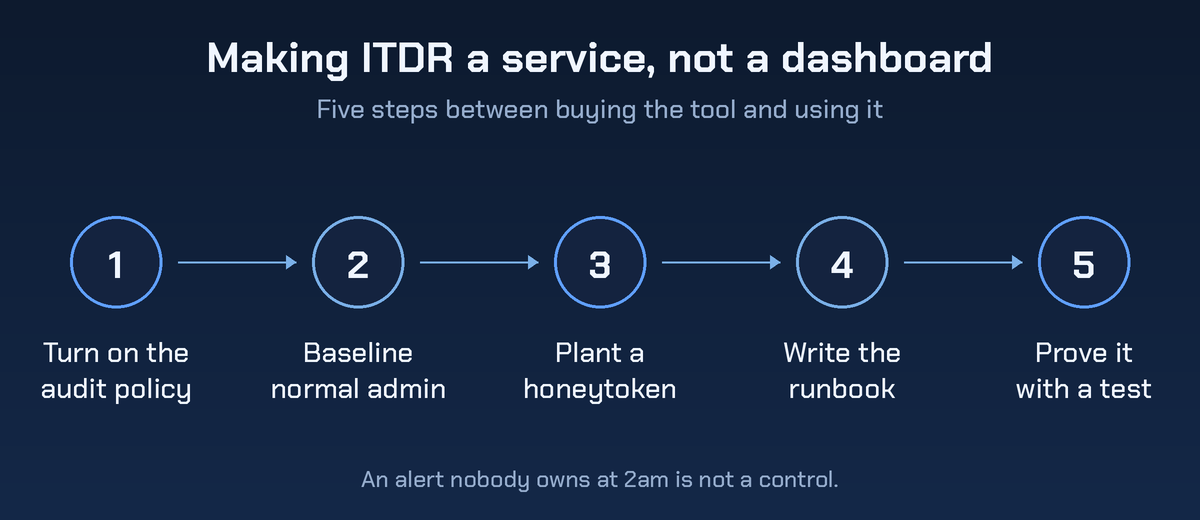
The cheapest high-signal detection you can deploy. A privileged-looking account that no human or service ever uses, seeded where enumeration will find it. Any touch is malicious by definition. Zero false positives, near zero cost, and most ITDR deployments still don't have one.

What it misses, which is the part that matters
Now the uncomfortable half.
Everything read-only
Directory enumeration is authorized traffic performed by a normal user with a normal account. Reading group memberships, permissions, trust relationships and service principal names looks like Outlook and the org chart app doing their jobs. There is no meaningful signal there, which is why an attacker who has spent an hour reading has already mapped the environment and generated nothing worth alerting on.
Everything offline
Once material leaves the wire, your telemetry ends. Cracking happens on hardware you'll never see, at a speed no lockout policy affects. The request that produced the material may have been logged. The seven hours of GPU time afterward were not.
Everything that looks like administration
An ACL grant on an object is a Tuesday. A certificate issued to a user is a Tuesday. A delegation attribute written to a computer object is a Tuesday. Those events exist in the log, but the baseline is thick with legitimate versions of exactly the same action, so alerting on them produces noise your service desk will suppress inside a week.
This is the single biggest gap. The attack techniques that make an active directory security assessment worth buying are mostly abuse of legitimate features, and legitimate features generate legitimate-looking events.
Standing privilege that hasn't been used yet
ITDR watches behavior. It has no opinion about whether an account should hold a right in the first place. A helpdesk group with reset rights over tier zero accounts is a catastrophe waiting for a phish, and it produces no telemetry whatsoever until somebody uses it.
Weak passwords
A password that cracks in nine seconds isn't an event. It's a property. Nothing in the detection stack will ever tell you about it.
Events you never turned on
This one's self-inflicted and extremely common. Default Windows audit policy doesn't generate several of the events the good detections depend on. Object access auditing needs advanced audit policy configured and often SACLs on the right objects. Service ticket request logging is loud enough that collectors drop it for cost. Certificate authority issuance logging is off in a lot of environments.
Half the detections your vendor listed on the datasheet are conditional on log sources nobody validated at deployment. Go check. It takes an afternoon.
Alerting on a path is not closing a path
Here's the argument to have with a client who wants to buy ITDR instead of fixing the directory.
A detection buys you time and a chance. It doesn't remove the edge from the graph. If a standard user can reach domain admin in three hops, that's still true after the ITDR deployment. What changed is that you might see hop two, if the log source is on, if the analytic covers that technique, if somebody is watching, and if the runbook says what to do.
Four conditionals. Every one of them fails in real deployments.
Compare that with setting the machine account quota to zero, or emptying a nested group. Those changes don't depend on anybody being awake.
Sequence it properly. Find the paths, close the cheap ones, then instrument the ones you can't close. Detection is the layer you put over residual risk, not the layer you put over unexamined risk.
| Attack step | Does ITDR see it | Why |
|---|---|---|
| Enumerate the directory | Rarely | Authorized reads by a normal account |
| Spray passwords | Yes | Failure volume across many accounts |
| Request tickets in bulk | Usually | Burst and encryption type stand out, if logged |
| Crack the material offline | No | Happens on attacker hardware |
| Grant itself an ACL | Sometimes | Event exists, baseline is full of real ones |
| Enroll a certificate | Sometimes | Needs CA logging on and a template baseline |
| Replicate the directory | Yes | High fidelity, almost no legitimate noise |
| Add itself to a tier zero group | Yes | Rare, specific, worth paging on |
The two cheap things that make ITDR worth having
A password audit
With written consent, pull the hashes and crack them offline the way an attacker would. You're not looking for a score, you're looking for the list: which privileged accounts fall in minutes, how many people used the season and the year, how many service accounts still carry a password a vendor set once and never rotated.
A password audit produces findings your detection stack structurally cannot generate. Run it annually and after every acquisition.
A privileged access review
Quarterly, on paper, with a human signature. Who holds each privileged right, who granted it, when it was last used, and does anybody still need it. ITDR shows you the use. The privileged access review kills the right.
These two together shrink the surface that detection has to cover, which is the only way alert volume ever comes down.
How MSPs should sell this
Don't sell ITDR as a product line. Sell the outcome and be specific about the boundary.
Say what you'll watch, what you can't watch, what happens at 2am and who is on the hook when it does. An identity alert nobody owns overnight isn't a control, it's a liability with a dashboard attached.
And keep the testing independent. If your team runs the directory and also grades whether the detections work, that grade isn't worth much to the client's insurer or their auditor. That's the case for a pentest partner who validates the detections without a stake in the answer.
What MSPs ask before they renew an ITDR license
Does ITDR replace an AD security assessment?
No, and it's the wrong order. The assessment maps which paths exist. ITDR tells you when somebody walks one. Buying detection first means alerting on routes you've never inventoried, and tuning is impossible without knowing what normal looks like in that specific directory.
Will it catch a golden ticket?
Sometimes, and not for the reason people assume. Forged tickets can be spotted through anomalies like a service ticket with no matching authentication ticket, odd lifetimes, or mismatched account details. Whether your deployment sees it depends entirely on whether those correlations are enabled and whether the source events are actually being collected.
Do we need it if we already run EDR and a SIEM?
Maybe not. A lot of what ITDR products sell is analytics over logs you already ship. If your SIEM has the domain controller events, the Entra logs and someone writing content, you can build a meaningful portion of it. What you're paying a vendor for is prebuilt content, a directory-aware baseline and response actions wired in. That's a real value, it just isn't a new sensor.
How do we prove the detections work?
Run the techniques in a controlled window and check what fired. Not a scan, an actual attempt, with the client's SOC blind to the schedule. The output is a matrix of technique against alert, and it's the most useful single page a detection program ever produces.
What about hybrid environments?
Hybrid is where this gets hard. An on-premises escalation becomes a cloud one through sync, and the identity sync server is tier zero whether the client treats it that way or not. Scope both directions or write down plainly that you didn't.
Open the console before you renew
Pick one client running ITDR and answer three questions. Which log sources are actually arriving. Which detections are enabled versus licensed. What happens when one fires at 2am.
Most MSPs can't answer the second one without opening the console, and the answer is usually smaller than expected.
Then validate it. We'll run the identity techniques against a client's directory, tell you which ones went unnoticed, and hand you the matrix under your brand. Get a pentest quote and send the list of detections that are switched on. The gap between that list and the licensed one is where we start.