
Every phishing simulation tool demo is the same demo. A gallery of templates, a click-rate chart that goes down and to the right, a leaderboard, and a slide about behavior change. Nothing in that demo tells you whether the platform survives contact with forty tenants and a QBR deck. MSP Pentesting is channel-only, so the complaints reach us about a year late, after the contract has been signed and renewed once. None of them have ever been about template count.
They're about the console.
So this isn't a vendor ranking. Rankings go stale in a quarter and none are scored on what decides whether you can run this as a service. This is the criteria list, the questions that expose a weak answer, and how to run a trial that tells you something.
Why vendor rankings don't help an MSP
A best phishing simulation tools listicle scores for a security manager at one company with one domain and one directory. Your constraints are different in kind. Many tenants, many mail configurations, many languages, a technician doing this at 4pm on a Friday, and an owner who needs a one-page report that doesn't mention SPF.
Score for that instead. Eight criteria, in the order they'll bite you.
The criteria that actually decide it
Multi-tenancy that's real, not a folder
Ask whether tenants are separate data boundaries or just tags on a shared user list. The difference shows up the day a client asks you to delete their data, or the day you accidentally launch a campaign against the wrong list.
Then ask the questions behind it. Can you push a campaign to twenty tenants at once and still get per-tenant results? Can a client log in and see only their own users? Can you scope a technician to three tenants? Is there a roll-up view across the whole book, or do you open twenty tabs to build a board report?
Per-client reporting a non-technical owner can read
Most platforms produce a beautiful dashboard and a useless PDF. You need the PDF, because that's what goes in the QBR pack and gets forwarded to a board.
Look for white-labeling with your logo, a summary an owner understands without a glossary, department or location breakdowns, and trend across campaigns rather than one campaign in isolation. Then check whether you can schedule it to generate itself. If somebody on your team has to rebuild that deck monthly, the tool just added labor to a service you priced as automated.
Template quality, and how to test it
Template count is a vanity metric. Three things matter. How fast new templates appear after a real campaign shows up in the wild, whether you can clone a genuine phish out of a client's own quarantine into a template in minutes, and whether difficulty is rated honestly instead of everything being labeled advanced.
Check what the landing page does after a click, too. A page that just says gotcha teaches nothing. A short, specific explanation of the exact tells in that message is the entire training value of the exercise.
And look at what payload types are supported beyond a link. Attachments, credential-harvest pages, OAuth consent prompts and QR codes all behave differently against a mail filter and against a human.
Payload localization
This one gets skipped and it quietly wrecks results. If you serve a client with staff in Quebec, Mexico or Germany, a US English template with a US date format and a US brand reads as obviously fake to half the workforce, and your click rate becomes a measure of who speaks English rather than who's vulnerable.
Real localization means the message body is written in the language, not machine translated. It means local currency and date format, local brands and banks, local holidays, and sender names that look native. Ask to see two templates in the target language and have someone who speaks it read them. That test takes ten minutes and rules out a surprising number of platforms.
The API and directory sync
If users are a CSV upload, you'll stop running the program by month four. Non-negotiables are directory sync from Entra ID or Google Workspace with automatic add and remove, an API that pulls results out so they land in your reporting stack without a human, and webhooks or exports for repeat clickers so enrollment in follow-up training happens on its own.
Ask for the API documentation before the trial, not during. A vendor who has to go find it is telling you something.
Whether it fights the mail filter
This is the criterion that generates the most support tickets and the one nobody asks about in a demo.
Microsoft 365 has a supported path for this. In the Defender portal, the advanced delivery policy has a phishing simulation section where you register the sending domain, sending IP and simulation URLs so the messages skip filtering without a blanket allow rule, and if Safe Links is on you add the simulation URLs to the do-not-rewrite list. Google Workspace has no equivalent purpose-built switch, so you're working with the inbound gateway and email allowlist settings under Gmail's spam, phishing and malware configuration.
Two things to check here. First, whether the vendor publishes its sending IPs and domains and tells you when they change, because a silent change means a client's campaign lands in quarantine and you find out from the click rate. Second, how wide the allowlist has to be. A vendor that needs you to bypass filtering for a broad IP range has handed a real attacker a delivery path, and that's a decision you own, not the vendor.
Ask about phantom clicks as well. Security tooling detonates URLs, and unless the platform filters those by user agent or source, your reports will show clicks from people who never opened the mail.
The report button and what happens next
Measuring clicks alone trains nothing. The number that predicts whether a real phish gets contained is how many people report it and how fast. Check whether the add-in coexists with Microsoft's built-in report action, whether reports route to your service desk or the platform swallows them, and whether reporting a real phish is a different path than reporting a simulated one.
Licensing shape
Per seat, per tenant, annual commitment, minimum seat counts and whether small clients are even viable. Ask about minimums per tenant specifically, because a fifty-seat floor makes half your base unsellable. Ask whether training content is bundled or a separate SKU. Ask about an NFR license for your own staff, because you should be running this against yourselves first.
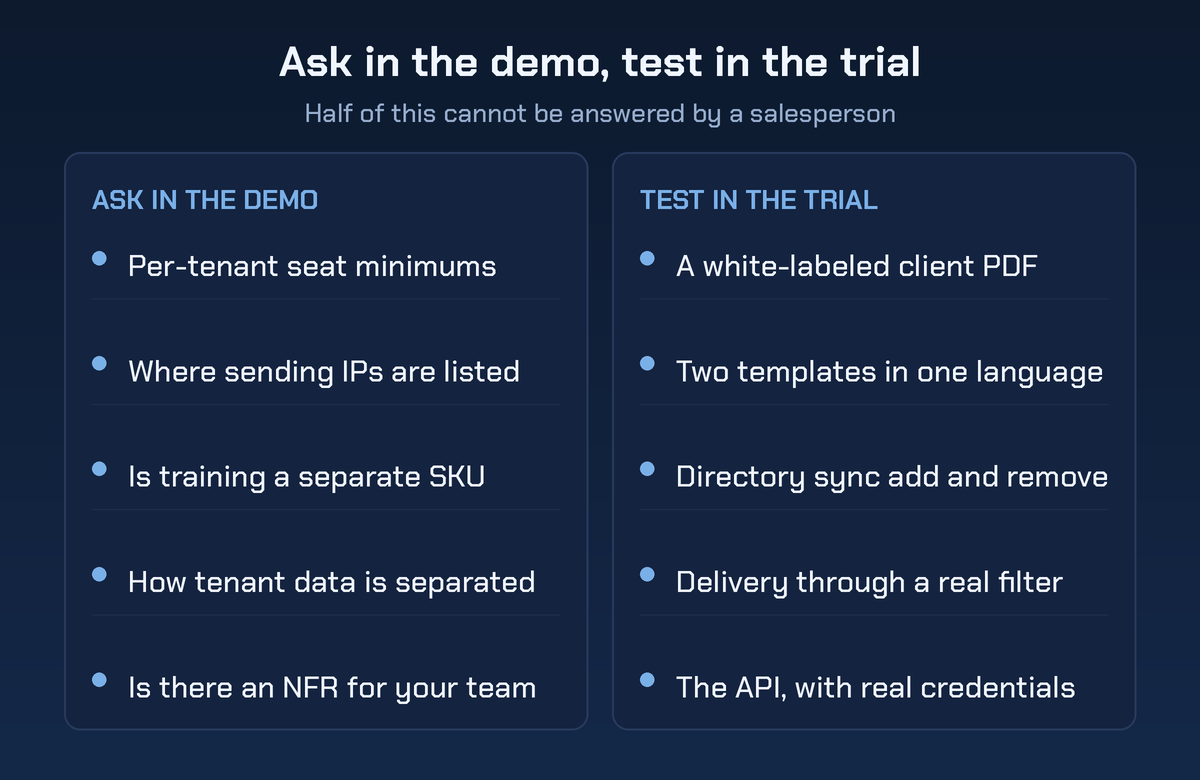
The left column is what you can settle in a call. The right column can't be answered by a salesperson, and any platform that won't give you a real tenant to try it in has told you the answer.
Reading between the lines of a demo
Here's the shorthand version, with what a weak answer sounds like.
| Criterion | What to ask | What a weak answer sounds like |
|---|---|---|
| Multi-tenancy | Show me two tenants and a roll-up view | We use groups and tags for that |
| Client reporting | Generate a white-labeled PDF right now | You can export the dashboard to CSV |
| Template freshness | When did you last add a template | Our library has thousands of templates |
| Localization | Show two templates in this language | We support translation for all templates |
| API | Send me the API docs before the trial | Our team can build you an integration |
| Mail filter | Where do you publish sending IPs | Just allowlist our range and it works |
| Reporting button | Does it coexist with the native one | You should remove the built-in button |
| Licensing | What is the per-tenant minimum | Pricing depends, let us build a quote |
The categories of phishing simulation software
Products in this market fall into four groups, and the group tells you more than the brand does.
- Open source frameworks. Gophish is the obvious one. Total control, no licensing, and you own the infrastructure, the sending reputation, the templates and the support burden. Great for a security team that tests occasionally, rough as the backbone of a monthly service across forty tenants.
- The built-in option. Microsoft includes attack simulation training with Defender for Office 365 Plan 2, which many clients already have through their licensing. It's inside the tenant so there's no filter fight at all, and it doesn't give you a cross-tenant console, which is exactly the thing an MSP needs.
- MSP-first platforms. Built around a partner console, per-tenant billing and white-labeled reporting. This is usually where the fit is, and the tradeoff tends to show up in template depth and localization.
- Enterprise awareness suites. Deep content libraries and mature reporting, sold to enterprises with partner programs added later. Multi-tenancy quality varies enormously and it's the first thing to test.
Pick the group first. It cuts the shortlist to three and saves you four demos.
Where the tool stops
Every platform on your shortlist will run a campaign. None of them decides who's in scope, what happens after a third click, how you handle the executive who demands exemption, or what you tell a client whose click rate went up. That's program design, and it's covered in our guide to running a phishing simulation program.
The other boundary worth naming to clients. A simulation measures whether staff click. It doesn't measure what an attacker could do with the credentials they'd hand over. When a client wants that answer, that's a social engineering engagement with a real objective behind it. That work ships as white-labeled penetration testing, so the client never meets a second vendor.
What partners ask us during a tool bake-off
What's the most important feature in a phishing simulation platform for an MSP?
Real multi-tenancy, followed immediately by white-labeled per-client reporting. Everything else is recoverable. If the console fights you at ten tenants, you'll quietly stop running campaigns and the service dies without anyone canceling it.
Should we use the phishing tool built into Microsoft 365?
It's a reasonable place for a single client to start, especially if they're already licensed for it. It isn't a service platform, because there's no cross-tenant console and reporting stays inside each tenant. Plenty of MSPs use it for one-off tests and a partner platform for the recurring program.
How do we stop the mail filter from blocking simulations?
Use the supported path. On Microsoft 365 that's the advanced delivery phishing simulation configuration plus Safe Links do-not-rewrite entries. On Google Workspace it's the inbound gateway and allowlist settings. Avoid broad transport rules that bypass filtering by IP range alone, because that's a bypass a real attacker can inherit.
How often should campaigns run?
Monthly beats quarterly for behavior, and quarterly beats nothing. What matters more than frequency is that difficulty climbs over time. Sending the same easy template every month produces a chart that looks like progress and isn't.
Do we need a separate tool for vishing and smishing?
Often yes. Voice and SMS need phone numbers, consent handling and a different authorization conversation, and a lot of email platforms bolt it on thinly. Test it separately if the client cares about those channels, and don't assume the email vendor's version is equivalent.
Buy the console, not the gallery
Pick a phishing simulation tool the way you'd pick an RMM. Multi-tenancy, reporting you can hand to a client, an API, and a supported way through the mail filter. Template galleries are the easiest thing in this market to fake and the least likely to determine whether the service still runs in a year.
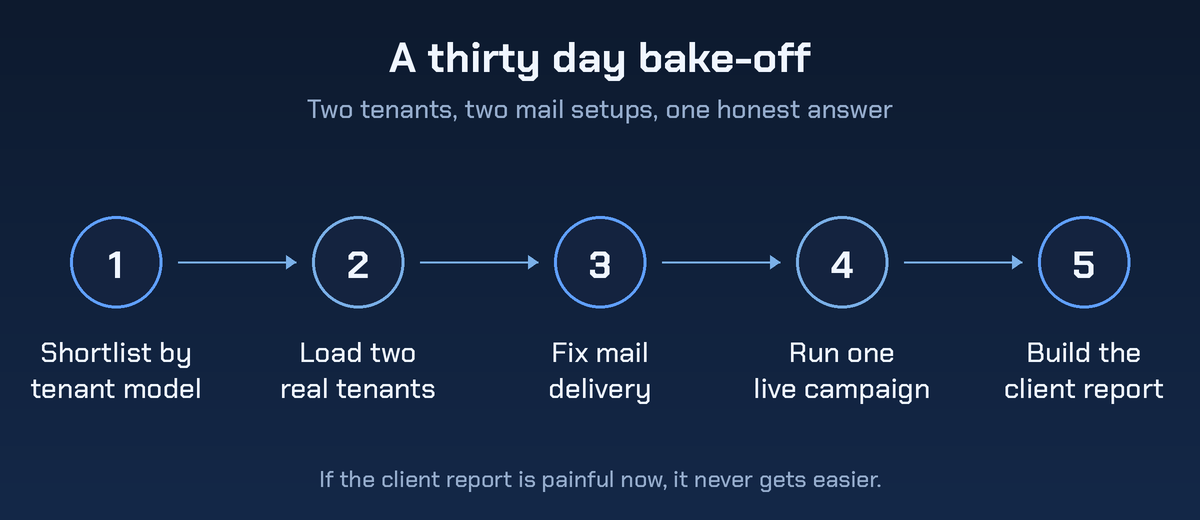
Run a real trial in two tenants with different mail setups. Ship one campaign in a second language. Then decide.
When a client asks what happens after somebody hands over a password, no console has an answer. Bring the tenant count and get a pentest quote.


