
Here's how phishing simulation training dies at an MSP. You buy the platform in January. Monthly campaigns start in February. Click rate drops for two quarters, everyone's pleased, and then the number sits flat for three years while the client keeps paying and nobody can explain what improved. MSP Pentesting builds and runs these programs under your brand, channel-only, and the difference between a program that keeps getting better and one that flatlines has almost nothing to do with which platform you picked.
It's program design. Four decisions: the baseline, the cadence, how difficulty climbs, and what you do about the people who keep clicking.
Get those right with a mediocre tool and you'll beat a great tool run badly.
Start with a baseline you didn't rig
One campaign. Unannounced. No training first. Everybody in scope, executives included. Moderate difficulty, not the obviously fake one.
You're capturing four numbers and three facts.
The numbers: click rate, credential submission rate, report rate, and time from first delivery to first report. That last one is the number nobody tracks and the one that predicts real incident outcomes.
The facts: does a report button exist in the mail client, where do reports land, and does a human triage them inside an hour. If reports go to a shared mailbox nobody watches, your report rate metric is measuring nothing.
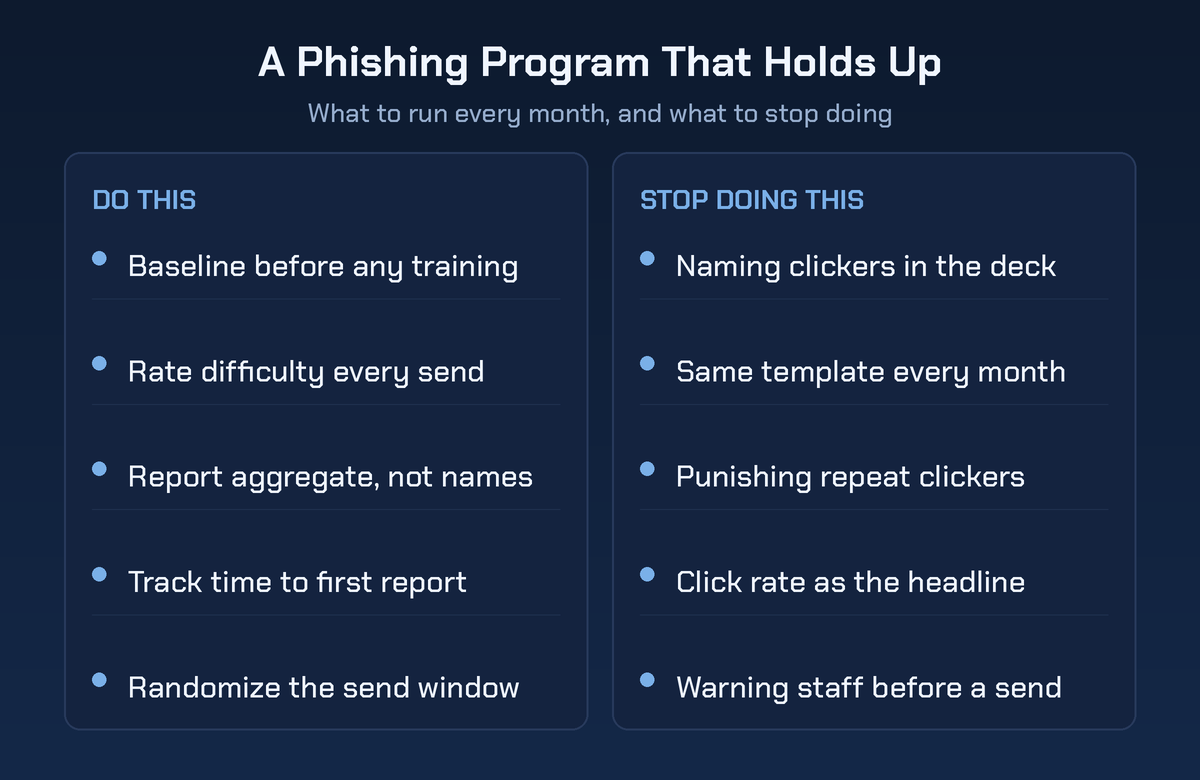
Then the discipline part. Don't announce the send. Don't exclude the leadership team because somebody got nervous. Don't run it the week after an awareness webinar, and don't pick an easy template so quarter two looks like a triumph.
A rigged baseline poisons every number that follows it. You can't undo it later, because the client remembers the first chart.
Cadence: monthly, randomized, nobody excluded
Monthly per user beats quarterly blasts, and the reason isn't repetition. It's coverage. Quarterly campaigns miss people on leave, and that leaves real gaps over twelve months.
Randomize the send day and the hour. Programs that always land Tuesday morning train employees to be suspicious on Tuesday mornings, which is not the behavior anyone wanted.
Watch exclusion creep. It starts with one executive assistant, then the sales team during quarter end, then the partners. Six months later the program covers the people who were never the target.
Rotate themes and log what you sent to whom. Repeating a template inside twelve months makes the trend line lie.
Difficulty progression, and how to prove it
This is the part almost every MSP program skips, and it's the one that keeps clients believing the numbers.
NIST published the Phish Scale, a method for rating how hard a given phishing email is for a human to detect. It works on two components. The observable cues in the message, where more cues make it easier to spot, and premise alignment, meaning how well the story fits that recipient's actual job context. Higher alignment makes it harder. An invoice pretext is much harder for accounts payable than for a network engineer.
Rate every campaign before you send it. Then plot click rate and difficulty on the same chart.
Without that rating you cannot tell the difference between a workforce getting worse and a test getting harder. That ambiguity is why these programs lose credibility in year two. With it, a rising click rate becomes a story you can defend: we made it harder on purpose, here's the rating, and the report rate held.
The ladder we run looks like this. Obvious external sender with multiple cues. Then internal-looking branding with fewer cues. Then a role-aligned pretext built from public information about the client. Then an MFA prompt or an OAuth consent screen, because modern credential theft frequently walks straight past the password. Then a new channel entirely.
That last rung matters. Training people not to type their password doesn't prepare them for a consent prompt that never asks for one.
Repeat clickers, and why punishing them backfires
The industry default is embedded training. Somebody clicks, they land on a page that tells them they clicked, they watch three minutes of video. It feels right and the research is unkind to it.
Lain, Kostiainen and Capkun ran a phishing study across more than 14,000 employees over fifteen months, published at IEEE Symposium on Security and Privacy in 2022. Two findings should change how you build this. Embedded training delivered during simulated phishing didn't make employees more resilient, and it produced side effects that could make them more susceptible. Meanwhile, crowd-sourced reporting worked: employees caught new campaigns fast, triage load stayed manageable, and participation held up.
Read that twice. The feature most platforms sell as the core underperformed. The one most programs treat as an extra carried the value.
Punishment is the same mistake with worse consequences. Three mechanisms, all predictable.
It kills reporting. The number you need is the report, and reporting means volunteering that you interacted with something suspicious. Attach consequences to clicking and the people who click go quiet. A real compromise then sits undiscovered because whoever touched it is hoping nobody noticed. They learn to avoid the security team, not to avoid phishing.
It misreads the signal. Somebody who clicks four role-aligned pretexts a year is telling you their role is high exposure. That's a control finding about accounts payable or the help desk. It isn't a character finding about a person.
It ends the program. One HR complaint about a bereavement-themed test or a named-and-shamed employee and the client's awareness budget evaporates. A test that gets the program canceled wasn't a good test, however dramatic the failure rate looked in the deck.
The escalation ladder that actually works runs the other direction, away from the person and toward the control.
| Signal | What it means | What you change |
|---|---|---|
| Clicked once | Normal human behavior under load | Nothing, log it and move on |
| Clicked twice in a year | Worth a short, specific conversation | Two minute coaching from a human, same week |
| Submitted credentials | The password is the weak point, not the user | Phishing-resistant MFA for that group |
| Repeats in a high-risk role | Role exposure, not personal failure | Callback verification, tighter approvals |
| Nobody reported it | The reporting path is broken | Fix the button, the mailbox and the triage |
Block user consent to third-party apps. Turn on phishing-resistant MFA for finance and IT before anyone else. Require a callback to a known number for payment changes. Those changes hold whether or not anybody clicks next month.
Repeat clicking is a reason to change a control. It is not a reason to change a person.
Reporting to the client without embarrassing their staff
The readout is where programs get killed, and it's usually the MSP's fault.
Report in aggregate and set a floor. No group smaller than about eight gets its own bar on a chart. A three-person department chart is a name with extra steps.
Never name individuals in the standard report. If the client's HR wants names, that's their decision, made in writing, with a stated purpose. It should never be your default output, and you should say so in the first meeting so nobody's surprised later.
Split people metrics from process metrics. This is the single change that makes readouts constructive. People metrics: click, submit, report. Process metrics: is DMARC on enforcement, is the report button deployed everywhere, what's the triage time, did the help desk verify identity before resetting anything, does a mailbox rule creation raise an alert.
Process failures are yours and the client's to fix. Leading with them takes the heat off the staff and puts it on the work you can bill for.
Always chart difficulty next to results. Every time. It's the difference between a trend and a mood.
Open with what changed. Not the worst department. What we changed since last quarter, what moved, what we're changing next. Give managers a one-page summary of what their team saw, with no names on it, so they can talk about it without accusing anyone.
Keep the tooling conversation separate. If the client wants to argue platforms, point them at how to compare phishing simulation tools against MSP requirements and get back to the program.
How the program feeds a real social engineering engagement
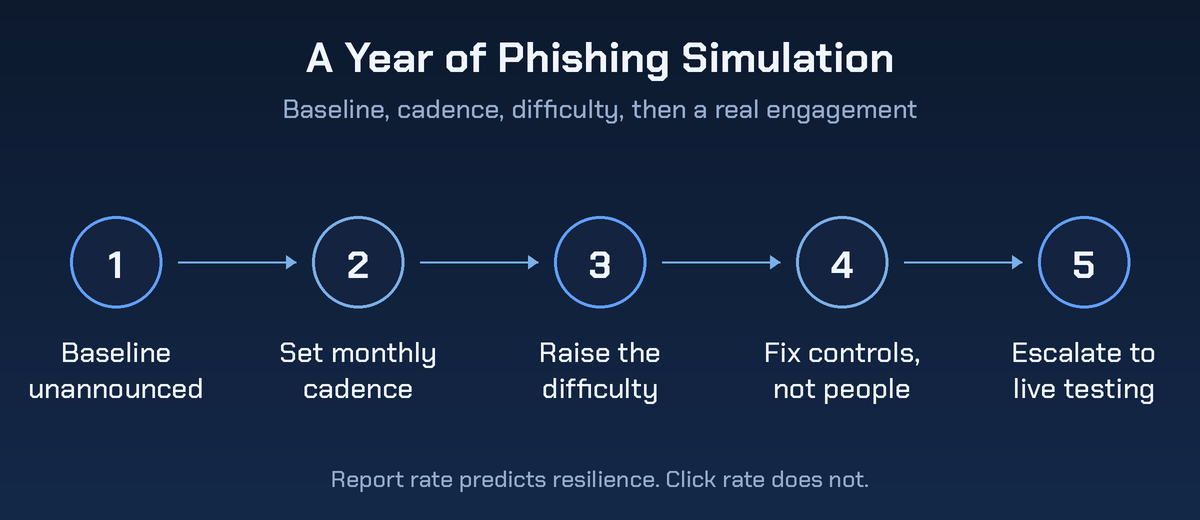
The simulation program is the baseline. A social engineering engagement is the proof. They're different products and the program is what makes the second one sellable.
Once report rate is stable and the process metrics are healthy, escalate in three steps.
Targeted pretexts. A small, high-value group. Finance, the help desk, executive assistants. Built from public information, rated for difficulty, run manually rather than from a template library.
New channels. Voice and SMS reach people your mail filter never sees, and they carry constraints email doesn't. Before you sell one, read up on scoping a vishing and smishing simulation, because the authorization work is different and it happens before anyone dials.
A full engagement with an objective. Not a click rate. Get a session, create a mailbox rule, redirect a payment, reach a specific file. Then measure whether detection fired, how fast, and who acted.
The program hands the engagement three things it would otherwise have to build: a target list with role context, a pretext library you know is fresh, and a documented record of what the client has already agreed is acceptable.
And here's the part MSPs skip. You run the mail flow, the awareness platform and the help desk. You can't independently grade the help desk verification process your own team wrote. That's not a criticism, it's the same reason auditors don't audit themselves, and it's why the escalation usually goes out to a white-labeled social engineering partner while your team stays in the remediation seat.
Questions MSPs ask about running the program
Should employees know the program exists?
Yes to the program, no to the individual sends. Announce at rollout that simulations happen, explain why, and say plainly that results aren't used for discipline. Then never warn anyone about a specific campaign.
What's a good click rate?
Wrong question without a difficulty rating attached. A low rate on obvious templates means nothing. Ask instead whether report rate is climbing while difficulty climbs, and whether time to first report is falling.
Does this satisfy a compliance requirement?
Several frameworks require security awareness training and periodic testing without naming a method, so simulations serve as evidence rather than as the requirement itself. Keep campaign records, difficulty ratings, completion data and the dates. Auditors want the paper trail more than the percentage.
How do we price it?
Per user per month, bundled with the security stack, not a standalone line the client can cut in a bad quarter. Price the quarterly readout in, because the readout is the work and it's what renews.
Do we exclude executives?
No. They're the targets. If leadership won't participate, you don't have a program, you have a compliance artifact, and it'll be worth exactly what it costs.
Fix the baseline before you fix the people
Take one client. Run an unannounced baseline this month with no training attached. Rate its difficulty before you send it and write the rating down.
Then check three things that have nothing to do with employees: is there a report button, does anyone triage it, and will the help desk reset MFA for a caller who sounds convincing.
Those three answers are your first quarter of work. Answer them, then get a pentest quote. The program and the escalation want designing in one conversation, not eighteen months apart.


