
SaaS security posture management exists because the attack that reached mailboxes inside Microsoft's own corporate tenant never touched a firewall. Microsoft published the sequence itself: a password spray landed on a legacy, non-production test tenant account that had no MFA, and the actor then abused a legacy test OAuth application holding elevated access to the corporate environment to reach mailboxes. A forgotten tenant. A missing MFA policy. An over-permissioned app registration. Every link in that chain is an SSPM finding, and MSP Pentesting gets asked constantly, channel-only and under our partners' brands, where the posture dashboard stops being enough.
Short answer. SSPM tells you a door is unlocked. It doesn't tell you what's behind it, whether anyone outside can reach it, or whether your client's alerting would say a word.
What SSPM actually does
Gartner defines the category as a tool that continuously assesses security risk and manages the security posture of SaaS applications. In practice it means API connectors into each tenant, reading configuration on a schedule and telling you what drifted.
What a good one reads:
- Tenant configuration against a baseline, and drift from it over time
- Admin role assignments, standing privilege and break-glass accounts
- Authentication policy, including MFA coverage and legacy protocols left enabled
- External sharing, guest access and public link settings
- Third-party OAuth grants, the scopes they hold and who consented
- Dormant, orphaned and offboarded accounts still holding licenses
- Control mappings for whichever framework the client reports against
This is genuinely useful. Nothing else gives an MSP a portfolio view across forty tenants, and for the config half of SaaS risk it beats a person with a checklist every time.
It's also the easiest recurring product to attach to an existing Microsoft 365 practice, which is why it sells.
SSPM and CSPM are not the same product
Clients mix these up constantly, and so do a fair number of vendors.
Cloud security posture management watches infrastructure. AWS accounts, Azure subscriptions, Google Cloud projects. Resource configuration, network exposure, IAM policy, storage permissions, encryption. The people who fix those findings are engineers.
SSPM watches tenanted applications. Microsoft 365, Google Workspace, Salesforce, Okta, ServiceNow, Slack, Zoom, HubSpot. The people who fix those findings are administrators, and often they don't sit in IT at all. Salesforce belongs to sales operations. The HR system belongs to HR.
Different control plane, different APIs, different owner, different budget. If you're drawing the wider boundary for a client, start from what a cloud security assessment covers and where its scope ends, then treat SaaS as the second conversation rather than a line item you absorb.
Where SSPM stops
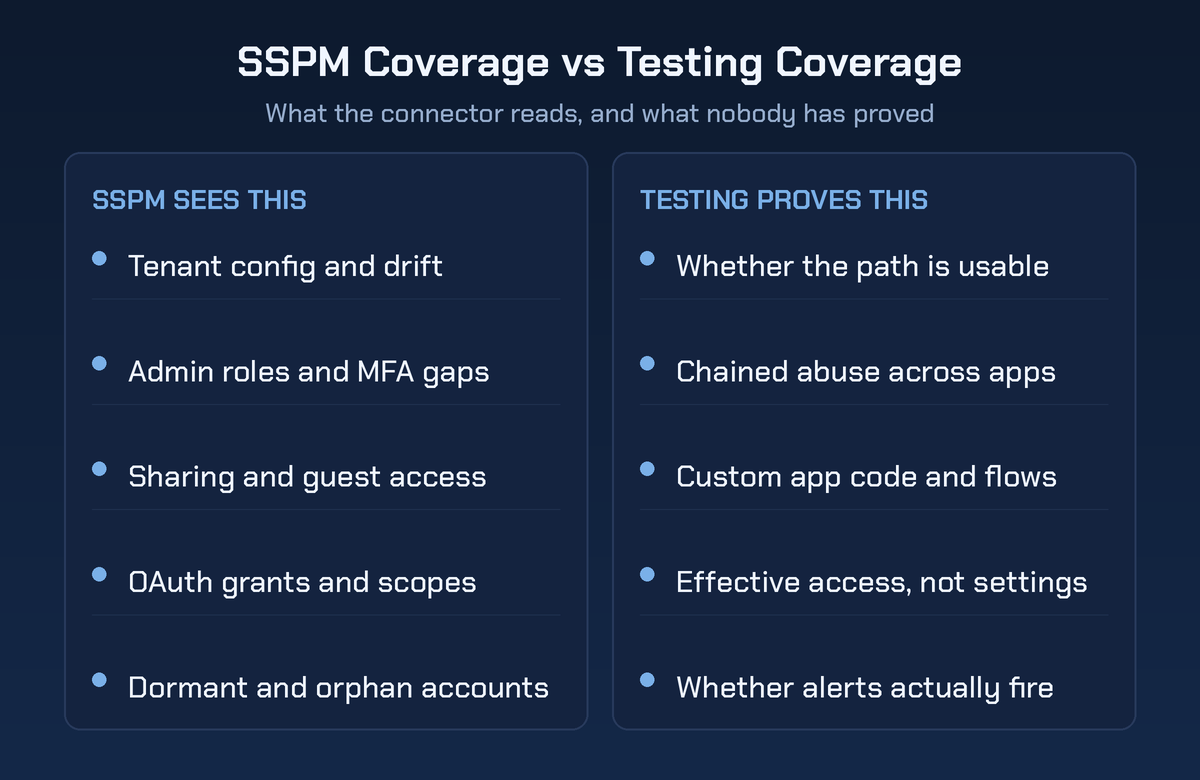
Seven boundaries. All seven show up in real environments, and none of them are a criticism of the tools.
Coverage is connector-shaped. An SSPM knows about the apps it has integrations for. Your client is running dozens more, half of them expensed on a card, several of them holding customer data. What isn't connected isn't covered, and the dashboard shows green either way.
It reads state, it doesn't attempt the path. "Legacy authentication is enabled" is a fact. "An attacker can authenticate to that mailbox today with a password from a credential dump" is a finding. The gap between those two sentences is the entire argument for testing.
Configured permissions are not effective permissions. Salesforce resolves access through profiles, permission sets, role hierarchy, sharing rules and manual shares. SharePoint breaks inheritance six folders down and nobody remembers. Ask a posture tool who can actually read the board minutes and you'll get a list of settings, not an answer.
Custom code inside the SaaS is invisible. Apex classes, Power Apps and Power Automate flows, ServiceNow business rules, Apps Script bound to a spreadsheet, internal Slack and Teams apps. That's application code running with real privilege, and it needs application security testing, not a config connector.
Chained abuse crosses apps. Identity in the IdP, a token into chat, a mailbox rule in Exchange, a file in cloud storage. Each app is compliant on its own. The path across them is nobody's dashboard, because no single connector sees both ends.
Non-human identity is the real gap. Service accounts, integration users, API keys and long-lived refresh tokens. They outnumber people, they rarely have an owner, they almost never rotate, and they're exempt from the conditional access policy somebody wrote for humans. The Microsoft incident turned on exactly this.
Nothing proves detection. SSPM raising an alert is not evidence that the client's SIEM raised one, that it reached a human, or that the human did anything. Posture and detection are separate claims and only one of them gets tested.
The ownership problem nobody scopes for
Here's the failure mode that wrecks SSPM rollouts, and it isn't technical.
You connect the tool, it produces four hundred findings across eleven applications, and then you discover that you have administrative rights in three of them. Sales operations owns Salesforce and answers to a VP who doesn't report to your sponsor. Marketing owns the automation platform. Finance owns the expense system and considers it none of IT's business.
The dashboard turns red and stays red, because nobody with the authority to fix a setting has been told it's their job.
So do the org chart work before you sell the connectors. For every app that holds sensitive data, write down who administers it, who approves changes, and who gets the finding. Put that table in the proposal. It converts an unbounded findings backlog into assigned work, and it gives you an honest reason to charge for the governance instead of eating it.
Clients rarely have this list. Building it is billable, and it makes the rest of the program deliverable.
Where testing starts
SaaS testing isn't a smaller version of a network pentest. It's four workstreams, and you can sell them separately.
| Question | What SSPM gives you | What testing gives you |
|---|---|---|
| Is MFA enforced? | Policy coverage and the exclusion list | Whether an excluded account still authenticates |
| Who can read this data? | Sharing settings and role assignments | Effective access, proven from a real account |
| Are OAuth grants safe? | An inventory of apps and scopes | What a consented token actually reaches |
| Would we notice? | An alert inside its own console | Whether the SOC saw it, and how fast |
Identity attack paths. Password spray against the accounts the policy forgot, token theft and replay, adversary in the middle against session cookies, device code flow abuse, and privilege escalation through admin role assignment.
OAuth and consent abuse. Can a standard user consent to a third-party app? What scopes can they grant without an admin? If they granted them, what would the token read, and does anything raise an alert when it happens? This one demonstrates well and clients understand it instantly.
Effective access, tested rather than exported. Take a real low-privilege account and see what it can reach. Not what the permissions report claims, what the account can open.
Detection validation. Run the technique, then watch. Did the alert fire, did it route, did a human act, how long did it take. Write the times down, because those numbers are the ones a client remembers.
One constraint to respect. You test your client's tenant and your client's own integrations, not the vendor's platform. Most SaaS providers draw that line in their terms and several require written permission before any security testing at all. Read the vendor's acceptable use terms during scoping, not after somebody files an abuse report.
How MSPs should package the two
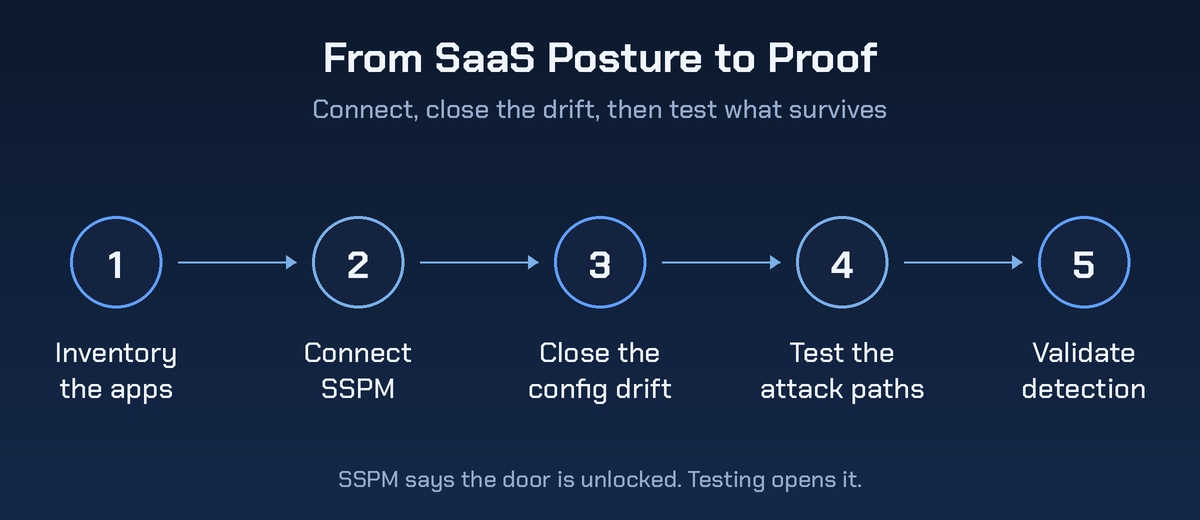
Sell them together and never as substitutes. SSPM is monthly recurring revenue with genuine work attached, and testing is the periodic proof that the work mattered.
A sequence that holds up in practice:
- Inventory the SaaS estate honestly, including what finance is paying for that IT never approved
- Connect SSPM to the apps that hold the sensitive data first, not the easiest connectors
- Spend sixty to ninety days closing configuration drift and getting owners assigned
- Then test the paths that survived, because those are the interesting ones
- Validate that detection fires, and retest the findings you paid to fix
The mistake to avoid is selling the platform and telling the client they're covered. They're covered for configuration. They have no evidence about consequence, and the first person to ask for that evidence will be an auditor, an insurer or an incident.
There's also an independence problem sitting in the middle of this. You configured the tenant. You granted the admin roles. Grading your own configuration isn't an assessment, and a client's auditor will say so. That's the ordinary reason this goes out to a pentest partner working under your brand while your team keeps the remediation revenue.
What partners ask once the dashboard turns green
Do we need SSPM if we already run CSPM?
Yes, they cover different planes. A CSPM tool has no visibility into who consented to a third-party app in your client's Microsoft 365 tenant, and an SSPM has nothing to say about an open storage bucket. Overlapping vendors sell both, which is where the confusion starts.
Can we pentest Microsoft 365 or Salesforce?
You can test your client's tenant configuration, their identity setup and their own integrations and custom code. You can't attack the provider's shared platform. Microsoft publishes unified rules of engagement for its cloud, and other vendors set their own terms. Check them per app, per engagement.
How often should the testing run?
Annually for most clients, and after any major change: a new IdP, an acquisition, a migration between tenants, or a big OAuth integration going live. The posture tool covers the months in between, which is exactly what it's for.
What's the fastest finding to demonstrate?
User consent to third-party applications. In a lot of tenants a standard user can grant an app access to their own mail and files without an admin ever seeing it. It's a two minute demonstration and it reliably changes the conversation.
Which audit controls does SSPM evidence support?
It produces evidence for access review, configuration management and monitoring controls, and it does that well. It isn't a substitute for independent testing where a framework or a customer contract asks for that specifically.
Pull two lists this week
Pick your largest Microsoft 365 client and pull two lists this week. Every third-party application with a consent grant, and every account excluded from conditional access.
Those two lists are usually longer than anyone expects, and neither takes an hour to produce.
Fix what's obvious. Then test what's left. Get a pentest quote, send the consent list with it, and we'll show the client what one of those grants is worth to somebody who wants it.


