
Your client needs a fast penetration test before a SOC 2 review. The staging app works, but every browser throws trust warnings, internal APIs use random self-signed certs, and nobody knows which private key matches which server. That's a normal MSP week.
openssl certificate generation ceases to be merely a Linux admin trick and develops into a service skill. If your team can generate clean certificates, build an internal trust model, and avoid deployment mistakes, you make pentesting, pen testing, compliance prep, and secure rollouts much easier for clients.
For MSP, vCISO, GRC, CPA, and reseller teams, this matters in real engagements. Good certificate handling supports cleaner risk assessment work, fewer delays before manual pentesting, and less friction during evidence gathering for SOC 2, PCI DSS, HIPAA, and ISO 27001.
Why MSPs Must Master OpenSSL Certificate Generation
A lot of MSP teams only touch certificates when something breaks. That's backwards. Certificates shape whether an internal web app, admin portal, or API can be tested safely and predictably.
The usual problem isn't the command syntax. It's operational sloppiness. One tech generates a key on a laptop, another submits the CSR from a different host, and a third tries to install the issued certificate during a client fire drill. Then the penetration testing schedule slips because the environment isn't ready.
Where this shows up in real work
You'll run into this during:
- Pre-pentest cleanup: Internal apps need trusted HTTPS before a web application pentest or network pentest starts.
- Compliance prep: Auditors and client security teams want repeatable processes for cert issuance and handling.
- Temporary environments: Dev, QA, and demo systems often need internal trust without using a public CA.
- Secure service-to-service traffic: Internal APIs and admin tools need stronger identity controls than "it's on the LAN."
Practical rule: If your team can't quickly issue, verify, and replace certificates, you'll lose time on every security engagement.
OpenSSL remains the utility already present in many environments. It's flexible, scriptable, and ugly in the way many reliable infrastructure tools are ugly. Used well, it supports the exact kind of repeatable operational security that makes pen test, pentest, and audit work smoother.
Build Your Own Private Certificate Authority
If you issue a separate self-signed certificate for every internal tool, you create distrust at scale. Browsers complain, test tooling behaves inconsistently, and your staff starts ignoring warnings they should respect.
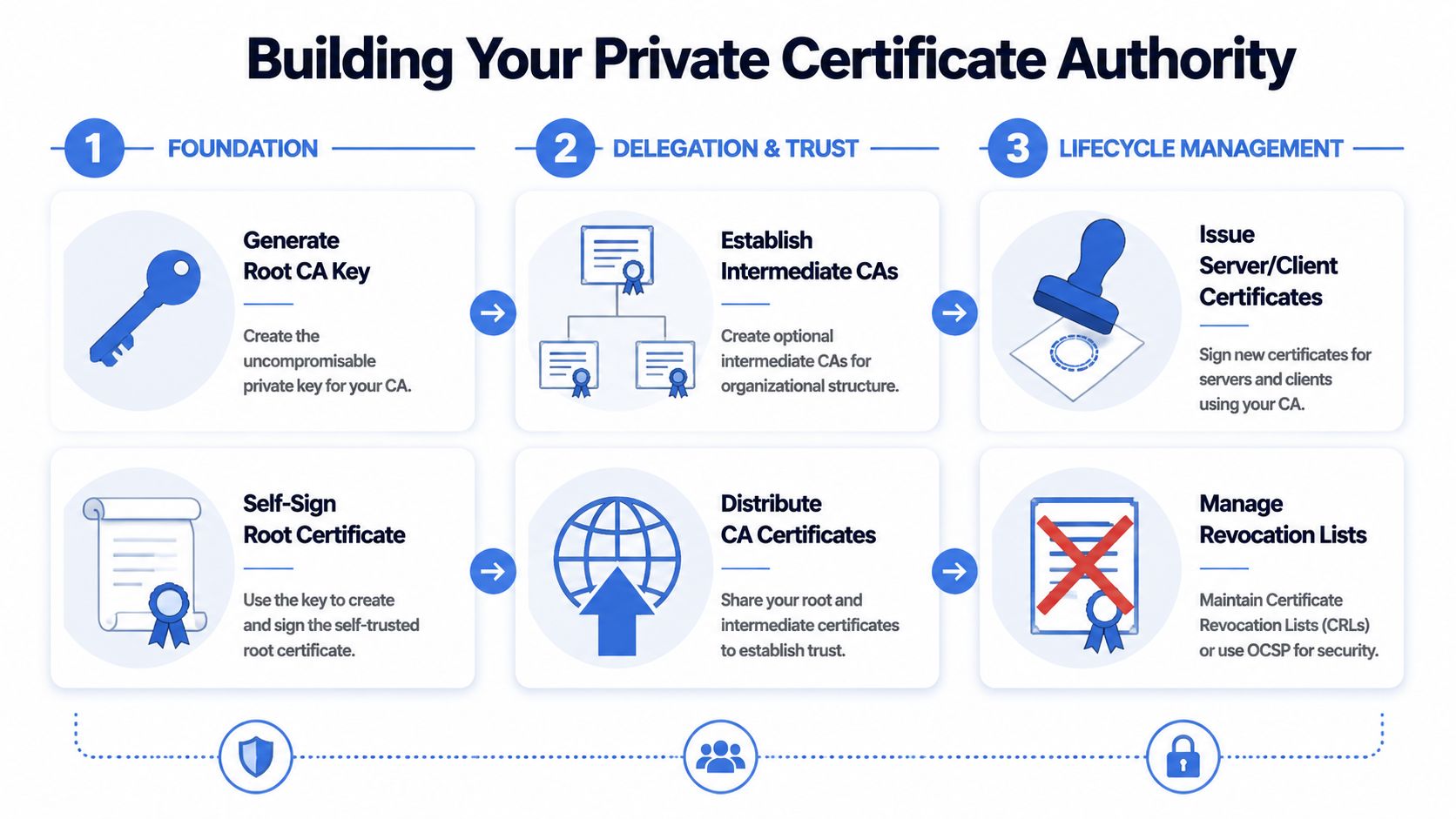
A private Certificate Authority, or CA, fixes that. You create one trust anchor, distribute that CA certificate to systems you control, and then sign internal server or client certificates from that authority. That's far cleaner for MSP operations.
Start with the root CA
OpenSSL's combined commands are one of the biggest practical improvements in certificate handling. Progress Software documents openssl req -x509 -sha256 -nodes -days 365 -newkey rsa:4096 -keyout private.key -out certificate.crt as a one-step way to generate a private key and self-signed certificate, which is commonly used for internal trust and testing environments in their OpenSSL certificate guide.
For an internal root CA, the pattern is straightforward:
- Generate the CA private key
- Create a self-signed root certificate
- Protect that key like it matters, because it does
A simple example looks like this:
- Root key and cert in one step:
openssl req -x509 -sha256 -nodes -days 365 -newkey rsa:4096 -keyout private.key -out certificate.crt
That command is useful because it removes manual drift. Fewer steps usually means fewer mistakes.
What works and what doesn't
What works:
- One root for internal trust: Easier to manage than a pile of unrelated self-signed certs.
- Tight handling of the CA private key: Store it with restricted access. Treat it as a high-impact asset.
- Clear naming and file ownership: Make it obvious which key signs what.
What doesn't:
- Using the root key casually: If a root key sits on a shared admin box, your process is already weak.
- No trust distribution plan: A private CA is only useful if managed endpoints trust it.
- Ad hoc file copies over chat or email: That's how keys end up everywhere.
Your private CA should make internal trust boring. If it feels improvised, it probably is.
A practical MSP model
For internal applications, labs, staging systems, and compliance demos, a private CA gives your team a reusable foundation. During a risk assessment or pre-engagement validation, that matters. You don't want engineers wasting time clicking through browser warnings while trying to verify whether a finding is real.
For vCISO and GRC teams, a private CA also helps document process maturity. You can show that internal certificates aren't random artifacts. They're issued from a controlled trust source with a repeatable workflow.
Generate Server Certificates and CSRs with SANs
A server certificate is where numerous teams start, and where many teams unwittingly make mistakes. They generate a certificate with a Common Name, install it, and then wonder why browsers or clients still reject it.
Modern environments expect Subject Alternative Names, or SANs. If you're securing an app used in a penetration test or compliance review, SAN handling is part of doing the job properly.

The baseline CSR workflow
DigiCert's OpenSSL quick reference documents the standard CSR pattern as openssl req -new -newkey rsa:2048 -nodes -keyout yourdomain.key -out yourdomain.csr, and notes that 2048-bit RSA is a widely accepted minimum baseline in current certificate guidance in its OpenSSL quick reference.
That gives you a clean, practical starting point:
- Private key generation
- CSR creation
- CA signing after review
A common command for this is:
- Server key and CSR:
openssl req -new -newkey rsa:2048 -nodes -keyout yourdomain.key -out yourdomain.csr
If you're automating requests, the same source also documents using inline subject details to reduce interactive prompts. That matters when your team needs repeatability across clients.
Why SANs matter in practice
The business problem is simple. Clients don't care that the certificate technically exists. They care that the app loads cleanly, scanners behave predictably, and testers can trust what they're seeing.
Use SANs when:
- One app has multiple hostnames: Admin, API, and front-end names often differ.
- A test environment mirrors production naming: This avoids unnecessary TLS errors during validation.
- A certificate must support service migration: Temporary overlap is common in MSP-led cutovers.
Here's the operational takeaway. If a certificate doesn't represent the names clients use, deployment friction follows.
A clean signing flow
A practical server-cert process usually looks like this:
| Step | What the team does | Why it matters |
|---|---|---|
| Generate key and CSR | Create both together to reduce drift | Less room for mismatch |
| Review request details | Confirm subject and SAN intent before signing | Avoid bad reissues |
| Sign with internal CA or submit to public CA | Match the trust model to the use case | Internal and external needs differ |
| Validate the final cert | Inspect contents before install | Saves time during deployment |
Don't treat certificate issuance as paperwork. It's part of environment readiness for pen testing and compliance validation.
For ISO 27001 and SOC 2 support work, this is one of those small technical controls that reflects a larger process discipline. Clean server certificates make environments easier to secure, easier to test, and easier to explain.
Create Client Certificates for Mutual TLS
Server-side TLS proves the server's identity to the client. Sometimes that's not enough. Internal APIs, admin tools, service accounts, and sensitive data paths often need the server to verify the client too.
That's mutual TLS, or mTLS. In MSP environments, it's one of the simplest ways to raise the bar for internal service access without depending only on passwords or network location.

How client certificates fit
A client certificate is issued the same basic way as a server certificate. You generate a private key, create a CSR, then sign it with your private CA. The difference is purpose. The certificate identifies a device, user, or service that the server should trust.
If your team needs a quick refresher on the underlying crypto model, this guide to public key and private key encryption is a helpful foundation.
Good mTLS use cases for MSPs
Client certificates are especially useful in these situations:
- Internal APIs: Restrict access to approved services, not just anyone who can reach the endpoint.
- Admin portals: Add stronger identity for privileged paths.
- Partner integrations: Limit machine access without exposing broad credentials.
- Sensitive management traffic: Support tighter controls around tools used during remediation or testing.
This comes up after a manual pentesting engagement more often than many teams expect. A tester finds an internal admin interface with weak access assumptions, and mTLS becomes a practical recommendation.
What the workflow looks like
The workflow is familiar:
- Generate a client private key
- Create a CSR for that client identity
- Sign it with your internal CA
- Install the client cert and key securely
- Configure the server to require and validate client certs
The hard part isn't OpenSSL. The hard part is lifecycle discipline. If you issue client certs with no owner, no naming standard, and no revocation process, you'll create future cleanup pain.
mTLS works best when each certificate maps to a known service, system, or person. Anonymous certificate sprawl defeats the point.
Where teams stumble
A few common mistakes show up fast:
- Reusing one client certificate everywhere: That destroys accountability.
- Poor private key handling on endpoints: A client cert is only as trustworthy as the key storage behind it.
- No process for replacement: Expired or misplaced client certs can break production access if nobody owns renewals.
For HIPAA, PCI DSS, and internal segmentation work, mTLS isn't magic. It is, however, a practical way to reduce trust by default and tighten access around sensitive services.
Convert Formats and Harden Certificate Configurations
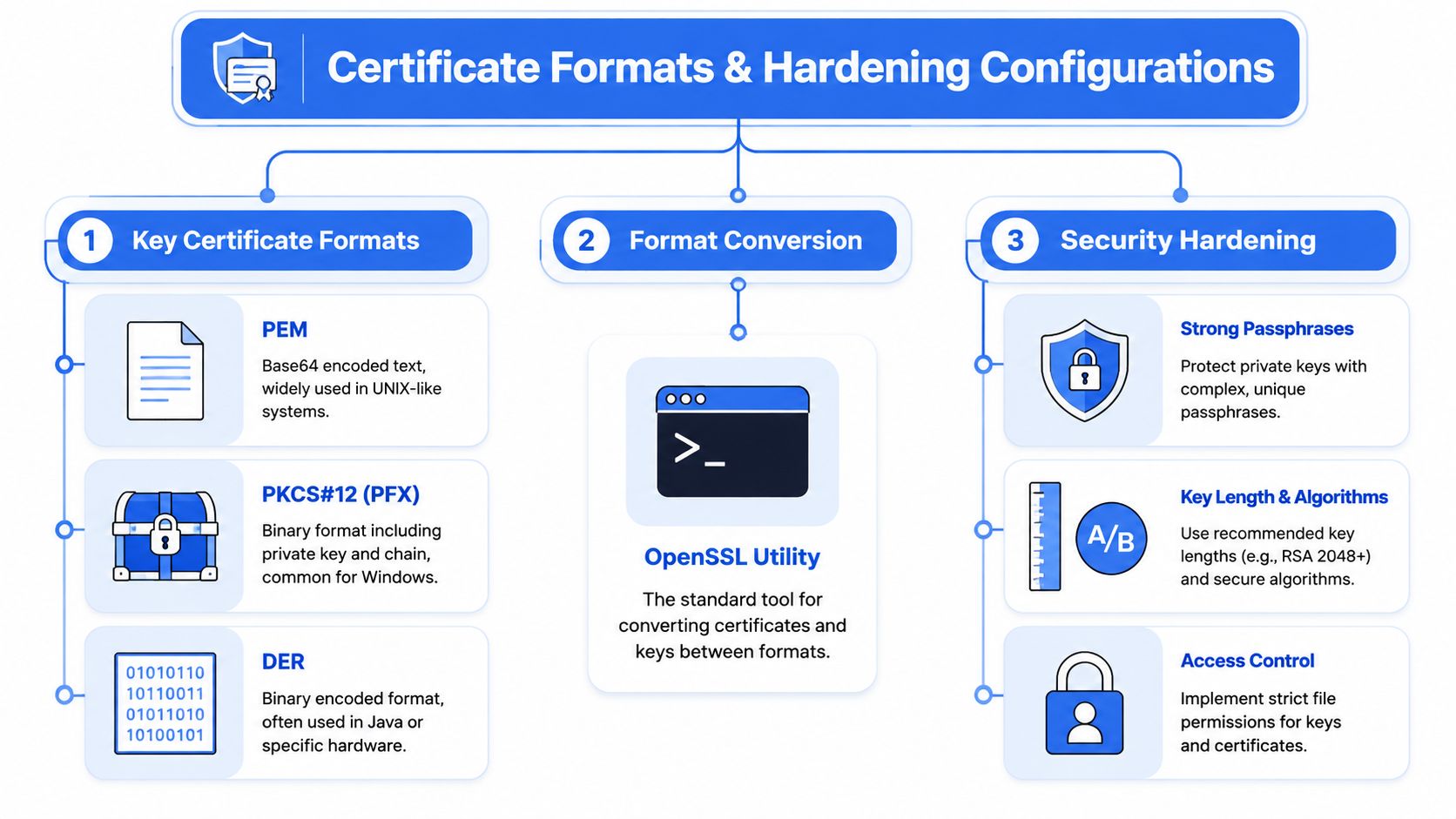
A certificate that works in one stack often fails in another because of format, packaging, or key handling. Linux tools may be happy with PEM files. A Windows-oriented application might expect PKCS#12 or PFX. Java tooling may prefer DER in some cases.
That's normal. The point isn't to memorize every format. The point is to know what each system expects and convert without breaking trust or leaking keys.
The format problem MSPs actually face
Mixed client environments create mixed certificate needs. One side wants separate PEM files. Another wants a bundled keystore. IBM documentation is often where teams look for PKCS#12 handling because enterprise apps regularly need that packaging.
Format conversion is also where rushed teams make dangerous shortcuts. They move keys around carelessly, export files with weak handling, or forget which bundle includes the chain.
Here's the practical map:
- PEM: Common, text-based, easy to inspect
- PKCS#12 or PFX: Useful when you need certificate, chain, and private key together
- DER: Binary encoding used in some application stacks
Hardening beats mere compatibility
A certificate that imports successfully isn't automatically a good certificate.
Security hardening usually comes down to a few habits:
- Use accepted key sizes: The accepted baseline is already covered earlier.
- Control key access: Restrict file permissions and admin handling.
- Protect exported bundles carefully: A PFX file with weak operational handling becomes a portable secret.
- Prefer repeatable configs over hand-typed commands: Fewer manual mistakes, better auditability.
DigiCert also documents a practical validation technique for avoiding key mismatches. Extract the public key from the private key, CSR, and certificate, hash each with SHA-256, and confirm all three match in DigitalOcean's OpenSSL workflow discussion. That check is simple and worth doing before deployment.
Use this before installation
| Check | Why it matters |
|---|---|
| Matching private key and certificate | Prevents failed installs and last-minute rework |
| Correct certificate chain | Stops trust errors in client applications |
| Expected format for the target platform | Avoids import failures |
| Controlled storage location | Reduces accidental exposure of private keys |
A mismatch between key, CSR, and issued certificate is one of the most frustrating certificate failures because everything looks valid until install time.
For reseller and MSP teams, this is part of professional delivery. When a client asks for a certificate package in a different format, you should be able to produce it cleanly and explain the security trade-offs without guessing.
Automate and Scale Your Certificate Management
One certificate is easy. A fleet of internal apps, VPN components, APIs, and client-specific environments is not. Manual OpenSSL commands don't scale well when multiple engineers support multiple clients under deadlines.
That's why certificate operations are shifting away from one-off command-line work and toward automation. CockroachDB's OpenSSL guidance reflects that broader reality. Teams now manage more short-lived certificates across cloud, containers, and internal services, which makes scriptable and renewal-safe generation important for managed service provider certificate operations.
What automation actually improves
Automation doesn't just save time. It reduces inconsistency.
A good internal certificate workflow should:
- Use predefined config files: This cuts typing mistakes in subject fields and extensions.
- Standardize file names and storage paths: That helps handoffs across team members.
- Support renewal without improvisation: Nobody wants a late-night ticket caused by forgotten cert expiry.
- Produce export-ready artifacts: Different platforms still need different packaging.
In this context, OpenSSL becomes part of infrastructure, not just troubleshooting.
A simple MSP-friendly pattern
Most MSP teams benefit from a lightweight internal "certificate factory" model:
- Template the request details in config files
- Run scripts for key and CSR generation
- Sign from the correct trust source
- Validate output before deployment
- Log who issued what and for which client
If your security roadmap includes stronger identity controls, this article on how to implement zero trust security fits naturally with certificate automation and service authentication.
What not to automate blindly
Not every step should be unattended. Root CA handling, trust-store changes, and high-impact certificate issuance deserve human review. Automation should remove routine friction, not remove judgment.
For white label pentesting, compliance support, and fast-turn onboarding, the operational benefit is clear. The more repeatable your certificate process is, the easier it is to deliver affordable services without lowering standards.
Partner with Experts for Your Security Needs
Strong certificate operations make your MSP better. They help your team support cleaner environments, smoother audits, and more reliable prep for penetration testing, pentest, and pen test work tied to SOC 2, HIPAA, PCI DSS, and ISO 27001.
They also keep projects from failing for preventable reasons. Process gaps, tool confusion, and weak execution can derail otherwise solid client work, which is part of the broader challenge discussed in this piece on avoiding failed MSP engagements. Certificate handling is only one part of that picture, but it's a common one.
When you need a partner for white label pentesting, it helps to understand what a white label service looks like in practice. The right model lets you keep the client relationship while expanding what you can deliver.
For many MSPs, the smart move is simple. Keep your internal team focused on client trust, delivery, and remediation. Bring in specialists for the actual penetration test and manual pentesting work when needed, especially when clients expect certified testers with OSCP, CEH, and CREST backgrounds.
If you need a channel-only partner for fast, affordable, and white labeled penetration testing, see how we deliver tests under your brand. We work with MSPs, vCISOs, GRC firms, and resellers that want expert-led manual pentesting without competing with their own client relationships. Contact us today to learn more.
%20(1).png)
.avif)
.png)
.png)
.png)

