
You've probably seen a version of this before. A client calls because machines feel slow, someone notices odd outbound traffic, and nothing looks obviously broken at first glance. Then the logs start telling a different story.
That's where remote access trojans get dangerous for an MSP, vCISO, or GRC advisor. They don't always smash through the front door. They slip in, stay quiet, and give an attacker remote control over a system that still appears normal enough to miss during a rushed review.
For client-facing security teams, this isn't just a malware topic. It's a service problem, a trust problem, and often a compliance problem tied to SOC 2, HIPAA, PCI DSS, or ISO 27001 requirements around access control, monitoring, and incident response. If you can explain the threat clearly and help clients act early, you become more than the IT provider. You become the team they rely on when risk gets real.
What Are Remote Access Trojans Really
A remote access trojan, usually shortened to RAT, is malware that gives an attacker remote control of a victim system. Think of it as a hidden remote control app installed without permission, except the person holding the controls isn't your help desk. It's an intruder.
That matters because a RAT often doesn't look dramatic on day one. The device may still boot normally. The user may still work. But in the background, the attacker can browse files, steal credentials, issue commands, and prepare for follow-on activity like ransomware or lateral movement.
BitSight said RATs were the second most common form of malware in 2024, and Darktrace reported a 30% increase in RAT activity between the first and last halves of 2024 in its discussion of what remote access trojans are and why they matter. For MSPs, that changes the conversation. RATs aren't edge-case malware anymore. They're part of the normal threat environment you need to explain to clients in business terms.
Why MSPs should care fast
A RAT usually works by installing a client on the victim device and keeping a covert link back to an attacker-controlled system. From the attacker's side, that creates persistent access. From your side, it creates a client emergency that may start with vague symptoms and end with an incident report, legal review, and hard questions about controls.
Practical rule: If a client system is communicating outward in ways that don't match its normal role, treat that as a business risk first and a malware label second.
Here's the simplest way to explain a RAT to a non-technical client:
- It's hidden access: Someone outside the business can control a system without approved remote support.
- It's persistent access: Reboots don't necessarily remove it.
- It's useful to attackers: They can steal data, harvest passwords, and use the system as a launch point.
For a reseller or trusted advisor, that explanation lands better than jargon. Clients don't need a malware taxonomy lesson. They need to understand why unauthorized remote control threatens operations, data handling, and audit readiness.
Common Ways RATs Infect Client Systems
Most RAT infections start with trust. A user trusts an email, a download, a browser prompt, or a software update message that looks close enough to normal. Attackers know that, so they design entry points around routine behavior.
The biggest entry points
A useful client analogy is a burglar checking for the easiest way in.
- Phishing emails: The attacker sends a message that looks urgent or familiar, then tricks the user into opening an attachment, clicking a login page, or running a file. If you need a client-friendly primer, this guide on how to protect against phishing attacks helps frame the human side clearly.
- Malicious downloads: Free utilities, fake installers, cracked software, and browser add-ons are common delivery vehicles. The user thinks they're installing something helpful. They're installing access.
- Software weaknesses: Unpatched apps and operating systems create openings. The attacker doesn't need a user to approve anything if they can exploit a weakness and drop the RAT afterward.
Why fake updates work
A fake update lure works because it fits a habit users already have. People are used to browser updates, document viewers, VPN prompts, and security notices. When the message feels familiar, they lower their guard.
That's why pure awareness training isn't enough. Users need guardrails, and systems need policy. Application allowlisting, controlled software installation, and tighter browser controls all help reduce how often “helpful click” turns into compromise.
A lot of RAT infections look less like a movie-style hack and more like a normal user action taken at the wrong moment.
Mobile devices count too
Many teams still talk about RATs like they only target desktops. That's outdated. Zimperium notes in its overview of remote access trojans on mobile and cross-device environments that RATs also target mobile devices through malicious downloads or deceptive updates.
That matters for mixed fleets. If a client supports bring-your-own-device, Android use, mobile email, or browser-based access to business apps, the exposure isn't limited to the office laptop. A compromised phone can intersect with saved credentials, MFA fatigue, business email access, and cloud app sessions.
For MSPs, the practical lesson is simple:
- Desktop controls alone won't cover it
- MDM policy matters
- Sideloading and app approval matter
- Cross-device phishing resistance matters
When you explain infection paths this way, clients stop seeing RATs as “just another virus” and start seeing them as an access problem spread across the tools their staff use every day.
Understanding RAT Behavior and Technical Indicators
Once a RAT lands on a device, the attacker's first job is to stay there. The second is to communicate without detection. The third is to use that access without drawing attention.
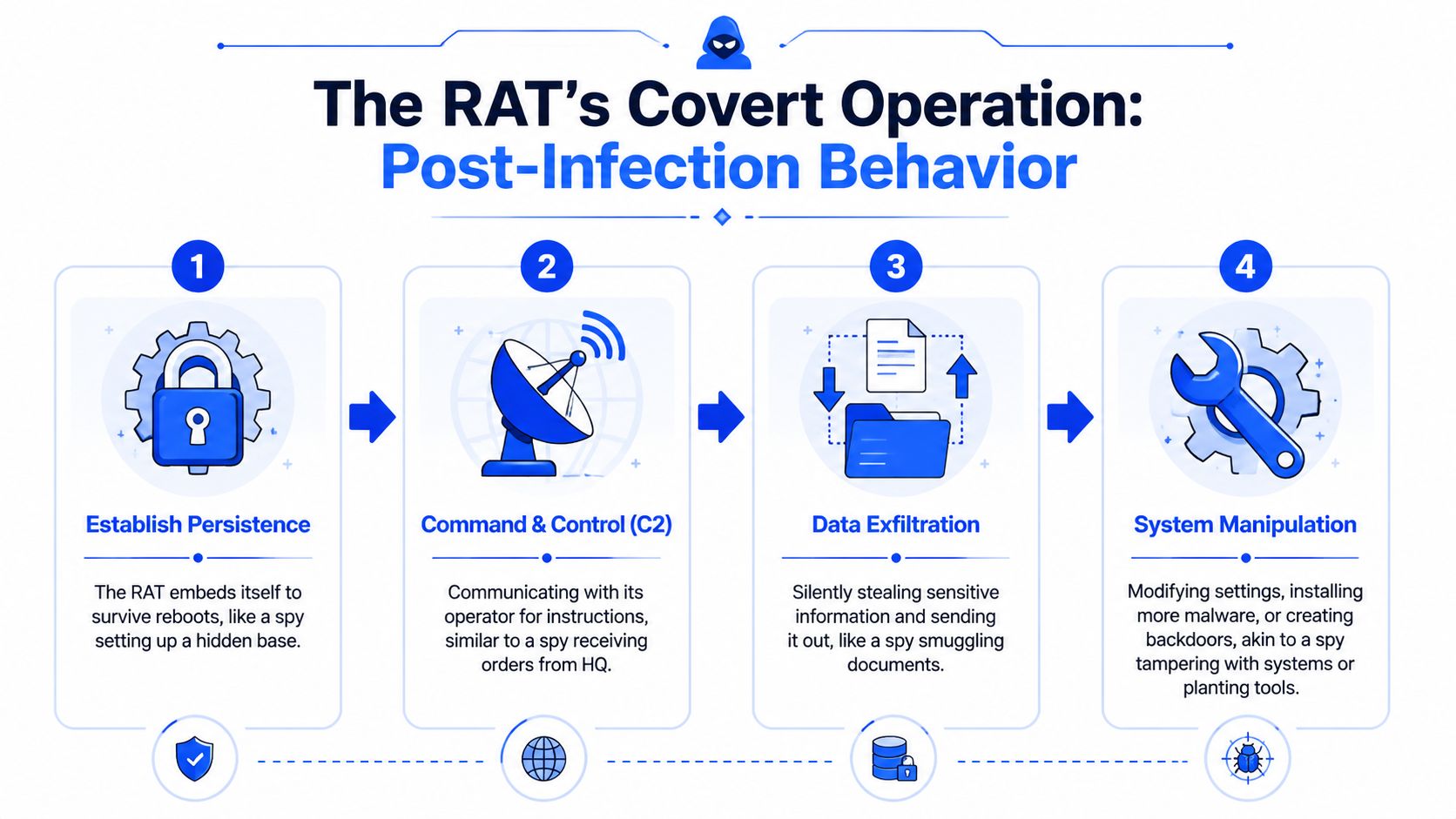
Huntress explains in its guide to how a remote access trojan establishes command and control that a RAT typically installs a client on the victim machine, connects to an attacker-controlled server, and creates a persistent command-and-control channel for remote command execution and data theft. Defenders often notice the effects of that connection, such as unusual outbound sessions from applications that shouldn't normally talk externally, rather than a clean interactive login trail.
What persistence looks like
Persistence means the RAT survives reboots and ordinary user behavior. If the user logs off and back on, the attacker still wants access. If the machine restarts after a patch cycle, the malware still wants to launch.
In practice, MSPs often investigate signs like:
- Unexpected startup behavior: New launch points that don't fit the approved software stack
- Odd scheduled activity: Tasks or recurring executions that don't line up with patching, backup, or approved admin tooling
- Processes that look familiar at a glance: Names or locations that try to blend in with real software
What command and control looks like
A command-and-control link is the attacker's communication path. That's how they issue instructions, pull data, and keep the compromised system working for them.
Useful hunting clues include:
IndicatorWhy it mattersUnusual outbound sessionsA normal app may be making connections it was never expected to makeTiming that doesn't fit business useRepeated communications at strange intervals can indicate beaconingEncrypted traffic from the wrong processEncryption alone isn't suspicious, but encrypted communications from an odd application can be
What attackers do after access
Once they have stable access, attackers can use the RAT to do real damage without immediately dropping louder payloads. Common actions include browsing files, pulling documents, collecting credentials, and preparing other tools.
Watch for behavior that breaks the role of the machine. A file server, browser, accounting workstation, and jump box should not all “talk” the same way.
That “role of the machine” mindset helps during triage. A finance laptop opening a spreadsheet is normal. The same laptop spawning weird external traffic from an unrelated process isn't. In these instances, risk assessment and endpoint baselining become practical, not theoretical.
For compliance-minded clients, those technical indicators also support documented monitoring controls. If a client is working toward SOC 2, HIPAA, PCI DSS, or ISO 27001, showing how you define and watch for abnormal behavior becomes part of the security story they can defend to auditors and customers.
Spotting Malicious RATs Versus Legit Admin Tools
Many MSP teams hesitate. You already use remote support tools, RMM platforms, scripting engines, and admin utilities. So how do you tell a malicious RAT from a legitimate remote administration tool without creating noise or disrupting real work?
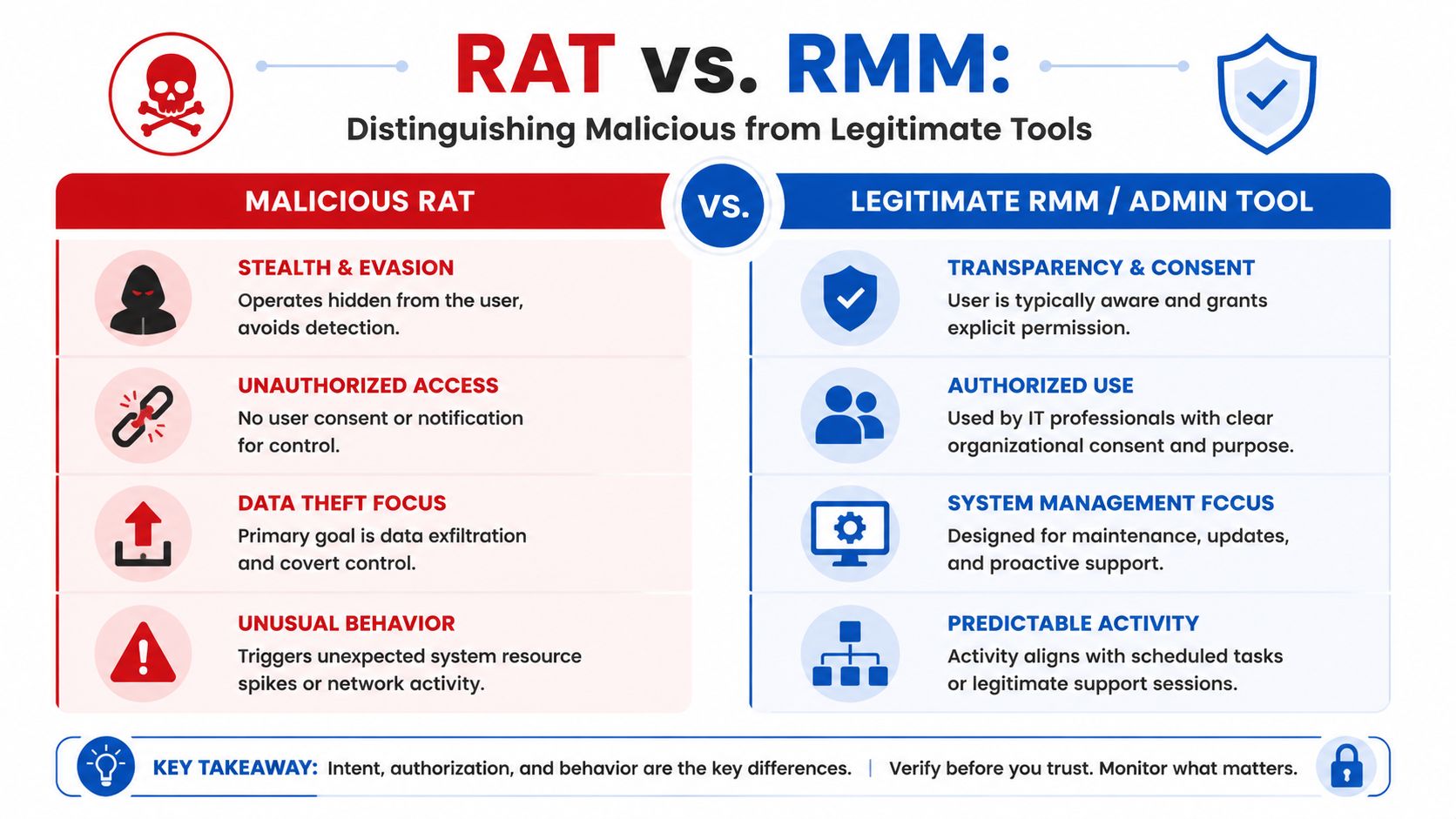
Cyber Centaurs highlights in its article on understanding remote access trojans and trusted admin tool abuse that attackers often abuse trusted software, encrypted command-and-control, living-off-the-land techniques, and stealthy execution to blend into normal admin traffic. That's why the detection problem is less about the malware name and more about spotting behavior that deviates from approved administrative activity.
A cleaner way to compare them
Here's the practical difference.
QuestionMalicious RATLegit admin toolWas it authorized?No clear approval or business reasonApproved by the client or internal ITDoes the user or admin know it's there?Usually hiddenUsually documented and expectedWhat's the purpose?Covert control, theft, persistenceSupport, maintenance, managementDoes the activity fit change records or support tickets?Often noOften yesDoes it leave normal operational evidence?Tries to avoid itUsually creates predictable logs and workflows
Questions your team should ask
When an alert hits, don't start with “Is this a RAT?” Start with narrower operational questions.
- Who approved this tool: If nobody can tie it to a project, ticket, deployment standard, or vendor record, that's a red flag.
- Does its behavior match its claimed purpose: A support tool used during a ticket window is one thing. A hidden process communicating after hours with no related work is another.
- Is it trying to blend in: Renamed binaries, odd parent-child process relationships, and unexplained encrypted outbound traffic deserve a closer look.
If a tool needs stealth to do its job, it probably isn't doing your job.
Why this matters for MSP workflows
Your RMM, patching, and remote support stack already creates noise. Attackers count on that. They know defenders can get desensitized to “just another management agent” or “just another encrypted outbound session.”
That's why mature detection depends on baselining. You need to know what normal admin behavior looks like for each client. Not just what tools are installed, but when they run, what systems they touch, and how they communicate. That's where a vCISO program, documented control review, and disciplined GRC process become useful in day-to-day security operations.
How to Hunt for and Respond to RATs
When you suspect a RAT, speed matters. Not rushed guessing, but fast containment and structured investigation. A delayed response gives the attacker more time to move, steal, or stage the next step.
Where to start hunting
Start with the signals that are easiest to verify and hardest to explain away.
- Review outbound network behavior: Look for systems making connections that don't fit their normal job.
- Check recent persistence changes: Startup items, recurring tasks, and unusual launch points deserve review.
- Inspect suspicious executables and scripts: Temporary folders, user profile areas, and odd process chains often tell the story faster than antivirus labels.
- Compare to your approved stack: If it isn't part of the sanctioned environment, treat it as untrusted until proven otherwise.
If the client needs a plain-English cleanup resource alongside your incident process, this step-by-step guide to remove hackers gives a helpful non-alarmist explanation of what recovery usually involves.
A practical response sequence
A short response checklist keeps teams focused.
- Isolate first
Remove the affected device from the network or limit its communication path. The goal is to stop ongoing command-and-control and reduce the chance of lateral movement. - Scope the blast radius
Determine whether the issue is limited to one endpoint, one user, one credential set, or something broader. Review recent logins, adjacent systems, and administrative actions. - Find the entry path
Was it phishing, a malicious download, weak software controls, or an unmanaged device? To answer this, a focused penetration test, pen test, or broader penetration testing program often pays off. A good pentest can expose the same weakness before an attacker does. - Remove persistence and rebuild trust
Delete the malware, remove startup and task persistence, rotate credentials, and validate that business apps and admin tools are still trustworthy. - Harden the environment
Close the gap that let the attacker in. Tighten software policies, user access, mobile controls, and monitoring rules.
Turn triage into service value
The strongest MSP teams don't stop at “we removed it.” They convert the incident into a stronger ongoing service. If you're building that capability, a managed SIEM service approach for ongoing monitoring fits naturally after containment because it gives clients a clearer path to detect unusual behavior earlier.
A good incident response closes the ticket. A great one changes the client's security posture so the same mistake is harder to repeat.
That's where you move from reactive support into strategic protection.
Offering RAT Prevention as an MSP Service
Clients rarely ask for “RAT prevention” by name. They ask for lower risk, cleaner audits, stronger controls, and less chance of getting blindsided. That's your opening.
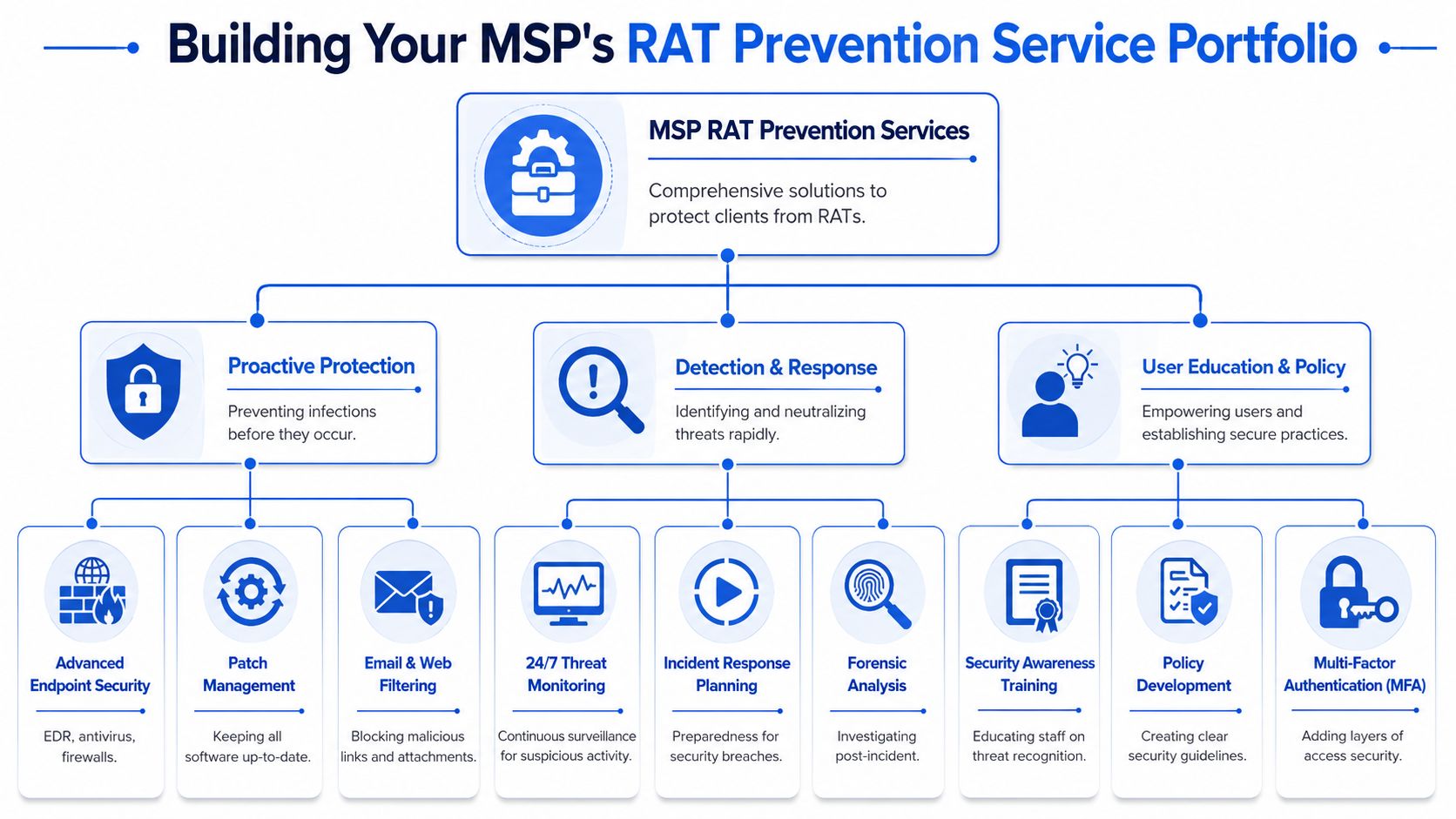
A strong service offer doesn't start with malware jargon. It starts with business outcomes: protect endpoints, reduce unauthorized access, improve monitoring, and support compliance requirements tied to SOC 2, HIPAA, PCI DSS, and ISO 27001.
What a packaged service can include
Think in layers instead of one-off fixes.
- Baseline protection: Email filtering, web filtering, patching, endpoint controls, and MFA reduce the chances of initial compromise.
- Detection and response: Log review, alert tuning, escalation workflows, and incident playbooks improve your speed when something slips through.
- User and policy support: Awareness training, software installation rules, BYOD standards, and MDM policy help reduce trust-based attacks.
- Advisory oversight: A vCISO or GRC-led review ties the technical controls back to policy, audit evidence, and executive reporting.
Where pentesting fits
Pentesting becomes commercially valuable, not just technically interesting. A penetration test helps prove whether the controls you've sold hold up under pressure. It also gives clients a cleaner narrative for board discussions, customer questionnaires, and audit prep.
Done well, manual pentesting is especially useful because humans find context problems that automated scans miss. That matters when you're evaluating phishing exposure, remote access paths, internal movement risk, cloud misconfigurations, and weak assumptions between tools. A strong pen test also feeds directly into a better risk assessment.
Why white label matters for resellers
Most MSPs, CPAs, and compliance-focused firms don't want to build a full offensive security team in-house. They want to offer the service, keep the client relationship, and avoid getting dragged into inflated pricing, weak methodology, or long wait times.
That's why white label pentesting works. You can deliver penetration testing under your own brand while a dedicated partner performs the work behind the scenes. For reseller channels, that keeps your account ownership intact and helps you expand into higher-value services without becoming a direct competitor to yourself.
A good partner model should give you three things:
- Affordable delivery so clients say yes
- Fast turnaround so security projects don't stall
- Certified testers with credentials such as OSCP, CEH, and CREST
If you position RAT prevention this way, you're not selling fear. You're selling a practical security stack clients can understand, budget for, and map back to real business risk.
Start Your White Label Penetration Test Partnership
A lot of firms in the penetration testing market make life harder for partners than it needs to be. Some are too expensive for mid-market clients. Some rely too heavily on automated scanning and call it a pentest. Some take too long to schedule. Others make resellers nervous because they look like they might chase the client directly.
That's a bad fit for MSPs, vCISOs, CPAs, and GRC firms that need a dependable delivery partner.
The better model is simple. You keep the client relationship. You offer white label pentesting under your brand. A channel-only team handles the technical work with an affordable, fast, and manual pentesting approach that supports real security outcomes and real compliance goals. That includes support for projects tied to SOC 2, HIPAA, PCI DSS, ISO 27001, and broader risk assessment work.
If you're evaluating partners, don't just ask whether they do a pen test. Ask how they scope, how fast they deliver, whether their testers hold certifications like OSCP, CEH, and CREST, and whether they will stay in their lane as a true reseller partner.
If you want a channel-first option, review the white label pentest partner program and see how the model works.
MSPs, vCISOs, and resellers need a pentesting partner they can trust. When you request a quote for the engagement, you get channel-only, white label pentests with affordable pricing, fast turnaround, and certified testers holding OSCP, CEH, and CREST credentials. If you want to add manual pentesting, penetration testing, and compliance-focused security services without competing for your own clients, contact us today.

.avif)
.png)
.png)
.png)

