
Your client emails on Tuesday morning. Their auditor wants proof of patching controls for SOC 2. Their compliance consultant asks for documented approvals, testing records, and evidence that missed patches were tracked. Your help desk has screenshots and ticket notes, but no real policy.
That's where MSPs get exposed.
Weak patch management policies don't just create technical risk. They create sales risk, retention risk, and audit risk. If you can't show a repeatable process across clients, you look reactive. If a client gets hit through an old vulnerability, they won't care that your team was busy. They'll care that you were supposed to manage it.
Why Your MSP Needs an Airtight Patch Policy
Most MSPs patch systems. Far fewer can prove they patch systems in a way that holds up under scrutiny from auditors, insurers, client boards, and regulators. That gap is where client churn starts.
The business risk is obvious. A policy turns patching from an informal admin task into a documented control. That matters for HIPAA, PCI DSS, ISO 27001, and SOC 2 because clients don't just need updates applied. They need evidence that someone owns the process, reviews exceptions, and verifies results.
What makes this urgent is how often attackers use old flaws. One widely cited figure says that in 2022, 60% of data breaches and 76% of ransomware attacks involved known, unpatched vulnerabilities, according to breach statistics on unpatched vulnerabilities.
Bottom line: If your patch policy is loose, you're betting your client relationships on attackers not noticing what you missed.
What clients actually hear
When you say, “we usually patch monthly,” a mature client hears problems:
- No formal scope: Which systems are included, and which are excluded?
- No ownership: Who approves delays, failed installs, and emergency changes?
- No verification: How do you know the patch worked?
- No audit trail: Where's the evidence for a risk assessment or compliance review?
Airtight patch management policies fix that. They give your team a standard. They give your clients confidence. They also make your service easier to scale because every technician stops making up the process on the fly.
Why this helps you sell
A documented policy also separates you from cheap MSPs that sell “monitoring” and call it security. A vCISO, CPA firm, or GRC advisor can attach a real patch policy to a compliance package and show clients something concrete.
That makes patching easier to defend as a managed service, not a background task bundled into labor.
Building Your Foundational Policy Document
Most bad patch management policies fail before deployment even starts. They're vague, copied from a template, and written like internal IT notes. An MSP policy needs to work across different clients, asset types, maintenance windows, and approval paths.
NIST gives you the backbone for this. As summarized in NIST-linked patch planning guidance, NIST SP 800-40 Revision 4 and SP 800-53 SI-2 require organizations to identify, report, and correct system flaws, and to test patches before installation. That's why serious policies include roles, inventories, testing, and deployment schedules.
What the master policy must contain
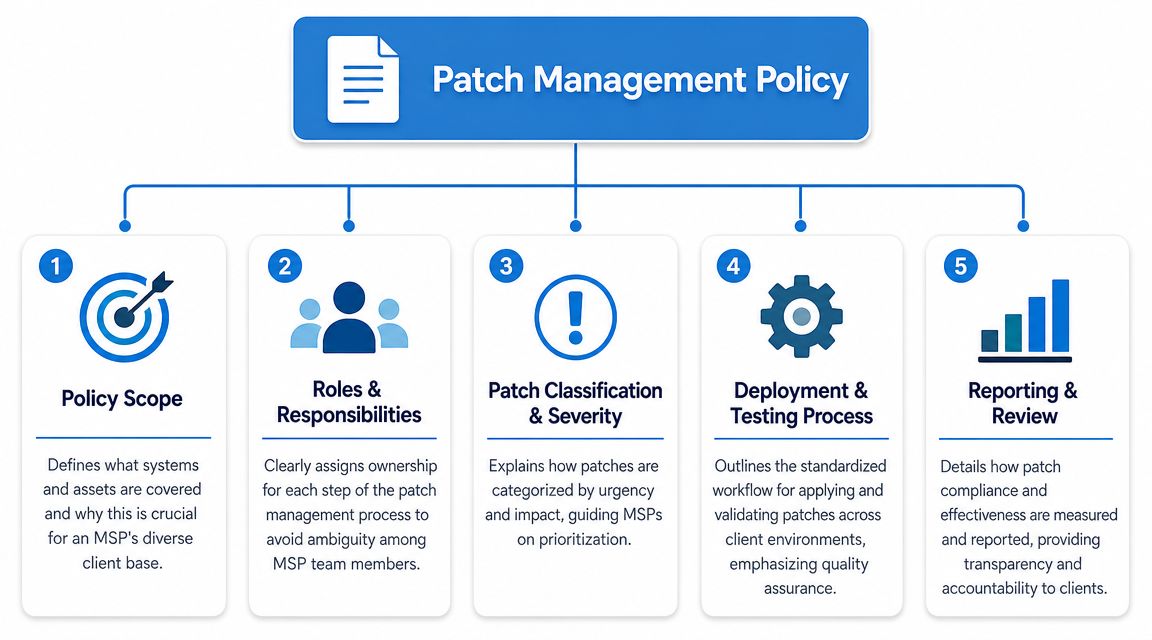
Start with a single master template your team can adapt per client. It should include:
- Scope of coverage: Spell out what's included. Servers, workstations, firewalls, virtual machines, cloud workloads, line-of-business apps, mobile devices, and third-party software. If something is out of scope, say it clearly.
- Roles and responsibilities: Your NOC, security team, account manager, client approver, and application owner should each have a defined job.
- Asset inventory requirement: No inventory, no patch policy. If you don't know the asset exists, you won't patch it.
- Patch classification logic: Define how the team handles routine updates versus security patches versus emergency fixes.
- Testing and deployment workflow: The policy should state where testing happens, who signs off, and how production rollout is approved.
- Documentation and reporting: Auditors want records. Clients want summaries. Your policy should require both.
The MSP version needs client-side language
Internal IT teams can assign everything to one org chart. MSPs can't. Your policy has to state where your responsibility ends and where the client's starts.
For example:
- Your team owns identification, scheduling, deployment, verification, and reporting.
- The client owns business approval, downtime acceptance, and decisions on unsupported apps.
- Shared ownership applies to exception handling, legacy systems, and change control.
A patch policy without named approvers is just a wish list.
Keep one template and many standards
Don't create a brand-new policy for every client. Build one core document, then attach client-specific schedules, asset groups, maintenance windows, and exception rules. That gives your reseller, MSP, and vCISO teams consistency without forcing every client into the same mold.
This is also where you make compliance easier. A policy written once and adapted well is easier to defend than ten weak documents written differently by ten techs.
Defining Patch Cadence and Testing Procedures
A patch policy that only says “patch regularly” is useless. Your team needs deadlines, approval paths, and test rules. Otherwise, patching turns into a calendar reminder with no accountability.
Palo Alto Networks summarizes common NIST-linked guidance this way: critical patches within 30 days and emergency or zero-day patches within 48–72 hours, as noted in patch management workflow guidance. That's the right starting point for an MSP policy.
Sample patching timelines by severity
Severity LevelCVE ScoreRemediation SLAEmergency or Zero-DayCritical business riskWithin 48–72 hoursCriticalCritical rangeWithin 30 daysHighElevated riskRisk-based scheduled remediationMediumModerate riskStandard maintenance cycleLowLower riskRoutine scheduled updates
If you manage mixed Windows and Linux estates, your cadence should still be one policy with separate procedures. This guide on Linux patch management for MSP environments is useful if your team needs a cleaner process for non-Windows assets.
Testing has to be written down
Plenty of MSPs say they test. Few define what testing means.
A workable policy should answer these questions:
- Where is the patch tested first
Use a mirrored staging environment when possible, or a controlled pilot group that reflects real production use. - What must be validated
Confirm application launch, authentication, service startup, integrations, backup agent status, and reboot behavior. - Who approves production rollout
This can't be implied. Name the MSP role and the client-side approver for affected business systems. - What happens if the patch fails
The policy needs a rollback path, even if rollback is operational rather than automated.
Approval paths matter more than most MSPs think
A common failure point is simple. No one knows who can approve a delay, who can waive testing, or who signs off on a weekend emergency change. That's how critical patches sit untouched while everyone waits for “someone” to decide.
Practical rule: If a patch touches a critical business app, your policy should define the approver before the patch is released, not during the outage call.
Testing and cadence aren't red tape. They are what make patching safe enough to scale across multiple clients.
Managing Exceptions and Emergency Patches
No MSP patches every system on time, every time. Auditors know that. Mature providers don't pretend exceptions never happen. They document them.

A realistic exception process is what keeps your patch management policies credible. Think about the client running an old accounting application that breaks when the host OS updates. You still need a way to record the risk, explain the delay, assign an owner, and set a review date.
What an exception should include
Your policy should require these fields in every exception record:
- Affected asset or application: Be specific enough that another tech can identify it fast.
- Reason for delay: Compatibility issue, vendor dependency, business blackout period, or pending maintenance window.
- Risk owner: Someone on the client side has to accept the business risk.
- Compensating controls: Segmentation, restricted access, increased monitoring, or temporary exposure reduction.
- Review date: Exceptions should expire or be renewed. They should never disappear into a ticket queue.
For teams that need a stronger remediation workflow, this guide on remediation of vulnerabilities in managed environments is a good companion process.
Emergency patching needs a separate lane
Now flip the scenario. A zero-day hits a remote access tool, firewall, or externally exposed service. That is not the time to debate your standard monthly cycle.
Your policy should say when the team can bypass normal testing and what happens next. Keep it simple:
- Trigger the emergency path when exposure is immediate and business risk is high.
- Notify the right people early so no one is surprised by downtime.
- Document the decision to move fast, especially if full testing wasn't possible.
- Verify after deployment and log any operational impact.
During an emergency, speed matters. Documentation still matters too.
MSPs that handle exceptions and emergency patches well look disciplined, not chaotic. That's exactly what clients, auditors, and GRC stakeholders want to see.
Proving Compliance with Pentesting and Reporting
Patching is only half the story. The other half is proving your process works.

Strong programs don't just deploy updates and hope for the best. As explained in Action1's patch management guidance, high-performing teams use staged deployment and closed-loop verification with vulnerability scans after patching. They also track mean time to patch and compliance rate, because one of the most common failure modes is “deploy and assume.”
What to report to clients and auditors
A good monthly patch report should answer simple questions:
- How fast are we remediating? Track mean time to patch across client environments.
- How complete is coverage? Show patch compliance by asset group or policy scope.
- What is still open? List unresolved vulnerabilities, exceptions, and blocked assets.
- Did the patch successfully apply? Verification matters more than a ticket marked closed.
If your team struggles to pull evidence together, these Windows Update log review practices can help tighten your audit trail.
Why pentest validation closes the loop
Pentesting, pen testing, and penetration testing become useful far beyond a sales checkbox. A pen test tells you whether patched systems are resisting the kinds of access paths an attacker would try. It validates the result, not just the process.
That matters for SOC 2, PCI DSS, HIPAA, and ISO 27001 conversations because compliance reviewers often ask the same thing in different words: how do you know the control is effective?
Manual validation is especially useful after major remediation work, during onboarding of a new client, or before an audit window. Automated tooling also has a place. If you want a practical breakdown of where automation helps, this overview of the benefits of automated pentesting is worth reading.
Use outside validation without building a big in-house team
Most MSPs don't need to hire full-time penetration testers to offer this. They need a channel model that protects the client relationship and gives them credible validation under their own brand.
That's where white label support fits. MSP Pentesting provides white labeled pentest services for MSPs and other resellers, including manual pentesting by certified testers with OSCP, CEH, and CREST credentials. For an MSP or vCISO, that gives you an independent validation option without adding headcount or competing with your own service line.
If your patch report says “completed” but your penetration test still finds the same exposure path, your process isn't finished.
Turn Your Patch Policy into a Business Builder
Most MSPs treat patching like background maintenance. That's a mistake. A strong patch policy is a client-facing security deliverable. It protects renewals, supports audits, and gives your team a cleaner way to manage risk across every environment you touch.
It also creates a better sales story. When you combine documented patch management policies, exception handling, verification reporting, and penetration testing, you move from “we apply updates” to “we manage a defensible security control.” That's a bigger conversation. It fits naturally into compliance, risk assessment, and recurring security services.
For MSPs, vCISOs, CPAs, and GRC firms, improved margins are realized. You can standardize policy work, attach reporting, and upsell white label pentesting without building an internal offensive security team. That gives clients a stronger outcome and gives you a new service line that feels credible, affordable, and fast.
If your current patch process lives in scattered tickets and technician memory, fix it now. Clients notice. Auditors definitely notice.
If you want to add fast, affordable, white label pentesting to your security and compliance stack, take a look at the MSP pentest partner program. Our channel-only reseller program helps MSPs deliver manual pentests under their own brand without competing for client relationships.

.avif)
.png)
.png)
.png)

