
An SNMP trap is an automated alert a network device sends when something important happens, and it usually goes out as a one-way UDP message to a manager on port 162. That makes traps great for fast detection, but it also makes them a real security concern because legacy SNMP has a history of weak defaults, spoofing risk, and even 600x DDoS amplification potential.
If you run an MSP, you already know the scene. A client says, "The network was flaky all morning," but your monitoring barely shows anything useful. Or the opposite happens. Your NOC gets buried in alerts, nobody knows which ones matter, and the actual outage hides in the noise.
That’s where SNMP traps matter.
Think of them like a fire alarm for your client’s infrastructure. A switch, firewall, router, UPS, or server notices a problem and shouts right away instead of waiting for your monitoring platform to ask. That helps with uptime, faster response, and cleaner evidence for SOC 2, HIPAA, PCI DSS, and ISO 27001 conversations.
But here’s the part too many providers miss. SNMP traps are not just monitoring data. They’re also an attack surface. If you understand that, you can do more than monitor devices. You can offer real pentest, pen testing, penetration test, and penetration testing services around trap security, trap receivers, default credentials, and alert spoofing.
That’s how an MSP becomes more valuable without building a giant offensive security team in-house.
What Are SNMP Traps and How Do They Work
An SNMP trap is a message a device sends when an event happens. No one has to ask for it. The device notices the issue and pushes the alert out on its own.
That’s the simplest answer to what are SNMP traps.
If polling is your technician calling every few minutes to ask, "Are you okay?", a trap is the device calling you first. That matters when the issue is short, ugly, and easy to miss.
The basic parts
Four pieces make this work:
- SNMP agent. The software on the device that detects the event and creates the trap.
- SNMP manager. The system that receives the trap.
- NMS. The broader monitoring platform that logs, correlates, and alerts on what the manager receives.
- MIB. The dictionary that helps your tools translate raw object identifiers into something a human can understand.
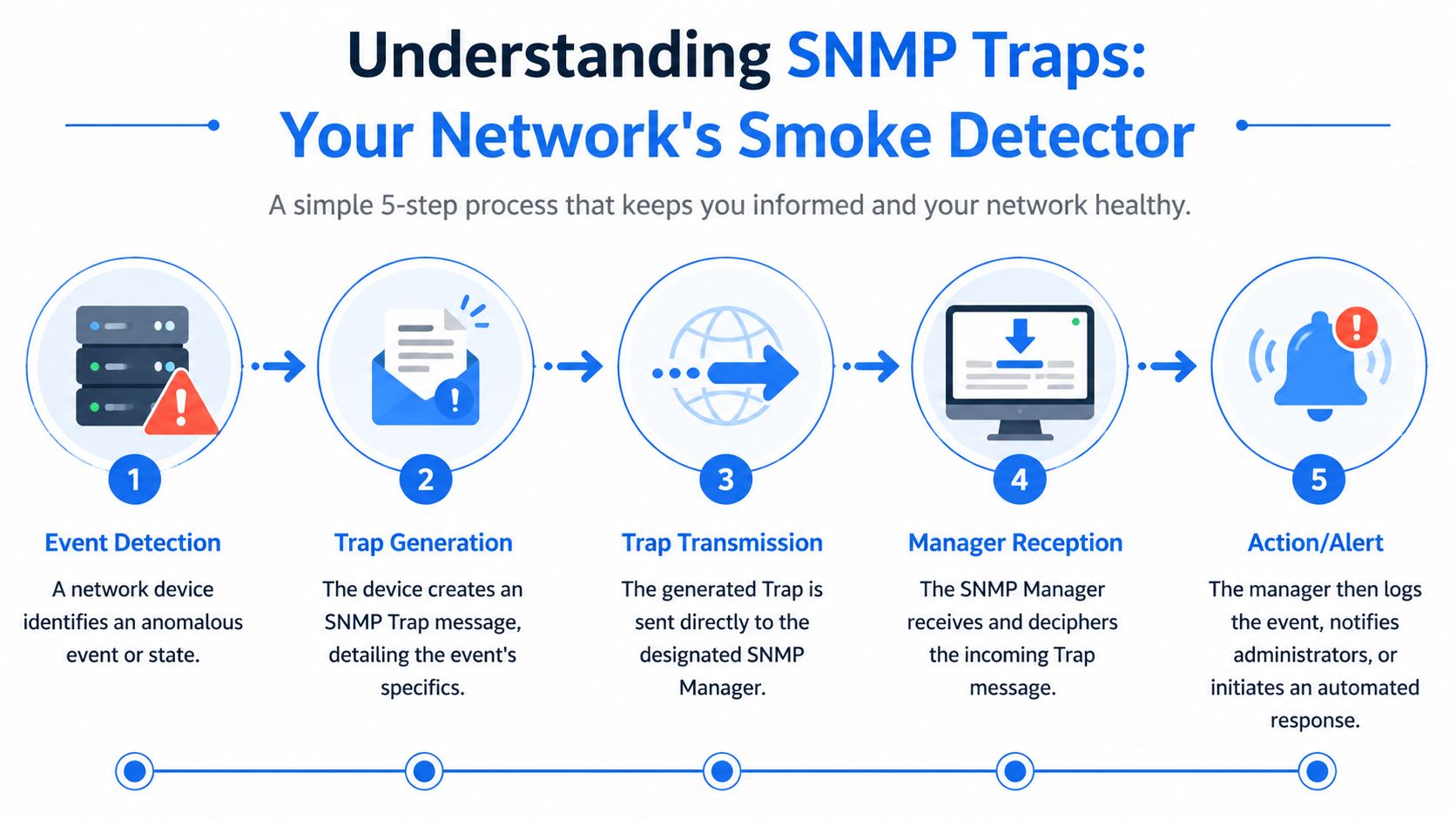
Cisco explains that SNMP traps are unacknowledged notifications sent from an agent to a manager over UDP port 162, and that SNMPv1 traps include fields like Enterprise OID, agent address, and generic or specific trap types, while SNMPv2c and v3 add sysUpTime and snmpTrapOID for more context in each event through Cisco’s SNMP trap reference.
What the flow looks like
Here’s the normal sequence:
- A device detects something important, like a link failure or hardware issue.
- The agent builds a trap message.
- It sends that message over UDP to the manager.
- The manager parses it using the MIB.
- Your NMS logs it, fires an alert, or kicks off an automation.
Practical rule: If your team can’t explain where traps are generated, where they land, and how MIBs are handled, your monitoring stack isn’t mature enough for a serious client environment.
This is why SNMP traps belong in every decent network architecture review for MSP environments. You’re not just checking that alerts exist. You’re checking whether the alert path itself is reliable, understandable, and secure.
SNMP Versions and Traps Versus Informs
Most SNMP conversations get too academic. Here’s the version that matters to an MSP owner. SNMPv1 and SNMPv2c are operationally convenient and security-poor. SNMPv3 is the one you want.
The older versions rely on community strings. In plain English, that’s shared-password logic, and teams often leave those values weak or inherited from old deployments. SNMPv3 adds authentication and encryption, which is what you want if your clients care about compliance, privacy, and not exposing internal device details.

Version choice is really a risk decision
Use this as the short version:
| Version | What it means for an MSP |
|---|---|
| SNMPv1 | Old, easy to find, and a liability in a modern client estate |
| SNMPv2c | Better functionality than v1, but still built around community strings |
| SNMPv3 | Authentication and encryption. Best fit for regulated clients and security-focused monitoring |
If a client is chasing SOC 2, HIPAA, PCI DSS, or ISO 27001, you shouldn’t treat SNMP versioning as a nice-to-have cleanup item. It belongs in the risk assessment.
Traps and informs are not the same thing
A trap is fire-and-forget. The device sends it and moves on.
An inform asks for confirmation. The sender expects an acknowledgement from the receiving system. That means more reliability, but also more processing overhead and more moving parts to validate.
SolarWinds’ Thwack community notes that traps are valuable because polling every 5 to 60 minutes can miss short-lived issues, and gives a useful example where an interface flaps every 15 seconds while polling happens every 60 seconds, which can completely hide how unstable the link really is in this SNMP polling versus traps discussion.
A trap tells you something happened. An inform tells you the message probably arrived.
My recommendation is simple. If you’re dealing with higher-latency or compliance-heavy environments, review whether inform-based, acknowledged alerting fits better than pure trap delivery. If you’re still on legacy versions, fix that before you brag about your monitoring maturity.
Common Use Cases for Proactive Client Monitoring
Here’s where traps earn their keep. They help your team act before the client opens a ticket.
A switch port drops on a production floor. A UPS throws a power event. A firewall starts reporting authentication failures. A router sees a link bounce repeatedly. Those are all moments where waiting for the next polling interval is a bad idea.
Where traps shine for MSPs
- Critical hardware failures. Power supply issues, fan problems, or memory-related events can trigger fast alerts so your team can replace hardware before a total outage.
- Network instability. Link up and link down traps help your staff catch flapping interfaces that users describe as "random slowness."
- Threshold breaches. CPU or memory conditions can warn you before an overloaded system becomes a support nightmare.
- Security-relevant events. Some devices can generate trap activity around suspicious authentication behavior or other notable operational anomalies.
The business win is obvious. Your client sees you call them first.
That changes the relationship from vendor to trusted advisor. It also gives your vCISO, GRC, and reseller partners stronger evidence when they talk about control effectiveness and incident response readiness.
Polling alone leaves blind spots
Polling still matters. You need historical context and baselines.
But polling can miss the sharp stuff. The interface flap example above is exactly why. If the condition appears and disappears between scheduled checks, your dashboard can look clean while the client is living through chaos.
Clients don’t buy monitoring. They buy fewer surprises.
That’s why smart MSPs use SNMP traps as part of a broader service, not as a standalone magic trick.
Why SNMP Traps Create a Major Security Risk
A client calls at 7:10 a.m. Their monitoring system lit up overnight, the help desk opened a pile of tickets, and half the alerts were fake. The actual issue got buried. That is the problem with SNMP traps in a poorly secured environment. They can become an attack path, an alert-flood tool, and a compliance headache at the same time.
SNMP traps create risk when MSPs treat them as trusted by default. If you accept trap traffic from the wrong sources, keep legacy SNMP settings in place, or skip validation at the receiver, you hand attackers a cheap way to cause confusion inside the client’s monitoring stack.
Legacy SNMP still creates easy openings
The ugliest SNMP problems usually start with old decisions that nobody revisited. Devices get deployed with weak community strings, broad ACLs, and management services exposed far beyond what the client needs.
That is not just a networking issue. It is a security issue with business impact. An attacker who can read device data learns how the environment is built. An attacker who can interfere with trap handling can waste your team’s time, hide important events, and make the client question whether your monitoring means anything at all.
For MSP owners, technical debt transforms into a service opportunity. If your client still has legacy SNMP in production, they need more than monitoring. They need someone to test whether those controls fail under pressure and document what has to change.
Spoofed traps can break trust in your monitoring
Trap traffic uses UDP, so the receiver does not get the safety checks people expect from more controlled exchanges. In a sloppy deployment, false traps can be injected to trigger noisy workflows, generate fake incidents, or overwhelm analysts until they miss the actual problem.
That is why trap security belongs in your threat model.
A flooded NMS or SIEM creates direct operational pain. Analysts burn time triaging garbage. Escalations go to the wrong teams. Real outage indicators arrive in the middle of the noise. During an active intrusion, that confusion helps the attacker.
Weak trap handling also hurts compliance
Clients chasing SOC 2, HIPAA, PCI DSS, or ISO 27001 usually focus on policies first. That is backward. If monitoring inputs can be spoofed, flooded, or accepted from the wrong sources, the client has a control reliability problem. Detection and response look good on paper and weak in practice.
This gets worse in environments full of IoT, embedded systems, and specialty devices. Those devices often ship with poor defaults, weak update processes, and spotty documentation. Sheridan Tech's embedded security insights are worth reviewing if your client has that kind of footprint, because trap-related exposure often starts at the edge and then spills into the core monitoring environment.
If you want to demonstrate the actual risk, pair the SNMP review with an internal penetration test for segmented client networks. That gives your MSP something far more valuable than a generic warning. It gives you evidence, a remediation plan, and a white-labeled security service that makes you look like the team that found the weakness before an attacker did.
How We Conduct an SNMP Penetration Test
A client calls because their monitoring stack looks fine on paper, but the SOC missed a real device failure while fake alerts kept the team busy for hours. That is the kind of problem an SNMP penetration test should expose before it turns into downtime, missed SLAs, or a hard conversation about why the MSP did not catch it sooner.
Our approach tests the full monitoring path, not just whether SNMP responds. We look at what an attacker can read, what they can fake, and how the client’s tools behave when trap traffic gets messy. That matters because the business risk is not limited to a noisy device. It includes bad triage, delayed response, and false confidence in controls the client may be counting on for compliance.
What a real test includes
A serious SNMP-focused pen test usually covers:
- Community string review. Test for weak, inherited, or default values on systems still using older versions.
- OID exposure checks. Query devices for details that reveal architecture, inventory, naming conventions, or operational data an attacker can use during lateral movement.
- Trap receiver validation. Review which sources can send traps, what the receiver accepts, and whether malformed or high-volume traffic can disrupt processing.
- MIB handling and parsing checks. Confirm alert data is translated correctly so vendor-specific events do not get mislabeled, downgraded, or ignored.
- Spoofing simulation. Send controlled false traps to see whether the NMS, SIEM, or escalation workflow can be manipulated into bad decisions.
UDP-based trap delivery creates a real testing requirement here. If nobody attempts spoofed or malformed trap traffic during the engagement, nobody has tested how the monitoring workflow holds up under attack.
Why manual testing wins
Human testing finds the failure points that scanners miss.
A scanner can tell you SNMP is exposed. A good tester asks whether the trap receiver trusts the wrong sources, whether parsing errors hide severity, and whether alert floods break downstream workflows. Those are the findings that matter to an MSP owner, because they map directly to service quality, client trust, and compliance evidence.
Field advice: If the provider never tests how the monitoring stack reacts to bad trap input, they tested exposure, not risk.
This is also where the business opportunity shows up. MSPs that offer white-labeled penetration testing can turn an SNMP review into a higher-value security conversation. You are not selling a scan. You are giving the client proof of control weakness, a remediation plan, and a path to stronger audit readiness under your brand.
Choose a partner that works channel-only, delivers manual testing, and writes reports your client can act on. If you are vetting providers, review their penetration testing methodology for MSP-led engagements and make sure SNMP testing includes receiver abuse, parsing validation, and workflow impact, not just port checks and default string guesses.
Integrating Traps into Your SIEM and SOC Workflow
Most SNMP pain doesn’t come from the trap itself. It comes from what happens after it lands.
If your SIEM, NMS, or SOC workflow treats every trap the same, your team gets noise instead of intelligence. That’s how alert fatigue starts. A mature MSP filters, enriches, and correlates trap data so analysts can act fast without drowning.

What good integration looks like
Your workflow should do three things well:
| Need | What to do |
|---|---|
| Normalize the event | Parse MIBs correctly so the team sees readable, actionable alerts |
| Reduce noise | Forward only meaningful trap classes and suppress low-value chatter |
| Correlate context | Tie trap events to logs, endpoint telemetry, and device roles inside the SIEM |
One link-down alert by itself may not be urgent. A cluster of related device alerts from the same client site probably is. Correlation is what turns trap data into something useful for a SOC.
Reliability matters in cloud-heavy environments
This gets harder in hybrid estates. More devices, more platforms, more weird vendor behavior.
Palo Alto’s SNMP monitoring guidance notes that in hybrid cloud environments, SNMPv3 INFORMs can reduce lost alerts by up to 40% in high-latency networks, which matters when reliable event delivery supports SOC 2 evidence and incident response timing in Palo Alto’s SNMP monitoring and traps documentation.
That doesn’t mean you should convert every notification into an inform. It means you should choose reliability where missed alerts carry real business impact.
The best SOC workflows treat traps as one signal, not the whole story.
For MSPs, this is another chance to stand out. If you can help a client reduce trap noise, improve escalation quality, and validate alert delivery, you’re not just maintaining gear. You’re improving security operations.
If you want to offer white label pentesting without channel conflict, we deliver pentests that carry your logo for MSPs, vCISOs, GRC firms, and resellers, with affordable manual pentesting performed by OSCP, CEH, and CREST certified pentesters. We stay channel-only, move fast, and deliver reports on a timeline scoped to the engagement so you can help clients strengthen SOC 2, HIPAA, PCI DSS, and ISO 27001 readiness without inflated pricing or long lead times. Contact us today to learn more.
%20(1).png)
.avif)
.png)
.png)
.png)

