
You probably manage clients who think they're “pretty locked down.” They've got endpoint protection, backups, maybe MFA in some places, and a clean-looking stack on paper. Then a penetration test shows a legacy Windows authentication path that still gives attackers an easy lane into the environment.
That legacy path is NTLM.
If you're an MSP, vCISO, GRC advisor, or reseller, you need to understand what is NTLM and why it still matters. This isn't trivia for Windows admins. It's a real business risk that can lead to client compromise, ugly compliance conversations, and uncomfortable questions about why no one flagged it earlier.
Why NTLM Is a Ticking Time Bomb for MSPs
A lot of client environments look modern on the surface and still carry old authentication habits underneath. That's where NTLM causes problems. It hangs around in legacy apps, old file access workflows, printer-related paths, misconfigured internal services, and Windows environments that fall back to outdated behavior when Kerberos isn't used.
For an MSP, that means a hidden client risk can sit inside an otherwise well-managed network. The danger isn't just technical. If attackers abuse NTLM to move laterally or impersonate users, your client doesn't care that the protocol was “legacy.” They care that their provider didn't surface the issue before it turned into a breach, failed audit finding, or board-level incident.
Why this matters to compliance teams
NTLM creates friction for SOC 2, HIPAA, PCI DSS, and ISO 27001 programs because it points to weak authentication hygiene, poor legacy control mapping, and incomplete hardening. A vCISO can't sign off confidently on identity risk if old protocols are still trusted inside the network.
A GRC firm or CPA advising regulated clients should care too. If your evidence says controls are in place, but a pen test or penetration test shows relay paths and reusable hashes, the control story falls apart fast.
Practical rule: If a client still relies on NTLM anywhere meaningful, that client needs a proper risk assessment and internal pentest, not a checkbox scan.
Why it's your business problem
MSPs lose trust when preventable identity weaknesses stay undiscovered. NTLM is one of those issues that makes a provider look reactive instead of competent. If you're trying to build higher-value security services, catching this kind of weakness before an attacker does is part of the job.
Explaining NTLM Like You're a CISO
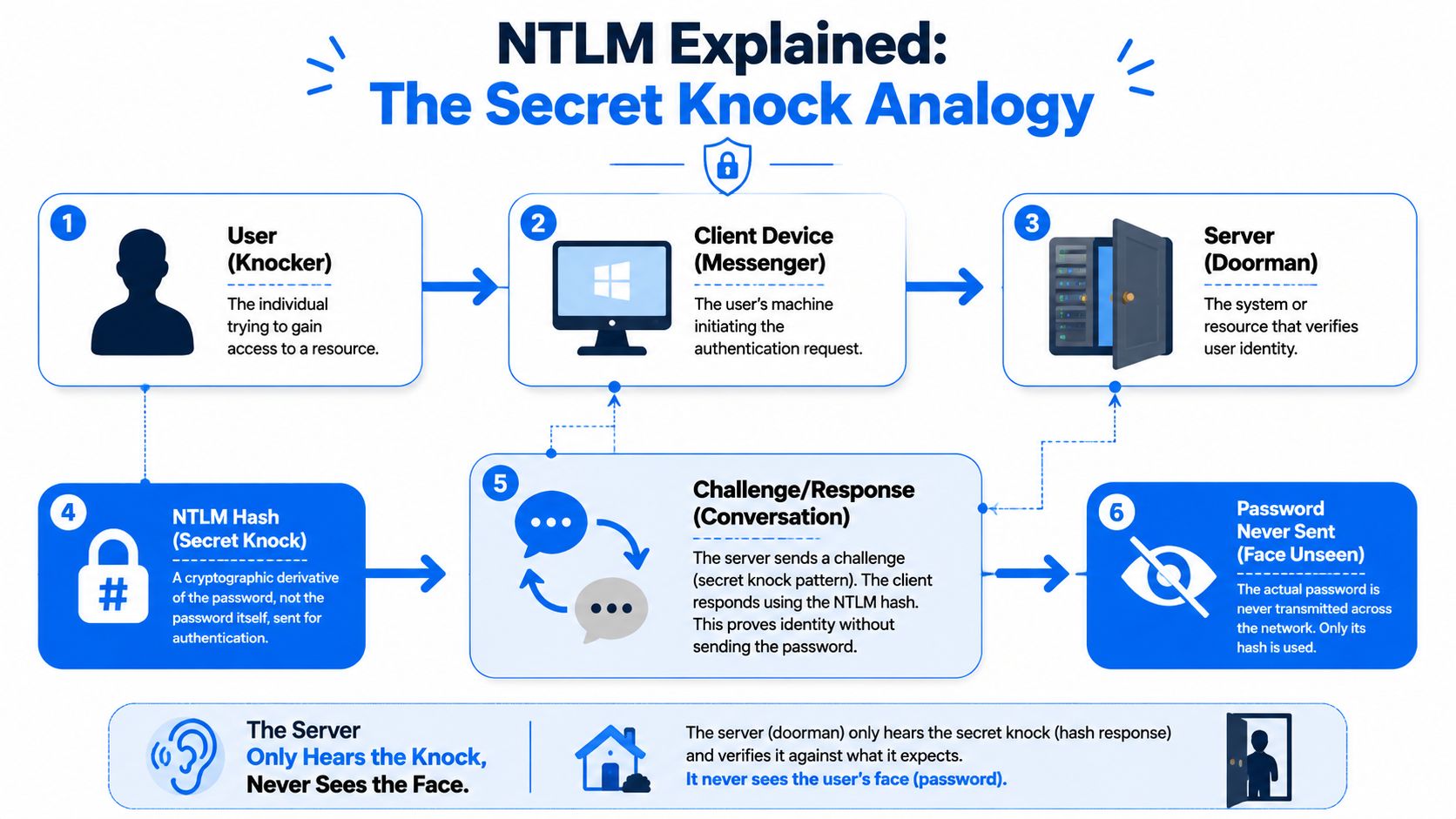
NTLM stands for NT LAN Manager. It's a Microsoft authentication family built for Windows environments. In simple terms, it helps a user prove they know a password without sending the actual password across the network.
It functions as a secret knock at a door where the server acts as the doorman. The user avoids showing their face, meaning the plaintext password is not sent. Instead, the client uses a stored password-derived value to answer a challenge from the server. If the answer matches, the server lets them in.
What's actually happening
NTLM relies on unsalted password hashes, which is the core problem. The protocol uses two 16-byte hashes, the older LM hash and the NT hash, and in NTLMv1 the server sends an 8-byte challenge and the client computes a 24-byte response based on the hash material, as described in the NTLM technical overview on Wikipedia.
That design is old, and old crypto ages badly. The same source notes that every possible 8-character NTLM password hash was shown crackable in under 6 hours in 2012, and by 2019 modern hardware cut that to about 2.5 hours.
Why versions matter
Here's the short version:
- LM hash is ancient and weak. If you still find it, treat it like a fire alarm.
- NTLMv1 is worse. It leans on outdated DES-based behavior and should be considered unsafe.
- NTLMv2 is better than v1, but still not a protocol you should feel good about keeping around.
NTLM was built for a different era. If you're still depending on it, you're carrying old trust assumptions into modern attack paths.
This is why asking what is NTLM isn't enough. The essential question is why your client still needs it.
How NTLM Attacks Put Your Clients at Risk
Attackers don't need to break NTLM in some movie-style way. They abuse how it works in normal environments. The two big problems are Pass-the-Hash and NTLM Relay.
Pass-the-Hash means the hash is enough
With Pass-the-Hash, the attacker steals the hash and uses it directly. They don't need the user's plaintext password. If the hash works, access works.
That's why unsalted hashes are such a problem in Windows environments. The hash becomes a stand-in for the password. If an attacker grabs it from one system, they can often use it elsewhere, especially in flat internal networks or environments with poor local admin hygiene.
NTLM Relay means the server never proves itself
Relay attacks are different. The attacker sits in the middle, captures an NTLM authentication exchange, and forwards it to another service. NTLM lacks proper mutual authentication and server verification, so the user thinks they're talking to a trusted service while the attacker relays that trust somewhere else.

That's not a lab-only concern. The Silverfort review of NTLM risk notes that 31% of all breaches over the past decade involved credential theft, and it ties NTLM attacks like pass-the-hash and relay to that problem because of hash reuse without salting.
What this looks like in a client network
A user clicks something they shouldn't, browses to an internal resource, or triggers name resolution traffic. An attacker captures the authentication flow, relays it to SMB, LDAP, or HTTP-connected services, and then starts turning one foothold into domain-wide access.
Common outcomes include:
- Lateral movement into servers and admin workstations
- Privilege escalation through relayed authentication
- Directory abuse that can expose sensitive identity data
- Compliance impact when old controls don't hold up under a real penetration testing exercise
If your client's internal trust model still assumes “inside equals safe,” NTLM gives attackers a shortcut.
This is one of the most common reasons a manual pentest finds serious issues in an environment that passed basic vulnerability scanning.
Finding Hidden NTLM Threats in a Network
You won't find meaningful NTLM exposure with a simple automated scan. A scanner might tell you a host is alive, maybe that SMB exists, maybe that a policy looks weak. That's not the same as proving whether an attacker can capture, relay, or reuse authentication inside the network.
Manual pentesting, pen testing, and a real penetration test are where this gets exposed. Experienced operators use tools like Responder, Impacket, and CrackMapExec to identify name resolution abuse, NTLM dependencies, and relay opportunities that a checklist won't catch.
What a tester is actually looking for
A good internal tester maps behavior, not just ports. They want to know:
- Where NTLM still appears in authentication flows
- Which hosts accept relayed authentication
- Whether SMB signing or related controls are missing
- How far a captured credential can travel
The CrowdStrike overview of NTLM weaknesses notes that tools like Responder.py can poison local network name resolution and capture credentials, and that in penetration tests of legacy environments, NTLM relay attacks succeed in up to 40% of cases before mitigations like SMB signing are applied.
Why this matters during client upgrades
A lot of NTLM problems show up when clients modernize part of the environment but leave old access paths in place. That's common when they refresh servers, move workloads, or rethink IT hardware for modern cloud adoption without fully validating how identity and legacy services still interact.
For MSPs, a proper internal penetration testing approach earns its keep. You need evidence of what can be exploited, not assumptions based on a GPO screenshot.
The biggest NTLM risk isn't that it exists. It's that teams assume it isn't being used anymore.
Why manual expertise matters
A junior tech can run a tool. A strong tester knows when output is noise, when a relay path is blocked for the wrong reason, and when a “small” NTLM finding is the first step toward domain compromise.
That's why MSPs should stop treating this as a commodity scan. If a client depends on you for security guidance, you need a human-led risk assessment that shows what an attacker can really do.
Practical Steps to Mitigate NTLM Vulnerabilities
You don't fix NTLM risk with one setting. You reduce it in layers, then you verify those layers with a pen test.
Start with the controls that break relay paths
SMB signing should be a baseline control. If relay attacks depend on forwarding authentication to SMB-enabled services, signing raises the bar and cuts off common abuse paths.
Extended Protection for Authentication matters too. NTLM is weak in part because it doesn't strongly bind the authentication exchange to the right server context. EPA helps close that gap.
Here's the practical stack MSPs should push:
- Restrict NTLM usage: Disable it where business processes allow, and identify every system that still needs an exception.
- Turn on SMB signing: This is one of the clearest hardening wins for internal Windows environments.
- Use LAPS: Local admin password randomization limits the blast radius when one machine is compromised.
- Audit aggressively: Newer Windows builds provide better NTLM visibility, which helps you map dependencies before making disruptive changes.
Don't ignore the operational side
Control changes fail when the client doesn't know which old app, file path, or appliance still leans on NTLM. That's why remediation needs both technical testing and stakeholder coordination.
If your team needs broader context on layered network protection and security, that's a useful starting point. For Windows-specific governance work, this guide to the Local Group Policy Editor is also helpful when you're reviewing how these restrictions get enforced.
Field advice: Don't disable NTLM blindly in production. Audit first, test next, then phase out dependencies with proof in hand.
For SOC 2, PCI DSS, HIPAA, and ISO 27001 clients, that verification step matters. Auditors want controls. Smart clients want evidence those controls work.
Moving to Kerberos for Modern Security
The long-term answer isn't “manage NTLM better.” The answer is move to Kerberos wherever possible.
Kerberos is stronger because it uses a ticket-based approach and supports mutual authentication. In plain English, both sides do a better job proving who they are. That's very different from NTLM, where the server side trust model leaves room for relay abuse.
Why Kerberos is the better model
Think of Kerberos like a secure digital event pass checked at multiple points, instead of a doorman who only recognizes a knock. It's built for a more modern trust model and fits much better with enterprise identity controls.
Microsoft has already signaled where this is headed. The Silverfort summary of Microsoft's NTLM phase-out timeline says deprecation began in early 2025 with completion targeted by 2027, while pushing transitions toward Kerberos via Negotiate. The same source also notes improved NTLM auditing in Windows 11 24H2 and Server 2025, which gives teams better visibility into where NTLM is still hanging on.
What MSPs should do now
Don't wait for a forced migration event. Start identifying the apps, workflows, and devices that still fall back to NTLM. Then make Kerberos adoption part of roadmap planning for regulated and security-conscious clients.
That's especially important for vCISOs, GRC advisors, and resellers supporting formal compliance programs. The organizations that handle this early will have fewer ugly surprises when legacy defaults disappear.
Secure Your Clients with White Label Pentesting
NTLM is the kind of issue that slips past rushed assessments and cheap automated testing. That's exactly why MSPs need a dependable partner for white label pentesting, manual pentesting, and fast-turnaround penetration testing that reflects real attacker behavior.
If you want to keep clients from shopping elsewhere for security services, give them something better under your own brand. A solid pentest partner helps you deliver affordable, credible assessments without bloated pricing, weak methodology, or endless scheduling delays.
That matters if you're serving SOC 2, HIPAA, PCI DSS, or ISO 27001 clients who need more than a scan report. It also matters if you're a reseller who wants margin, speed, and a team that won't compete for your accounts. Resources that help clients protect your digital world can support the conversation, but significant value comes from expert-led testing by certified pentesters with OSCP, CEH, and CREST experience. If white-labeled delivery is part of your model, our white label penetration testing is worth a look.
Stop sending clients to outside security vendors who can turn around and pitch against you. Own the relationship. Own the assessment. Own the result.
If you need an affordable, fast, channel-only partner for manual pentests, pen testing, and full penetration testing, talk to us about testing you can resell as your own. Our OSCP, CEH, and CREST-certified pentesters deliver white label pentesting built for MSPs, vCISOs, GRC firms, and resellers, without competing for your clients.

.avif)
.png)
.png)
.png)

