
A new client signs on. They don't have Active Directory. They don't have Intune. They have a stack of standalone Windows machines, a few shared local admin accounts, and a lot of confidence that “the antivirus is fine.”
Then you look closer.
Passwords are weak, USB storage is open, audit settings are thin, and half the estate is managed by habit instead of policy. That’s where the local group policy editor stops being a niche Windows tool and starts becoming a practical security control. For an MSP, vCISO, or GRC advisor, it’s one of the fastest ways to turn a messy endpoint baseline into something defensible for a risk assessment, a pen test, or a compliance review.
Why MSPs Must Master Local Policy Management
A lot of client environments still live in the middle ground. They’re too small for mature central management, but large enough to create real risk. That’s common in SMB work, especially when a client has grown through quick hardware purchases and inconsistent setup practices.
For those environments, the local group policy editor is often the first meaningful control plane you can use. It gives you a way to harden one workstation at a time, build a repeatable baseline, and prove that security work is happening where it matters. If you support a mixed fleet, this matters even more because every unmanaged local exception turns into a future ticket, a future finding, or a future breach.

Where MSPs usually get stuck
Some providers still treat local policy as a fallback. That’s a mistake.
If a client has standalone systems, workgroup machines, kiosks, lab devices, or branch endpoints outside normal domain control, local policy is the control you have today. If you need a simple overview of what a managed service provider typically owns in a client relationship, that broader role is exactly why local policy hygiene becomes your problem too.
A good local baseline also makes your other services easier to sell. If you’re offering SOC 2, HIPAA, PCI DSS, or ISO 27001 support, you need evidence that endpoint controls aren’t just discussed but enforced. In many smaller client environments, local policy is the evidence trail that shows someone locked the door.
Why this matters for pentesting
Manual pentesting, pen testing, and penetration testing teams look for weak local controls early because they often lead to the easiest wins. Weak rights assignments, poor audit settings, and permissive software rules can turn a single foothold into lateral movement or privilege escalation.
Practical rule: If a client can’t explain how local endpoint settings are controlled, a manual pentest will usually find that out for them.
If you already review domain posture, pair that work with an Active Directory audit approach and a local policy review. The domain tells part of the story. The workstation tells the rest.
What Is The Local Group Policy Editor
A pentester lands on a standalone workstation, checks local rights, reviews audit settings, and finds the machine is effectively self-governed. That is the point where the Local Group Policy Editor stops being a convenience tool and becomes part of the attack surface.
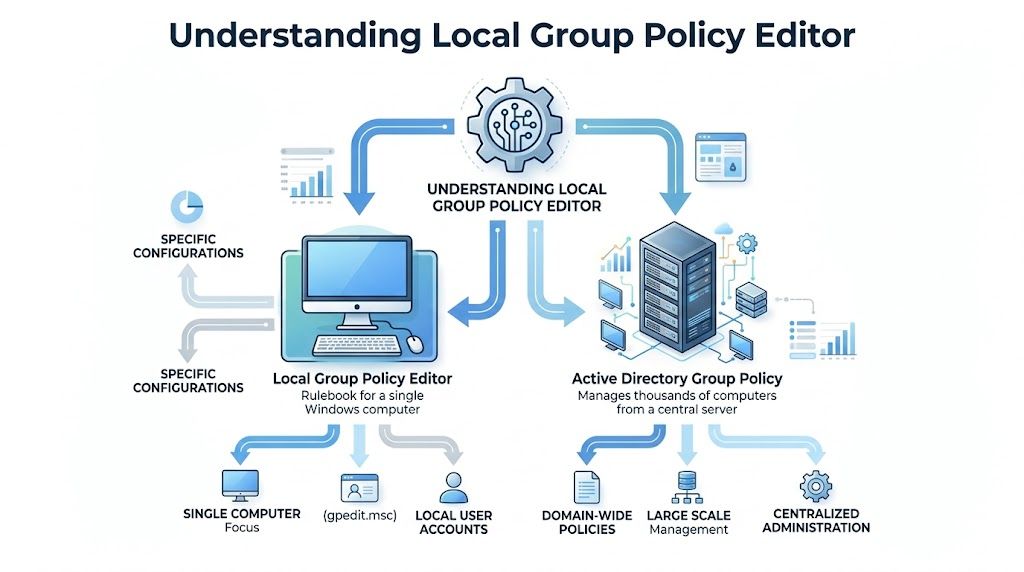
The Local Group Policy Editor, opened with gpedit.msc, is the Windows interface for setting policy on a single machine. It gives administrators a structured way to define security, system, and user controls through Computer Configuration and User Configuration, as explained in TechTarget’s Local Group Policy Editor definition.
For MSPs, that matters because local policy is often the only enforceable control layer on systems that sit outside normal domain management. It is also one of the fastest places to prove improvement during remediation. If a client asks what changed after hardening, local policy gives you settings you can point to, test, and document for compliance reviews.
The two branches that matter
Computer Configuration applies to the device. These settings are processed in the machine context and affect the endpoint regardless of who signs in.
User Configuration applies to the user session. These settings shape what a user can run, change, or access after logon.
That split is operationally important. If you are trying to reduce local attack paths, machine-level settings usually carry more weight because they follow the endpoint itself. User settings still matter, especially for kiosks, shared devices, and restricted roles.
What it actually changes
Local policy writes enforceable Windows policy state. In practice, that means you are not relying on technicians to click the right setting every time or on users to leave security controls alone. You are defining how Windows should behave.
The local GPO is stored on the machine, with policy data tied into normal Windows policy processing. That gives you something concrete to audit when a manual penetration test finds weak controls. You can check whether the problem came from a missing baseline, a conflicting setting, or an admin exception that was never cleaned up.
For an MSP owner, the commercial value is straightforward:
- It creates testable security controls: pentesters can validate them, and auditors can map them to policy requirements.
- It shortens remediation cycles: you can correct classes of endpoint issues through policy instead of one-off technician work.
- It supports higher-value services: local hardening work feeds directly into SOC 2 readiness, policy evidence collection, and post-pentest remediation projects.
Local policy is the smallest practical enforcement layer on a Windows endpoint. If it is weak, attackers get easier privilege escalation, weaker logging, and more room to persist. If it is configured well, the same machine is harder to abuse and easier to defend in a manual assessment.
How it differs from domain policy
Domain Group Policy is centralized and designed for scale. The local group policy editor controls the machine in front of you unless you use supported remote administration methods.
That sounds limiting, but it solves a real MSP problem. Plenty of client devices live outside clean centralized management because of acquisitions, workgroups, lab environments, temporary deployments, or poor tenancy discipline. On those systems, local policy is often the control that determines whether a pentest finding turns into a minor note or a serious report item.
That is why experienced MSP teams treat gpedit.msc as both a hardening tool and a revenue tool. It helps close obvious gaps, produces cleaner evidence for compliance work, and gives your team a clearer path from findings to paid remediation.
How To Access And Enable The Policy Editor
On supported Windows editions, opening the local group policy editor is simple. Press the Windows key, type gpedit.msc, and launch it. You can also use the Run dialog and enter gpedit.msc there.
On Pro, Enterprise, and Server editions, that’s usually all you need. In practice, this is one of the fastest ways to start hardening a workstation during onboarding, remediation, or a pre-penetration test cleanup.

The Windows Home problem
Here’s the operational headache. The Local Group Policy Editor is not included with Windows 10 or 11 Home editions, creating a security blind spot for SMBs that can’t enforce standardized local policies without upgrading, as noted in this Local Group Policy Editor overview for Home edition limitations.
That’s not just an inconvenience. It creates inconsistency across the fleet. Some systems can be hardened cleanly through policy. Others need workarounds, manual registry handling, or an edition upgrade before you can apply the same baseline.
What works in the field
For MSPs, there are really only a few sane options:
- Standardize on supported editions: If a client expects managed security, push for Pro or above. It’s the cleanest path.
- Document the exception clearly: If Home devices remain, flag them as an endpoint governance gap in your risk register and compliance notes.
- Don’t pretend manual one-off settings are equivalent: They aren’t. They’re harder to audit, easier to drift, and tougher to defend during a pen test or audit.
A lot of online content promises ways to “enable” gpedit on Home with package installs or unsupported hacks. That may work in isolated cases, but it’s not how I’d build a client security program. If you’re responsible for SOC 2, HIPAA, or PCI DSS readiness, unsupported operating system modifications are a poor foundation.
A practical access checklist
Use this quick workflow:
- Confirm edition first so you know whether gpedit is available.
- Open gpedit.msc from Search or Run on supported systems.
- Verify admin rights before making changes.
- Record the baseline so you can show what changed after remediation.
- Flag Home endpoints for upgrade planning or compensating controls.
Unsupported shortcuts often cost more time later than a clean edition upgrade costs today.
Essential Security Policies To Configure Now
If you want better penetration testing outcomes, don’t start with flashy tooling. Start with the settings attackers trip over first.
The local group policy editor manages thousands of settings through Computer Configuration and User Configuration, and enabling advanced audit policies can generate over 10,000 events daily in active environments, which gives security teams useful material for SOC analysis and forensics during a pen test, according to Microsoft’s Group Policy documentation for Windows Server 2012 R2).
The policies that pull real weight
A hardened endpoint baseline usually starts with identity, access, execution control, and logging. That doesn’t mean turning on every setting you can find. It means choosing the policies that reduce attacker options and support compliance evidence.
Here are five worth prioritizing.
Policy NamePolicy PathRecommended Setting & ReasonPassword policyComputer Configuration > Windows Settings > Security Settings > Account Policies > Password PolicySet strong password requirements. This reduces weak local credentials and supports compliance conversations around baseline access control.Account lockout policyComputer Configuration > Windows Settings > Security Settings > Account Policies > Account Lockout PolicySet a defined lockout threshold and reset behavior. This makes password guessing harder and shows clear control maturity during a risk assessment.Deny network access for sensitive accountsComputer Configuration > Windows Settings > Security Settings > Local Policies > User Rights AssignmentRestrict network logon for default or high-risk accounts. This cuts down easy lateral movement opportunities.Advanced audit policyComputer Configuration > Windows Settings > Security Settings > Advanced Audit Policy ConfigurationEnable targeted auditing for logon, account activity, and privilege use. This helps with SOC 2 evidence, investigations, and post-incident review.Software restriction or removable media controlsUser Configuration or Computer Configuration under Administrative Templates and Security SettingsLimit uncontrolled software execution and removable device use. This reduces malware execution paths and data exfiltration risk.
What not to do
Don’t enable policies with no operational plan. If you switch on broad auditing but nobody reviews the logs, you’ve created noise, not security. If you tighten software controls without testing line-of-business apps, you’ll create help desk pain and someone will roll back the change.
That’s why good MSP security work balances affordable hardening with real-world usability. The best policy baseline is one the client will keep.
A policy that survives production is worth more than a perfect policy that gets disabled after three tickets.
If you need a broader baseline framework to compare against, Your Guide to the ACSC Essential 8 is a useful companion reference. It helps frame local hardening decisions inside a bigger maturity model without turning the exercise into checkbox theater.
How Pentesters Exploit Weak Local Policies
A manual pentest rarely starts with exotic tradecraft. It usually starts with what the environment gives away for free.
That’s why weak local policy matters so much. A permissive rights assignment, poor audit settings, or unmanaged local admin behavior creates the kind of low-friction path an attacker wants. Your client may think the issue is “just a workstation setting.” A skilled tester sees a pivot point.
A common path from foothold to movement
One policy that deserves immediate attention is Deny access to this computer from the network under User Rights Assignment. According to this Local GPO attack surface analysis, enabling that setting for default accounts can reduce the success of MITRE ATT&CK T1021 techniques such as lateral movement via RDP and SMB by up to 85%. Testers frequently find this setting misconfigured, which can leave the door open to NTLM relay attacks.
That’s the kind of control that changes a test outcome fast. If the setting is weak, a foothold on one machine may become movement across several. If the setting is strong, the attacker’s path narrows.
What testers actually look for
During internal penetration testing, testers often validate whether local policy has created unnecessary opportunities, including:
- Network logon exposure: Can default or risky accounts reach systems they shouldn’t?
- Weak audit visibility: Can an attacker operate with little traceability because event collection is too thin?
- Loose execution controls: Can users or malware run scripts and tools too freely?
- Policy drift: Did one machine fall outside the expected standard because nobody noticed a local override?
If you want to understand how these issues show up in a real engagement, a focused internal penetration testing service overview is useful context for how workstation weaknesses turn into broader internal findings.
Attackers don’t need every control to fail. They need one weak machine, one permissive account path, and enough time.
Why certified testers focus here
Such situations demand OSCP, CEH, and CREST-level experience. Manual testers don’t just run a scanner and dump findings. They validate whether a local policy weakness is cosmetic or exploitable.
That’s the difference between a noisy report and a useful one. A good penetration test tells you which local policy gaps create business risk, which ones affect compliance evidence, and which ones should be fixed first.
Automating And Troubleshooting Local Policies
The downside of the local group policy editor is obvious. It applies to the local machine. For an MSP managing many client endpoints, that creates operational risk and can lead to configuration drift, which pentesters should investigate because drift creates exploit opportunities, as discussed in Varonis’ group policy editor overview.
That doesn’t mean local policy is the wrong tool. It means you need a management method around it.
Where automation helps
For non-domain fleets, use PowerShell to check policy-related registry locations, compare endpoints against a defined standard, and flag machines that don’t match. Even if you aren’t doing full centralized enforcement, automated checking gives you visibility.
Useful habits include:
- Baseline first: Build one approved configuration and compare others to it.
- Script verification: Check whether expected settings exist where policy should enforce them.
- Track exceptions: Some machines will need different treatment. Document why before the drift becomes normal.
- Bundle remediation: Fix related settings together so clients see one coordinated change window instead of endless small disruptions.
When policy doesn’t apply as expected
Troubleshooting matters because local policy can conflict with other management layers. In hybrid environments, local settings may lose out to domain GPOs or MDM controls. That’s why tools like RSoP.msc and gpresult matter. They help you see what policy prevailed, not what you thought should win.
A practical troubleshooting flow looks like this:
- Confirm the machine edition and admin context
- Check whether the setting exists in the expected policy path
- Review Resultant Set of Policy
- Look for domain or MDM precedence
- Force a refresh and retest
- Document the final effective setting
Good troubleshooting is part technical and part procedural. Half the battle is proving which control source owns the final setting.
What doesn’t scale well
Opening gpedit on each machine and clicking through settings by hand doesn’t scale. It also doesn’t create strong reporting. If you’re running a mature reseller, GRC, or vCISO practice, you need repeatable checks, versioned baselines, and remediation notes your team can follow consistently.
That’s how you make local policy supportable. Not by avoiding it, but by wrapping it in process.
Your White-Label Pentest Remediation Template
After a penetration testing engagement, clients don’t want a lecture on policy architecture. They want a clear list of what’s wrong, why it matters, and how to fix it. If you’re delivering services under your own brand, your remediation notes need to be simple, credible, and immediately useful.
Here’s a clean template you can adapt for client reports.
Sample remediation language
Finding: Weak or inconsistent local security policy on standalone Windows endpoints
Risk: Local policy gaps may allow unauthorized access, weak password practices, uncontrolled software execution, poor audit visibility, or easier lateral movement during an attack.
Affected systems: Workstations and servers using local policy as the primary endpoint control method
Business impact: Increased exposure during a pen test, weaker support for SOC 2, HIPAA, PCI DSS, or ISO 27001 evidence, and higher operational risk from configuration drift
Recommended remediation:
- Review account policies and enforce stronger local password and lockout settings
- Restrict risky rights assignments including unnecessary network access for sensitive or default accounts
- Enable meaningful audit settings to support investigations and compliance reporting
- Limit software and device abuse through software restriction and removable media controls
- Validate effective policy with local testing and follow-up verification after refresh
- Document exceptions where business needs require deviations from the standard
How to package it for clients
Keep the report practical. Separate findings into urgent, important, and monitor categories. Include the affected policy path when possible so a technician can act without guessing.
For teams that want a client-ready reporting format, this penetration testing report template is a good starting point for turning technical findings into something a decision-maker can approve.
A key advantage for a channel partner is speed. When your report language is standardized, your team can move from finding to remediation plan fast. That makes your security practice easier to deliver, easier to explain, and easier to sell as a repeatable service.
If you want a channel-only partner for white label pentesting, manual pentesting, and fast remediation support for your MSP, vCISO, reseller, or GRC practice, talk to us about pentests you can resell as your own. Our certified team supports affordable penetration testing across internal, external, cloud, web, mobile, and social engineering environments, with white-labeled delivery that helps you grow without competing against your own client relationships.

.avif)
.png)
.png)
.png)

