
A client doesn’t call about credential harvesting. They call because email stopped working, files got encrypted, payroll changed, or Microsoft 365 started acting strange.
That’s the problem. Credential harvesting usually looks small at first. One fake login page. One stolen browser session. One employee who typed a password into the wrong place. Then it turns into account takeover, ransomware, data theft, compliance pain, and a very uncomfortable client retention conversation.
If you’re an MSP, vCISO, GRC advisor, CPA firm, or security reseller, you can’t treat this like a user-awareness issue alone. This is a business risk. It affects renewals, project revenue, compliance work, and your credibility as the team responsible for reducing risk.
Why Credential Harvesting Threatens Your Clients
Credential harvesting is simple. An attacker tricks a user or infects a device so they can steal usernames, passwords, authentication tokens, or session cookies. Once they have them, they log in as a real user.
This is why the question what is credential harvesting matters so much to managed service providers. It’s not some edge-case attack. It’s one of the fastest ways criminals get into cloud apps, email, remote access tools, and internal systems without breaking in through a noisy software exploit.
Recorded Future’s 2025 identity threat data found that credential theft was the top initial access vector, with 50% more credentials indexed in the second half of 2025 than the first half, 90% more in the last three months than the first three months, and 276 million credentials containing active session cookies, which can let attackers bypass MFA by hijacking authenticated sessions (Biometric Update coverage of Recorded Future’s report).
Why this hurts MSP relationships
Clients don’t care whether the root cause was a phishing page, an infostealer, or a stolen cookie. They care that their provider didn’t catch the risk before damage spread.
A single compromised device yielded an average of 87 stolen credentials in that same Recorded Future reporting, which shows how one infected endpoint can expose far more than one account. That’s why one user incident can quickly become a tenant-wide mess.
Practical rule: If a client user enters credentials into a fake portal or gets hit with infostealer malware, treat it like a broader identity incident, not a one-account reset.
For clients chasing SOC 2, HIPAA, PCI DSS, or ISO 27001, this gets even more serious. Identity controls, access reviews, logging, and response plans all look weaker when attackers can sign in as legitimate users.
If ransomware preparedness is part of your client conversations, this guide on ransomware prevention best practices is worth reviewing alongside identity-focused controls.
Common Credential Harvesting Techniques Used By Hackers
Attackers don’t need to outsmart every control. They just need a believable path to a login page or a way to steal data from a device.
The most common methods
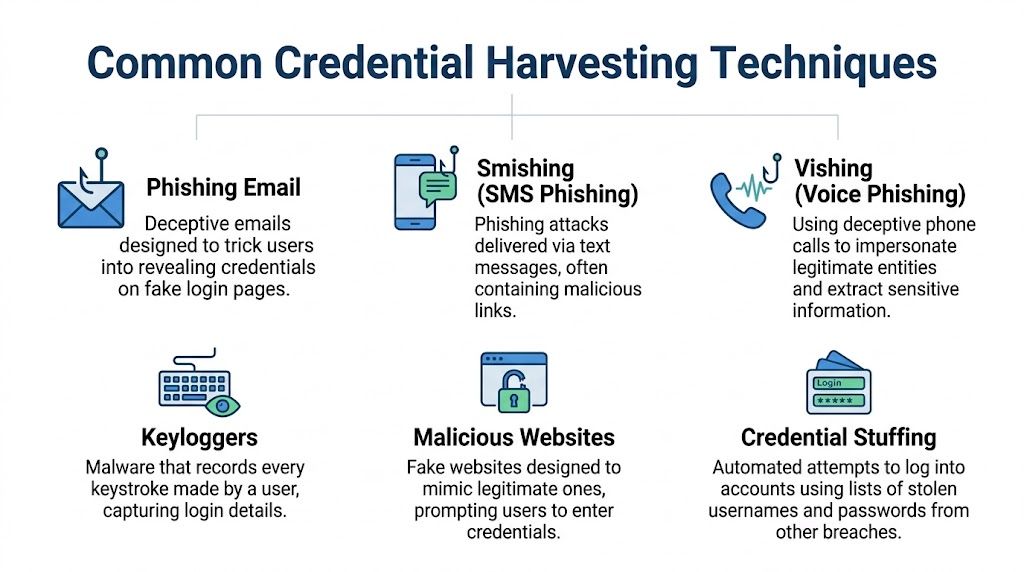
Phishing is the classic example. A user gets an email that looks like Microsoft 365, Google Workspace, a payroll system, or a shared document notice. They click, land on a fake sign-in page, and hand over the keys.
Infostealer malware works differently. Instead of waiting for a user to type a password into a fake form, malware pulls credentials, browser-stored logins, tokens, and cookies from the device itself.
Adversary-in-the-Middle attacks sit between the user and the authentic login flow. Tools such as Evilginx2 are often discussed in offensive security because they can capture credentials and session data even when MFA is enabled.
Keyloggers record what users type. If the user signs in, the attacker gets the login.
Credential stuffing takes stolen usernames and passwords from one breach and tries them across other apps. Password reuse makes this attack cheap and effective.
CrowdStrike’s overview notes that credential harvesters commonly exploit HTTP POST requests to fake login portals that mimic services like Microsoft 365, and that modern variants use AI to craft hyper-personalized phishing emails with 30-50% higher success rates. It also states that over 80% of security incidents involve stolen credentials as the initial access vector (CrowdStrike credential harvesting overview).
Real-World Signs Your Clients Are Being Targeted
Most harvesting attacks don’t announce themselves. You see fragments. A strange login. A mailbox rule. A token that shouldn’t still be active. Good MSPs catch the pattern before the incident becomes public.
Signals worth treating seriously
Watch for these:
- Unusual login geography that doesn’t fit the user’s history or normal business activity
- Multiple failed login attempts against one account or many accounts in a short window
- Unexpected password reset requests that the user says they didn’t initiate
- New inbox forwarding rules sending mail to external addresses
- Session behavior that looks normal on the surface but starts from a device, browser, or context that doesn’t fit the user
- Repeated prompts for MFA that may suggest an attacker is trying to push or replay access attempts
- User complaints about being signed out or seeing security prompts they didn’t expect
Recorded Future’s 2025 reporting also found 276 million credentials included active session cookies and that 31% of all malware-sourced credentials contained those cookies, which is why “the password was never used after reset” is not a comforting finding when you investigate identity abuse (Biometric Update coverage of Recorded Future’s report).
What those signs usually mean
A forwarding rule often means the attacker is watching finance or legal conversations. A burst of failed logins can point to password spraying or stuffing. A valid login from an odd context may mean the attacker stole a browser session and skipped the MFA challenge entirely.
Don’t write these off as user error. Treat them like early breach indicators.
How To Detect and Mitigate Harvesting Attacks
You don’t solve credential harvesting with one product. You reduce it with layers that catch different failure points.

Start with identity controls
MFA is still mandatory. Skip the debate. If a client doesn’t have it broadly enforced, fix that first.
But don’t stop there. HHS guidance tied MITM and keylogger attacks to unauthorized access in 60% of healthcare breaches, notes that hardware keys are more resistant to MITM attacks, and says UEBA and real-time event analysis can identify 95% of suspicious login attempts (HHS sector alert on credential harvesting).
That means app-based MFA is better than nothing, but phishing-resistant methods matter more for higher-risk users.
Build the rest of the stack
Use a short list and enforce it hard:
- Reduce token risk: Shorten session lifetimes where practical and review how persistent sign-in is configured.
- Harden endpoints: Infostealers and keyloggers live on devices, not just in email. EDR matters.
- Limit privilege: PAM and role-based access reduce blast radius after account takeover.
- Monitor behavior: UEBA, sign-in context, and mailbox changes should feed active alerting.
- Train users on modern lures: Not generic posters. Real examples tied to their apps and workflows.
- Retire weak legacy paths: Old authentication methods and poor proxy discovery settings make attacks easier.
A lot of MSPs also benefit from using a zero trust lens when they review collaboration platforms and identity architecture. This write-up on SharePoint Zero Trust architecture is a useful reference for thinking through access design beyond simple perimeter assumptions.
Operator view: If your client says “we already have MFA,” the next question should be “can an attacker steal the session anyway?”
These controls also support compliance work. Whether you’re mapping to SOC 2, HIPAA, PCI DSS, or ISO 27001, auditors and clients want evidence that identity risk is managed in practice, not just described in policy.
Prove Your Security with Manual Penetration Testing
Controls on paper don’t keep clients. Proof does.
A real pentest, pen test, or penetration test shows whether your defenses work against the same paths attackers use. That includes phishing simulations, external attack surface review, web application login testing, cloud configuration review, and checks for weak identity workflows that make harvesting easier.
Why manual pentesting matters
Automated scanners find known issues. Skilled testers find the combinations that create real exposure.
That’s especially important with credential harvesting because the risk usually sits between tools. The email was plausible, the login page looked legitimate, the session stayed alive too long, and the alert didn’t reach the right person. Manual penetration testing catches those chains better than checkbox tooling.
Cyberint’s 2025 research reported a 160% increase in leaked credentials compared to 2024, and Verizon’s DBIR finding cited there says leaked credentials drove 22% of breaches in 2024. The same reporting ties the surge to malware-as-a-service that makes harvesting logins from browsers and memory easier for attackers (SC Media coverage of the research).
What good testing should include
A strong manual pentesting program should validate:
- Phishing exposure: Can users be driven to a believable fake portal?
- MFA resilience: Can an attacker still abuse sessions or weaker authentication paths?
- External weaknesses: Are there internet-facing systems that help attackers stage or escalate access?
- Cloud identity gaps: Are mailbox rules, stale sessions, or weak app permissions creating openings?
- Reporting quality: Does the client get fixes they can implement, not scanner dumps?
If you’re comparing approaches, this explainer on black box penetration testing is useful because it shows how an external attacker perspective can uncover issues internal teams miss.
For MSPs and vCISO firms, the business angle is obvious. A credible risk assessment backed by real testing gives you stronger renewal conversations, cleaner compliance evidence, and a better reason for clients to trust your guidance. If you want to see what a partner-ready delivery model looks like, review this approach to manual white-labeled pentesting.
Good pentesting doesn’t just find vulnerabilities. It shows whether your client’s identity controls hold up when someone actively tries to break them.
Partner With Us For Affordable Pentesting Services
If you advise clients on security, you need a way to validate what you’re recommending. Otherwise, you’re selling policies and hoping the controls work.
That’s where a channel-focused testing partner makes sense for MSPs, vCISOs, GRC firms, CPAs, and other resellers. You need white label pentesting, fast turnaround, strong reporting, and certified testers who know how real attacks happen. You also need a partner who won’t compete for your accounts.
The market has enough overpriced scans, slow delivery, and shallow reporting already. The better option is affordable, manual pentesting performed by OSCP, CEH, and CREST certified pentesters who can support client goals tied to SOC 2, HIPAA, PCI DSS, ISO 27001, and broader compliance needs.
If you want a channel-only partner for fast, affordable, manual pentests and penetration testing, talk to us about pentests that carry your logo. We help MSPs, vCISOs, and resellers deliver white label pentesting without competing for client relationships. Contact us today.

.avif)
.png)
.png)
.png)

