
Most advice on WMIC get serial number is bad. Not outdated. Bad.
People keep repeating wmic get serial number like it's a real command, then wonder why their scripts fail during onboarding, a risk assessment, or a compliance review. If you're an MSP, vCISO, GRC advisor, or reseller trying to build clean asset inventory for SOC 2, HIPAA, PCI DSS, or ISO 27001, sloppy serial collection isn't a tiny scripting mistake. It's operational debt.
It also creates downstream mess in pentest, pen test, penetration test, and penetration testing scoping. Bad asset data means missed devices, wrong assumptions, and ugly conversations with clients when the inventory in the spreadsheet doesn't match what's sitting on desks or running in a hypervisor.
The WMIC Command You Should Actually Use
Start with the correction. wmic get serial number is invalid. The actual command is wmic bios get serialnumber, which retrieves the SerialNumber property from the Win32_BIOS WMI class. That command came in with WMI in Windows 2000 and became standard in Windows XP, released October 25, 2001, as documented in this WMIC command reference.
That matters because a fake command in your runbook is more than a typo. It wastes technician time, breaks automation, and gives your client a false sense that inventory was captured when it wasn't.
Why this matters for audits
Serial numbers are basic evidence. Auditors and compliance teams don't care that a script looked close enough. They care whether the device record is accurate, repeatable, and tied to real hardware.
If you're delivering managed services, that record feeds several revenue-critical workflows:
- Asset tracking: You need a dependable way to identify devices across tickets, lifecycle work, and renewals.
- Compliance mapping: Hardware identity often gets pulled into SOC 2 and HIPAA evidence collection.
- Scoping security work: A penetration test or broader risk assessment only works when the inventory isn't fiction.
Practical rule: If your team is still searching for "WMIC get serial number" during a client engagement, your process isn't mature enough for compliance-grade work.
The command to use
Run this on a Windows system:
wmic bios get serialnumber
That's the right starting point. Not a blog-comment variant. Not a guessed syntax. The actual command.
Get Local System Serials with WMIC
For a single machine on your bench or a laptop in front of a user, WMIC is still a fast way to pull the serial if the feature is available.

The command often needed is:
wmic bios get serialnumber
That query hits the Win32_BIOS WMI class and pulls from SMBIOS tables stored in firmware. On Dell systems, that value maps to the Service Tag. On HP systems, it returns the hardware serial number. It's also the standard built-in choice for batch scripting, though on Windows 11 the WMIC feature may need to be installed first, as explained in this Stack Overflow discussion of what the command actually retrieves.
BIOS serial versus motherboard serial
Often, a lot of inventory gets sloppy.
If you want the system-level serial, use:
wmic bios get serialnumber
If you want the motherboard serial, use:
wmic baseboard get serialnumber
Those are not the same thing. If a client had a board swap, refurb, or warranty repair, the values can differ. If your help desk, procurement records, and compliance binder all assume they're interchangeable, you're setting yourself up for reconciliation headaches later.
Use the right identifier for the job
A smart workflow looks like this:
- For endpoint inventory: Start with the BIOS serial because that usually tracks the overall device identity.
- For hardware validation: Check the baseboard serial when you suspect replacement parts or repurposed chassis.
- For compliance evidence: Compare the digital serial against the physical label before you trust it.
When a device record doesn't line up with the sticker, don't force the spreadsheet to win. Investigate the hardware history.
For manual pentesting and compliance prep, this distinction matters more than often recognized. You don't want to scope a pen testing engagement around one identifier when field techs are documenting another.
Inventory Remote Computers with WMIC Scripts
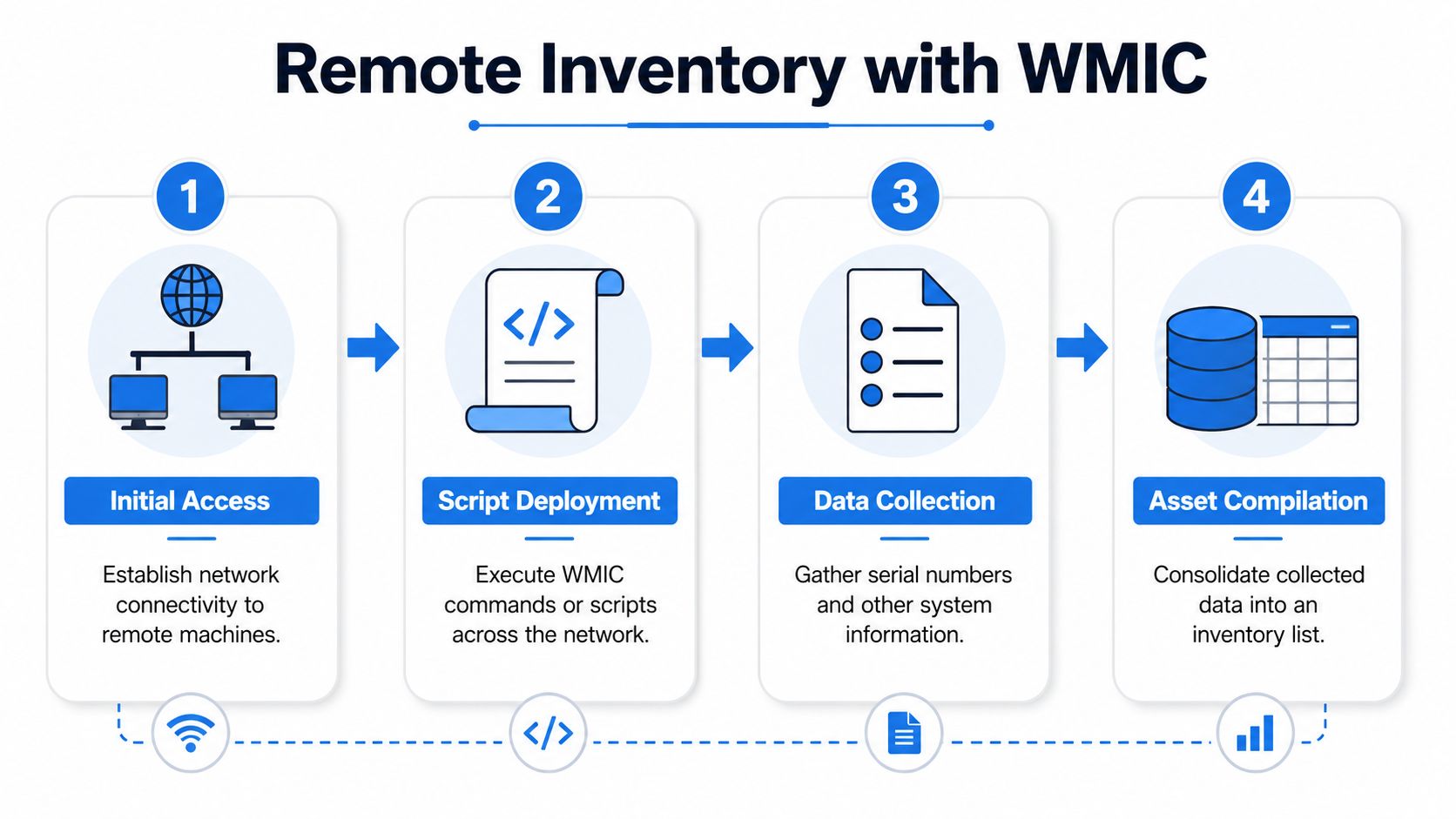
Logging into every machine one by one is a rookie move. If you're taking over a new client and need a first-pass inventory, remote WMIC can still help you get there fast.
Use the /node: parameter to query another system:
wmic /node:"PC-01" bios get serialnumber
If the hostname has a hyphen or other special characters, quote it. That avoids the parsing problems admins run into with remote WMIC calls, as noted in this Spiceworks discussion on pulling BIOS serial numbers remotely.
A simple batch approach
Drop your hostnames into a text file, then loop through them:
@echo off
for /f %%i in (computers.txt) do (
    echo ==== %%i ====
    wmic /node:"%%i" bios get serialnumber
)
That isn't pretty, but it works as a quick inventory pass in practice. It's the kind of thing an MSP tech can run during onboarding while validating what the RMM says is present.
What this script is good for
Use it when you need a rough but useful first layer of visibility:
- New client onboarding: Pull system serials before you trust old spreadsheets.
- Risk assessment prep: Confirm endpoints that should be in scope exist.
- Compliance support: Give your vCISO or GRC team a cleaner starting point for control evidence.
If you're already collecting endpoint data through an RMM, pair it with process discipline. This write-up on the Ninja RMM agent is a useful reminder that tooling only helps when the underlying inventory logic is sound.
Remote WMIC is fine for a first pass. It is not a substitute for validating what the client actually owns and uses.
Where people trip up
Remote collection depends on the usual basics. You need admin access to the target, network connectivity, and working WMI on the other side. When those conditions aren't there, your script doesn't prove the endpoint is missing. It only proves your method failed.
That's a big distinction in compliance and penetration testing scoping.
Why PowerShell Is the Modern WMIC Replacement
If you're still building core workflows around WMIC, you're carrying avoidable risk.
The valid WMIC command has been deprecated in Windows 11 version 24H2, and Microsoft recommends Get-CimInstance -ClassName Win32_BIOS as the replacement, according to this sysadmin discussion on the 24H2 change. That's the business issue. Not nostalgia for an old tool. Your scripts are aging out underneath you.
The PowerShell command to use
For the same BIOS serial in PowerShell, run:
Get-CimInstance -ClassName Win32_BIOS | Select-Object SerialNumber
For teams that need structured output, this is the better path. You get objects, cleaner automation, and easier export into whatever system your MSP, reseller, or GRC team uses.
WMIC versus PowerShell
| Feature | WMIC | PowerShell (Get-CimInstance) |
|---|---|---|
| Status | Deprecated in Windows 11 24H2 | Recommended modern replacement |
| Output style | Plain text | Structured objects |
| Automation fit | Works for older batch scripts | Better for scalable scripting and exports |
| Windows 11 handling | May require optional feature installation | Aligned with Microsoft's direction |
| Error handling | Basic and clunky | More flexible in real automation workflows |
That table tells the whole story. WMIC is a convenience. PowerShell is a platform.
Why MSPs should stop clinging to batch habits
A lot of shops keep WMIC because the old batch files still run on some machines. That's not strategy. That's inertia.
When your services include SOC 2, HIPAA, PCI DSS, or ISO 27001 support, your evidence collection needs to be stable and repeatable. PowerShell gives you a better foundation for that because it handles data like data, not like scraped console text.
If your team is modernizing broader Microsoft automation too, these AzureAD and Graph module scripts are worth reviewing because they reinforce the same point. Stop building around retired habits when current tooling is already better.
Where this pays off operationally
PowerShell makes it easier to:
- Export clean data: Better fit for CSVs and asset records.
- Handle exceptions: Useful when devices return blanks, malformed output, or inconsistent values.
- Standardize services: Stronger for repeatable managed service delivery and white label pentesting support workflows.
For teams that want a broader scripting baseline, this PowerShell cheat sheet is a practical internal reference point.
Old WMIC scripts feel cheap until they break in the middle of an audit prep sprint. Then they get expensive fast.
Troubleshooting Common WMIC Serial Number Errors
The most annoying WMIC problems aren't syntax errors. They're the moments where the command runs and the output still lies to you.
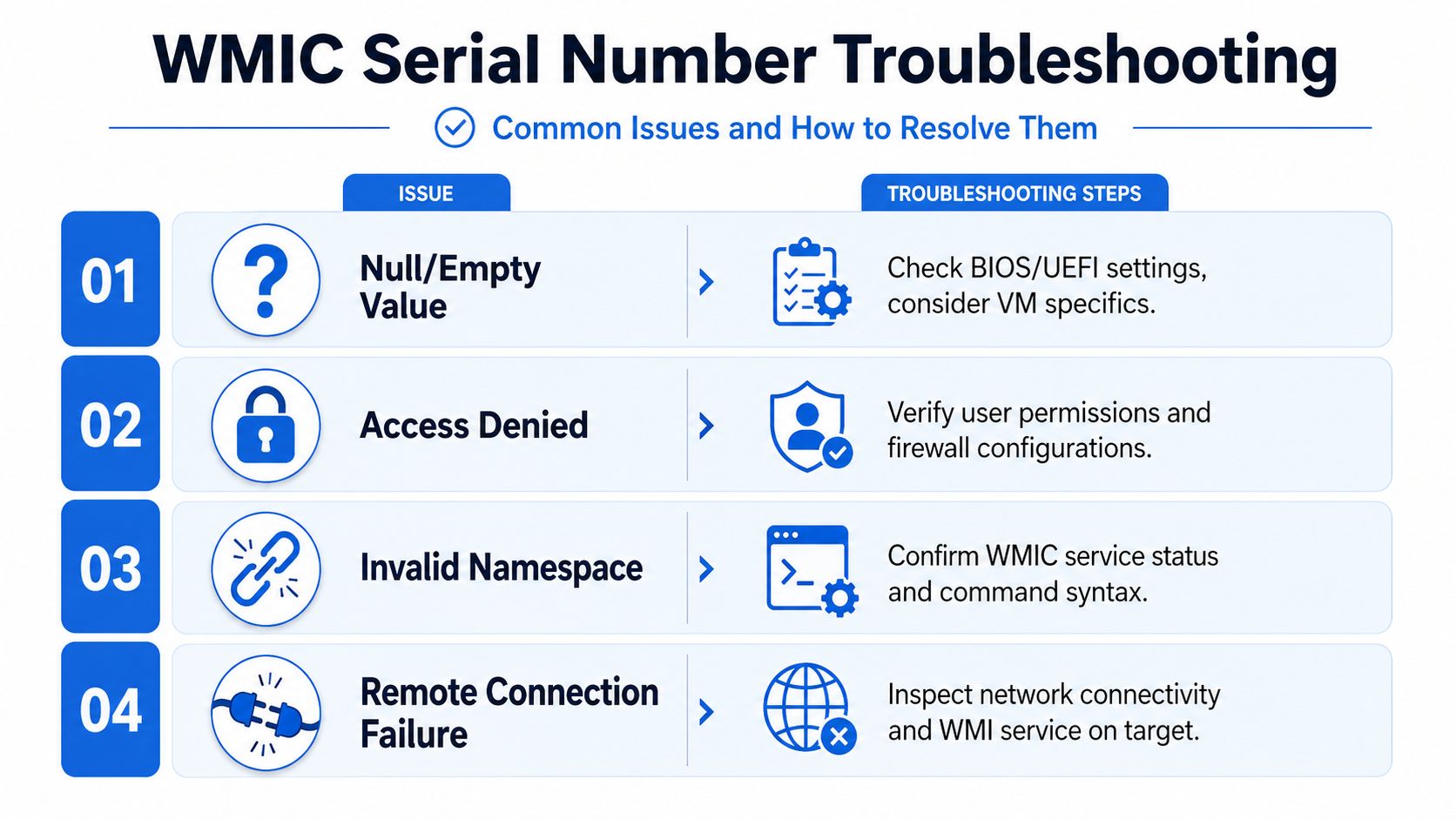
A common failure happens when the SMBIOS table contains a null or default value because of a board replacement or a manufacturing omission. In that case, the query can return null instead of a real serial. In virtualized setups like Docker or VMWare, the hypervisor may spoof or nullify the serial entirely, which is a major issue for MSPs dealing with cloud-heavy client estates, as discussed in this sysadmin thread on WMIC serial number gaps in modern and virtual environments.
When the serial comes back blank
A blank output doesn't always mean the command failed. Sometimes the firmware field itself is empty.
That's common after hardware work where the board got replaced and nobody programmed the identifying data back into BIOS or UEFI. At that point, your script isn't broken. Your asset record is.
What to do next
- Check firmware directly: Look in BIOS or UEFI and confirm whether the serial exists there.
- Compare to the chassis label: If the sticker has a value and firmware doesn't, document the mismatch.
- Escalate hardware correction: The fix may require manual entry into firmware by the manufacturer or authorized support process.
Virtual environments break assumptions
Many guides are often lacking in detail. They tell you to install the feature and rerun the command, as if that's the whole story.
It isn't.
In virtualized environments, the "serial number" may be generic, missing, spoofed, or controlled by the hypervisor. If you're doing a risk assessment, a penetration test, or compliance scoping in a client tenant that mixes physical and virtual assets, you can't pretend those identifiers carry the same trust level.
A VM returning an empty or fake serial isn't weird. Treat it as an environment characteristic, not a technician failure.
Other errors worth checking
A few practical checks still matter during triage:
- Access denied: Verify the account has the right permissions and the target allows remote WMI.
- Remote connection failure: Confirm the endpoint is reachable and WMI is available.
- Invalid results on other hardware classes: WMIC output can get ugly fast on some storage queries, which is one more reason not to build your whole inventory process around it.
Good technicians don't just rerun the command louder. They identify whether the failure sits in syntax, permissions, firmware, or virtualization.
Integrate Asset Data into Your Security Services
Serial collection isn't just housekeeping. It's the base layer for profitable security work.
In enterprise environments, the BIOS serial collected with wmic bios get serialnumber is often used for asset tracking and compliance reporting, and it needs to match the physical device label for SOC 2 and similar audit requirements that depend on verifiable hardware identity, as noted in this discussion of serial use in compliance reporting.
Turn inventory into billable work
Once your inventory is trustworthy, you can use it to support:
- Compliance readiness: Better evidence for SOC 2, HIPAA, PCI DSS, and ISO 27001
- Scoping accuracy: Cleaner boundaries for pentest, pen test, and broader penetration testing
- Advisory services: Stronger vCISO and GRC recommendations backed by actual device records
If you need a practical outside perspective on physical asset process, this guide to asset tracking for Australian industries is useful because it reinforces a simple truth. Bad asset records create downstream operational pain no matter the vertical.
For MSPs trying to connect endpoint data to service delivery, this piece on device management software is also worth a look.
The bigger point is simple. Accurate inventory makes your security services faster, more defensible, and easier to sell as an affordable package instead of a messy custom project.
If you're an MSP, vCISO, reseller, or GRC firm that wants affordable, fast, white label pentesting delivered by certified testers with OSCP, CEH, and CREST backgrounds, talk to us about testing you can resell as your own. We work channel-only, never compete with partners, and help you turn clean asset data into profitable manual pentesting, compliance, and security assessment services. Contact us today.

.avif)
.png)
.png)
.png)

