
You're probably dealing with this right now. A client wants faster support, your techs want fewer tickets, and your stack depends on one quiet little tool sitting on every endpoint. That tool is often the Ninja RMM Agent.
That's where MSPs get sloppy. They treat the agent like a utility instead of what it really is: a privileged foothold into client systems. If you manage endpoints for SOC 2, HIPAA, PCI DSS, or ISO 27001 environments, sloppy deployment isn't just a technical issue. It's a trust problem, a compliance problem, and eventually a client retention problem.
Why Your Ninja RMM Agent Needs a Security-First Approach
The Ninja platform is everywhere for a reason. NinjaRMM, now NinjaOne, posted 75% year-over-year revenue growth, a sign of how central it has become for MSP operations and endpoint management (Summit Partners on NinjaOne growth). Growth like that means one thing for MSPs. More clients know the name, more technicians rely on it, and more attackers understand how to abuse it.

The problem isn't the tool itself. The problem is how many providers deploy it with an operations-first mindset and almost no thought about consent, access scope, and downstream exposure. If the agent has broad control over desktops, servers, and sensitive systems, then your deployment process is part of your security architecture whether you planned for that or not.
Practical rule: If your RMM agent can touch everything, it deserves the same scrutiny as any other privileged access system.
That matters even more when you're trying to move upmarket. A vCISO, GRC partner, or compliance-focused reseller can't credibly talk about risk assessment while treating the RMM layer like a background service. Your clients expect process, approvals, documentation, and role separation. They don't just want uptime. They want proof you won't become their weakest link.
If you want a useful example of how operational tools can become business risk, review the lessons from Atlantic Net breach. It's a good reminder that trust in a tool never replaces layered controls. That same principle shows up in security in layers for MSP environments, and it applies directly to the Ninja RMM Agent.
Best Practices for Ninja RMM Agent Deployment
Most deployment mistakes come from rushing. A tech wants coverage fast, so they do a manual install, skip validation, and assume they'll clean it up later. That's how you create inconsistent policies, missing approvals, and endpoints that never behave the same way twice.
Standardize the rollout process
The NinjaRMM Agent communicates over TLS 1.2 on port 443, and port 443 is mandatory for all traffic. It also supports patching for over 135 third-party applications and delivers a 98% success rate in typical MSP environments when used properly (ProVal review of NinjaOne RMM). That tells you two things. The platform is built for scale, and your deployment process needs to be predictable enough to take advantage of that.
Use scripted deployment wherever possible. Don't rely on a technician clicking through installs on live client systems unless you enjoy inconsistent results and callback tickets.
A strong deployment standard should include:
- Client-specific installer control: Build installers by organization so you don't mix tenants or policies.
- Silent deployment methods: Push through GPO, RMM scripting, or approved endpoint management workflows to reduce user interference.
- Approval records: Tie every rollout to documented client authorization, especially in regulated environments.
- Verification checks: Confirm the device appears in the right tenant, inherits the right policy set, and reports correctly after install.
Treat deployment as a compliance event
Many MSPs lose margin without realizing it. Bad installs create support noise. Support noise eats technician time. Technician time kills profit.
Here's the simpler way to consider it:
| Deployment choice | Business outcome |
|---|---|
| Manual, rushed installs | More cleanup, more exceptions, more client confusion |
| Standardized, scripted installs | Fewer tickets, cleaner reporting, easier audits |
| Undocumented installs | Trust issues and compliance headaches |
| Approved, documented installs | Better client confidence and cleaner evidence trails |
If your client base includes SOC 2, HIPAA, or PCI DSS requirements, deployment records matter. They show who approved access, when the agent was installed, and what level of control your team was granted. That's a lot easier to defend than “our tech put it on there because we needed remote access.”
For MSPs managing multiple stacks, this kind of discipline also makes device management software strategy much easier to govern.
Using Automation to Secure and Manage Endpoints
Automation is where the Ninja RMM Agent earns its keep. It's also where lazy MSPs create hidden risk. If your automations are broad, untested, or poorly segmented, you can spread bad changes as fast as good ones.

The right approach is to use automation as security enforcement, not just labor savings. That means building policies around baseline settings, patching windows, alert thresholds, and remediation scripts that match the client's environment.
Build automations around real risk
Start with the basics that move the needle:
- Patch policies: Separate workstations, servers, and sensitive systems so you don't treat every endpoint the same.
- Security state monitoring: Alert when antivirus is disabled, firewalls change, or required tools stop reporting.
- Configuration drift response: Use scripts to correct common misconfigurations before they turn into audit findings.
- Asset visibility: Tie automation to inventory so you know what you're managing and what's missing.
A clean inventory matters more than most MSPs admit. If you need a practical outside reference on that, this complete guide to IT inventory is worth reviewing. You can't secure what your tools don't accurately see.
Good automation removes repetitive work. Great automation also reduces audit pain.
Keep automation narrow and reviewable
Don't dump every client into the same policy bucket. A medical practice with HIPAA exposure doesn't need the same tolerance for change as a small office with basic support needs. A vCISO or GRC advisor should be able to explain why a policy exists, who approved it, and what risk it addresses.
That's why patch and remediation workflows should be reviewed like control sets, not just convenience features. When you tighten those policies, your service becomes easier to defend during a risk assessment, easier to support, and easier to package into higher-margin security offerings. This is also why many MSPs spend time refining patch management policies before they expand into broader security services.
Security Hardening for Your Ninja RMM Agent
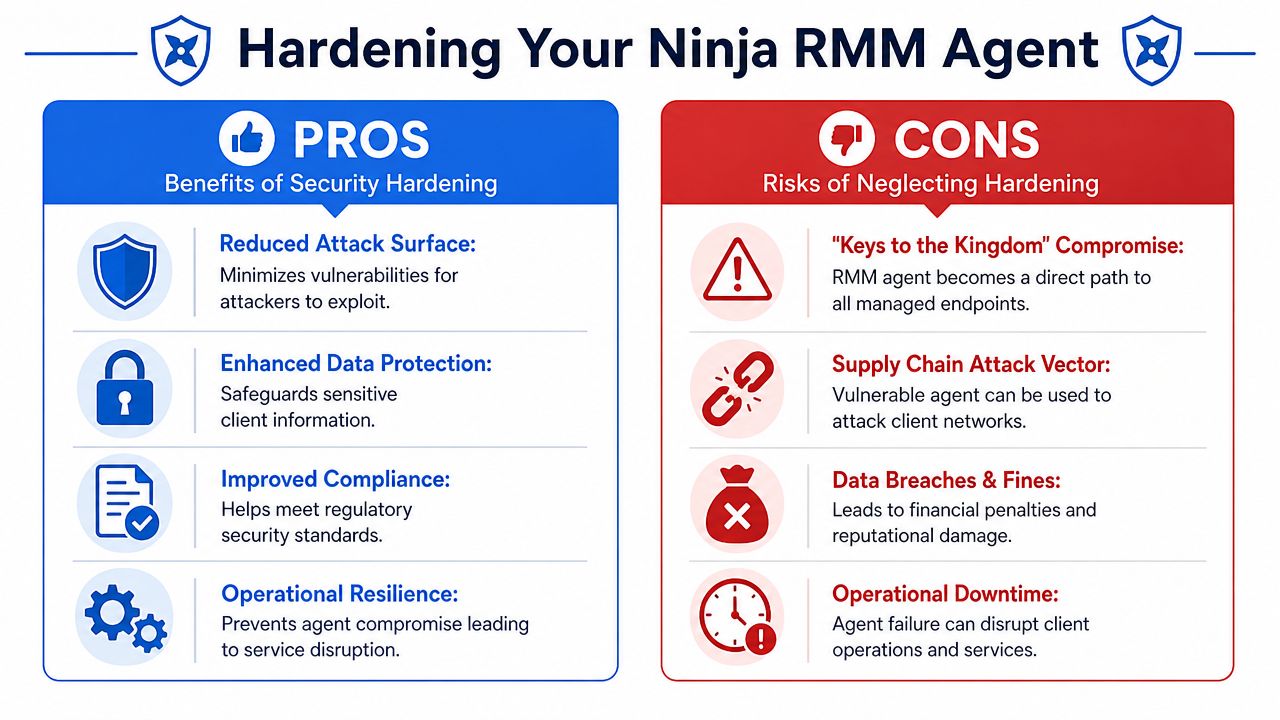
If your RMM agent gets abused, you don't have a minor tool issue. You have a keys-to-the-kingdom problem. That's the hard truth.
Cato CTRL researchers reported in June 2026 that attackers used fake fiscal document lures against Brazilian organizations to get victims to download the legitimate NinjaOne RMM agent, turning a trusted workflow into a stealthy remote access path (Cato CTRL on NinjaOne RMM abuse). That matters because it proves what experienced consultants already know. Attackers don't need fake malware when they can borrow a real admin tool and hide inside normal operations.
Lock down technician access
Start in the console. Too many shops give broad access because it's faster in the short term. Then one compromised account or one careless admin action affects every client.
Use least privilege. Split roles by function. Review who can deploy agents, who can run scripts, who can access servers, and who can change policy. If a junior tech can do everything, your control model is broken.
Use this checklist:
- Separate deployment rights: Not every technician should be able to push the agent.
- Limit script execution: Custom scripts should be restricted and reviewed.
- Audit account scope: Check tenant access, role assignment, and dormant accounts.
- Document exceptions: If someone needs increased rights, write down why and for how long.
Stop unauthorized installs
This is the issue most vendors don't want to talk about. Some MSPs or third parties install RMM agents without clear client approval, and that creates a serious compliance and ethics gap.
A sysadmin on Reddit described a vendor installing NinjaRMM without consent, bypassing controls and gaining full system access (Reddit discussion on unauthorized NinjaRMM install). Whether you call that aggressive support or bad behavior, clients call it a breach of trust.
If your client didn't clearly approve agent deployment, you don't have consent. You have exposure.
That exposure hits hard in SOC 2, HIPAA, PCI DSS, and ISO 27001 conversations. Auditors and security-minded clients care about authorization boundaries. A surprise agent install can undermine your story fast, especially if you also offer penetration testing, pen testing, or broader security advisory services.
Hardening supports your own credibility
An MSP can't sell white label pentesting, a serious penetration test, or a meaningful risk assessment while ignoring its own RMM attack surface. Any decent manual pentest team is going to examine remote access tooling, privilege paths, and agent deployment controls.
For smaller clients, even general endpoint guidance can help frame the conversation. Eagle Point's guide for SMB cybersecurity is a decent example of how endpoint protection fits into broader defense planning. But the key point is simpler. Your RMM agent needs governance, not just installation.
Troubleshooting Agent Failures and Next Steps
When the Ninja RMM Agent fails, IT professionals often waste time looking in the wrong place. They blame the installer, the endpoint, or the user. In reality, firewall misconfigurations blocking outbound traffic on port 443 account for approximately 65% of failed NinjaRMM agent installations, which makes it the most common onboarding problem (Syscon knowledge base on Ninja monitoring).
Start with the network path
Before you touch the endpoint, check the obvious path first. If the agent can't get out reliably, nothing else matters.
Work through it in this order:
- Confirm outbound access on port 443: Don't assume the site firewall, proxy, or filter is passing what the agent needs.
- Review TLS inspection behavior: Security appliances can interfere with trusted management traffic if policies are too aggressive.
- Validate allowlisting: Make sure the environment isn't blocking required agent communication paths.
- Check policy inheritance: A device in the wrong tenant or wrong group can look like a broken install when it's really a misassignment.
Don't ignore local endpoint friction
Some failures are local. Services don't start cleanly, security tools interfere, or prior installs leave junk behind. If the agent appears unstable after onboarding, compare the endpoint against a known-good device in the same client environment.
A practical triage list looks like this:
- Service health: Verify the installed service is present and running.
- Security software conflicts: EDR, AV, and application control tools can disrupt installs or scripts.
- Old agent residue: Remove broken or duplicate remnants before redeploying.
- Script context: If your automation works on one group and fails on another, check permissions and execution context.
The fastest way to fix recurring agent problems is to stop treating them as one-off tickets. They're usually process failures.
That's the bigger issue. Reliable agent deployment and troubleshooting isn't just about fewer support calls. It's part of a stronger managed service model. If your team wants to sell more security, improve client retention, and support compliance work without burning margin, your own tooling has to hold up under scrutiny.
If you want to validate your controls before a client, auditor, or attacker does, work with us on white-labeled pentest delivery. We're a channel-only partner, so we never compete with MSPs, vCISOs, GRC firms, or resellers. Our team delivers affordable, manual pentesting, pen testing, and penetration testing with certified pentesters holding OSCP, CEH, and CREST credentials. We move fast, keep it white labeled, and help you add security services without the bloated pricing, weak testing, or long lead times that drag down margins. Contact us today to learn more.

.avif)
.png)
.png)
.png)

