
An employee copies a domain admin password so they can paste it into a server console. Later that afternoon, they copy a customer address, an MFA backup code, and a support note. None of that feels dramatic in the moment.
Then a pentester lands on that workstation during an internal assessment and checks the clipboard history. Suddenly, a convenience feature turns into a shortcut to credential exposure, lateral movement, and a very uncomfortable compliance conversation.
Most MSPs already worry about phishing, weak MFA, and exposed RDP. Good. They should. But Windows Clipboard History is one of those quiet risks that gets ignored because it looks harmless. For MSPs, vCISOs, GRC firms, CPAs, and other resellers, that blind spot creates both liability and opportunity. If you can identify it, control it, and validate it through proper pentesting, pen testing, and penetration testing, you protect clients and open the door to more security and compliance work.
That Copied Password Is a Ticking Time Bomb
A copied password doesn't disappear just because the user pasted it once. In many client environments, it hangs around long enough to be useful to an attacker.
That matters because users copy sensitive data all day. Admin passwords. Shared service account credentials. Database connection strings. Client PII. Internal URLs. Billing details. A lot of it gets copied in plain text because people are busy and trying to get work done.
Why this becomes an MSP problem
If your client is pursuing SOC 2, HIPAA, PCI DSS, or ISO 27001, copied secrets sitting on endpoints create a nasty gap between policy and reality. The written policy says sensitive data should be controlled. The workstation says otherwise.
A simple internal compromise can turn that gap into a finding. A user account gets phished, the attacker lands on a desktop, and the clipboard history becomes low-effort recon. That's the same pattern behind many forms of credential harvesting. Attackers don't always need to crack anything if users already copied what they need.
Practical rule: If a user can copy it, assume an attacker who reaches that endpoint may be able to see it.
This is why clipboard risk belongs in a risk assessment, not in a generic productivity conversation. For an MSP or vCISO, the issue isn't whether Windows built a useful feature. The issue is whether the client understands where sensitive data is being retained, who can access it, and whether controls match the compliance story being sold to auditors and customers.
The business angle resellers miss
Clients rarely ask, "Can you assess clipboard retention risk?" They ask broader questions. Are we ready for SOC 2? Are we exposed to insider threats? Did we lock down data leakage on endpoints? Can you validate our Microsoft hardening?
Clipboard security fits inside all of those conversations. That makes it a clean add-on for compliance advisory, endpoint hardening, policy review, and manual pentesting.
Understanding Windows Clipboard History Basics
Before you can manage the risk, you need to know exactly what the feature does.
How the feature works
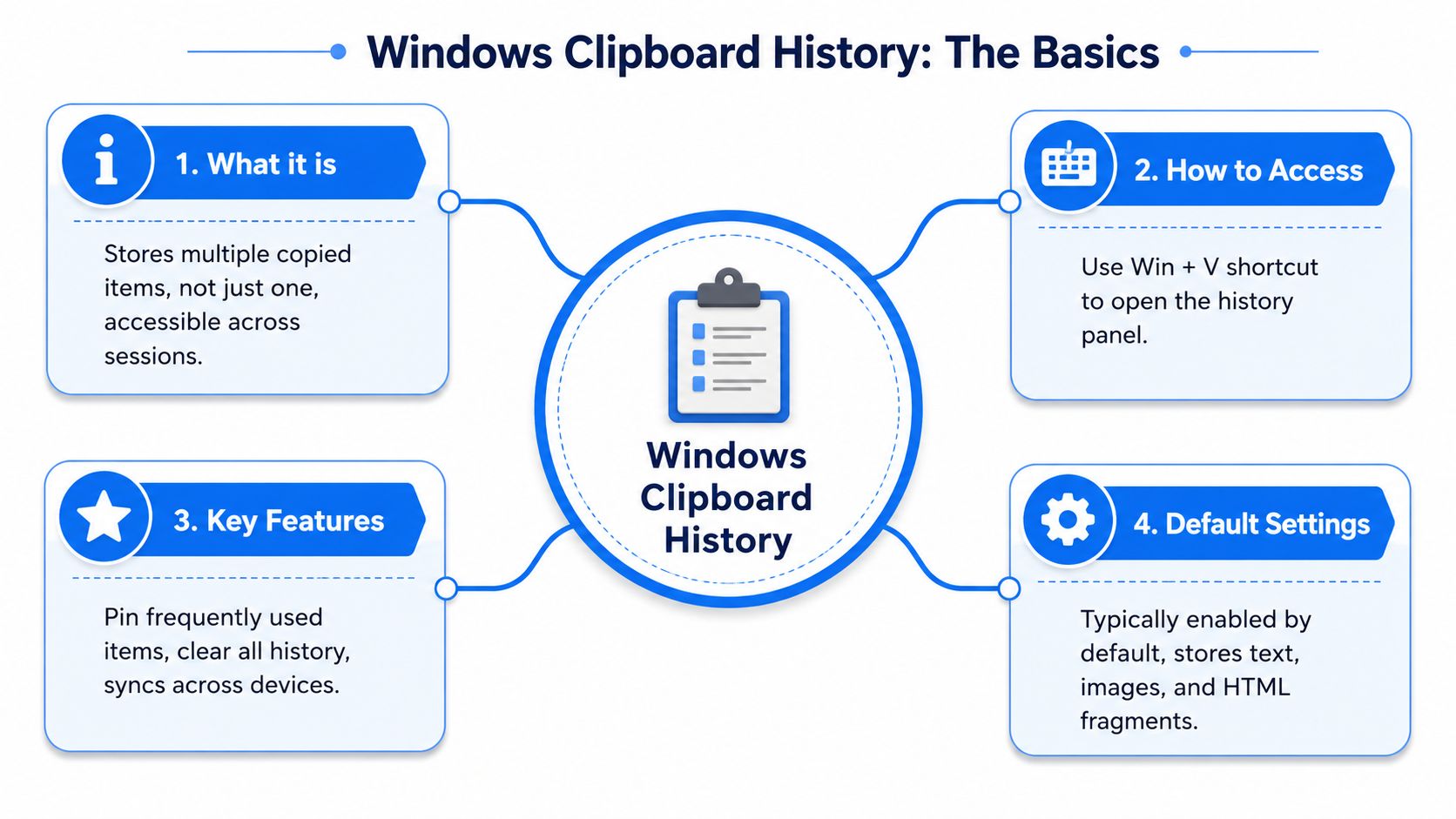
Windows Clipboard History was introduced in the Windows 10 October 2018 update, version 1809, and it stores up to 25 copied entries, with each item limited to 4 MB. It's off by default and requires manual activation, which matters for MSPs managing client environments (designDATA).
Users open it with Win + V. Once enabled, Windows keeps a rolling list of copied content instead of only the last item. That can include text, HTML, and supported images.
Here's the simple version for a junior tech:
- Old clipboard: One copied thing at a time
- Clipboard history: A small stack of recent copied things
- Pinned items: Special entries users keep around intentionally
- Sync option: Data can move across devices if configured
What makes it risky
The feature sounds harmless because it improves productivity. The problem is retention.
Pinned items can persist across restarts or when users clear other entries, and admins can manage settings through policy controls. If you're reviewing endpoint exposure, that persistence matters more than the convenience.
A few practical checks belong in every Microsoft security baseline review:
- Check activation paths: Users can turn it on through Settings or by pressing Win + V.
- Review persistence: If users pin sensitive content, it may stick around longer than expected.
- Inspect policy control: If the client needs stronger controls, use settings and Local Group Policy Editor guidance as part of the hardening process.
A feature being off by default doesn't remove risk. It just means you need to verify whether users turned it on.
One more operational issue
There's also an underrated reliability problem. Reports show Windows 11 clipboard history can miss items during ultra-rapid copy bursts because of asynchronous notifications and delayed rendering behavior, with a documented roughly 30-second timeout for delayed renders in some scenarios (Windows Forum analysis).
That matters for security teams and compliance workflows. If a client relies on rapid copy processes in scripts, admin workflows, or investigations, missing entries can create bad assumptions about what was retained.
How Pentesters Exploit Clipboard History
A red team mindset changes the conversation. A user sees a clipboard helper. A pentester sees exposed secrets, user habits, and an easy path to privilege escalation.
What a pentester looks for first
During an internal pentest or penetration test, once a tester has user-level access to a workstation, they start with low-noise opportunities. Clipboard history is one of them.
Why? Because users copy things they should never store in plain text. Common examples include:
- Credentials: Admin passwords, temporary passwords, VPN strings
- Sensitive data: PII, customer records, ticket notes
- Technical details: Internal share paths, app URLs, cloud console links, code snippets
- Operational shortcuts: Reused commands, service account details, setup notes
None of this requires fancy malware. Sometimes it takes nothing more than opening the feature and reviewing what the user already left behind.
Where sync makes things worse
Cross-device synchronization supports text and image data, and sensitive data like passwords can appear in plain text within the history interface, making it a critical vector for lateral movement in compromise scenarios.
That's the part many MSPs underestimate.
If a privileged user copies a credential on one machine and sync is active, the exposure may no longer be limited to that one endpoint. Now you've got a business risk that touches device trust, account security, identity governance, and policy enforcement.
If your client allows clipboard sync, they need to treat copied data as data that may move.
Why scanners won't catch the full problem
Automated tools are useful, but they don't think like an attacker. A scanner might flag a missing patch or a weak service configuration. It won't tell you whether a help desk lead copied a privileged credential three hours ago and left it accessible to anyone who gains local access.
That's the gap between a vulnerability assessment and real manual pentesting. A penetration test actively simulates attacks and validates exploit paths, while a vulnerability assessment focuses on known weaknesses without manual validation.
For PCI DSS, SOC 2, and ISO 27001 clients, that difference matters. Auditors care about control intent. Attackers care about what works. You need testing that answers the second question.
Enterprise Controls to Manage Clipboard Risk
You can't solve this with user training alone. Users will keep copying sensitive data because that's how real work happens. The control has to live at the endpoint and policy layer.
Start with centralized policy
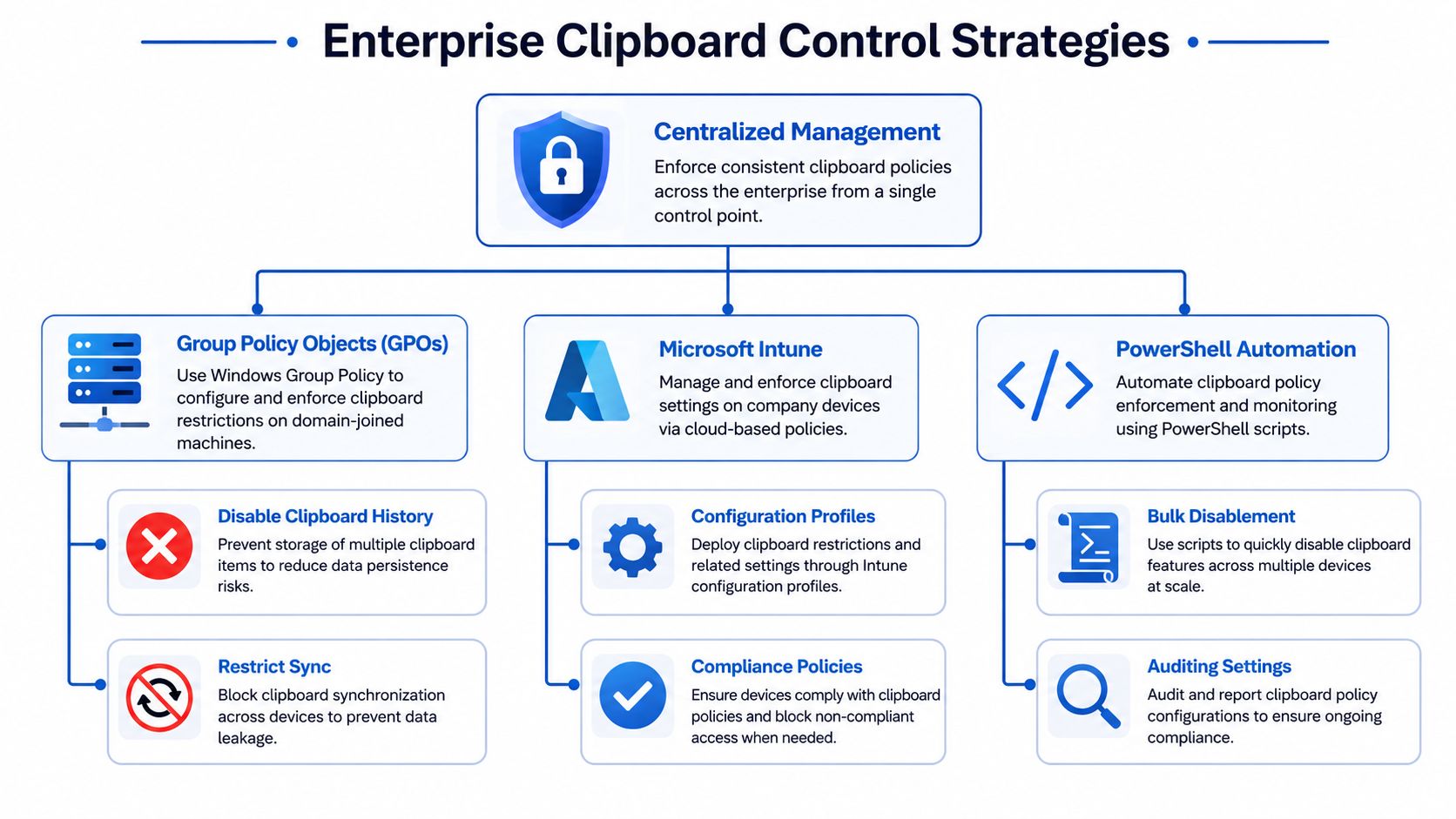
Administrators can force-disable clipboard history via group policy, and because the feature is disabled by default but can activate as soon as a user presses Win + V, proactive GPO configuration matters (ClipClip overview).
For most domain-managed clients, Group Policy should be your first control. It is clear, enforceable, and easy to audit at scale.
If the client runs modern endpoint management, apply the same intent through Microsoft Intune. The goal is consistency. You don't want one office using one rule and remote users drifting into another state.
Build a practical control stack
Use a layered approach instead of a single switch:
- Disable history where sensitive work happens: Admin jump boxes, finance systems, healthcare workflows, and privileged user devices should be the first targets.
- Restrict sync aggressively: Even if a client keeps clipboard history for productivity, cross-device movement should face much tighter review.
- Use PowerShell for spot fixes: This helps when you need targeted remediation or quick alignment before an audit.
- Document exceptions: Some users will argue they need it. Fine. Make them justify it, and tie the exception to role, business need, and review frequency.
Tie clipboard policy to insider risk
Clipboard misuse isn't always about an external attacker. It can also support accidental leakage or deliberate misuse by trusted users. If you're shaping a broader endpoint security policy, include clipboard controls in your thinking around cybersecurity for internal threats.
Operational advice: Disable by default for high-trust roles, then approve exceptions only when the client can explain why the productivity gain outweighs the data exposure.
That approach gives MSPs and GRC teams something concrete to put in governance documents. It also gives vCISOs a cleaner story when mapping controls to compliance requirements.
Hardening Best Practices and Forensic Guidance
Disabling the feature is a strong start. It isn't the finish line.
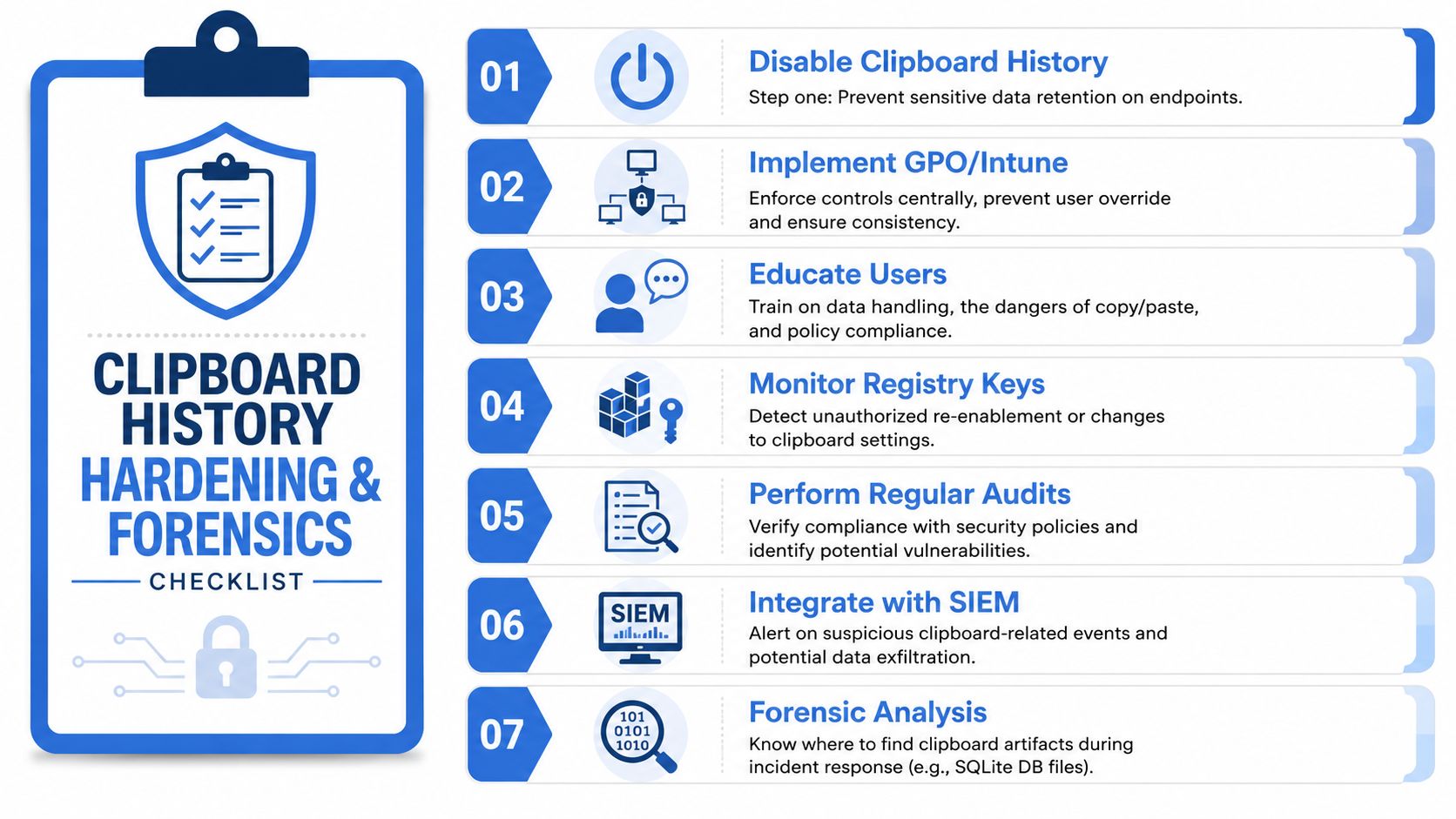
Users change settings. Devices fall out of policy. Exceptions multiply. If you're serious about compliance, you need proof that the control remains in place and you need a plan for what to inspect when something goes wrong.
What mature MSPs do differently
Strong MSPs don't treat clipboard history as a one-time hardening task. They fold it into recurring security operations.
That means adding clipboard settings to baseline audits, endpoint reviews, and compliance evidence collection. If you're helping clients with HIPAA, SOC 2, PCI DSS, or ISO 27001, that extra verification turns a technical tweak into defensible due diligence.
A useful way to frame it for clients is simple:
| Focus area | What to verify |
|---|---|
| Policy enforcement | Are the intended settings still applied on managed endpoints |
| Exception handling | Who is allowed to use the feature and why |
| Monitoring | Can the team detect unauthorized re-enablement |
| Incident response | Does the team know how to review relevant artifacts |
Forensics matters more than people think
Clipboard history can become relevant during an investigation because it may reveal what a user copied before suspicious activity, what data an attacker may have accessed, or whether a sensitive value was exposed in plain text.
You don't need every MSP engineer doing deep forensic work, but your security team should understand that clipboard artifacts can help reconstruct user actions. That supports incident response and strengthens post-incident reporting.
For clients asking broader questions about endpoint privacy and retention, resources like myhalo on data protection can help frame the business side of data handling. The technical point remains the same. If data sits on a workstation, it becomes discoverable, reviewable, and potentially exposable.
Good hardening is measurable. Good forensics is repeatable.
A simple checklist for recurring reviews
- Audit endpoint baselines: Confirm clipboard settings match policy.
- Review privileged user devices: These machines carry the highest exposure.
- Train users on copy behavior: Especially admins, finance teams, and support leads.
- Add checks to compliance reviews: Make clipboard controls part of the evidence set.
- Test the policy in real life: Validate whether controls hold under attack.
This is what separates MSPs from generic IT support. You're not just deploying settings. You're showing clients how endpoint behavior affects risk, evidence, and contractual trust.
Offer a Pentest to Validate Clipboard Security
Once you explain the risk and push the control, the client asks the right next question. How do we know it works?
The answer is a manual pentest.
A scanner can't tell you whether a user found a workaround, whether a GPO didn't apply to a subset of devices, or whether a synced credential is still reachable through a realistic attack path. A human tester can. That's why pen testing, pentest, penetration testing, and manual pentesting still matter, especially in internal environments.
Why this creates a clean reseller opportunity
This is one of the easiest ways for an MSP, vCISO, or GRC firm to move from advisory into validation. You identify a real endpoint risk, recommend control changes, and then offer a white label pentesting engagement to verify the fix.
The business case is strong because manual testing is often expensive. Typical manual web app pentests start at $5,000, while broader assessments covering APIs, networks, and cloud can run from $15,000 to over $50,000 (Software Secured pricing overview). More affordable reseller-friendly options exist through a white-labeled model built for channel partners (MSP Pentesting pricing details). Pricing depends on scope. Request a quote for exact figures.
For internal endpoint exposure like clipboard risk, an internal penetration testing engagement makes the most sense. It tests what matters after initial access, which is exactly where clipboard history becomes dangerous.
What to tell your clients
Keep it plain:
- A vulnerability scan shows known weaknesses.
- A penetration test shows what an attacker can do.
- A manual pentest validates whether endpoint controls hold up in practice.
- White label pentesting lets resellers deliver that value without building an in-house team.
If your clients are tired of inflated prices, weak methodology, and long lead times, this is the kind of focused security conversation that wins trust. It also gives you a concrete path to more compliance, risk assessment, and security revenue.
If you want affordable, fast, white label pentesting from a channel-only partner that never competes with your MSP or vCISO business, we make it easy to sell pentests under your own brand. Our certified pentesters, including OSCP, CEH, and CREST professionals, deliver manual pentests, pen tests, penetration testing, and reseller-friendly reporting with quick turnaround. Contact us today to learn more.

.avif)
.png)
.png)
.png)

