
Your client is heading into a SOC 2 audit. The auditor asks a simple question that turns into a big problem fast: are these controls 2FA or MFA, and can you prove they work?
That moment matters. If your client can't answer clearly, the audit slows down, the trust level drops, and your team gets pulled into cleanup mode. For an MSP, vCISO, GRC firm, CPA practice, or IT reseller, this isn't just identity jargon. It's a real business risk tied to compliance, client retention, and new service revenue.
Most articles on 2FA vs MFA stop at definitions. That doesn't help when you're trying to pass SOC 2, support HIPAA clients, or package a real risk assessment with follow-up penetration testing. You need to know what to recommend, what to test, and what to sell.
Topic2FAMFADefinitionExactly two authentication factorsTwo or more authentication factorsTypical examplePassword plus authenticator app codePassword plus device trust plus biometric or hardware keyPolicy styleFixed login flowAdaptive, policy-driven access controlCompliance fitOften accepted if it uses two distinct factorsBetter fit for privileged access and higher-risk environmentsPentest focusBypass paths, weak OTP delivery, prompt abusePolicy gaps, fallback methods, step-up logic, recovery flawsBest useBaseline protectionStronger protection for sensitive systems and regulated clients
Why the 2FA vs MFA Debate Matters to Your MSP
The 2FA vs MFA question shows up when the stakes are high. A client is chasing SOC 2, renewing cyber insurance, answering a customer security questionnaire, or trying to satisfy a board member who just heard about another account takeover.
If you answer with a vague “they have two-step login,” you're exposed. Auditors, procurement teams, and security reviewers want specifics. They want to know whether the client uses two distinct factors, whether privileged accounts are protected, and whether someone has tested the setup.
Where MSPs get burned
A lot of providers still treat authentication as a checkbox. Turn on SMS codes, call it done, move on to the next ticket. That worked when the goal was basic hardening. It doesn't work when clients need proof, tighter controls, and evidence that a real attacker couldn't walk around the login flow.
The opportunity is bigger than the risk. If you're the provider who can explain the control in plain English, map it to PCI DSS, HIPAA, ISO 27001, or SOC 2, and back it up with a real pen test, you stop being a commodity.
Practical rule: If your client handles sensitive data, remote access, cloud admin roles, or regulated workloads, authentication is not just a setup task. It's a service line.
What clients actually need from you
They don't need another abstract security lecture. They need decisions.
- Baseline guidance: Tell them when basic 2FA is acceptable and when it isn't.
- Audit support: Help them document whether they have true multi-factor protection or just a two-step process.
- Validation: Use pentest, pen test, and penetration testing work to confirm the control works in practice.
- Packaging: Turn this into repeatable advisory and remediation work your team can deliver under your brand.
If you don't own this conversation, someone else will. Usually a consultant, a GRC advisor, or a security vendor that now owns the strategic relationship you should have kept.
Understanding the Core Authentication Factors
Authentication gets easier when you strip away the jargon. Every secure login method is built from a small set of factor types.
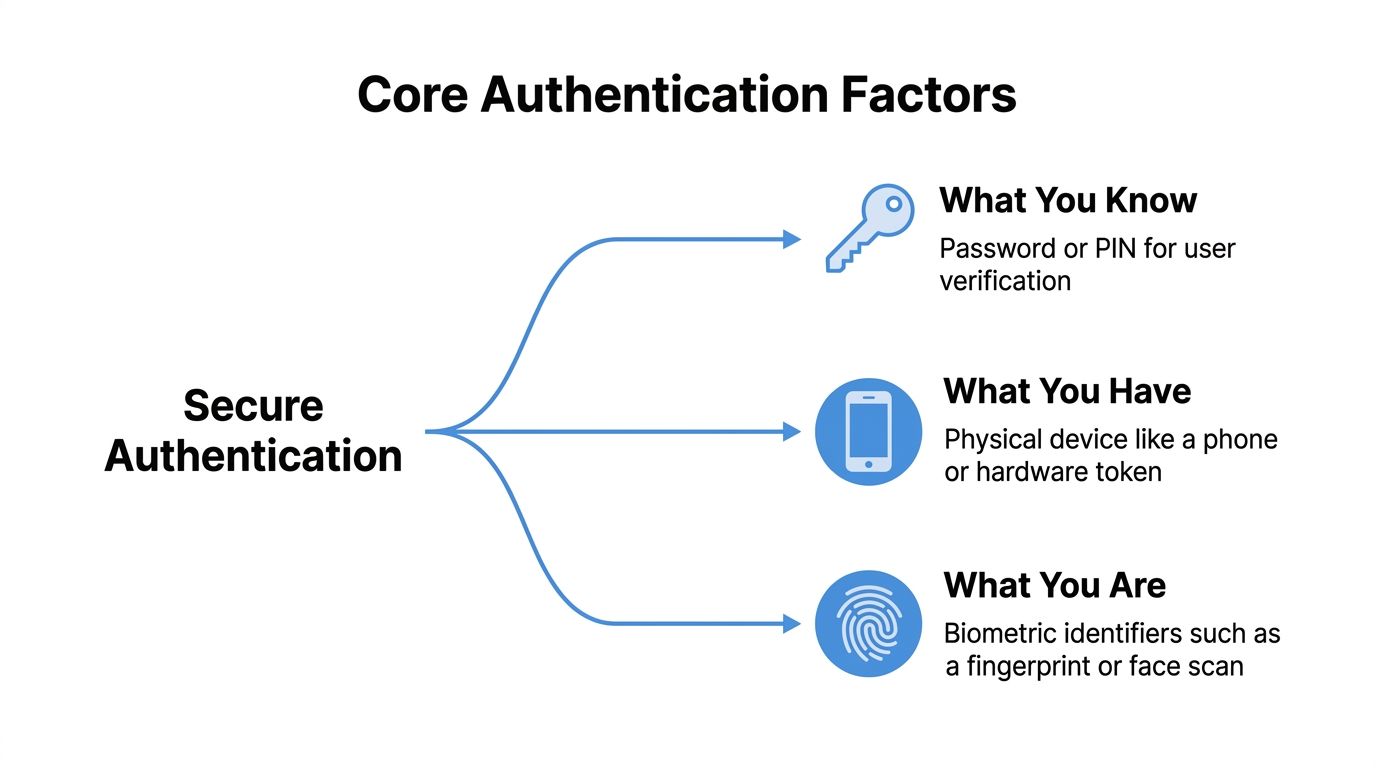
The three factor types
- What you know: A password, passphrase, or PIN.
- What you have: A phone, hardware token, smart card, or authenticator app.
- What you are: A fingerprint, face scan, or other biometric.
2FA means exactly two distinct factors. A password plus a code from an authenticator app is 2FA. A password plus a hardware token is 2FA. The key point is that the two checks must come from different factor categories.
MFA is the broader category. It can use two factors, or more than two. It also tends to support richer policy controls, such as requiring stronger verification for admins, remote access, or risky sign-ins.
The compliance mistake that keeps failing audits
The mess starts when teams confuse 2-step verification with 2FA. Two steps do not automatically mean two factors. Password plus PIN is still just “what you know” twice. That's not the same thing.
That distinction matters because frameworks like HIPAA, PCI DSS, and SOC 2 require two distinct factors, not just two prompts. A 2024 IDSA-backed explanation of 2SV vs 2FA notes that 38% of organizations failed compliance audits due to treating 2SV as equivalent to 2FA.
If your client says, “We have two-step enabled everywhere,” your next question should be, “Are those two different factors, or just two screens?”
That single clarification can save an audit.
What MSPs should review first
Before you recommend tooling, map the client's actual factor types. Check admin portals, VPN access, cloud apps, and recovery flows. Then look at edge cases like backup codes, email OTP, and help desk resets.
If your team needs a refresher on authentication plumbing, this overview of Extensible Authentication Protocol and related identity flows is worth reviewing. If you're comparing delivery methods for temporary codes, this guide to secure SMS verification services is useful context, especially when clients still rely on text-based workflows.
Comparing Security Against Real World Attacks
Here's where 2FA vs MFA stops being a terminology issue and becomes a breach issue. In real penetration testing, weak authentication fails in boring, predictable ways.
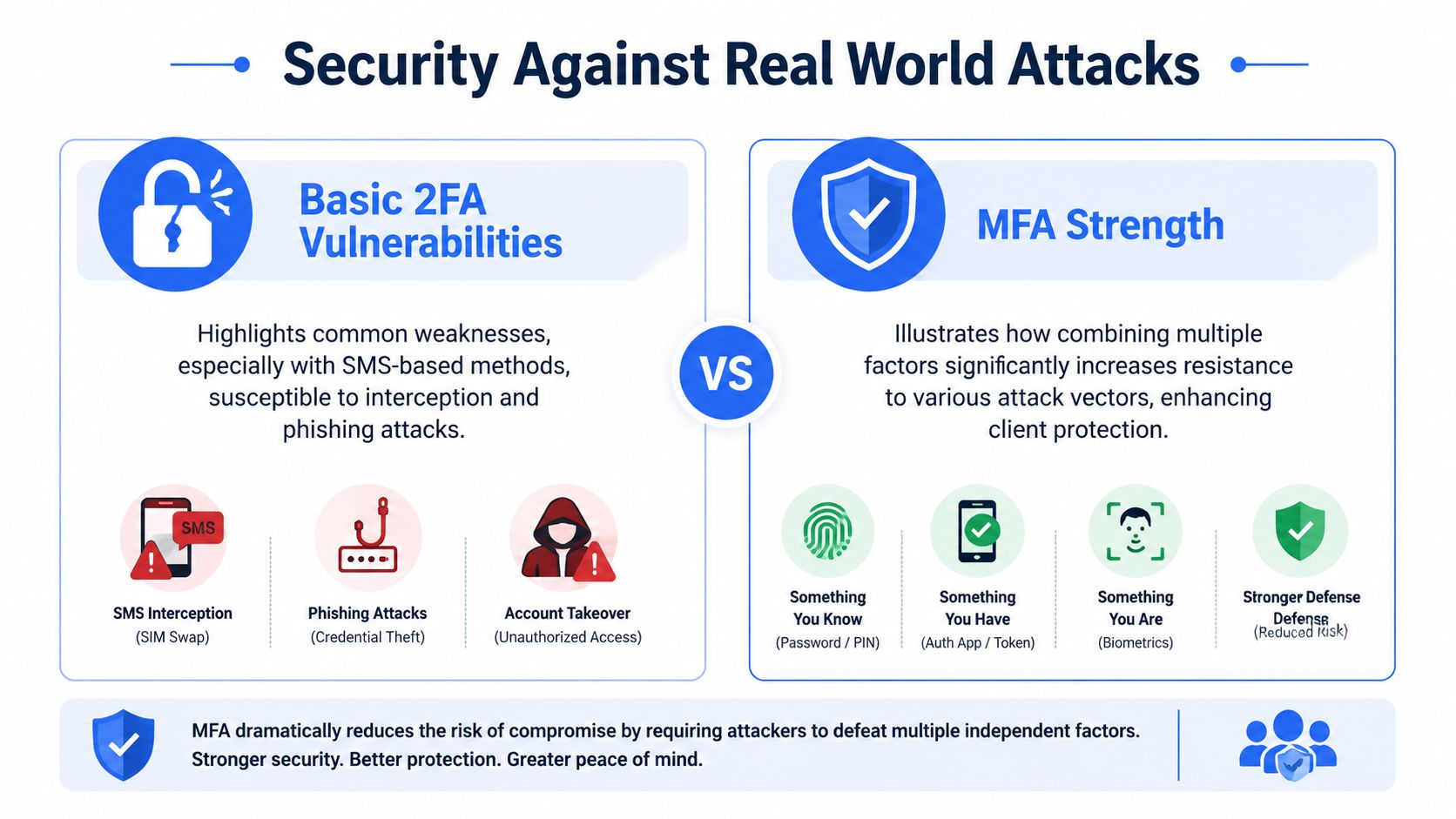
Why basic 2FA gets bypassed
SMS-based 2FA is the classic example. It's better than password-only login, but it brings obvious problems. Attackers target phone-based codes through SIM swapping, social engineering, and real-time interception. Email OTP has similar weaknesses when the mailbox itself is already compromised.
Push prompts also create trouble when the workflow is static. Users get spammed with approval requests until someone taps “approve” out of habit or confusion.
According to ManageEngine's breakdown of 2FA and MFA behavior in penetration testing, 2FA mandates a fixed, two-step verification, while MFA supports dynamic, policy-driven evaluation of multiple factors. In pen testing, that difference is critical because static 2FA often fails against MFA fatigue, while MFA can trigger step-up authentication or deny access based on risk.
What stronger MFA changes
A stronger MFA deployment doesn't just add one more hoop. It changes the attack surface.
- Number matching: The user must match a displayed number before approving a push.
- Phishing-resistant factors: FIDO2, WebAuthn, hardware-backed keys, and stronger biometric workflows are harder to replay.
- Context checks: Device trust, location, and login behavior can change the required verification path.
- Step-up controls: A normal login may pass, while a riskier one gets blocked or challenged.
That matters for any MSP supporting remote workers, Azure or Microsoft 365 admins, VPN users, or clients with customer data in cloud platforms.
A system that asks the same question every time is easier to map, script, and abuse. A system that changes based on risk is harder to game.
How a pentester sees it
A certified pentester doesn't care what the vendor slide deck promised. They test fallback paths, enrollment flaws, session reuse, prompt abuse, weak recovery methods, and login inconsistencies across apps.
That's also why anti-phishing controls belong in the same conversation. Authentication and phishing are tied together in practice, and this guide on how to protect against phishing attacks is a good companion resource for client planning.
A Simple MFA Migration Guide for MSPs
Most clients won't jump from weak logins to polished MFA overnight. They need a path they can budget, understand, and deploy without breaking operations. That gives you a clean, billable roadmap.
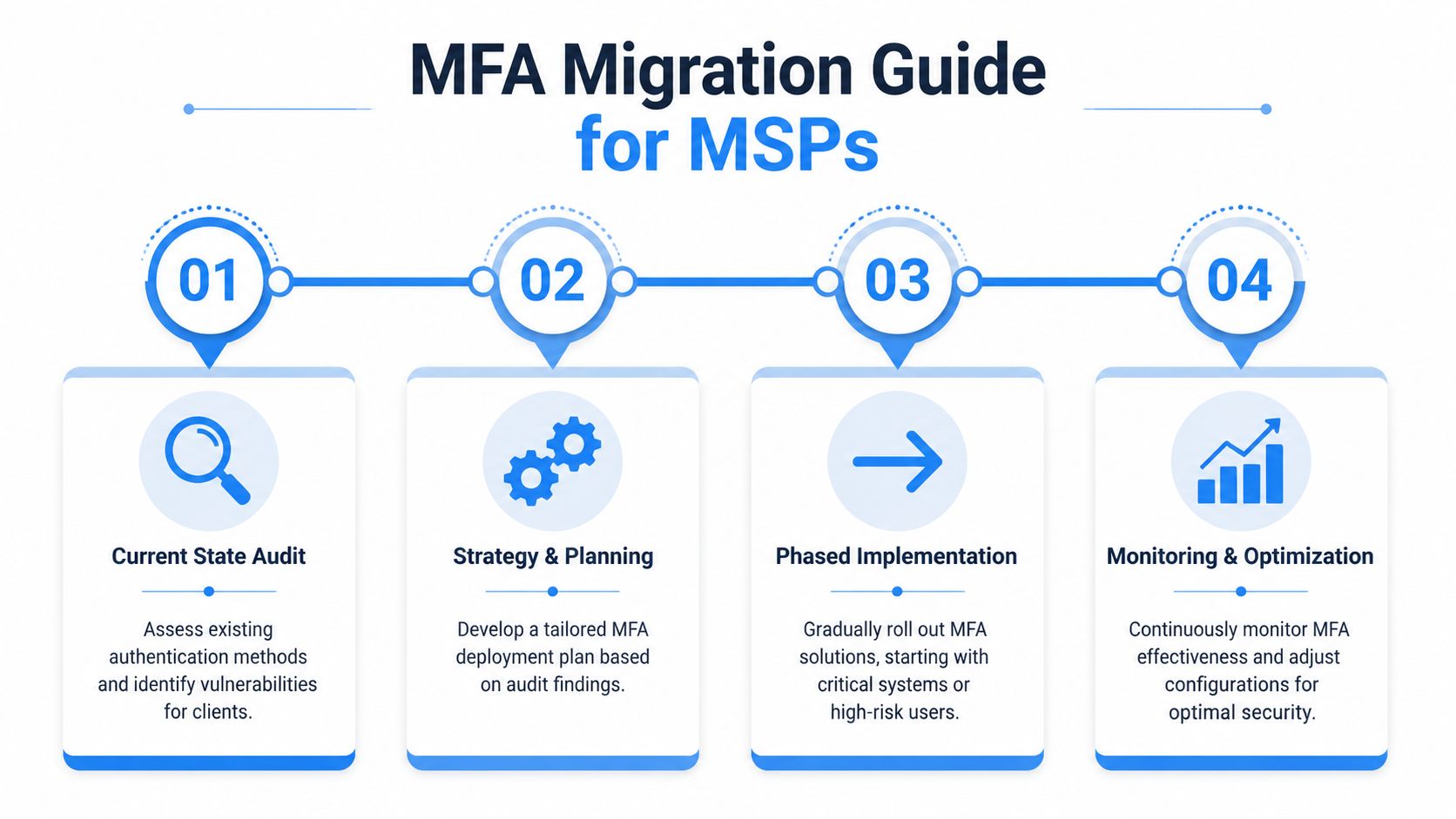
Start with a current state audit
Begin with a risk assessment. Inventory every login path that matters: Microsoft 365, VPN, remote access tools, backup consoles, line-of-business apps, cloud admin panels, and password reset workflows.
Common problems include: Shared admin accounts. SMS codes on privileged users. Email OTP used as a backup for critical systems. “Temporary” exceptions that somehow became permanent.
Build the migration in phases
You don't need to replace everything on day one. You do need to stop pretending every user and every application deserves the same control level.
- Enforce true 2FA everywhere possible first. This removes the easy password-only exposure.
- Prioritize privileged and remote access next. Admins, finance users, healthcare staff, and anyone handling regulated data should move to stronger MFA first.
- Push phishing-resistant methods where the risk justifies it. Hardware keys, stronger app-based approval flows, and tighter device policies belong here.
- Clean up recovery and exception processes. Help desk bypasses and weak fallback methods can undo the rest of the project.
Tie the recommendation to compliance
Clients often ask a simple question: “Will 2FA satisfy the requirement?” Sometimes yes, but that doesn't mean it's the right long-term answer.
As explained in Rublon's overview of industry MFA expectations, frameworks like PCI DSS, HIPAA, and NIST often accept 2FA when it uses two different authentication factors. But MFA is the safer, phishing-resistant baseline recommended for privileged and remote access to sensitive information.
That gives you a clean advisory position. Use 2FA as the floor. Recommend MFA as the standard for anything that could create serious business damage.
Package it as managed work
Here lie the margins.
- Assessment project: Review the current environment and map authentication gaps.
- Remediation project: Roll out improved controls in phases.
- User enablement: Train staff on prompts, approvals, and help desk procedures.
- Validation retest: Confirm the new setup holds up under real penetration testing.
Clients buy this faster when you frame it around reduced audit friction and fewer bad surprises.
How to Pentest MFA and Prove Compliance
Buying MFA licenses isn't the same as being secure. Plenty of environments have “MFA enabled” on paper and weak controls in practice.

What a real pen test checks
A real pen test doesn't stop at the login screen. It checks whether an attacker can bypass the flow through bad logic, poor rate limiting, weak recovery paths, token reuse, or forgotten legacy portals.
Automated scanners won't catch that well. You need manual pentesting performed by people who think like attackers and document like auditors. That's where certified testers matter. OSCP, CEH, and CREST credentials aren't marketing fluff when the job requires methodical validation and clean reporting.
Why this matters for SOC 2 and ISO 27001
You need evidence. A client claiming “we turned on MFA” is not the same as a client handing an auditor a credible penetration testing report that shows the control was evaluated.
According to 1Kosmos on 2FA and MFA testing outcomes, 2FA systems using SMS or email OTPs have a high failure rate in penetration tests, with attacker success exceeding 60% in some scenarios. By contrast, MFA systems with phishing-resistant methods show near-zero compromise rates in red team exercises, which is why they are treated as the stronger standard in compliance-heavy environments like SOC 2.
Field advice: If a client's strongest control can be bypassed by a reset workflow, an email code, or a help desk shortcut, the control isn't strong enough.
For teams supporting attestations, this guide to SOC 2 penetration testing requirements and evidence helps connect technical testing to audit-ready documentation.
Why white label delivery makes sense
Most MSPs and vCISO firms shouldn't build a full internal pentesting team for occasional authentication reviews. It's expensive, slow, and hard to staff well. A white-labeled model gives you access to affordable, fast, manual pen testing without competing with your own client relationships.
That matters because the industry still has a pricing and delivery problem. Too many providers charge enterprise rates, lean on weak methodology, and drag reports out for weeks. Clients want speed, clarity, and findings they can fix.
Become Your Clients' Security Partner Today
The answer to 2FA vs MFA is simple. 2FA is a baseline. MFA is the better standard for clients with meaningful risk, remote access, privileged accounts, and compliance pressure.
The market has already moved in that direction. According to Forbes Advisor's summary of MFA adoption and security impact, figures cited by the US national security cyber chief show that MFA could prevent as much as 80–90% of cyber-attacks, and nearly two-thirds of users globally were employing MFA as of January 2023. Your clients increasingly expect this level of protection, and their auditors do too.
That creates a clear opening for MSPs, vCISOs, GRC firms, CPAs, and security-focused resellers. You can guide clients through the control decision, package the rollout, and back it up with a penetration test that proves the control holds. That's sticky revenue and stronger client trust.
If you don't provide that guidance, another provider will. And once someone else owns the compliance and security roadmap, you're no longer the strategic partner. You're just the company managing tools.
If you want a channel-only partner for white label pentesting, our white-label pentesting service helps MSPs, vCISOs, GRC firms, and resellers deliver fast, affordable, manual pentesting under their own brand. Our OSCP, CEH, and CREST certified pentesters provide quick turnaround, solid reporting, and we never compete with your client relationships. Contact us today to learn more.

.avif)
.png)
.png)
.png)

