
A client pings you on a Friday afternoon. They need to satisfy a SOC 2 request, a HIPAA questionnaire, or a security review tied to a new contract. They want answers fast, and your first instinct is the same one most MSPs have. Run an automated network security scan, export the findings, and send over a report.
That instinct is not wrong. It is just incomplete.
An automated scan is a useful starting point because it is fast, repeatable, and easy to package into a managed service. But if that scan is the whole service, you are selling a commodity. Worse, you are giving the client a false sense of security while leaving attack paths untouched.
MSP owners feel this pressure from both sides. Clients want affordable security. Auditors want documentation. Competitors want your accounts. If you only offer scanning, another provider will step in with pentesting, penetration testing, and a stronger risk assessment story. They will look more mature, more credible, and more valuable.
The fix is simple. Use automation for coverage. Layer manual pentesting on top for depth. Sell both under your brand through a channel-only partner that does not compete with you.
Why Your Clients Need More Than Automated Scans
A basic scan can help your client check a box. It can show open services, missing patches, weak configurations, and known vulnerabilities. That matters, especially when a client needs something documented quickly for PCI DSS, ISO 27001, SOC 2, or internal board reporting.
But clients do not hire you to check boxes. They hire you to protect their business.
The scanner is not the service
If your team runs a scan, sends a PDF, and calls it done, you are leaving money and trust on the table. Another MSP, vCISO, or GRC advisor can walk in and ask one painful question: “Who validated whether any of these findings are exploitable?” If your answer is nobody, your service looks thin.
That is the core business problem. Automated scanning is widely available. The value is not in pushing the button. The value is in explaining what matters, proving impact, and finding what the scanner missed.
Compliance pressure exposes weak offerings
This shows up all the time in reseller and audit-driven work. A CPA firm supporting a client through compliance asks for evidence of testing. A vCISO wants a stronger security narrative for the board. A healthcare client wants confidence before an assessment. A manufacturer wants to reassure a large customer after a security questionnaire lands in procurement.
In each case, a scan helps. By itself, it does not close the gap.
Practical takeaway: If your security service ends at vulnerability scanning, you are not delivering the full story your clients think they bought.
The opportunity is bigger than the report
The opportunity is bigger than the report. Profitable services start here. Use the automated network security scan to establish baseline visibility. Then use the findings to open the next conversation:
- Known issues: What obvious weaknesses need remediation now
- Business exposure: Which findings affect sensitive systems, regulated data, or internet-facing assets
- Validation gap: Which risks still need a real pen test or penetration test
- Compliance fit: Whether the client needs proof of deeper testing for audits, contracts, or cyber insurance
That second conversation is where margin lives. It is also where client retention improves. When you guide the full process, you become harder to replace.
What Automated Network Security Scans Find
Think of an automated scanner like a guard at the front door holding a stack of wanted posters. It is good at spotting faces already on the list. It is not a detective. It does not understand intent, business context, or whether two harmless-looking issues can be chained into a serious compromise.
That is why an automated network security scan is useful, but narrow.
What the scanner is built to do
Most scanning tools look for known weaknesses across systems, applications, and network services. They compare what they discover against known vulnerability data and configuration problems.
Common scan types include:
- Vulnerability scans: These look for known software flaws, missing patches, and exposed weaknesses tied to published vulnerabilities.
- Port and service scans: These identify reachable services, open ports, and unexpected exposure that should not be public or broadly accessible.
- Configuration scans: These flag settings that drift from hardening standards, such as weak encryption, default options, or risky protocol choices.
- Web application scans: These test web-facing assets for recognizable issues in forms, headers, session handling, and common application weaknesses.
For a plain-English explanation you can reuse with clients, this guide on security vulnerability scanning is a solid internal resource.
Why clients like scans
Scans are easy to understand because the output feels concrete. A report says software is outdated, a service is exposed, or a system is missing a patch. That gives the client something they can act on quickly.
They also fit managed services well:
| Scan type | Best use | Client-friendly explanation |
|---|---|---|
| Vulnerability scan | Routine security hygiene | “We checked for known software issues.” |
| Port scan | Exposure review | “We checked what doors are open.” |
| Configuration scan | Hardening review | “We checked whether systems are set up safely.” |
| Web scan | Internet-facing review | “We checked whether your website and app show common weaknesses.” |
Where the scan stops
A scanner can tell you a door is unlocked. It usually cannot tell you whether that unlocked door leads to payroll, production systems, or a dead-end closet.
That matters when you are advising a client on risk assessment and compliance. Your client does not care about a huge list of technical noise. They care about business impact. Can an attacker get in? Can they move around? Can they access regulated data? Can they break a critical workflow?
A scanner also does not think creatively. It does not test the odd behavior a human tester notices. It does not ask whether a low-severity issue becomes serious when paired with a weak password policy or a poorly segmented internal network.
The right way to position scans
Do not oversell scanning as a complete security assessment. Position it for what it is:
- A baseline
- A recurring hygiene check
- A fast way to identify known issues
- A trigger for deeper manual review
That makes your recommendation more credible. Clients trust providers who explain limits clearly, especially when audits and contracts are on the line.
The Truth About Automated Scanning Strengths And Limits
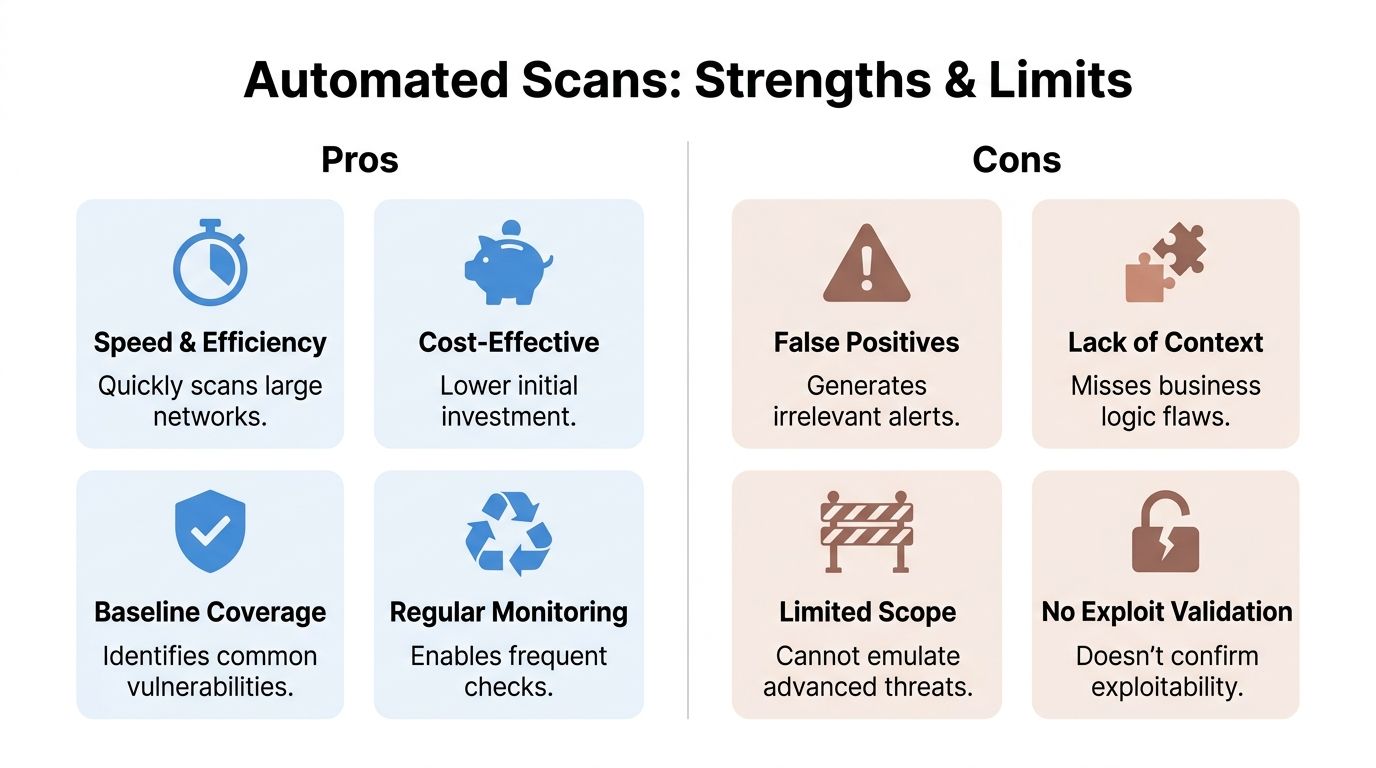
Automated scanning earns its place. It is fast, scalable, and useful for recurring checks across a lot of client environments. If you manage many networks, cloud assets, and endpoints, you need automation. Running everything manually would be too slow and too expensive.
But speed is not the same thing as assurance.
Where automated scanning wins
A good scanner can cover a lot of ground quickly. It helps you identify common weaknesses, maintain visibility, and create repeatable reporting for clients who need regular security documentation.
Rapid7 states that automated scanners like InsightVM can reduce mean time to remediate by 40-60%, and that credentialed scans reveal 3x more vulnerabilities than non-credentialed scans on its network vulnerability scanner page at https://www.rapid7.com/solutions/network-vulnerability-scanner.
Those are real operational gains. If you are an MSP owner, that means faster workflows, cleaner prioritization, and easier client reporting.
Where automated scanning fails
This is the part too many providers avoid saying out loud. A scanner does not attack like an attacker. It checks for known patterns. It does not reason through messy environments, weird trust relationships, broken workflows, or chained weaknesses.
AppSecure reports that in 2025, manual penetration testing consistently uncovers far more unique vulnerabilities than automated network security scans, and organizations combining automated scanning with manual testing achieved almost a 50% faster vulnerability remediation time. The same source notes that over 21,000 CVEs were disclosed in H1 2025 alone. That data is published in its cybersecurity statistics summary at https://www.appsecure.security/blog/cyber-security-statistics-2025.
That is the cleanest argument for adding a human layer. The scanner is good at finding known issues. The human finds the dangerous path through them.
What scanners commonly miss
The gap becomes a client risk here:
- Business logic flaws: A tool may not understand that a user can abuse a workflow to access something they should never see.
- Chained exploits: Several low-level issues can combine into a serious compromise.
- Context: A finding on a test box matters less than the same finding on a server tied to regulated data.
- Exploit validation: A scanner often flags possibilities. A tester proves what is exploitable.
- Privilege paths: Attackers do not stop at one host. They look for routes to move deeper.
If you need a clear comparison to use in client conversations, this page on vulnerability assessment vs penetration testing lays out the distinction well.
Key point: An automated network security scan tells you what is probably wrong. A manual penetration test tells you what an attacker can do with it.
Why this matters to your business
If you stop at the scan, the client may think they bought certainty when they only bought visibility. That creates a dangerous mismatch between expectation and reality.
For an MSP, reseller, or vCISO, that is more than a technical issue. It is a positioning problem. The providers winning larger security-led deals are not just handing over scan output. They are packaging scanning, manual pentesting, remediation guidance, and compliance-ready reporting into one offer.
That is the standard now. If you are not building toward it, somebody else will.
Configuring Scans For Compliance And Profitability
Most MSPs do not have a scanning problem. They have a packaging problem.
They own the tool, schedule the scan, and dump out the findings. Then they wonder why the client sees it as low-value. The answer is simple. Raw output is noisy. Clients pay for guidance.
Start with credentialed scans
If you want scan data that leads to action, stop leaning on unauthenticated checks as your primary method. They have a place, but they miss too much.
Rapid7 says credentialed scans reveal 3x more vulnerabilities than non-credentialed scans, and automated scanners like InsightVM can reduce MTTR by 40-60% while helping teams focus on high-impact issues and cut exploit risk by up to 85% on the same network vulnerability scanner page at https://www.rapid7.com/solutions/network-vulnerability-scanner.
That matters for service delivery. Credentialed scans give you a better view of missing patches, local misconfigurations, and internal exposure that a surface-only scan will miss.
Match cadence to client reality
Do not force every client into the same schedule. Tie scan frequency to business risk, environment change, and compliance pressure.
A practical model looks like this:
- Regulated healthcare or finance clients: Run internal scans more frequently and review exceptions closely because change control and audit pressure are constant.
- Cloud-heavy clients: Scan after major infrastructure changes and on a steady recurring basis because new assets appear fast.
- Small business clients: Use a lighter recurring cadence, but tighten it if they store sensitive data or face customer security reviews.
- Clients chasing compliance milestones: Run scans ahead of the audit window so remediation work starts before evidence is due.
Use the report as a sales tool
Many MSPs undersell themselves in this area. The scan report is not the final deliverable. It is the opening move.
Use it to drive a short advisory conversation:
- Which findings are real business risks
- Which findings are just hygiene issues
- Which systems need deeper manual validation
- Which controls matter for SOC 2, HIPAA, PCI DSS, or ISO 27001
- Whether a pen test is now warranted
A clean, white label pentesting pathway turns that conversation into revenue instead of loose recommendations that go nowhere.
Tip: Never hand over a scan report without an executive summary in plain English. Clients should know what to fix first, what can wait, and what needs a manual penetration test.
Reduce noise before it reaches the client
False positives and weak prioritization kill trust. If your client sees ten pages of findings that do not matter, they will ignore the one issue that does.
Tighten your process:
- Validate critical findings: Do not escalate every scanner alert to a major incident.
- Group related issues: Clients understand themes better than tool noise.
- Map findings to compliance: Show where issues affect SOC 2, HIPAA, PCI DSS, or internal policy.
- Separate hygiene from exploitation risk: Missing updates matter, but so do weak trust boundaries and exposed admin paths.
Build a margin-friendly service stack
The profitable model is straightforward. Sell recurring scanning as the baseline managed service. Then attach add-on work for remediation planning, risk assessment, and manual pentesting when the data shows deeper exposure.
That is a stronger offer for clients, and it stops your team from competing on cheap scan-only pricing.
Why Manual Penetration Testing Is The Next Step
A scanner checks. A human tester thinks.
That difference is the whole game.
If your client needs a real answer to “Can someone get in and what happens if they do?” then they need manual pentesting. Not just automated output. Not just a vulnerability list. They need a certified tester to follow the evidence, test assumptions, and validate impact.
Human testers find what tools miss
Penetration testing earns its keep here. A manual tester can notice weird trust relationships, weak process controls, exposed internal paths, and combinations of flaws that a scanner will never rank correctly.
That is especially important in:
- Internal networks
- Cloud environments
- Web applications
- Client environments preparing for compliance
- Complex organizations with mixed legacy and modern systems
The problem is that traditional security firms often make this painful. Prices are inflated. Lead times drag. Reporting is inconsistent. Some firms even compete with the same MSPs they claim to support.
Certifications matter when clients ask hard questions
When your client, auditor, or board asks who performed the testing, credentials matter. Certified pentesters with OSCP, CEH, and CREST backgrounds bring credibility to the work and confidence to the report.
That matters for your brand, especially if you are delivering services as a white label pentesting partner.
For a plain-language outside perspective on the value of a deeper network engagement, this overview of Network Penetration Testing Services is useful context.
What to add to your stack
The next step after scanning is not “buy another scanner.” It is adding a repeatable manual testing path for the right clients.
That usually includes:
| Client situation | Right next step |
|---|---|
| Audit or contract pressure | Manual pen test with compliance-ready reporting |
| Internet-facing exposure | External penetration test |
| Flat internal network or access concerns | Internal pentest |
| Sensitive application workflows | Web application penetration testing |
| Major environment change | Targeted retest plus manual validation |
If you need a service page to align your internal language and sales process, this resource on network penetration testing can help frame the discussion.
Channel-only matters more than most MSPs realize
A lot of MSP owners get burned by security vendors that promise partnership and then sniff around their accounts. That is why channel-only matters. You need a partner that works behind the scenes, under your brand, without trying to replace you.
One factual example in this space is MSP Pentesting, which provides white labeled pentests for MSPs across environments such as internal, external, web application, cloud, mobile, physical, and social engineering engagements, delivered by certified pentesters including OSCP, CEH, and CREST.
That is the model to look for. Fast turnaround. Manual work. White-label reporting. No channel conflict.
Expert advice: If a pentesting partner cannot explain how they handle white-label delivery, remediation retesting, and channel protection, keep looking.
A Hybrid Security Playbook For Modern MSPs
The smart play is not choosing between scanning and pentesting. It is combining them into one service motion your clients can understand and buy.
This is the offer. Baseline monitoring through automation. Focused human testing where the risk sits. One story. One workflow. Better margin.
Use active and passive scanning on purpose
InterVision explains the split clearly. Active scans detect 80-95% of known issues but can cause network disruption, while passive scanning is non-intrusive but only finds 50-70% of vulnerabilities. The same source says a hybrid approach using active scans during off-peak hours and continuous passive monitoring can reduce audit preparation from weeks to days and achieve up to a 90% compliance uplift for standards like HIPAA at https://intervision.com/blog-automated-network-scanning-and-assessments/.
That is useful guidance for service design, not just tooling.
A practical workflow that sells
Build the client journey around these stages:
Baseline visibility
Run the automated network security scan to identify known weaknesses, exposed services, and configuration issues.
Risk review
Translate findings into business language. What affects regulated data, internet-facing systems, or critical operations?
Manual validation
Launch a targeted penetration test where the exposure is serious, unclear, or audit-sensitive.
Remediation support
Help the client fix what matters first. Then retest.
Compliance packaging
Turn the technical work into evidence for SOC 2, HIPAA, PCI DSS, ISO 27001, and broader GRC workflows.
Why this model is more profitable
A scan-only service gets price-shopped. A layered service gets compared on outcomes.
Your client sees:
- Continuous visibility
- Proof of deeper testing
- Better audit readiness
- Clear prioritization
- Fewer surprises during security reviews
You see:
- Higher-value projects
- Better retention
- A stronger advisor position
- Easier cross-sell into risk assessment and compliance support
For MSPs evaluating broader security program ideas, Dr3am Security offers another outside example of how providers frame layered security support around client needs.
What to standardize internally
If you want this to work at scale, document the handoff points.
- Sales: Know when a scan is enough and when to recommend a pen test
- Technical team: Validate critical findings before escalation
- Compliance team: Map findings to the client’s framework
- Client success: Schedule remediation follow-up and retesting
- Leadership: Package all of it as a branded security program, not random one-off tasks
This hybrid model is easier to sell because it is easier to explain. The scanner finds obvious problems fast. The human tester checks whether those problems lead to compromise. Clients understand that immediately.
Partner With Us For Profitable Security Services
If you are still selling automated scanning as a complete answer, you are exposed.
Clients are asking harder questions. Auditors want better evidence. Competitors are packaging deeper services. The MSPs that keep accounts and grow margins are the ones offering both baseline scanning and real penetration testing.
You do not need to build a giant offensive security team in-house to do this well. You need a reliable, channel-only partner that can deliver affordable, fast, manual work under your brand.
That is the gap in this market. Too many firms are overpriced, slow, and hard to work with. Their process feels built for enterprise procurement, not for MSPs, vCISOs, GRC firms, CPAs, and resellers who need fast answers and client-safe delivery.
The better model is simple:
- Automated network security scan for recurring visibility
- White label pentesting for depth and compliance credibility
- Manual pentesting by certified testers
- Fast reporting your client can act on
- No channel conflict
If you want to protect your client base, increase project revenue, and stop losing security work to providers with a better story, fix your offer now. Add a real pen testing layer. Package it cleanly. Deliver it under your brand.
Contact us today to build a security service your clients will value.
MSPs, vCISOs, CPAs, and resellers that need fast, affordable, white-labeled pentesting can start with risk assessments you can resell and add manual penetration testing to their service stack without building an in-house offensive team. Apply for the partner program and turn automated scanning into a stronger, more profitable security offering.

.avif)
.png)
.png)
.png)

