
A client gets ready for a SOC 2, HIPAA, or PCI DSS review, and the conversation starts with patching, endpoint controls, and admin access. Then someone asks a simple question. How are you managing firmware versions across laptops, desktops, and servers?
That's where a lot of MSPs get exposed. They've got decent OS patching, decent EDR, maybe even a polished risk assessment process, but BIOS management still lives in the break-fix bucket. It's treated like a one-off task instead of part of a mature security service.
If you've been searching for BIOS update how, the technical steps matter. For MSP owners, though, the bigger issue is service design. Firmware sits at the bottom of the stack, and if you ignore it, your security story has a hole in it.
Why BIOS Updates Are a Critical MSP Service

An outdated BIOS usually doesn't trigger panic the way ransomware does. That's exactly why it gets missed. The client sees a healthy Windows update dashboard and assumes the device is fully maintained.
The problem is that firmware sits below the operating system. As Ask Leo explains in its BIOS security discussion, BIOS updates are increasingly important because firmware sits below the operating system, so vulnerabilities there can bypass OS protections and enable full-system compromise. That changes the conversation from “nice to have” to risk management.
Compliance questions expose weak firmware processes
For MSPs, this shows up during audits, security questionnaires, and vCISO reviews. A client asks whether critical systems are running current firmware, whether update decisions are documented, and whether exceptions are tracked. If your answer is “we update BIOS when someone complains,” that's not a managed process.
BIOS work also fits naturally into broader storage and boot integrity discussions. If you already advise clients on partitioning and startup architecture, this is a useful companion read on GPT vs MBR and what it means for system design.
Practical rule: Treat BIOS management like a security control with change risk, not like a random desktop chore.
The right standard is risk-based
The wrong policy is “always update everything immediately.” The other wrong policy is “never touch BIOS unless the machine is broken.” The same Ask Leo guidance makes the better point. The right approach for an MSP is not “always update” or “never update,” but to update when the security, stability, or compatibility benefit exceeds the operational risk.
That matters for GRC work because clients don't need blind activity. They need documented judgment. A good MSP can explain why a specific firmware release should be staged quickly on one device class, deferred on another, and tested before broad rollout.
This becomes a trust signal
Clients notice when you can talk about firmware the same way you talk about MFA, logging, and backup recovery. It shows depth. It also makes your compliance services more credible because you're addressing the full system, not just the parts users can see.
For a modern MSP, BIOS updates belong inside managed security, not outside it.
Essential Prep for a Successful BIOS Update
A failed BIOS flash creates the kind of ticket nobody wants. The machine won't boot, the client is upset, and your tech is suddenly hunting model numbers, recovery steps, and board-specific file names under pressure.
That's why prep is where the essential work happens. Intel's guidance is clear that the update path is highly hardware-specific, and the first move is to identify the exact board model and get the correct firmware from the manufacturer because a failed flash carries meaningful operational risk, as noted in Intel's BIOS update guidance.
Start with inventory and documentation
You need more than a vague device list. Before touching firmware, collect the exact system model, current BIOS version, manufacturer, and any business context that affects timing. A front-desk laptop and a line-of-business workstation do not carry the same outage risk.
Use that inventory to create staging groups by model. This is also where your patch governance should connect with your firmware governance. If you already maintain written patch management policies for client environments, BIOS updates should sit in that same operational framework.
Use a preparation checklist that your team can repeat
A good BIOS process shouldn't depend on your most senior engineer remembering everything from memory.
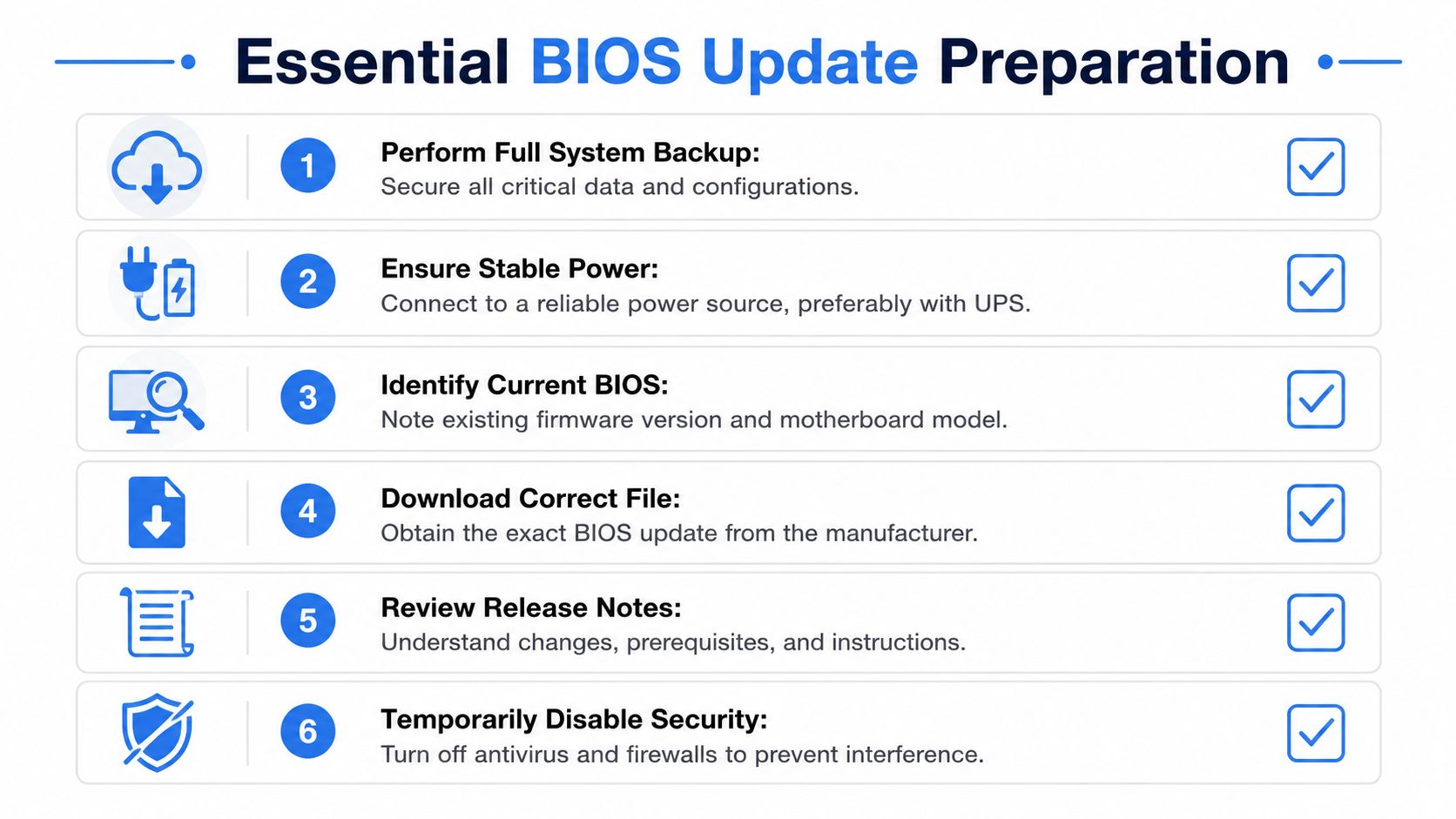
- Confirm the exact hardware: Match the motherboard or system model before downloading anything. Similar product names are not good enough.
- Check the current BIOS version: Record what is installed now so post-update validation is simple.
- Review the OEM release notes: Look for compatibility fixes, security relevance, prerequisites, and warnings.
- Create a rollback-minded plan: Even if firmware rollback isn't straightforward, you still need recovery thinking before you begin.
- Stabilize power and timing: Schedule the job when the user can tolerate downtime and the device has reliable power.
- Document business justification: Tie the update to security, stability, hardware support, or a client requirement.
BIOS updates are one of those tasks where “close enough” causes the outage.
Prep is billable security work
A lot of MSPs undercharge here because they frame prep as admin overhead. It isn't. This is risk assessment, change control, and operational planning. For clients under ISO 27001, SOC 2, HIPAA, or PCI DSS, that documentation has value beyond the update itself.
The strongest teams don't just know BIOS update how. They can explain why a given firmware release should be approved, delayed, tested, or excluded.
Mastering Manual and UEFI Update Methods
Every tech should know how to update one machine cleanly before the team tries to automate anything. If your staff can't perform a controlled manual BIOS update, they won't recognize failure conditions when an RMM job goes sideways.
Dell's guidance describes a reliable workflow: identify the exact system model, download the latest stable BIOS, place it on a FAT32-formatted USB drive, reboot into the firmware menu, and use the device's built-in flashing utility, as outlined in Dell's BIOS and UEFI update documentation.
The standard single-device workflow
On most systems, the practical flow looks like this:
- Identify the exact model in Windows. System Information is often the fastest place to verify what you're working on.
- Download the correct BIOS file from the OEM support page. Stick to the manufacturer source and the latest stable release that fits your plan.
- Prepare the USB drive. Format it as FAT32 and copy the BIOS file as instructed by the vendor.
- Reboot into firmware setup. Common entry paths include F2, F12, or Del, depending on the system.
- Launch the built-in flash utility. Names vary, but the job is the same.
Vendor names differ, function stays the same
Techs sometimes get intimidated by branding. They shouldn't.
You'll see names like ASUS EZ Flash, Gigabyte Q-Flash, ASRock Instant Flash, and generic BIOS Update menus on business systems. Different label, same idea. The board firmware includes a utility that points to the BIOS file and writes the update in a controlled environment.
If a tech only knows the Windows side of support, firmware work will feel risky. Once they know the UEFI tools by name, it becomes predictable.
What works and what usually does not
What works is boring. Exact model match, stable power, proper file placement, and patience during reboot cycles.
What doesn't work is improvising with a “similar” BIOS file, skipping the OEM instructions, or assuming all boards handle USB files the same way. BIOS update how is less about cleverness and more about following the manufacturer path without freelancing.
This is also where your service quality becomes visible. The client may only remember that the machine rebooted. Your team knows the difference between a controlled firmware maintenance event and a gamble.
Scaling Updates with Automation and RMM Tools
Manual BIOS work is fine for a bench test, a pilot group, or an urgent single-device fix. It is not a fleet strategy. If you manage multiple clients, multiple hardware lines, and remote users, manual flashing becomes expensive and hard to audit.
That's why the major maturity jump happens when firmware updates move into orchestration. As How-To Geek's coverage of modern BIOS management explains, enterprise and MSP environments require repeatable orchestration, not just single-device workflows. BIOS updates can be delivered through centralized tooling and scheduled jobs to inventory versions, stage updates by model, and reduce the chance of bricking remote devices.
Manual work creates hidden service risk
The issue isn't only technician time. It's inconsistency.
One tech checks release notes. Another doesn't. One remembers that a specific model needs special sequencing. Another launches the update through an RMM script without confirming prerequisites. That inconsistency is where avoidable outages come from.
If you're already standardizing endpoint control through device management software used in MSP environments, firmware should be part of the same operational model.
BIOS update methods compared
FactorManual Update Per DeviceAutomated Update Fleet-wideTechnician involvementHigh touchLower touch after setupConsistencyDepends on the techMore repeatable by policyAuditabilityHarder to document uniformlyEasier to tie to jobs and groupsModel stagingAd hocStructured by hardware classRemote device safetyRiskier if done casuallyBetter when scheduled and validatedBest fitOne-offs, testing, urgent remediationOngoing managed service delivery
What scalable firmware management looks like
The strongest MSP teams build a simple framework:
- Inventory by model: Group devices by vendor and exact hardware family.
- Stage before broad release: Test on a small, representative set first.
- Schedule with context: Avoid pushing firmware during business-critical windows.
- Track exceptions: Some endpoints should be deferred because they support fragile workloads or need hands-on recovery options.
- Validate after deployment: Don't trust job completion alone. Confirm version state and boot stability.
BIOS management stops being a scary edge case and starts becoming a real managed service. For a vCISO, reseller, or GRC advisor, that matters because it produces an auditable process instead of scattered tickets and tribal knowledge.
Verifying Success and Handling Update Failures
A BIOS update is not complete when the progress bar disappears. It's complete when the machine boots normally, the expected firmware version is present, and the user's workload runs without surprises.
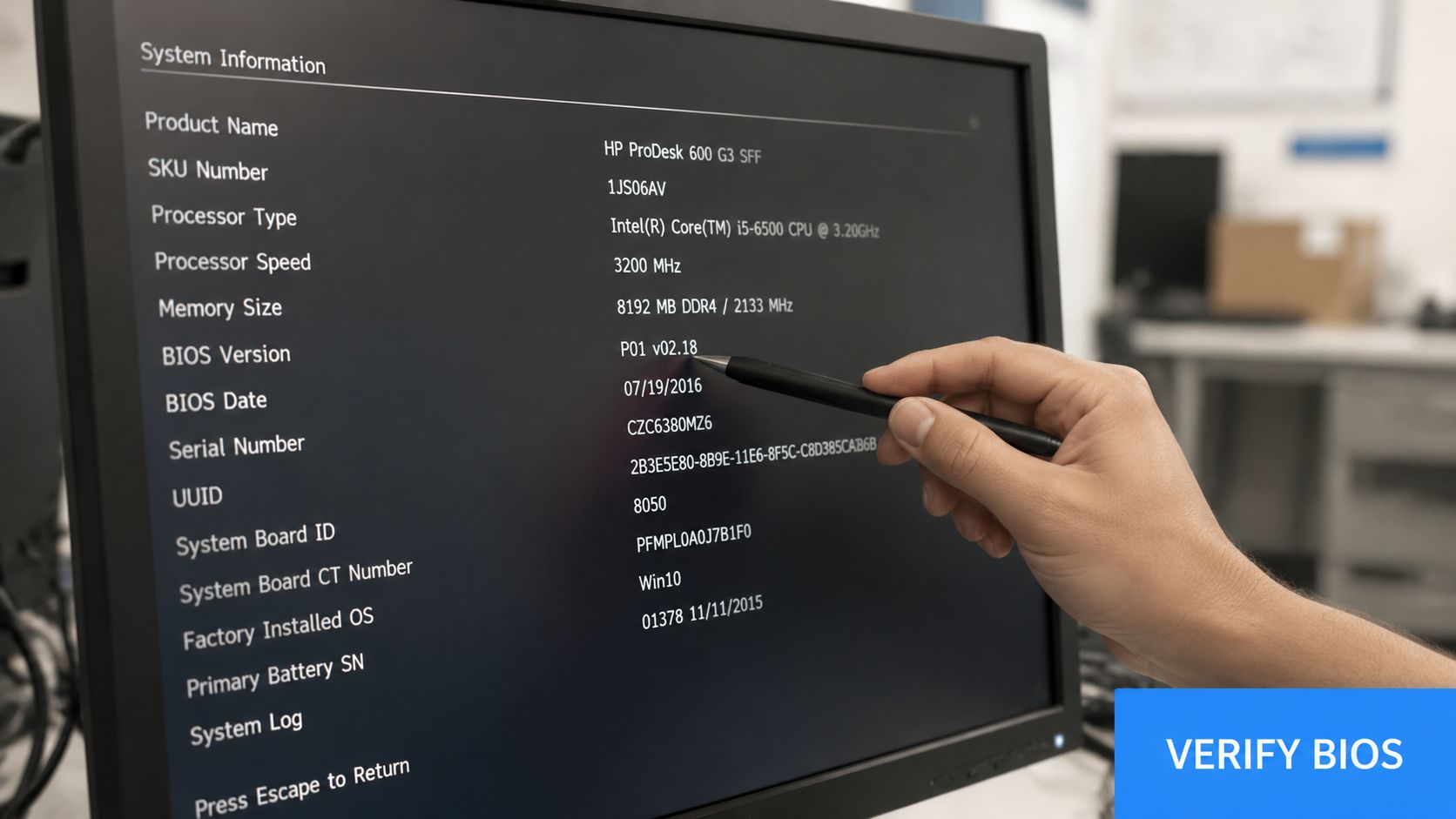
Start with the basics. Boot into the OS, confirm the BIOS version in system information, and test the things users rely on. Storage visibility, network connectivity, encryption status, peripheral behavior, and normal restart cycles all matter.
Check the outcome before closing the ticket
Use a short post-update checklist:
- Verify the installed BIOS version: Confirm the expected release is active.
- Test normal boot behavior: Watch for boot loops, unusual prompts, or changed firmware settings.
- Check business-critical functions: Validate the apps, peripherals, and startup dependencies the client uses every day.
- Record the change: Update the asset record and note anything that changed in firmware settings.
Failure planning matters more than confidence
HP's BIOS update guidance highlights the main operational pitfall. Do not power off the machine during the flashing process, and some recovery paths such as BIOS flashback require the update file to be in the root of the USB drive and sometimes use a board-specific filename, as described in HP's BIOS update article.
That one point drives a lot of your risk model. If a machine loses power during flash, or if the wrong file was used, recovery may depend on vendor-specific features your team needed to understand before the maintenance window started.
Some BIOS failures aren't caused by the update itself. They're caused by weak planning around recovery.
Recovery readiness separates pros from hobbyists
Before any flash, know whether the system supports recovery options such as BIOS Flashback, USB-based restoration, or vendor-specific emergency procedures. Also know whether the board expects a renamed file or a specific USB layout.
Clients rarely ask about these details until something breaks. When they do, the MSP that already planned for recovery looks competent. The MSP that starts searching support forums during an outage does not.
Turn Firmware Security Into a Competitive Advantage
Most providers still talk about security at the operating system and application layers. That's useful, but it's incomplete. When you can manage firmware safely, you show clients that your security thinking goes deeper than antivirus, firewalls, and checkbox patching.
That opens stronger conversations around risk assessment, asset criticality, and compliance evidence. It also helps vCISO and GRC teams tie endpoint integrity back to broader control frameworks such as SOC 2, HIPAA, PCI DSS, and ISO 27001. Firmware management won't replace those programs, but it strengthens them.
There's also a practical sales angle. BIOS update maturity creates a natural next step. Once you've improved firmware hygiene, clients want validation that their controls hold up under pressure. That's where pentest, pen test, penetration test, and penetration testing services fit. A manual assessment helps verify the practical security posture above and around the firmware layer.
For MSPs and resellers, this matters because clients don't just buy tools. They buy confidence. If you can manage BIOS risk, document decisions, and connect that work to a broader security roadmap, you become harder to replace.
If you want to add white label pentesting to your security offerings without competing against your own client relationships, our channel-only team lets you sell pentests under your own brand. We provide affordable, fast, manual pentesting for MSPs, vCISO firms, GRC providers, CPAs, and other resellers. Our team includes OSCP, CEH, and CREST certified pentesters, and we deliver white-labeled penetration testing that supports your brand, your client trust, and your compliance-driven services. Contact us today to learn more.

.avif)
.png)
.png)
.png)

