
A client calls two weeks before an audit. They want to know if their laptops are encrypted, whether their cloud storage is locked down, and if backup data is protected. They're not asking for a theory lesson. They want a yes or no, proof to back it up, and someone to own the answer.
That someone is usually you.
For an MSP, vCISO, GRC advisor, or reseller, data at rest is not just a security term. It's the files on a finance laptop, the customer records in a database, the backups in cloud storage, and the archives nobody has checked in months. If that stored data is exposed, your client has a breach problem and you have a trust problem.
Your Client's Data Is Your Responsibility
You already know the pattern. A client is chasing SOC 2, HIPAA, PCI DSS, or ISO 27001. The auditor sends a list. Suddenly everyone wants to know where sensitive data lives, whether it's encrypted, and who can access it.
Most clients think this is about one server or one app. It isn't. Stored data lives everywhere. It sits on laptops, file shares, databases, backup media, cloud repositories, and old archives that should have been cleaned up years ago.
Why this keeps getting harder
The amount of stored information keeps climbing. The global datasphere has grown past 180 zettabytes, according to digital data estimates. More stored data means more places to lose control.
That growth changes the MSP conversation. You're not just managing devices anymore. You're managing risk across every storage layer a client touches.
- Endpoints matter: A stolen laptop can turn into a reportable incident if local files aren't protected.
- Servers matter: Application data, exported reports, and shared drives often hold the most sensitive business records.
- Cloud storage matters: Clients assume their provider handled everything. That assumption causes problems.
If you need a simple way to explain the bigger picture to a client, point them to data security and data protection basics. Then bring the conversation back to operations, because that's where deals are won or lost.
Practical rule: If your client stores it, backs it up, syncs it, or archives it, it belongs in your data-at-rest review.
Where the business opportunity is
This is one of the cleanest service opportunities MSPs have. Clients already need help answering auditor questions, choosing controls, documenting decisions, and validating that the controls work.
That creates room for higher-value work:
- Risk assessment services tied to storage exposure
- vCISO guidance around encryption and key ownership
- GRC documentation that maps controls to compliance requirements
- Pentest and penetration testing validation that proves controls aren't just turned on, but working
Clients don't pay for encryption because they love encryption. They pay because they want fewer ugly surprises, cleaner audits, and a provider who sounds like they've seen this movie before.
Identifying Data at Rest and Its Biggest Threats
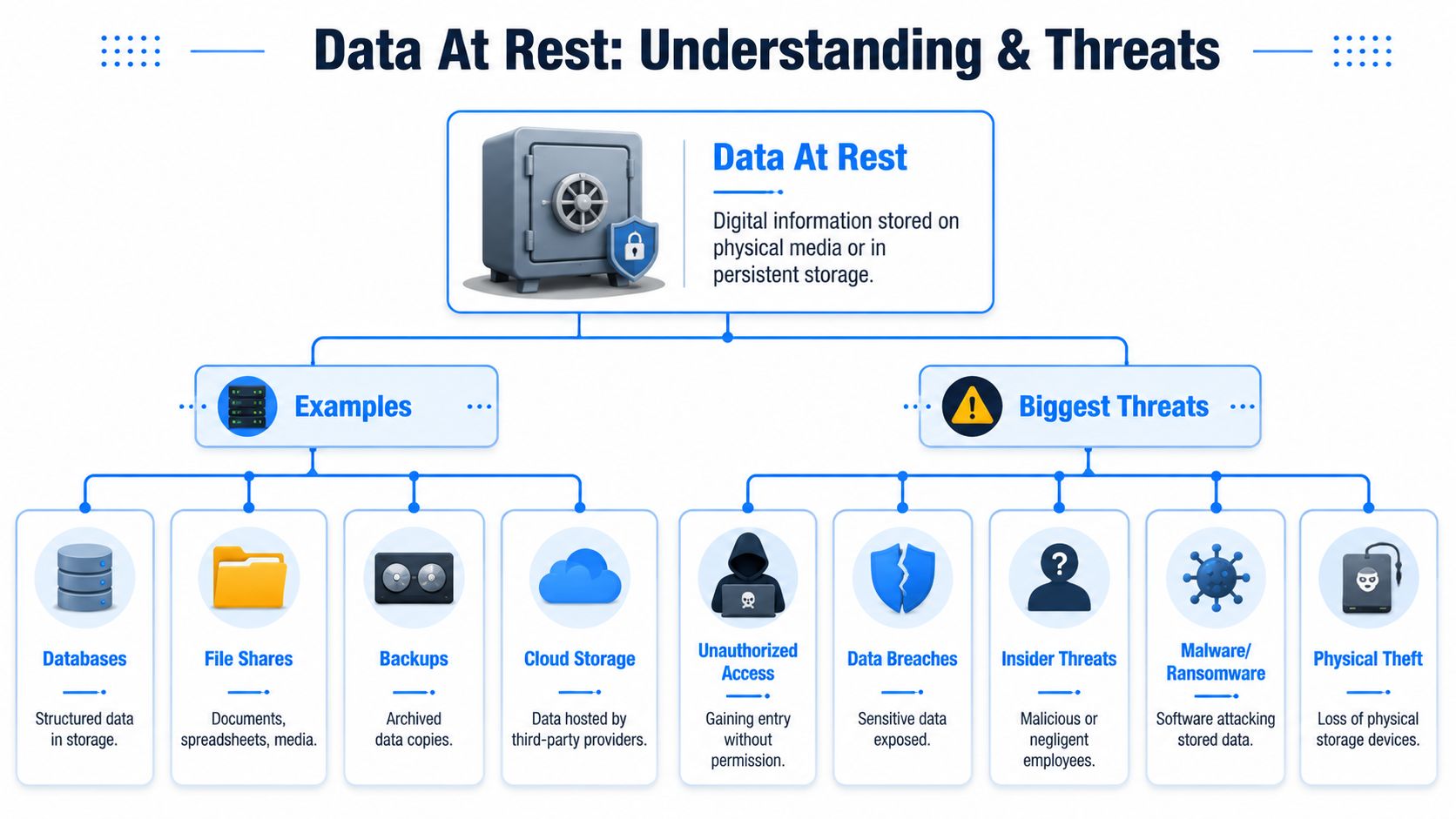
Think of data at rest like cash in a vault. It's sitting still. It isn't moving across a network and it isn't actively being processed. It's stored on something persistent.
That includes hard drives, SSDs, databases, backup media, SANs, cloud storage, and archive systems. If your client can save it and come back to it later, it's data at rest.
Where MSPs should look first
Start with the obvious storage locations. Then go one layer deeper.
The obvious list includes laptops, file servers, databases, Microsoft 365 exports, cloud buckets, NAS devices, and backup repositories. The deeper list is where people get hurt. That's where you find old exports, local temp folders, sync caches, and forgotten archives.
A lot of teams say “the database is encrypted” and stop there. That's incomplete. Duality's write-up on data at rest notes a commonly missed risk: encrypting a primary database doesn't automatically protect related metadata, transaction logs, temporary files, cached copies, or shadow copies.
Attackers love secondary artifacts because defenders forget they exist.
The threats that actually matter
The three threats MSPs should care about most are simple.
- Unauthorized access: Somebody gets into storage they shouldn't. That might be a former employee, a contractor with too much access, or a compromised admin account.
- Physical loss or theft: A laptop disappears from a car. A removable drive walks out the door. A retired device wasn't wiped correctly.
- Ransomware and abuse: Malware encrypts or exfiltrates stored data. An insider copies sensitive files to an unmanaged location.
Insider risk deserves more attention than most MSPs give it. If you want practical ideas for detection and governance, this piece on AI-driven insider threat strategies is worth reading because it focuses on behavior, not just perimeter controls.
What clients usually misunderstand
Clients often think “encrypted at rest” means “safe enough.” It doesn't.
Encryption helps when the storage media is stolen or accessed without authorization. It does not magically fix bad permissions, exposed cloud shares, sloppy retention, or weak monitoring. If sensitive exports sit in a public bucket or every employee can open payroll files, the problem isn't the algorithm. The problem is access and governance.
That's why your role matters. You're the one translating a technical label into a real control.
Choosing the Right Client Encryption Strategy
Most MSPs overcomplicate this. The right encryption strategy depends on where the data lives, how the client uses it, and who needs access. Start with the storage layer, because that's the security boundary for data at rest. NIST and Microsoft frame protection this way, focusing on encrypting stored files to protect devices when they're powered off or unauthenticated, as summarized in this data-at-rest encryption overview.
Four approaches that actually matter
You don't need a hundred options. You need four.
| Method | Best For | Pros | Cons |
|---|---|---|---|
| Full-disk encryption | Laptops, workstations, general endpoints | Strong protection for lost or stolen devices, simple to standardize | Doesn't solve excessive user access or risky file sharing |
| File-level encryption | Specific folders, highly sensitive documents, shared datasets | Granular control, useful for limited-access records | Harder to manage at scale, can create user friction |
| Database encryption | Line-of-business apps, SQL data stores | Protects structured application data, fits regulated workloads | Can leave adjacent artifacts exposed if not reviewed carefully |
| Cloud-native encryption | Cloud volumes, object storage, backup repositories | Fits modern infrastructure, works well with provider key services | Easy to misconfigure, still requires permission review and key governance |
How to choose without wasting time
Use full-disk encryption as your baseline for endpoints. If a client has staff carrying laptops with customer, financial, or patient data, this shouldn't be optional. It's the simplest answer to the stolen-device problem.
Use file-level encryption when only certain records need tighter handling. HR folders, legal documents, board materials, and finance exports are common examples. This is useful when the client needs more precision than whole-device controls can offer.
For business applications, database encryption is often the practical choice. SQL platforms commonly support storage-level protections such as TDE. That helps with compliance conversations, but don't mistake it for complete coverage.
If the client is heavily cloud-based, lean into cloud-native encryption tied to the provider's tooling and access model. The value here is operational fit. The risk is false confidence if no one validates permissions, keys, and inherited access.
What I'd recommend by client type
- Small professional services firm: Full-disk encryption on endpoints, encrypted cloud storage, tight admin controls
- Healthcare practice: Endpoint protection, database encryption for application records, backup repository review, documented key custody for HIPAA support
- SaaS company chasing SOC 2: Cloud-native encryption, database controls, strict access reviews, evidence collection for auditors
- Retail or payment environment: Storage protection around payment-related systems, role-based access, documented validation for PCI DSS efforts
If you need a plain-English refresher on the mechanics behind algorithms and cipher choices, this overview of different types of ciphers is useful. Just don't get stuck there. Clients don't buy cipher trivia. They buy decisions that reduce exposure.
Managing Encryption Keys Without Losing Them
A locked safe is worthless if the key is taped to the front.
That's why key management is where mature MSPs separate themselves from checkbox shops. Encryption failures usually don't happen because the math is weak. They happen because someone stored keys next to the data, skipped recovery planning, or forgot how the system was configured.
Why bad key management is dangerous
AFMC's HIPAA-focused guidance makes this point clearly in its encryption and recovery discussion. The biggest risk with encryption is often poor key management, and misconfiguration or forgotten passwords can make data permanently inaccessible.
That's the part clients rarely think about. They worry about thieves reading the data. They should also worry about their own team locking themselves out of it.
Strong encryption with weak key custody is a self-inflicted outage.
The MSP playbook for key control
Don't make this fancy. Make it durable.
- Store keys separately: If the encrypted data and the keys live together, you've weakened the whole control.
- Use managed key services when possible: Cloud KMS platforms and enterprise key tools beat spreadsheet-based secrets handling every time.
- Rotate on a schedule: Rotation isn't just for policy documents. It limits exposure when staff changes or credentials leak.
- Document recovery steps: If the only person who knows the process leaves, the client has a business continuity problem.
- Test recovery: A backup is theory until someone restores from it. Key recovery is the same.
What to package as an advisory service
MSPs can move upstream in this context.
Offer a key management review as part of onboarding or a compliance readiness package. Review where keys live, who owns them, how they're backed up, and what happens during staff turnover, tenant migration, or incident response. Most clients have never worked through those scenarios in detail.
That gives your vCISO and GRC work more weight. You're no longer just saying “enable encryption.” You're showing that you understand operations, recovery, and the ugly ways controls fail in practice.
Using Data Security to Nail Compliance Audits
Auditors don't want a comforting sentence in a policy. They want evidence.
If a client says sensitive data is encrypted at rest, they should be ready to show where it lives, how it's protected, who can access it, and what happens when a device is lost or a backup is restored. That's where MSPs can make themselves indispensable.
What compliance reviewers are really looking for
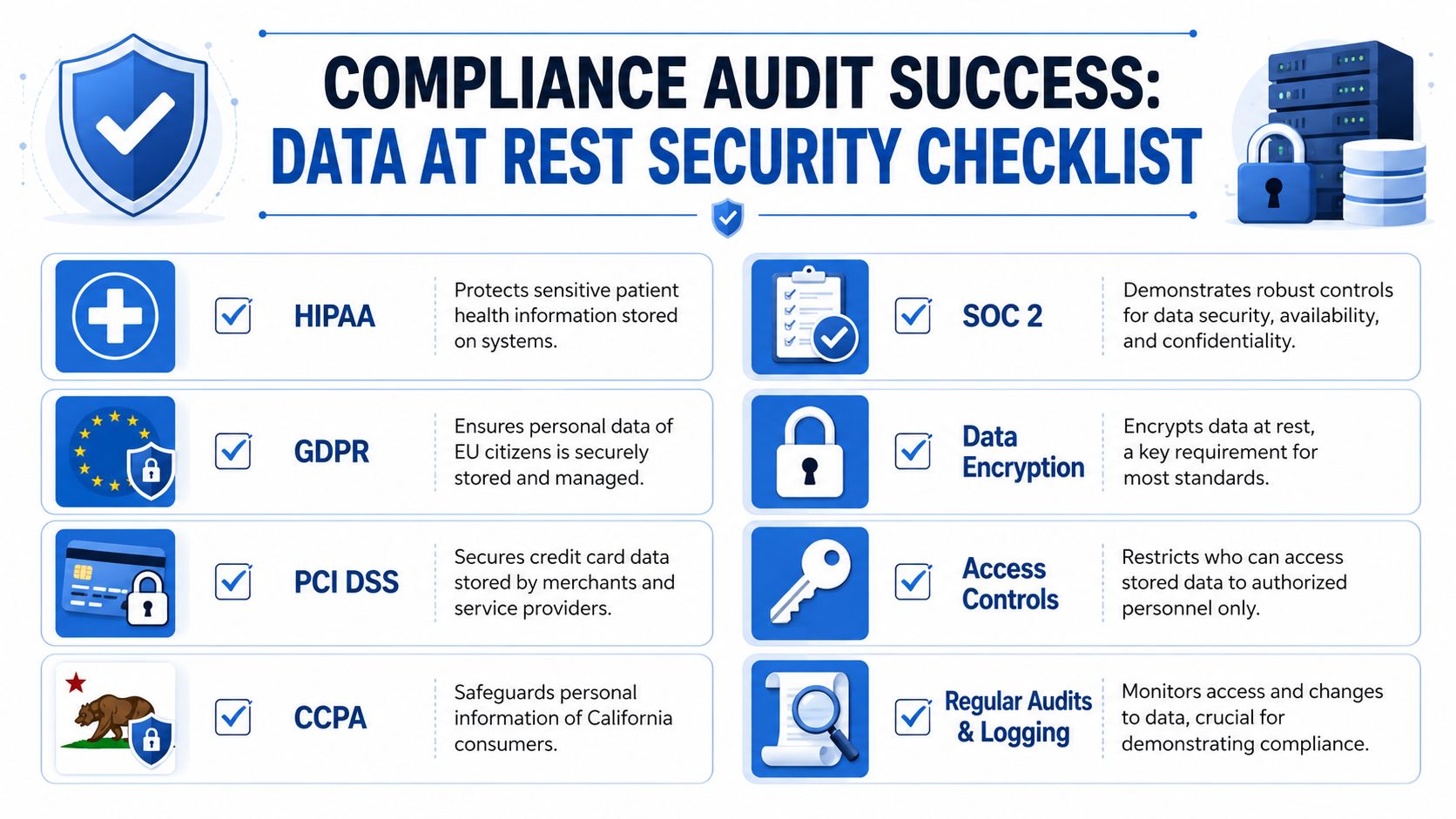
Across SOC 2, HIPAA, PCI DSS, and ISO 27001, the pattern is familiar. Reviewers care about storage protection, access control, logging, governance, and repeatability.
That means your client needs more than a tool turned on. They need proof that:
- Sensitive data was identified
- Storage locations were reviewed
- Encryption controls were applied appropriately
- Access was limited to the right people
- Logs and changes were monitored
- Recovery and backup processes were considered
If your client is pursuing SOC 2, this SOC 2 compliance checklist is a useful starting point for organizing evidence and control discussions.
Why this becomes recurring revenue
Compliance work usually starts as a fire drill. It becomes recurring revenue when you standardize it.
An MSP can package data-at-rest services into:
- Readiness assessments for new audit cycles
- Quarterly control reviews for regulated clients
- vCISO reporting tied to risk register items
- Pen testing and pentest validation to support evidence collection
- Remediation tracking after issues are found
The client doesn't just need controls. They need someone who can defend those controls in a room with an auditor.
That's a strong retention play. Once you're the provider who helps them survive audits without chaos, replacing you gets harder.
How We Pentest Data at Rest for Your Clients
A policy can say anything. A scanner can miss plenty. A manual pentest shows what an attacker can reach.
That matters for data at rest because storage controls fail in boring ways. Unencrypted backups. Secrets hardcoded in scripts. Over-permissioned cloud storage. Old exports sitting on a share everyone can read. None of that looks dramatic until someone steals it.

What a real penetration test should check
A good penetration test against data-at-rest controls doesn't stop at “encryption enabled.” It asks harder questions.
- Can we reach sensitive files through weak permissions?
- Do backups or snapshots expose plaintext data?
- Are application secrets stored in code, config files, or local artifacts?
- Can an attacker abuse admin roles to access storage directly?
- Do temp files, logs, or cached copies reveal sensitive records?
- Are cloud storage policies broader than the client thinks?
Manual work outperforms checkbox testing. A human tester follows the trail. They pivot from one weakness to the next and validate real exposure.
Why white label pentesting fits MSPs
Most MSPs don't want to build an internal penetration testing team from scratch. That's expensive, slow, and hard to staff well. It also creates delivery problems when the client needs a pentest report fast for a compliance deadline.
A channel-only model solves that. MSP Pentesting provides white label pentesting for partners, including manual pentest work delivered by OSCP, CEH, and CREST certified pentesters across web, cloud, internal, mobile, external, and social engineering scopes. For an MSP, reseller, or vCISO, that means you can offer affordable pen test and penetration testing services without competing against your own vendor.
What to look for in a pentest partner
Don't buy based on the lowest line item. Buy based on whether the work helps you keep the client.
Look for a partner that gives you:
- Manual pentesting: Not just automated output with a nicer PDF
- Fast turnaround: Audit deadlines don't wait
- White-labeled reporting: Your client relationship stays yours
- Clear remediation guidance: The report should help your team fix issues
- Channel-only alignment: No side selling, no poaching, no confusion
When a client asks, “How do we know this control really works?” a penetration test is one of the cleanest answers you can give.
Your Quick Checklist and Partnering for Success
If you want a practical starting point, use this checklist with every managed client that stores sensitive information.
The short list worth doing now
- Inventory storage locations: Find the laptops, servers, databases, cloud repositories, file shares, and backups that matter.
- Confirm encryption coverage: Check endpoints, cloud volumes, backup targets, and application storage.
- Review secondary artifacts: Look for logs, temp files, cached copies, exports, and shadow copies.
- Tighten access: Remove broad permissions and review admin access regularly.
- Separate keys from data: Make sure key custody isn't sitting in the same place as encrypted content.
- Test recovery: Verify backup restore and key recovery before an incident forces the issue.
- Validate with pentesting: Use a pentest, pen test, or penetration testing engagement to prove whether controls hold up under pressure.
How to turn this into a better service line
Don't treat data at rest like a one-time project. Package it.
Build an offering around risk assessment, encryption review, key management advisory, evidence collection for compliance, and follow-up penetration testing. That gives your clients a clearer path to SOC 2, HIPAA, PCI DSS, and internal security maturity. It also gives you a reason to stay involved after the initial setup work is done.
You also need the right partner model. If you're an MSP, vCISO, GRC firm, CPA, or reseller, you shouldn't have to worry that your pentesting vendor will pitch your client directly. A channel-only relationship matters. It protects your account, your brand, and your margins.
The MSPs that win here are the ones who keep it simple. Know where the data is. Protect it properly. Prove it with testing. Put the evidence in front of the client before the auditor asks.
If you want a channel-only partner for white label pentesting, we deliver pentests under your brand for MSPs, vCISOs, GRC firms, CPAs, and resellers that need affordable, manual pentest and penetration testing support without vendor competition. Contact us today to add faster, compliance-ready security testing to your client services.

.avif)
.png)
.png)
.png)

