
Your client leaves the office, opens a laptop at an airport gate, sees what looks like familiar guest Wi-Fi, and connects without thinking. Nothing looks wrong. Email loads, browser tabs open, and the workday keeps moving.
That's exactly why the evil twin attack still matters to every MSP, vCISO, GRC advisor, and IT reseller. It doesn't need a flashy exploit. It just needs a user to trust the wrong wireless network for a few seconds.
Most security discussions treat this like a niche Wi-Fi trick. That's a mistake. If your clients rely on public Wi-Fi, shared office space, travel, field staff, or unmanaged devices, this becomes a real business risk with real compliance consequences for SOC 2, HIPAA, PCI DSS, and ISO 27001 programs.
Your Client at the Coffee Shop Is Vulnerable
Your client's controller is in a coffee shop reviewing invoices. A sales rep is in a hotel lobby checking CRM notes. A physician is waiting at an airport and opening email from a clinic account. All three see “free Wi-Fi,” connect, and move on.
An attacker only needs to clone the network name and make the fake signal easier to grab. That's the trap. If you want a practical refresher on WPA3 configuration and guest networks, it's worth reviewing because public and guest wireless design still shapes how much trust users place in what they see.
Why MSPs keep missing this
Many MSPs focus on patching, endpoint controls, MFA, and firewall policy. Those matter. But none of them stop a user from joining the wrong access point in a cafe, airport, or hotel before the rest of the stack even has a chance to help.
That's why you should also understand the broader rogue access point problem. Evil twin attacks sit inside that category, but they're nastier because they depend on imitation and timing, not just an unauthorized device.
Practical rule: If your client's staff regularly works outside controlled office space, wireless impersonation belongs in every serious risk assessment.
MSPs either look proactive or reactive. The proactive ones talk about user behavior, network trust, and validation before an incident. The reactive ones wait until stolen credentials trigger cleanup work and ugly client conversations.
What Exactly Is an Evil Twin Attack
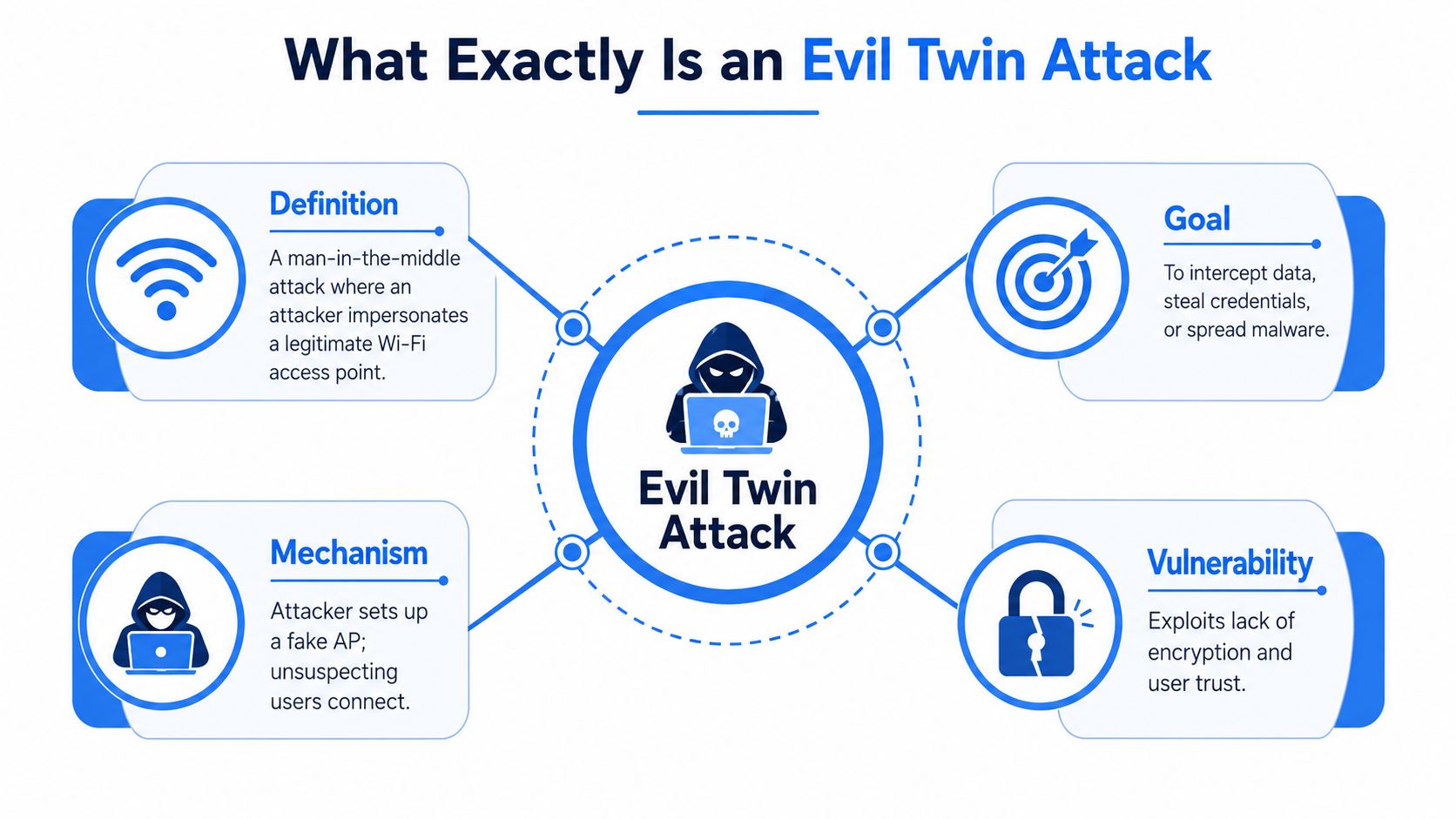
An evil twin attack is a man-in-the-middle attack on Wi-Fi. The attacker creates a fake wireless access point that looks like the legitimate one by copying the SSID, which is the Wi-Fi network name users see on their phones and laptops.
Imagine a fake storefront with the same sign as the shop next door. Customers walk in because the sign looks right. In Wi-Fi, the user's device “walks in” by connecting to the attacker's rogue access point.
What the attacker wants
The end goal is simple. Intercept traffic, steal credentials, or redirect the victim to fake login pages. Kaspersky notes that, despite being rare, evil twin attacks are a critical MITM risk that can intercept unencrypted traffic, including login credentials, financial data, and banking information, and can lead to stolen credentials that open access to departmental systems through its overview of evil twin attacks.
That's why this matters for HIPAA and PCI DSS. If a user enters credentials or accesses sensitive systems through a spoofed wireless connection, you're not dealing with a theoretical issue anymore. You're dealing with exposure, investigation, and audit pain.
What makes it dangerous
This attack doesn't win by “breaking Wi-Fi” in the way many buyers imagine. It wins by abusing trust. If the user connects to the fake network, the attacker gets a chance to observe traffic and capture credentials through interception or credential harvesting workflows.
A lot of security teams still underrate that because the setup can look ordinary. Same network name. Similar login screen. Working internet. Quiet theft.
How an Evil Twin Attack Works Step by Step
You can't defend this well if you don't understand the workflow. The attack is straightforward, and that's exactly why it works.
Step one and two
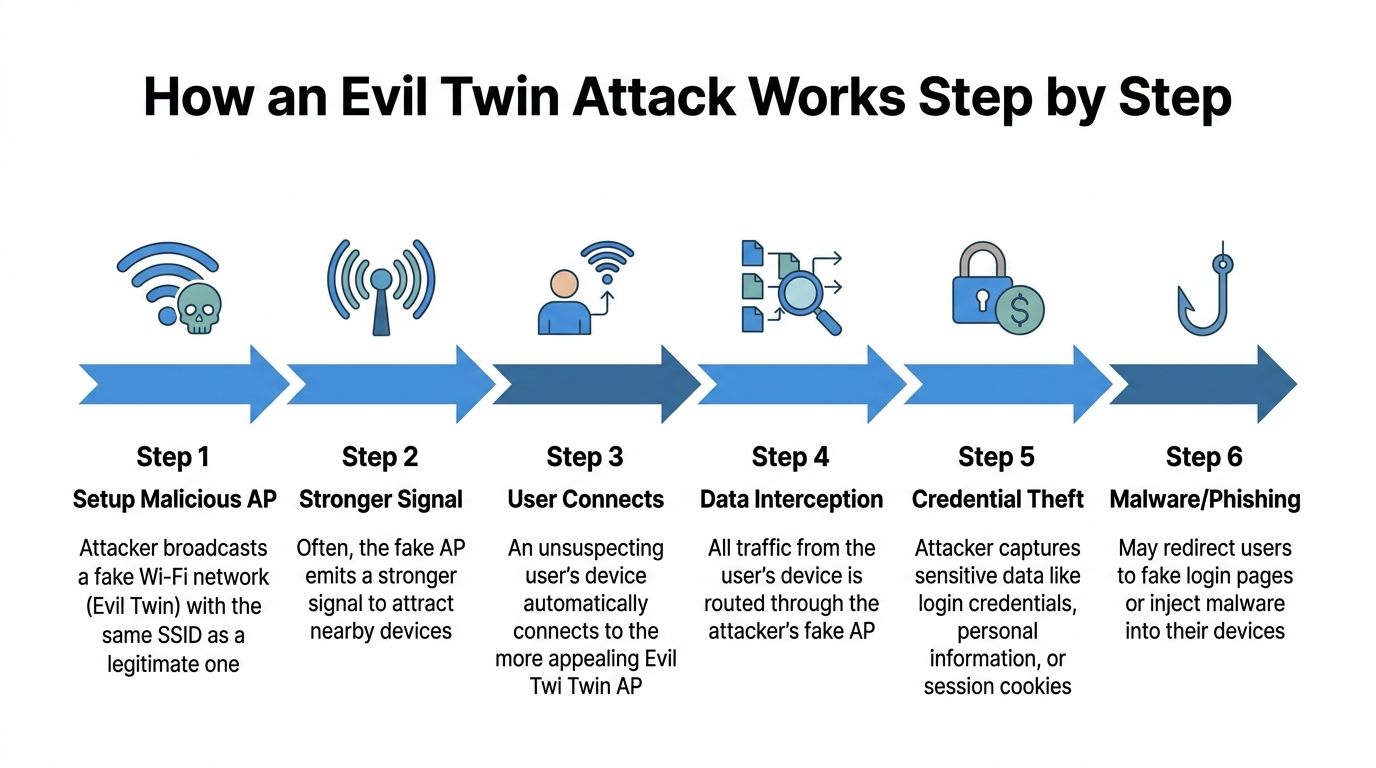
First, the attacker scouts the area. Bitdefender describes this clearly. The attacker surveys the wireless environment with tools like airodump-ng to find high-usage networks worth impersonating through its explanation of evil twin attacks.
Second, the attacker stands up a rogue access point that copies the target network's SSID. In some cases, the password or expected access pattern is cloned too, especially where users have connected before and devices are primed to reconnect.
Step three and four
Now the lure starts. The fake access point can broadcast a stronger signal and wait. Or the attacker can get more aggressive and push devices off the legitimate network with deauthentication tactics so they reconnect to the impostor instead.
If you work with clients who struggle with the basics of impersonation risk, a plain-English explainer on spoofing from GoSafe's guide helps frame the bigger issue. Attackers copy trusted identity markers because users and devices often trust appearances.
What happens after connection
Once the user connects, all traffic passes through the attacker's position in the middle. That gives the attacker room to inspect, redirect, manipulate, or capture data.
Here's the simple sequence MSPs should explain to clients:
- Scout the Wi-Fi space: The attacker identifies a busy network users already trust.
- Clone the network name: The fake access point presents itself as the legitimate SSID.
- Win the connection: Stronger signal or forced disconnects push the victim onto the rogue AP.
- Collect the payoff: Fake captive portals, session interception, and traffic observation do the rest.
If your security stack only checks software vulnerabilities, it won't catch a user connecting to the wrong wireless identity.
That's why a basic scanner won't validate this risk. This lives in behavior, radio space, and real-world attack simulation.
Methods for Detecting and Preventing Attacks
Your client's employee is at an airport, opens a laptop, sees a familiar guest Wi-Fi name, and connects without thinking. That single click can expose credentials, session cookies, and regulated data before your helpdesk ever gets a ticket.
That is why MSPs need a detection and prevention plan, not another round of generic security awareness slides.
What users should do
Keep user guidance short enough to survive real life. If the checklist is too long, nobody follows it in a coffee shop, hotel lobby, or boarding area.
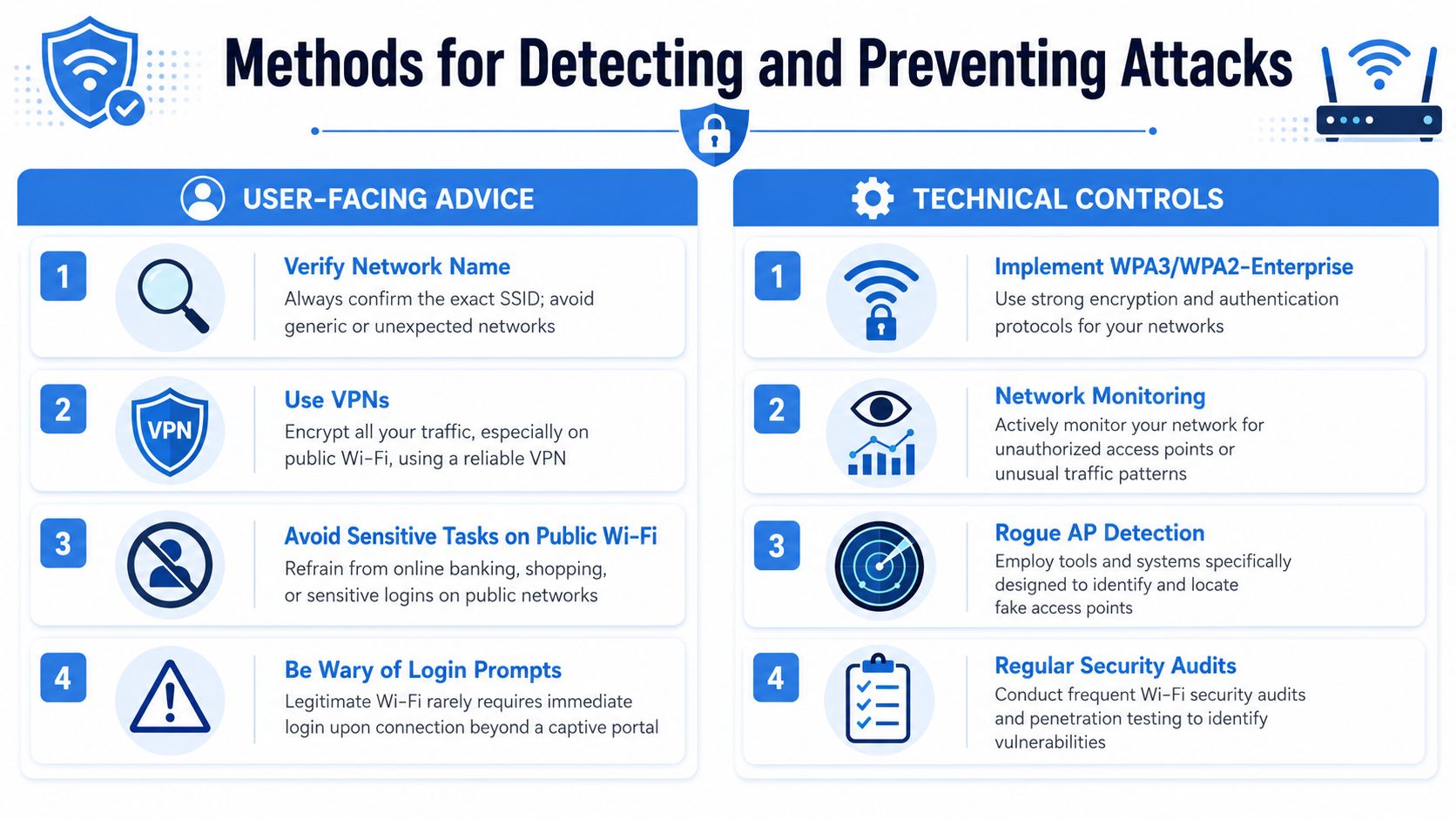
Tell users to do four things:
- Check the exact network name: Look for typo-squatted SSIDs, duplicate guest names, or odd suffixes.
- Turn off auto-join for public Wi-Fi: Saved public networks create easy opportunities for rogue access points.
- Use a VPN on untrusted networks: Encryption limits what an attacker can read if a user joins the wrong access point.
- Keep sensitive work off public Wi-Fi: Admin access, payroll, finance, and regulated data should wait for a trusted connection.
Kaspersky recommends the same core habits in its guidance on protecting against evil twin attacks.
What MSPs should deploy
User behavior is only one control. Your clients are paying you to reduce exposure when people make bad decisions under pressure.
Deploy controls that catch rogue wireless activity and limit the fallout. That is where your service becomes valuable, billable, and easier to defend in front of auditors and insurance questionnaires. If you want clients to see the difference between commodity IT support and real security work, have a clear wireless protection story and point them to discover MY CYBER GUARD's protection.
A practical stack looks like this:
| Control | Why it matters |
|---|---|
| WIPS or WIDS | Detects rogue access points, spoofed SSIDs, and suspicious wireless behavior |
| VPN enforcement | Shrinks the value of intercepted traffic and stolen sessions |
| User policy | Sets clear rules for public Wi-Fi use and blocks risky exceptions |
| Wi-Fi audits | Verifies whether controls hold up in the real world, not just in policy documents |
A recent study cited by Firewalls.com found many MSPs still lag on wireless intrusion prevention while client public Wi-Fi use remains common. That gap creates risk for your clients and liability for your business.
Training helps. Detection closes the gap. Testing proves whether either one works.
For risk assessments and compliance work, that distinction matters. Auditors and clients want evidence that you identified wireless impersonation risk, deployed controls that address it, and validated those controls through real testing.
Hardening Your Clients' Networks Against Threats
A lot of buyers assume WPA3 and HTTPS solved this problem. They didn't. They solve different problems.
The key point is simple. Evil twin attacks remain effective because the user gets tricked into joining the rogue network before protected traffic matters. As discussed in a Reddit networking thread on whether evil twin attacks are still a threat, the attack happens at the connection layer, which makes HTTPS irrelevant if the victim voluntarily joins the fake access point first.
What hardening actually looks like
If you want better protection, stop relying on “modern encryption” as a sales phrase and push real wireless identity controls.
Use:
- WPA3-Enterprise or WPA2-Enterprise where client environments support it
- 802.1X authentication instead of weak shared trust models
- Certificate-backed validation so clients can verify the network they're joining
- Segmented wireless access so a bad wireless connection doesn't become broad internal exposure
Why this helps your MSP business
At this stage, you move from commodity support to strategic security work. Any shop can reset passwords and deploy access points. Fewer providers can explain why connection-layer trust, enterprise authentication, and wireless architecture matter to SOC 2, HIPAA, PCI DSS, and ISO 27001 readiness.
That's valuable. Clients pay for clarity when the risk is confusing and the stakes are ugly.
How to Approach Penetration Testing for Wi-Fi
If you want to know whether your controls work, run a manual pentest. Don't hide behind scanner output. A vulnerability scanner can be useful, but it won't behave like an attacker with a rogue access point and a plan.

Why automation falls short
Beagle Security's guidance is blunt. Manual penetration testing for evil twin vulnerabilities requires certified pentesters with OSCP, CEH, or CREST credentials because automated tools consistently fail to detect the dynamic MAC spoofing scenarios behind these attacks, as noted in its article on vulnerability scanners for MSPs.
That lines up with what experienced MSPs already know. A scanner checks what it can see from a fixed perspective. A real attacker changes signal strength, timing, lures, and client behavior in the field.
What a real pen test should validate
A proper pen test, pentest, or penetration test for Wi-Fi should answer questions like these:
- Can a rogue AP fool client devices?
- Will staff notice a suspicious captive portal?
- Do VPN and policy controls reduce exposure?
- Can wireless access pivot into broader client systems?
If you're delivering security services, your clients need evidence, not assumptions. That's especially true for vCISO and GRC teams supporting SOC 2, HIPAA, and ISO 27001 control validation.
For MSPs building out this service line, a focused look at Wi-Fi pentesting services helps define the scope. The big distinction is manual testing versus checkbox scanning. One proves reality. The other produces paperwork.
Field advice: If a vendor claims to validate evil twin risk with an automated scan alone, they're selling convenience, not assurance.
The industry has a pricing and methodology problem. Too many firms charge premium rates for weak testing, drag out lead times, and hand back shallow reports. MSPs need something more practical: affordable, manual penetration testing by certified testers, with a turnaround fast enough to support client delivery instead of slowing it down.
Get Affordable White Label Pentesting Today
Your clients are exposed to risks they can't see. Evil twin attacks are a perfect example. They're rare in practice, but the business impact can be serious when a user connects to the wrong network and hands over credentials, session access, or sensitive traffic.
If you're an MSP, vCISO, GRC provider, CPA firm, or security reseller, this creates a clear opportunity. You can turn wireless risk into a useful service conversation around risk assessment, compliance, and manual pentesting instead of waiting for an incident to force the conversation later.
The smart move is to partner with a team that understands channel relationships. You need white label pentesting that is affordable, fast, manual, and performed by certified professionals with OSCP, CEH, and CREST credentials. You also need a partner that won't chase your accounts or compete with your business.
That's the difference between adding a profitable security service and creating a mess. The market already has enough inflated pricing, weak penetration testing, and long lead times. You don't need more of that. You need a channel-only partner that helps you protect clients, strengthen compliance programs, and close more security work.
Want a channel-only partner for affordable, fast, white label pentesting that never competes with your business? We cover everything from Wi-Fi to external network pentesting, and we help MSPs, vCISOs, GRC firms, and resellers deliver manual pentest, pen testing, and penetration testing services under their own brand. Contact us today to learn more.

.avif)
.png)
.png)
.png)

