

A client calls in angry. Their accounting portal just moved, everyone else can reach it, and their machine still points to the wrong place. Your tech can spend half an hour guessing, or they can start with the fastest useful check in the playbook.
That’s why Ipconfig clear DNS matters. It’s not glamorous, and it won’t replace a real risk assessment, penetration test, or deeper root-cause work. But in a managed environment, small fixes done quickly are what clients remember. Fast troubleshooting keeps users productive, protects trust, and gives your MSP room to have bigger conversations about security, compliance, and operational maturity.
Why Flushing DNS Is an MSP Essential
Most MSP owners have seen the same ticket. One user can’t reach a site after a migration, a DNS cutover, or a provider-side change. The site works on mobile data, works for another employee, and works from the vendor’s side. That usually means the issue is local, and flushing DNS is one of the first checks worth doing.
The reason is simple. The command clears stored hostname lookups on that workstation so the next request has to ask DNS again. It’s a cache reset, not a full network reset. Microsoft’s documentation around related DNS tools makes the separation clear, showing cache actions and server-statistics clearing as different administrative tasks in Microsoft’s DNS server statistics documentation.
Why clients care more than techs think
Clients don’t buy managed services because they want to hear about resolver behavior. They buy because they need email, apps, portals, line-of-business tools, and remote access to work.
A quick DNS cache flush can be the difference between “our IT provider fixed it in minutes” and “we lost a billing cycle because support kept rebooting things.” That’s why mature providers treat these commands as part of service delivery, not trivia.
Practical rule: If one endpoint fails while the same resource works elsewhere, start local before you escalate global.
This also ties into broader MSP positioning. Basic support creates the trust that opens the door to higher-value work later, whether that’s GRC consulting, SOC 2 readiness, or a conversation about penetration testing. If you want a simple outside explanation of how managed support creates business value, SES Computers’ IT services guide is a decent reference for framing that client-facing story.
How to Clear DNS on Windows Systems
On Windows, this should be a standard operating procedure. Your Level 1 techs should know it cold, your escalation team should know when it helps, and your documentation should make it copy-paste simple.
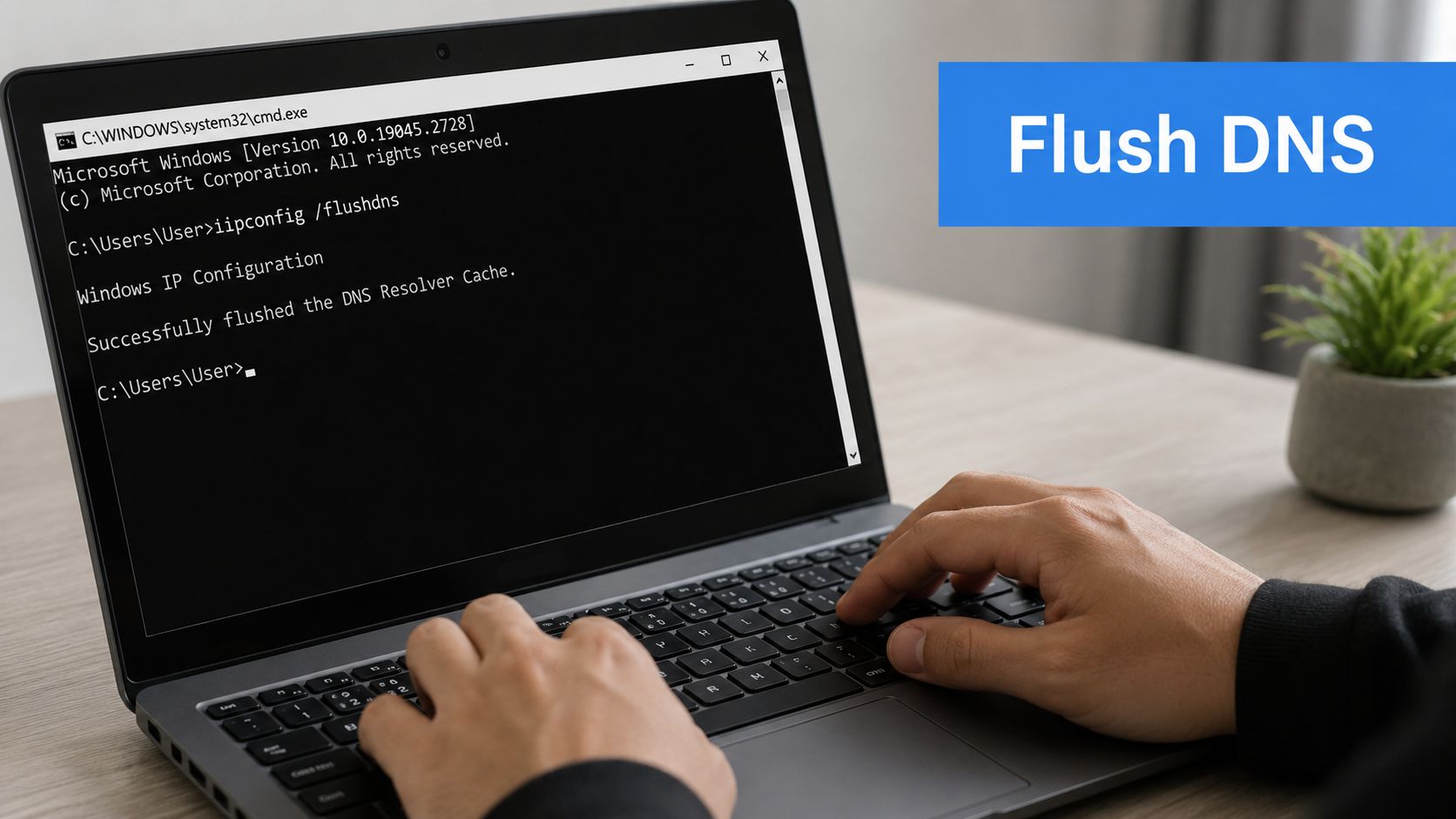
University and enterprise IT guidance consistently treats this as a normal troubleshooting step for name-resolution issues, and those same guides consistently require administrator-level access. They also document the PowerShell equivalent, which matters if your team is moving toward automation and remote administration, as shown in UCSD support guidance covering elevated DNS cache clearing workflows.
Use Command Prompt the right way
For the classic ipconfig clear DNS workflow on Windows:
- Open Command Prompt as Administrator.
- Run
ipconfig /flushdns. - Look for the success message "Successfully flushed the DNS Resolver Cache," which Microsoft shows in its support answer on performing a DNS flush in Windows.
- If your process calls for it, restart the machine afterward.
That last part matters in managed support. Some environments have enough moving parts that your best play is to flush, test, then restart if the result still looks inconsistent.
Use PowerShell when you want cleaner administration
If your tech stack leans modern, use the PowerShell equivalent:
Clear-DnsClientCache
That command is useful in scripts, remote sessions, and standardized support runbooks. If your team is already working on centralized endpoint control, this fits neatly beside your broader tooling strategy for device management software and endpoint standardization.
Here’s the bigger operational point. Don’t teach this command as a magic incantation. Teach it as one step inside a larger Windows repair flow.
- DNS issue suspected: Flush the cache first.
- Addressing looks wrong: Move on to
/releaseand/renewif your workflow supports it. - Stack feels broken: Consider the broader network repair path, including Winsock-related steps documented in standard support playbooks.
- Still broken after that: Stop treating it like DNS and start checking browser behavior, VPN routing, or local policy.
A good runbook saves more margin than a clever technician. Repeatable fixes are what scale.
Clearing DNS Cache on macOS and Linux
Your clients aren’t all on Windows. If your techs only know one command, they’re not managing an environment. They’re reacting to it.
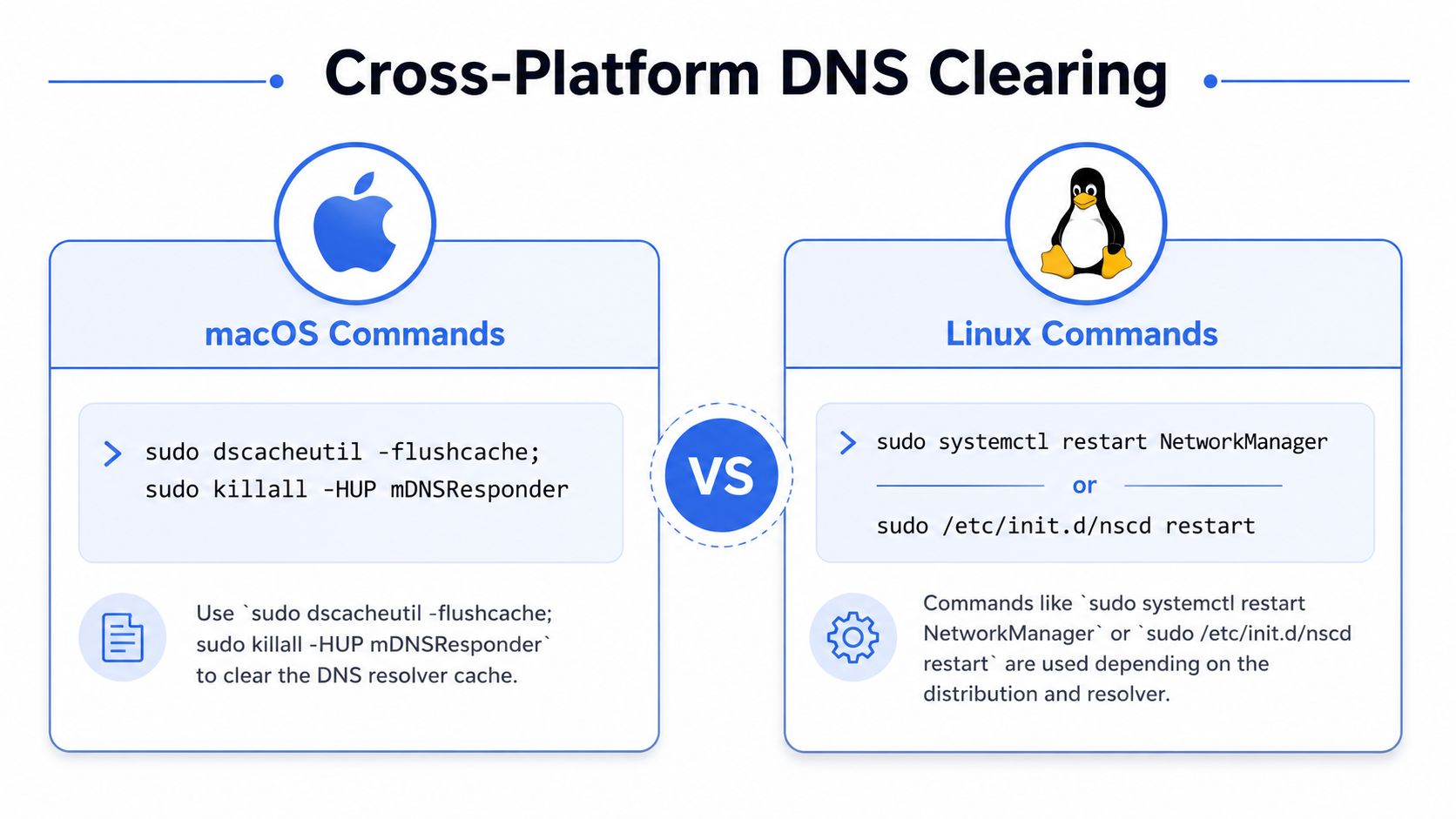
The important point is that Ipconfig clear DNS is a Windows phrase, not a universal one. Non-Windows systems use different mechanisms. macOS relies on mDNSResponder, while Linux may use systemd-resolved, nscd, dnsmasq, or BIND, as noted in this cross-platform DNS cache overview.
macOS needs its own commands
On macOS, the common approach is:
sudo dscacheutil -flushcachesudo killall -HUP mDNSResponder
That’s not just syntax trivia. It tells your team the resolver stack is different, so the troubleshooting path is different too.
Linux depends on the distro and resolver
Linux is more fragmented. Depending on what’s installed and active, your team may need to restart or clear the relevant caching service rather than mimic Windows behavior.
A few common patterns include service-level commands tied to systemd-resolved or nscd. If your client base includes Linux servers and developer workstations, your internal docs should map commands to the resolver in use. That’s one reason standardized Linux patch management and endpoint discipline matters so much. Consistency makes troubleshooting faster.
Cross-platform support gets expensive when every endpoint behaves differently and nobody documented why.
Enterprise DNS Management for MSPs
One user is easy. Fifty users with the same complaint is where process starts making money.
If your team is still walking techs through manual DNS cache clears one endpoint at a time, you’re burning labor on a task that should already be operationalized. Doing so allows an MSP to stop acting like a help desk and start acting like an IT partner.
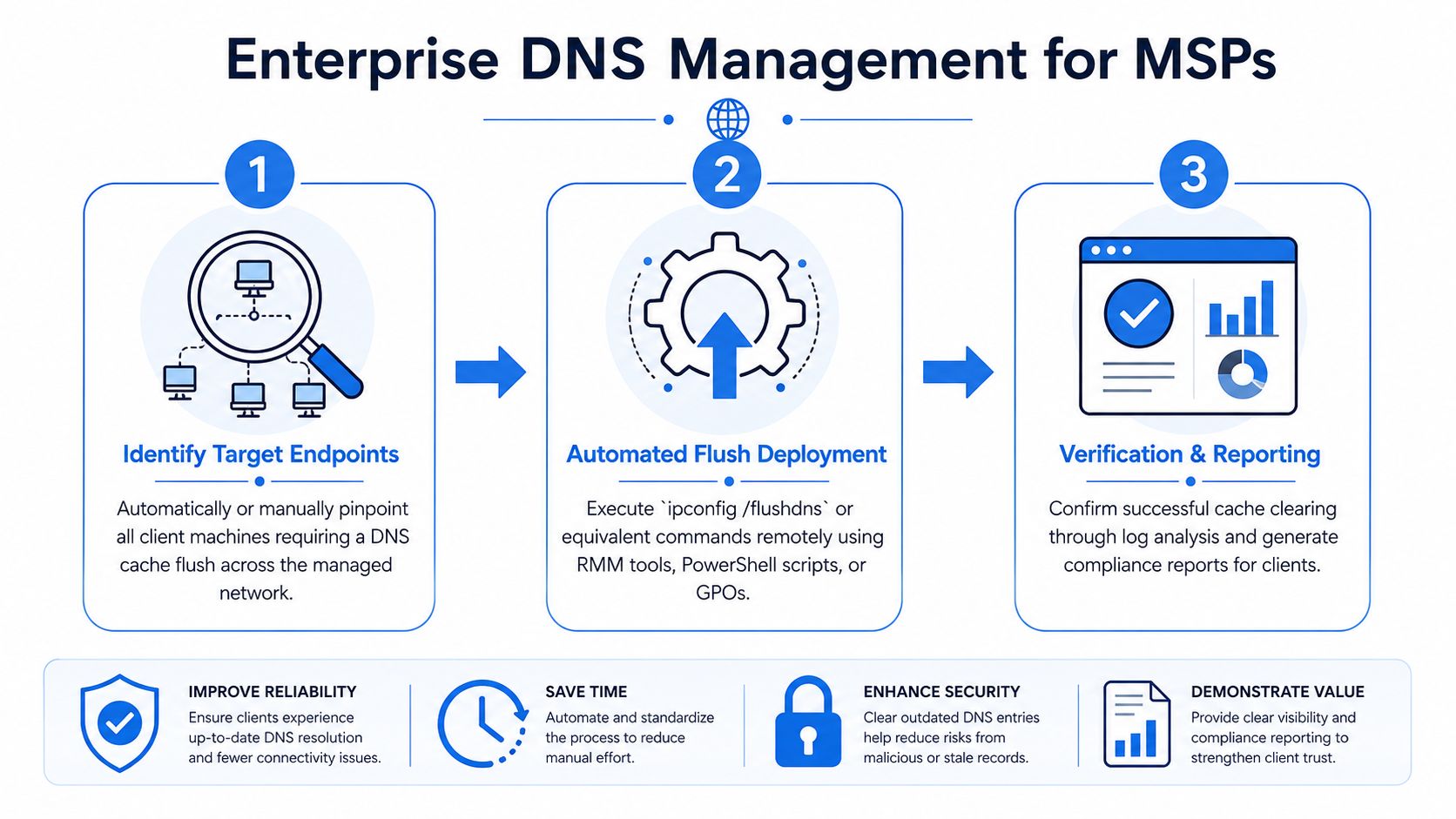
Start with targeting, not mass action
Don’t flush every machine because a few users complain. Identify the affected endpoints first. Look for common traits such as one office, one VPN profile, one browser, one user group, or one recently changed application.
That matters for both operations and compliance. In regulated environments tied to HIPAA, SOC 2, PCI DSS, or ISO 27001, a clean troubleshooting trail is better than blind changes. You want your team to show why they acted, what they changed, and which systems were touched.
Choose the remote method that fits your stack
You have several workable paths for enterprise execution:
- RMM scripting: Good for routine endpoint actions when your platform already supports scripted remediation.
- PowerShell Remoting: A solid choice when your Windows administration practices are mature and your engineers need more control.
- PsExec-style rapid response: Useful in some environments for one-off administrative fixes, though it needs tighter operational discipline.
- Group Policy or Intune: Best when you want policy-driven, repeatable behavior across fleets.
The business question isn’t “Can we run the command remotely?” Of course you can. The key question is whether the method fits your documentation, access model, audit requirements, and client expectations.
Build verification into the workflow
Remote execution without validation is just hope with admin rights. Your process should confirm the action succeeded and that the user’s issue changed afterward.
A useful internal workflow looks like this:
- Identify scope by user, site, device group, or application.
- Deploy the flush through your normal endpoint management channel.
- Retest resolution behavior with the affected app or service.
- Document the result inside the ticket.
- Escalate fast if the symptom persists, because the issue probably isn’t the local DNS cache.
The mature MSP move is simple. Automate the safe stuff, document the result, and escalate only when the evidence says you should.
That’s also where strategic security work begins to overlap with support. A vCISO or GRC advisor doesn’t need their engineers wasting cycles on repetitive manual fixes. They need an environment where recurring problems get classified, contained, and turned into policy.
When Flushing DNS Is Not the Answer
Many teams waste time with this approach. They treat ipconfig /flushdns like a cure-all, then wonder why the problem keeps coming back.
It won’t fix everything, and pretending otherwise is lazy troubleshooting. Microsoft’s own support discussion makes the scope clear. The effect is confined to the desktop where the command is run, and even frequent clearing is fine, which reinforces the point that this is a local symptom-handling step, not a full remediation plan, as discussed in Microsoft’s guidance on how often DNS cache may be cleared.
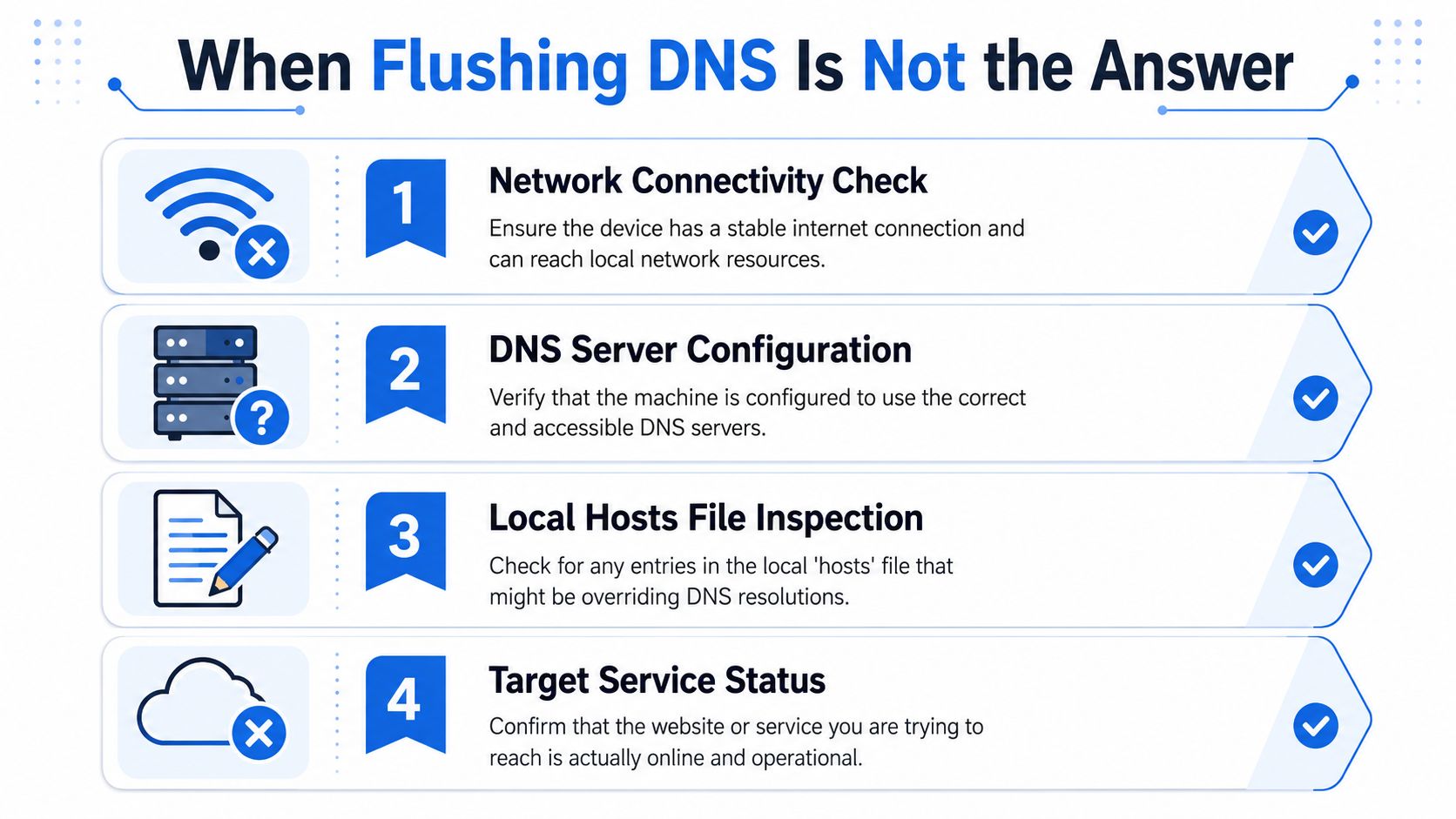
Problems this command won’t solve
A DNS flush won’t fix these root causes:
- DHCP issues: If the machine has bad lease information or adapter-level confusion, the cache isn’t your real problem.
- Browser state: Some browsers keep their own host cache and socket pools separate from the OS resolver.
- VPN split tunneling: Traffic may be resolving through a different path than your tech expects.
- Corrupted network stack: Winsock or deeper network components can break independently of DNS.
- Bad local overrides: A hosts file entry can beat DNS every time.
That’s why a broader network understanding matters. If your team needs a refresher on network boundaries and segmentation logic, this plain-English guide to defining a DMZ in networking is useful context.
What your team should do next
If flushing fails, stop repeating it. Move to diagnosis.
Check the basics first:
- Connectivity: Can the device reach anything else it should reach?
- Resolver path: Is it using the DNS server you expect?
- Application layer: Is the browser or app holding stale state?
- Target service: Is the service itself available?
Indiscriminate flushing is a workaround. Good technicians fix causes.
That distinction matters to MSP owners because repeated symptom-chasing kills margin. It also matters to vCISO and GRC teams because recurring “DNS issues” sometimes point to design problems, policy conflicts, or user-environment drift that deserve a proper risk assessment, not another command prompt session.
From DNS Fixes to Proactive Security
A DNS cache flush is reactive. Strong service delivery should become proactive fast.
DNS problems aren’t always innocent. Stale resolution, bad redirects, browser-layer confusion, and endpoint-specific behavior can all blur the line between routine support and a security concern. That’s where mature providers separate themselves. They don’t just clear the symptom. They test the environment, validate assumptions, and look for systemic weaknesses before they become incidents.
For MSPs, vCISOs, CPAs, and reseller partners, that’s the natural bridge into pentest, pen test, pentesting, penetration test, and penetration testing services. A proper review helps support SOC 2, HIPAA, PCI DSS, and ISO 27001 efforts while giving clients something more valuable than a quick fix. It gives them evidence. If you want affordable, manual pentesting delivered by OSCP, CEH, and CREST certified pentesters, with a white label pentesting model that won’t compete with your client relationships, a genuine opportunity presents itself.
Our white-labeled pentest delivery helps MSPs, vCISOs, GRC firms, and other channel partners sell affordable, manual pentest and penetration testing services under their own brand. If you want a channel-only partner for white label pentesting that supports compliance goals and helps you grow without adding delivery overhead, contact us today.

.avif)
.png)
.png)
.png)

