
A client needs “a place to store files,” but five minutes into discovery you find out they also want remote access, backups, role-based permissions, line-of-business apps, maybe a database, maybe QuickBooks, maybe an EMR, and maybe they want to satisfy SOC 2, HIPAA, or PCI DSS at the same time. That's when a simple hardware choice turns into a service-delivery decision.
For an MSP, the NAS vs Server question isn't just about storage. It affects support hours, project scope, security exposure, client satisfaction, and how easy it is to defend your recommendations during a compliance review or a future risk assessment. If you choose too small, the client outgrows it and blames you. If you choose too big, they feel oversold and start questioning every invoice.
The right answer is usually simple once you stop treating NAS and servers like interchangeable boxes.
Choosing the Right Storage for Your MSP Clients
A small law firm wants centralized document storage, secure sharing, and easy restores. A healthcare clinic wants file storage, but also needs an EMR app to run locally. A creative team wants fast shared storage for large media files and hates latency. Those are three different jobs, and pretending one platform fits all three creates avoidable support tickets.
A NAS is the cleaner fit when the client mainly needs shared file access, backups, and straightforward administration. A server makes sense when storage is only one piece of a larger stack that also includes applications, databases, identity services, or custom workflows.
Here's the business part many providers miss. The wrong choice raises your support burden. If you put a server where a NAS would've handled the job, you add complexity, patching effort, licensing questions, and more ways for the environment to drift. If you put a NAS where a server is needed, the client eventually pushes it beyond its role and your team ends up building awkward workarounds.
What MSP owners should optimize for
Use this lens before you touch a quote:
Decision FactorNASServerMain jobShared files and storageMulti-role IT workloadsAdmin effortLowerHigherFlexibilityLimited by designHighBest fitSimpler client environmentsComplex or growing environmentsSupport modelPredictableMore hands-onSecurity review needsStill importantCritical due to broader attack surface
That distinction is backed by a straightforward technical reality. A NAS is fundamentally a file-level storage appliance, while a server is a more general-purpose system that can host websites, run applications, and manage databases, as described in this NAS versus server comparison guide.
Practical rule: If the client's real requirement is “shared files with simple management,” sell the simple thing. If the requirement is “shared files plus business workloads,” stop calling it a storage project and design it like infrastructure.
This is also where compliance starts to matter. A client pursuing SOC 2 or HIPAA usually doesn't just need storage. They need access control, logging, segmentation, tested recovery, and proof that the system wasn't left exposed through weak configuration. Even basic infrastructure choices can affect later migration work, partitioning standards, and operational discipline. If you're already thinking about platform structure, it's worth reviewing adjacent deployment choices like GPT vs MBR partitioning in business systems.
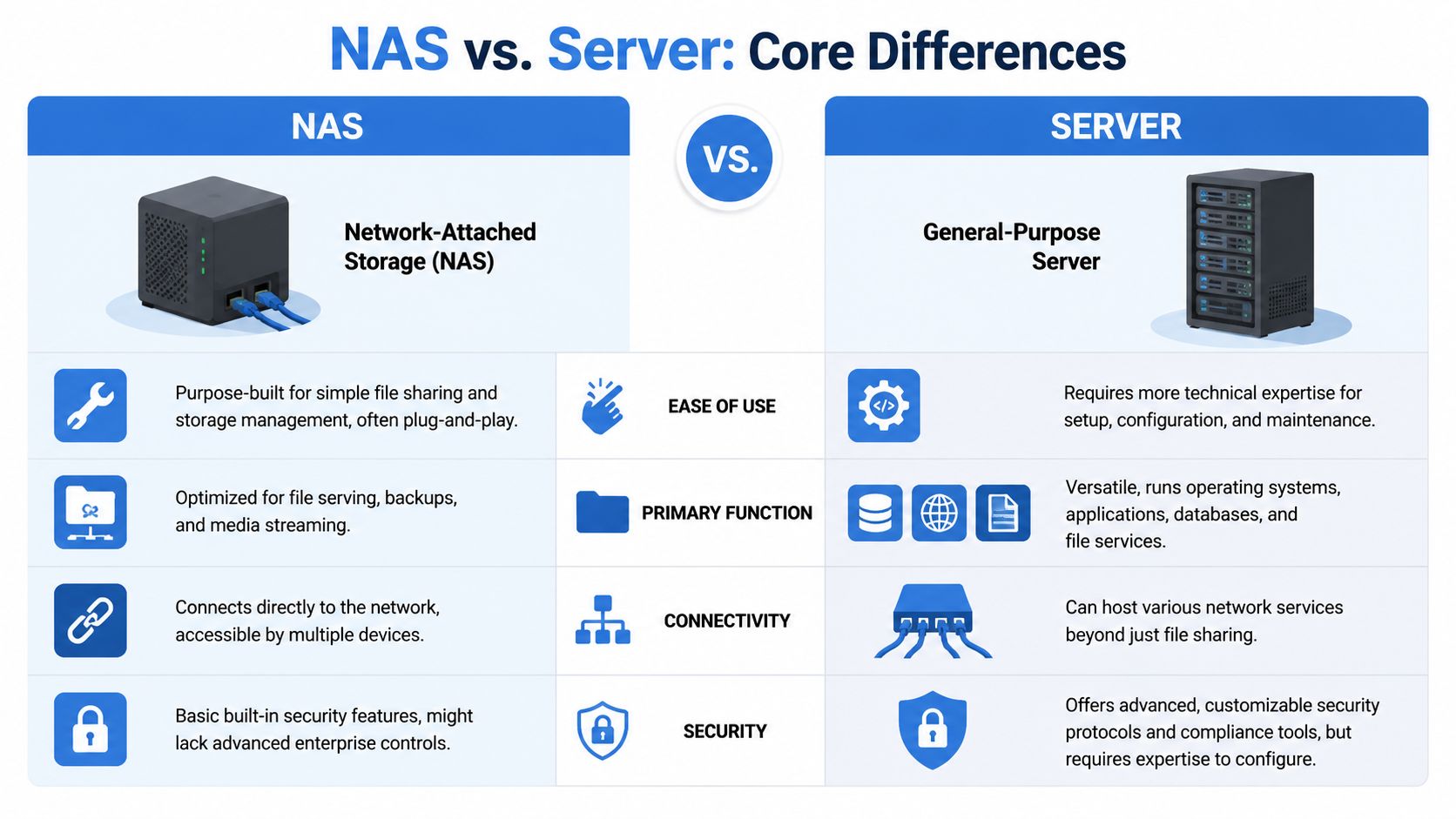
Understanding Core Differences Between NAS and Servers
A lot of buyers confuse these because both can store files on a network. That's where the similarity ends.
A NAS is a specialized tool. It functions as a purpose-built filing cabinet with a lock, drawers, and labels. It's designed to do one job well. Store files, share them across the network, and keep administration relatively simple.
A server is a workshop. You can use it for file sharing, but that's only one option. It can also run web services, databases, line-of-business applications, directory services, and custom workloads. That flexibility is the selling point, but it also creates more room for bad design and weak security.
Where NAS wins
Most MSPs should default to NAS when the client's problem is narrow and clear.
- Shared storage first: NAS is built for file-level storage and sharing.
- Simpler setup: It usually takes less effort to deploy and manage.
- Lower maintenance: Fewer moving parts means fewer surprises.
- Cleaner handoff: Clients understand what it does, which reduces expectation creep.
That same industry comparison noted above also points out why teams lean this way in practice. NAS is optimized for shared storage and simple administration, while servers are built for broader workloads and higher customization.
Where servers win
Servers are the right answer when the client needs room to build.
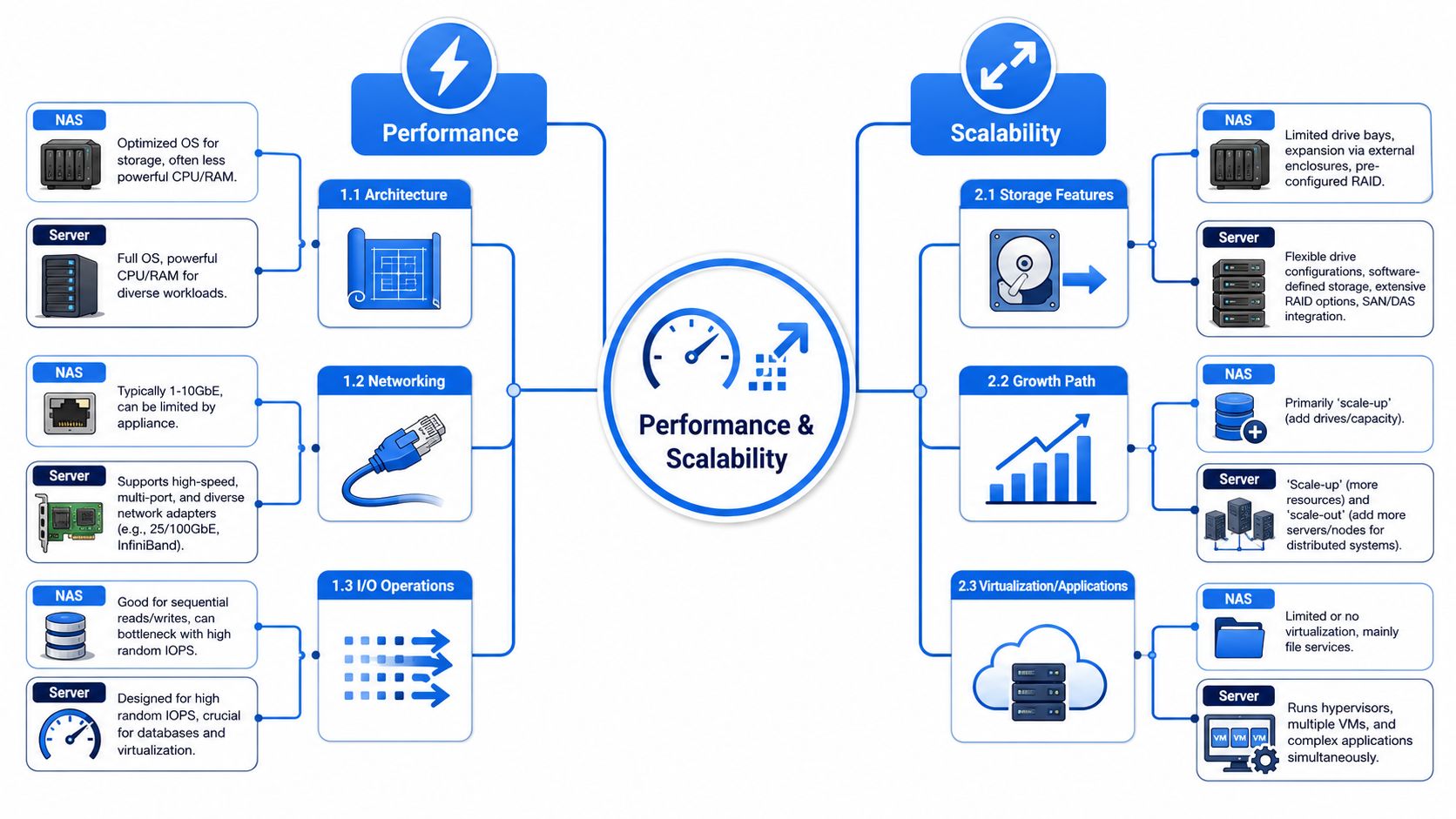
A separate technical comparison explains that NAS devices typically have lower RAM ceilings, less powerful processors, and simpler management, while servers support more customization, higher scalability, and stronger performance, including faster CPUs, more RAM, multiple high-speed NICs, and hardware RAID for demanding environments, according to this NAS vs server technical breakdown.
If the client says, “We might run apps on it later,” take that seriously. “Later” becomes “right now” faster than most project scopes account for.
The real-world MSP takeaway
Don't frame this as old tech versus advanced tech. That's the wrong conversation.
Frame it as specialized appliance versus general-purpose platform. One reduces complexity by limiting scope. The other creates options by increasing scope. For client service, that's the trade-off you need to explain in plain English.
A Technical Deep Dive on Performance and Scalability
Performance is where sloppy recommendations get exposed.
If users are opening office docs, scanning PDFs, and restoring folders, a NAS can feel perfectly fast. If they're hitting databases, heavy virtualization, or sustained multi-user workloads, the ceiling appears quickly. That's not a flaw. It's a design boundary.
Networking limits shape the answer
The easiest way to explain the gap is through connectivity. Mainstream NAS connectivity commonly ranges from 1GbE to 10GbE, with higher-end models reaching 25GbE or even 40GbE, while enterprise storage environments often use 16 Gb/s to 32 Gb/s Fibre Channel, with newer standards reaching 128 Gb/s, according to Backblaze's NAS vs SAN comparison.
That matters because a file-sharing appliance and an enterprise storage architecture are not playing the same game. One is built for collaborative access and backups. The other is built for lower-latency, higher-throughput workloads where delays hurt the application itself.
Don't use a server OS as a lazy NAS replacement
Some MSPs assume a Windows Server box can always stand in for a NAS with better results. That's not automatically true.
In a benchmark of Windows Server-based NAS file analysis, Windows Server 2022 reached up to 12,600 Files/Sec with a single disk-space analysis thread while Windows Server 2025 reached 9,500 Files/Sec, a 30% drop. At 8 parallel threads, the numbers were 75,600 vs. 74,400 Files/Sec, or about 1.5% lower on Server 2025. The same test showed higher CPU usage on Server 2025, including 20.6% vs. 16.8% CPU at 8 threads, in this Windows Server NAS performance benchmark.
That doesn't mean “servers are bad.” It means using a general-purpose platform for a narrow storage job can bring extra overhead.
What to tell clients who want room to grow
Use this simple framework:
- Choose NAS when growth means more files, more shared folders, and more backup capacity.
- Choose Server when growth means more applications, more users hitting services at once, or tighter performance expectations.
- Choose hybrid when the client needs both clean file storage and separate compute for apps or databases.
For MSP engineering teams, this is also where architecture discipline matters. A good deployment isn't just hardware selection. It's network layout, access paths, service separation, and failure planning. If your client environments are getting more layered, a network architecture review for MSP environments can expose design issues before they show up as outages or audit findings.
Mapping Security and Compliance to Your Choice
Most "NAS vs Server" articles go soft. They talk speeds and feeds, then barely touch risk.
That's a mistake. A cheap NAS with weak credentials and broad file shares can create real exposure. A badly configured server can be worse because it often runs more services, exposes more management paths, and carries more privilege. Neither option is secure because of the label on the chassis.

Common risk patterns MSPs keep seeing
A NAS usually gets into trouble through simplicity. Teams leave default settings in place, over-permission file shares, expose remote management carelessly, or treat it like an appliance that never needs review.
Servers usually fail in the opposite direction. They accumulate roles, stale services, legacy accounts, and inconsistent hardening. Once that happens, nobody's sure whether the box is just a file server, an application host, an admin utility node, or all three.
Compliance reviewers don't care that the deployment started simple. They care what exists today, who can access it, and whether you can prove the controls work.
Why compliance changes the conversation
If your client is working toward SOC 2, HIPAA, PCI DSS, or ISO 27001, your recommendation has to survive more than a performance discussion. It has to support access control, segmentation, monitoring, and evidence collection. A platform that's easy to deploy but hard to validate can create headaches later.
That's why manual pentesting matters for both choices. A proper pentest, pen test, penetration test, or penetration testing engagement validates what configuration reviews often miss. It shows whether exposed services, weak authentication, privilege paths, or trust relationships can be abused within an operational environment.
What strong validation looks like
For MSPs, vCISOs, and GRC partners, the best approach is practical:
- After deployment: Validate the exposed attack surface and access paths.
- Before an audit: Confirm the environment behaves the way policy says it should.
- After major changes: Retest when storage, authentication, or remote access workflows change.
- For white label delivery: Bundle the security review with the infrastructure rollout under your own brand.
The quality of the testing team matters too. You want experienced testers doing manual pentesting, not a scanner-only exercise dressed up as assurance. Teams with OSCP, CEH, and CREST backgrounds are easier to position in front of compliance-minded buyers because they understand how to test controls, not just enumerate findings. If your clients are preparing for attestation work, this SOC 2 audit requirements overview is useful context for framing infrastructure decisions before evidence collection starts.
Breaking Down Costs and Licensing for Resellers
A client asks for “just a file server,” your engineer prices a Windows box, your account manager adds Microsoft licensing, and the deal suddenly looks bloated next to a NAS quote. That gap matters. It affects close rates, margins, and how much support debt you inherit after the install.
NAS usually wins on price clarity. You buy the appliance, size the drives, define the backup plan, and attach a support contract. The licensing story is simpler too. In many SMB cases, that makes NAS easier to package, easier to approve, and easier for your help desk to support profitably.
Servers cost more because the bill rarely stops at hardware. You are also pricing Windows Server licensing, possible CAL requirements, virtualization decisions, backup agents, monitoring, patching, and more engineering time. Microsoft lays out the core-based licensing model for Windows Server in its Windows Server licensing guide. For a reseller, that means quoting errors get expensive fast.
A key margin question is operational load.
A NAS can protect margin when the client needs shared storage, backups, and controlled access without application hosting. You can standardize deployment. You can keep documentation cleaner. You can train junior technicians to handle a larger share of routine support. That lowers delivery cost and keeps ticket volume more predictable.
A server creates more revenue opportunities, but only if you sell and manage it with discipline. You can bill for design, migration, hardening, role configuration, patch management, and lifecycle work. You can also trap your team in low-margin support if the client only needed file storage and you sold a general-purpose server anyway.
That is the reseller mistake to avoid.
If the client needs line-of-business apps, database services, identity roles, or tighter control over custom workloads, sell the server and price the ongoing management properly. If they need reliable file sharing and backups, sell the NAS and keep the environment simple.
Licensing also changes the compliance conversation. A server often brings more policy scope, more patch governance, and more evidence to collect for SOC 2 or HIPAA reviews because there are more configurable components in play. A NAS can reduce that burden, but only if access control, remote administration, and backup handling are configured correctly.
Your proposal should reflect that reality:
- NAS package: appliance, storage design, backup setup, access control review, vendor support, and replacement planning
- Server package: hardware or virtual host, OS licensing, hardening, role-based configuration, backup, monitoring, patching, and documented administration
- Hybrid package: NAS for shared storage, server for applications or regulated workloads, with clear ownership of each layer
Do not sell hardware as the product. Sell lower support overhead, cleaner compliance scope, or application capability, depending on the client's needs.
Then protect the deal with security testing. Whether you deploy NAS, server, or hybrid, white-label pentesting gives MSPs a high-margin follow-on service and gives clients proof that the environment holds up under real attack paths. That matters to buyers under SOC 2 or HIPAA pressure, and it gives your firm a stronger story than “we installed the box correctly.”
Decision Matrix for Common MSP Client Use Cases
You don't need a philosophical answer. You need a fast recommendation your sales and engineering teams can use consistently.
Here's the matrix I'd hand to any MSP owner who's tired of overbuilding simple clients and underbuilding demanding ones.
MSP client scenario decision matrix
Client Use CasePrimary NeedRecommended SolutionSecurity ActionSmall law firmSecure document sharing and simple restoresNASReview permissions, remote access exposure, and run a penetration test before calling it audit-readyCreative agencyFast shared storage for large files and team collaborationNAS or hybridTest access controls, segmentation, and any exposed sync or remote workflowsHealthcare clinicFile storage plus EMR or other business application needsServer or hybridValidate authentication paths, sensitive data access, and support HIPAA control verification with manual pentestingCPA firmControlled file sharing with compliance pressure and partner accessNAS if app hosting isn't neededPerform a pen test focused on permissions, external access, and misconfiguration riskGrowing multi-site businessShared storage today, likely app or database workloads laterServer or hybridTest trust boundaries, remote management, and change the scope as the environment expandsvCISO-led compliance projectInfrastructure that supports evidence, control maturity, and least privilegeDepends on workload, not preferenceUse penetration testing to validate the control design before audit windows open
Clear recommendations without the fluff
If the client mainly needs shared files, backups, and simple administration, recommend NAS.
If the client needs storage plus applications, databases, or a serious growth path, recommend a server.
If the client wants both simplicity for storage and flexibility for workloads, recommend a hybrid design and keep those roles separate.
The part that shouldn't be optional is validation. Whatever you deploy, don't trust assumptions. Verify the environment with thorough pentesting so your client gets more than a box and a login. They get evidence that the deployment stands up to attack paths that matter in practical scenarios.
If you want a channel-only partner for white label pentesting, we let you sell pentests under your own brand and help MSPs, vCISOs, GRC firms, and resellers deliver affordable, fast, manual pentests without competing for the client relationship. Our team includes OSCP, CEH, and CREST certified pentesters, and we support internal, external, web app, cloud, mobile, physical, and social engineering engagements. If you need a pentest, pen test, penetration test, or full penetration testing partner that fits your brand and your delivery model, contact us today.

.avif)
.png)
.png)
.png)

