
Your client sends over a security questionnaire on a Friday afternoon. They need a penetration test for a deal, a renewal, or a compliance review. They want answers fast, and they expect their MSP, vCISO, or reseller partner to have a plan.
If your answer is slow, vague, or outsourced with no process behind it, you create an opening for someone else to take the account. That is how good clients drift away. Not because your support was bad, but because another firm sounded more ready on security.
An owasp zap automated scan gives you a practical first move. It is not a full pen test. It is not a replacement for manual pentesting. It is a fast way to identify visible web risk, show initiative, and create a reason to talk about a real penetration test.
Why Your MSP Needs Automated Scanning Now
The biggest mistake MSPs make with penetration testing is waiting until a client demands a full engagement. By then, the timeline is tight, the budget conversation is awkward, and the client is already comparing vendors.
A better approach is simpler. Run an OWASP ZAP automated scan early, use the results as a starter risk assessment, and show the client you are already thinking about SOC 2, HIPAA, PCI DSS, and ISO 27001 exposure before they ask.

OWASP ZAP now receives over 4 million "Check for Updates" calls per month, which shows how widely teams use it as a baseline web application scanner in real environments, according to Jit's overview of OWASP ZAP automation.
What this does for client relationships
You are not selling a dashboard. You are selling clarity.
When a client asks for help with a security requirement, an automated scan helps you:
- Respond fast: You can start with a baseline review instead of stalling the conversation.
- Show visible risk: Missing headers, exposed paths, and obvious web issues are easy for clients to understand.
- Create urgency: A scan report gives the client something concrete to react to.
- Open the door to deeper work: Once the client sees findings, it becomes easier to explain why a real penetration test matters.
Tip: Treat the scan report as a conversation tool, not the final deliverable. The goal is to move from "we checked" to "we need to test this properly."
Why automation fits the MSP model
MSPs win on repeatability. ZAP fits that model because it supports both passive scans and active scans. Passive scans review HTTP requests and responses without changing anything. Active scans inject attack traffic to uncover issues passive review can miss, as described in the earlier Jit resource.
That split matters. Passive scanning is a safe first touch. Active scanning is where you start finding more meaningful technical issues, but it also requires better judgment.
If you are building a white label pentesting motion, start with repeatable scanning and a standard review process. If you need a practical framework for that service packaging, this guide on automated penetration testing is a useful place to shape the client offer.
Getting Started with ZAP Using Docker and CLI
Most MSPs do not need a complicated install. They need a quick win. Docker gives you that.
ZAP was released in 2010, and it has over 80 integrated active scanner rules and passive checks, making it a strong fit for repeatable baseline assessments, according to HackerOne's ZAP capability overview.

Start with a passive baseline
If this is your first client run, do not jump straight into aggressive testing. Start with a passive scan against a staging app or approved target.
A simple Docker-based baseline workflow looks like this:
- Pull the ZAP container
- Point it at a client-approved URL
- Generate an HTML or JSON report
- Review findings before sharing anything externally
If you prefer a CLI-driven workflow, ZAP supports report generation with commands such as zap-cli report -o zap_report.json, as noted in the HackerOne resource above. That matters because headless execution is what makes scanning operational for an MSP, vCISO, or GRC advisor.
Keep your first workflow simple
Use this operating model instead of overengineering it:
- Use Docker for consistency: Your team gets the same scanner behavior across laptops and servers.
- Use passive review first: This reduces risk when you are learning the target application.
- Save reports in standard formats: HTML is easy for humans. JSON is easier if you want to process findings later.
- Scope every target in writing: Get approval before active testing. No shortcuts.
A first-pass sequence often includes the spider, then the report step. The spider helps ZAP discover reachable pages before deeper testing starts. That improves coverage without making your process messy.
Where MSPs usually get this wrong
They run a tool and forward the raw report.
That is lazy, and clients can tell. A raw report without interpretation creates confusion, not trust. You need a short summary in plain English that says what matters, what does not, and what needs a real pen test.
Use a review checklist like this before sending anything:
| Review item | Why it matters |
|---|---|
| Target confirmed | Prevents scanning the wrong environment |
| Login requirements checked | Stops false confidence from scanning only public pages |
| Report format selected | Makes delivery easier for technical and non-technical readers |
| Findings triaged | Removes obvious noise before the client sees it |
Practical advice: A good first scan should lead to a short client meeting. Do not email the report and disappear. Walk them through it.
Build a white label motion early
Revenue starts here. Your reseller model becomes more valuable when you can give clients something tangible within a short window, then position a manual penetration testing engagement as the next step.
Automation gets attention. Human testing closes the sale.
Automating Scans in Jenkins and GitHub Actions
One-off scans are useful. Embedded scans are better.
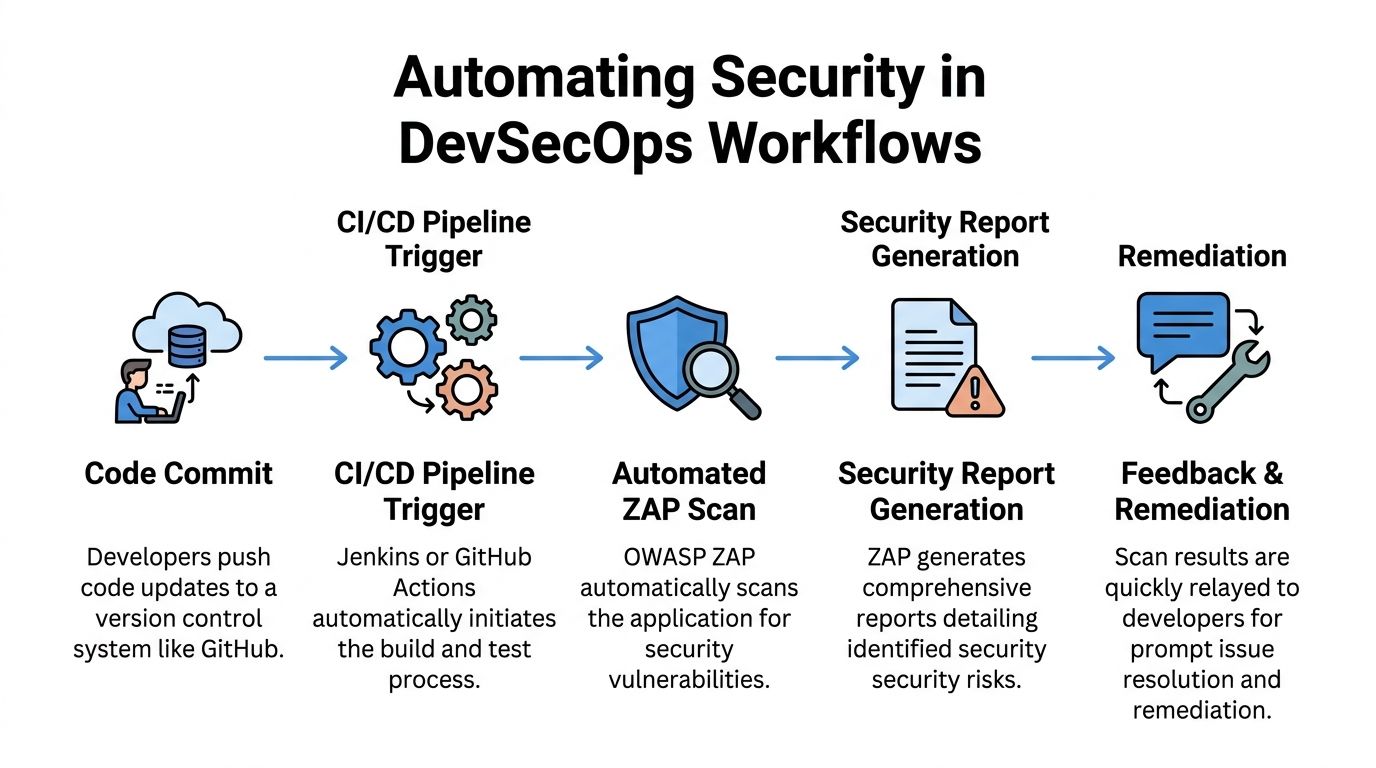
If your client has developers, release cycles, or even a basic deployment workflow, you should push for automated scanning in CI/CD. That changes the conversation from annual compliance theater to continuous security hygiene.
Why CI matters to your offer
When you help a client run an owasp zap automated scan on code push or before release, you become harder to replace. You are no longer just patching systems after the fact. You are helping shape how risk gets caught before production.
That matters for clients working through PCI DSS, ISO 27001, or broader compliance programs. It also matters for software buyers who now expect evidence of security controls.
If your clients need a plain-English primer on the bigger workflow, this overview of DevOps and continuous delivery gives useful context around why pipeline automation matters.
A simple Jenkins pattern
The Jenkins version is straightforward. Run ZAP in Docker, point it at a staging target, save the report as a build artifact, and notify the team if the run needs review.
A practical sequence looks like this:
- Prepare a staging app
- Launch ZAP container
- Run baseline or full scan
- Store report output
- Review findings before release
For teams handling authenticated areas, ZAP keeps authentication-related stats such as stats.auth.success, which can help detect session loss during CI/CD scanning, according to the ZAP documentation on target scanning issues. That same source notes SQL Injection benchmarking where ZAP showed a True Positive Rate of 58.09%, which is exactly why you should not pretend automation alone is enough.
A practical GitHub Actions approach
GitHub Actions gives smaller teams a cleaner on-ramp. The pattern is similar.
Use a workflow that:
- Deploys or points to staging
- Runs a baseline scan on push
- Stores HTML or JSON artifacts
- Flags results for review
- Schedules deeper scans separately
Do not run aggressive active scans against production just because the workflow makes it easy. Automation can make bad decisions faster.
Key takeaway: In CI/CD, the best use of ZAP is early detection and repeatability. The moment a finding looks real or high impact, a human should take over.
What to monitor besides findings
Teams often only look at alerts. That is incomplete.
You should also watch whether the scan stayed authenticated, whether the spider covered the expected app areas, and whether the target behaved normally during the run. A "clean" report is worthless if the scanner lost session state halfway through.
For vCISO and GRC engagements, that distinction matters. A weak scan can give false assurance, and false assurance is worse than a visible issue.
Making Sense of ZAP Scan Policies and Reports
The report is where many MSPs lose credibility. They collect data, then fail to translate it into business risk.
A client does not care that a rule fired. They care whether the issue could affect customer data, a compliance audit, or a sales deal. Your job is to convert scanner output into a useful story.

What deserves attention first
Not every alert matters equally. Some findings are low-risk hygiene issues. Others can point to exploitable weaknesses.
In specific WAVSEP benchmarking tests, ZAP achieved 100% precision for both SQL Injection and XSS vulnerabilities, with 0% false positive rates in those tests, according to this benchmarking paper. That does not mean every alert in every environment is perfect. It does mean some vulnerability classes deserve serious attention when they appear.
Use a triage model like this:
| Finding type | How to treat it |
|---|---|
| Authentication and session issues | Review quickly because they can affect protected data exposure |
| SQL Injection and XSS alerts | Escalate for analyst review, especially when evidence is strong |
| Header and configuration findings | Group for remediation planning and compliance cleanup |
| Informational noise | Keep for context, but do not lead the client conversation with it |
Use scan policies to reduce noise
This is one of the most useful ZAP features and one of the most ignored.
A scan policy lets you tune what ZAP emphasizes. That matters because a healthcare client dealing with HIPAA may need one style of review, while a SaaS client pursuing SOC 2 or ISO 27001 may need another. The tool can support that, but only if you stop treating every target the same.
A better approach:
- Tune for app type: Public brochure site, customer portal, and API should not share the same assumptions.
- Tune for client goal: Compliance prep is different from exploit validation.
- Tune for risk tolerance: Fragile apps need a lighter touch before deeper testing.
What clients should see
Never dump every alert into an email. Give them a short executive summary with three parts:
- What was tested
- What appears risky
- What requires manual validation
That final point is where you separate an automated scan from a real penetration testing engagement. If you need a cleaner structure for presenting that story, this penetration testing report template is useful for shaping findings into something a buyer, auditor, or compliance contact can understand.
Expert advice: Your value is not the scanner. Your value is knowing which findings deserve action and which findings deserve skepticism.
When Automated Scans Are Not Enough
An automated scan is not a penetration test. Say that clearly to every client.
Tools are good at repetition. People are good at judgment. Security failures usually happen where judgment matters most.
What automation misses
ZAP can find common web issues. It cannot think like an attacker with patience, context, and a goal.
It will not reliably catch the kind of problems that often matter most in real engagements:
- Business logic flaws: Abuse of workflows, approvals, pricing, or account actions
- Multi-step attack paths: Chaining small issues into a serious breach
- Privilege problems: Testing whether one user can reach another user's data in subtle ways
- Context-specific abuse: Features that are "working as designed" but still dangerous.
Manual pentesting earns its keep in these situations. A skilled tester asks different questions, follows weird edge cases, and keeps pushing after the easy checks are done.
Real-world scan failures are common
Automation also breaks in boring ways. That matters more than most vendors admit.
A key issue in real ZAP use is handling target failures and connection drops. ZAP can keep attacking known endpoints even after connectivity problems start, which can leave you with an incomplete or misleading result, as discussed in this video covering OWASP ZAP usage challenges.
That is not a niche problem. It is common in fragile staging environments, older client apps, and systems with touchy session handling.
The business case for manual validation
When a client asks for a pen test, they are usually asking for confidence, not just scanner output. They want to know whether someone with real offensive skill looked for what a tool would miss.
That is where certified testers matter. OSCP, CEH, and CREST credentials signal that the work goes beyond clicking "run scan." For MSPs and resellers, that is the high-value upsell.
Use this line internally with your team: automated scanning starts the conversation, manual penetration testing wins the trust.
A smart service ladder looks like this:
| Stage | What the client gets |
|---|---|
| Automated scan | Fast visibility and an entry-level risk discussion |
| Analyst review | Triage, validation, and business context |
| Manual pentest | Real attack simulation and deeper finding quality |
| Retest and reporting | Proof of remediation for compliance and procurement |
Turn Security Assessments into a Revenue Stream
This is the commercial play. Run an owasp zap automated scan as the fast front end. Use the findings to create urgency. Then move qualified clients into manual pentesting, remediation guidance, and repeat testing.
That model works because it matches how buyers behave. Many clients are not ready to buy a full penetration test cold. They are ready to respond to visible risk, looming compliance pressure, or a customer asking tough questions.
Build the offer around progression
Start with a simple package your team can explain in one minute:
- Baseline scan: Fast review for public-facing web assets
- Advisory call: Translate findings into business and compliance language
- Manual penetration testing option: For clients that need proof, depth, or audit support
- Retest path: Close the loop after remediation
This is especially useful for GRC firms, vCISO practices, CPAs supporting compliance work, and any reseller that wants to keep the client relationship without building a full in-house offensive security team.
Use compliance as the trigger
Clients rarely wake up wanting a scanner. They want to pass a review, answer a prospect, or reduce risk before it becomes expensive.
That is why terms like SOC 2, HIPAA, PCI DSS, and ISO 27001 should be part of your sales language. Not as scare tactics. As buying triggers.
If you want a non-vendor explanation you can share with clients about why penetration testing services matter in the first place, this write-up on penetration testing services gives a simple business case.
Margin comes from owning the full path. Scan first. Advise second. Sell the manual pen test when the client is ready. Keep the relationship under your brand with a channel-first model. For partners shaping that kind of offer, this guide on pentesting for the channel is worth reviewing.
Do not let another security firm use your client’s compliance panic as their sales opportunity. Be the one who shows up first with a clear answer.
If you want a channel-only partner for affordable, fast, white labeled pentest, pen testing, and penetration testing services, talk to us about pentesting you can sell as your own. Our OSCP, CEH, and CREST certified pentesters help MSPs, vCISOs, GRC firms, and resellers deliver manual pentesting under their own brand, with reports delivered within the week. Contact us today.

.avif)
.png)
.png)
.png)

