
A client calls after a ransomware event. Their server is down, staff can't work, and the backup job says it completed. Then you find out the restore point is too old, the backup share isn't reachable, or nobody documented how to bring the server back fast.
That isn't a backup problem. It's a trust problem.
If you're an MSP, vCISO, reseller, CPA firm with advisory clients, or a GRC partner, backup for Windows Server shouldn't sit in the "basic IT maintenance" bucket. It should be packaged as a business continuity service with recovery targets, reporting, testing, and compliance evidence. That's how you protect retention, raise margins, and stop selling backups like cheap storage.
Why Your Clients Need More Than Just Backups
Clients don't buy backup because they love backup. They buy it because they need to stay in business when something breaks, gets encrypted, or gets deleted. If your service only creates copies of data, you're selling a partial control.
For regulated clients, that's not enough. A client dealing with SOC 2, HIPAA, PCI DSS, or ISO 27001 needs more than a checkbox that says "backup enabled." They need a documented recovery process, a defensible retention policy, and proof that recovery is proven.
Backup Failure Becomes a Business Failure
When recovery drags, the client doesn't care whether the issue came from storage, scheduling, credentials, or a bad handoff between teams. They see downtime, missed revenue, angry staff, and an MSP that didn't protect them the way they expected.
That creates a simple rule for service providers.
Practical rule: Don't sell backup jobs. Sell recoverability.
This is also where client conversations get better. Instead of talking about gigs, agents, and destinations, talk about what matters to the owner or controller:
- Revenue impact: What happens if the line-of-business server is gone for a day?
- Operational impact: Which users stop working first?
- Compliance impact: What evidence will an auditor ask for?
- Reputation impact: How will the client explain a failed restore to their customers?
That shift moves you out of the commodity MSP lane.
Compliance Clients Expect Proof
Most clients don't understand backup architecture, but they understand risk. A medical practice understands patient access. A CPA firm understands records retention. A manufacturer understands that one dead application server can freeze the floor.
If you already advise on ransomware controls, your backup service should fit into the same conversation as endpoint hardening, MFA, user awareness, and recovery planning. A good refresher on ransomware prevention best practices helps frame backups as one layer of resilience, not the whole story.
Here's the blunt version. If your client gets hit and the restore doesn't work, they won't remember how low your monthly price was.
What MSPs Should Package Instead
A strong Windows Server backup offering should include more than software and storage. It should include:
- Defined recovery expectations: Put business-aligned recovery goals in writing.
- Operational ownership: Name who monitors jobs, who handles failures, and who runs restore tests.
- Audit-ready evidence: Keep reports, test notes, and retention settings organized.
- Service tiers: Give clients a basic option, a managed option, and a compliance-focused option.
That structure makes the service easier to sell and easier to renew. It also creates a natural path into higher-value security work later, because once clients trust you with recovery, they're more open to risk assessment, governance work, and penetration testing.
Choosing Your Windows Server Backup Architecture
A bad backup architecture kills margin. Your team burns hours on exceptions, storage cleanups, and slow restores, and the client still assumes backup is "handled" until an outage proves otherwise. Standardize the architecture first. Then sell the service around it.
On-Premises Backup Fits Control-Heavy Clients
Some clients still want backups to stay close to the server. You will see this with firms that distrust cloud storage, have weak connectivity, or face strict internal rules about data handling.
What works well here
- Fast local restores: Better for large server recoveries and routine file restores.
- Direct control: Useful for clients that care where backup media physically resides.
- Simple explanation: Some stakeholders trust hardware they can point to in a rack.
What gets ugly
- Single-site risk: Fire, theft, hardware failure, or ransomware can impact production and backup systems in the same event.
- Scaling costs: Every capacity increase becomes a hardware conversation.
- Higher support load: Your team inherits more hands-on maintenance across more locations.
Use on-prem backup only when the client has a real reason for it. As an MSP standard, local-only backup is hard to defend and harder to scale.
Cloud Backup Is Easier to Operate
Cloud-first designs are easier to manage across a client base. You avoid one-off hardware decisions at every office, and offsite protection is built in from day one.
Why MSPs like it
- Centralized administration: Better fit for multi-tenant operations.
- Cleaner disaster recovery posture: The backup copy is already offsite.
- Simpler expansion: Storage growth does not turn into a procurement project.
What you need to watch
- Slower large restores: Recovery can drag if the client needs a full server back quickly.
- Bandwidth constraints: Weak links turn recovery targets into missed promises.
- Data location concerns: Some clients care about residency, custody, and access control.
Cloud-first works well for many SMB accounts. It does not solve every recovery problem by itself.
Hybrid Backup Is the MSP Default
Most MSPs should build around hybrid architecture. Keep a local copy for fast restores. Keep an offsite copy for disaster recovery, ransomware resilience, and auditability. That model is easier to sell, easier to justify during renewals, and easier to map to compliance expectations tied to recovery evidence.
The design work is straightforward. Identify the Windows Server workloads that matter most, decide which systems need image-based protection versus file-level recovery, and set backup job types based on change rate and recovery goals. Then make sure at least one copy is isolated from the production site.
That shift improves client conversations. You stop selling "backup storage" and start selling a recovery program the client can defend to leadership, auditors, and cyber insurers.
Hybrid gives you the strongest mix of restore speed, offsite protection, and service consistency across client environments.
How To Choose by Client Type
Use this table during scoping and keep the recommendation tied to business risk, not tool preference:
Client situationBest fitWhySmall office with weak internetOn-prem or hybridFaster restores and less dependence on limited bandwidthCompliance-heavy clientHybridBetter balance of local recovery, offsite protection, and audit supportMulti-site client with limited local ITCloud or hybridEasier centralized operations across locationsHyper-V-heavy environmentHybridBetter recovery flexibility for host and guest failures
One operational detail gets missed too often. Recovery design can fall apart if the target system uses a different partition style or boot method than the original server. If your team regularly handles mixed estates, this guide on GPT vs MBR for MSP environments is worth reviewing before you lock in your backup standard.
Configuring Native Versus Third-Party Backup Tools
A lot of providers still ask the wrong question. They ask, "Can Windows Server Backup do the job?" The better question is, "Can I build a managed, auditable, profitable service on it?"
Sometimes the answer is yes for a tiny client. For most MSPs, the answer is no.
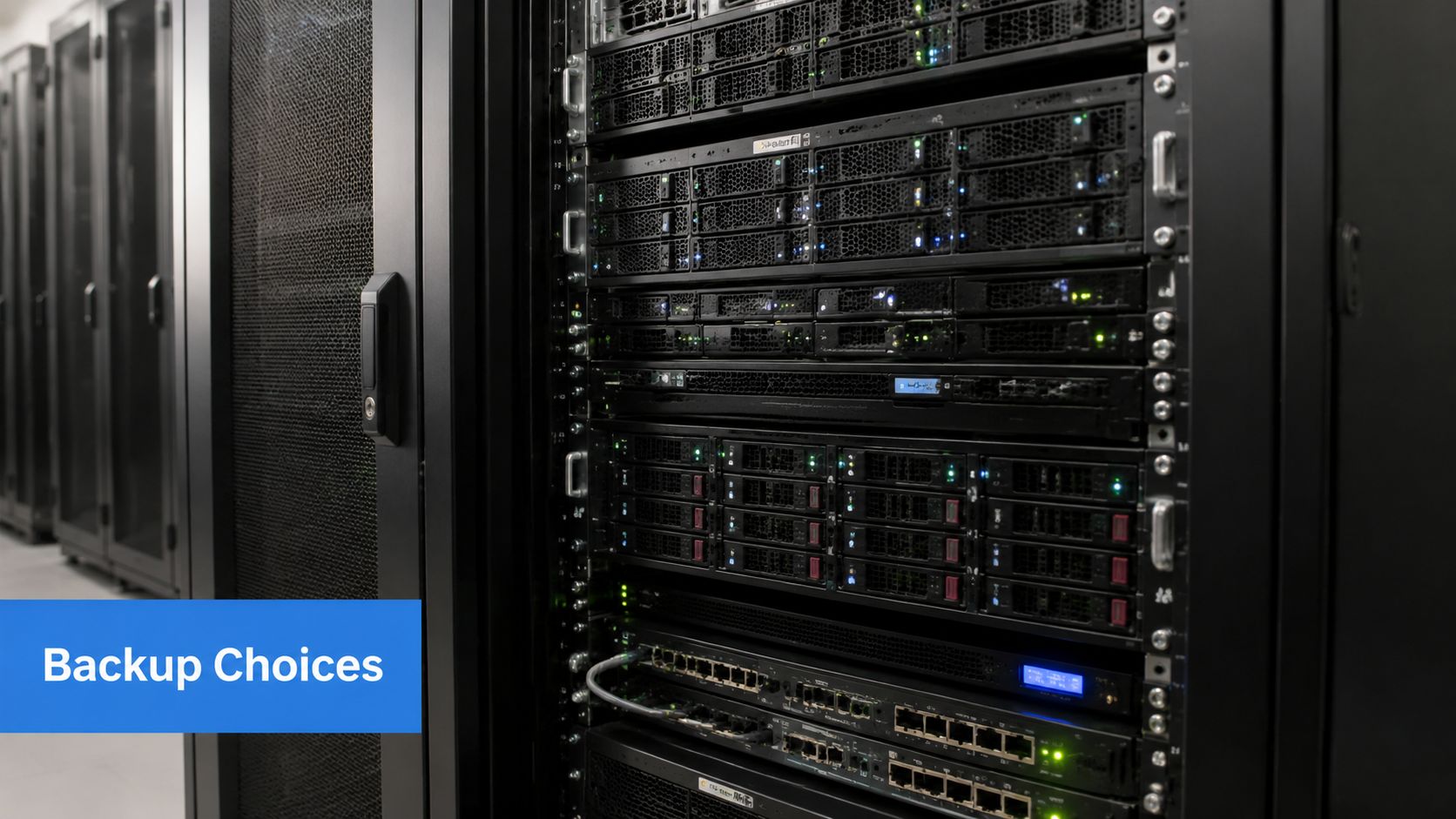
What Windows Server Backup Does Well
Microsoft's built-in Windows Server Backup feature is available in Windows Server 2016, Windows Server 2019, and Windows Server 2022, and it supports full server backups, scheduled automated jobs, file restores, and bare metal recovery, according to this Windows Server Backup overview.
That's real functionality. It also isn't just a file copier. For Exchange-aware VSS backups, administrators need to back up the entire volume containing the database and logs, and the Exchange plug-in requires the feature to be installed. That matters if you're protecting application-consistent workloads instead of just moving files around.
Where Native Backup Breaks for MSPs
The same source also highlights the operational gap. Native Windows Server Backup lacks reporting, notifications, encryption, and modern centralized management.
Those aren't nice-to-haves for an MSP. They're core service requirements.
If you manage one server manually, you can live with weak reporting. If you manage many clients, weak reporting becomes a labor problem and a compliance problem. You can't easily prove governance, spot patterns across tenants, or package backup reviews as a polished managed service.
Native Tool Versus Business Platform
Here's the practical difference:
RequirementNative WSBThird-party platformBasic backup and restoreYesYesBare metal recoveryYesYesCentralized managementLimitedStronger fitReporting for auditsWeakStronger fitNotifications and alertingWeakStronger fitMulti-tenant operationsWeakStronger fit
This is why serious MSPs outgrow the native tool. Not because it can't back up a server, but because it can't support the operating model you're trying to build.
A native utility can protect a server. It usually can't support a scalable service desk, a compliance review, and a QBR at the same time.
Clear Recommendation for MSPs
Use Windows Server Backup as a fallback, a lab tool, or a low-complexity option where the client understands the tradeoff. Don't make it your flagship managed backup service.
For your standard offering, choose a platform that supports:
- Multi-tenant visibility: Your team needs one place to monitor many clients.
- Automated reports: Auditors and client leadership want evidence without manual effort.
- Encryption support: Especially important for regulated data sets.
- Policy consistency: Standard retention and schedule templates keep your stack sane.
- Recovery validation workflows: Good tools help your team prove recoverability, not just job completion.
That shift changes backup from a line item into a defensible service. It also reduces technician time spent chasing one-off job failures and screenshot-based reporting.
Planning for Recovery with RPO RTO and Retention
A client gets hit with ransomware at 10:15 a.m. Your backup job ran at midnight. The owner asks two questions your team needs to answer fast. How much data is gone, and how long until operations are back.
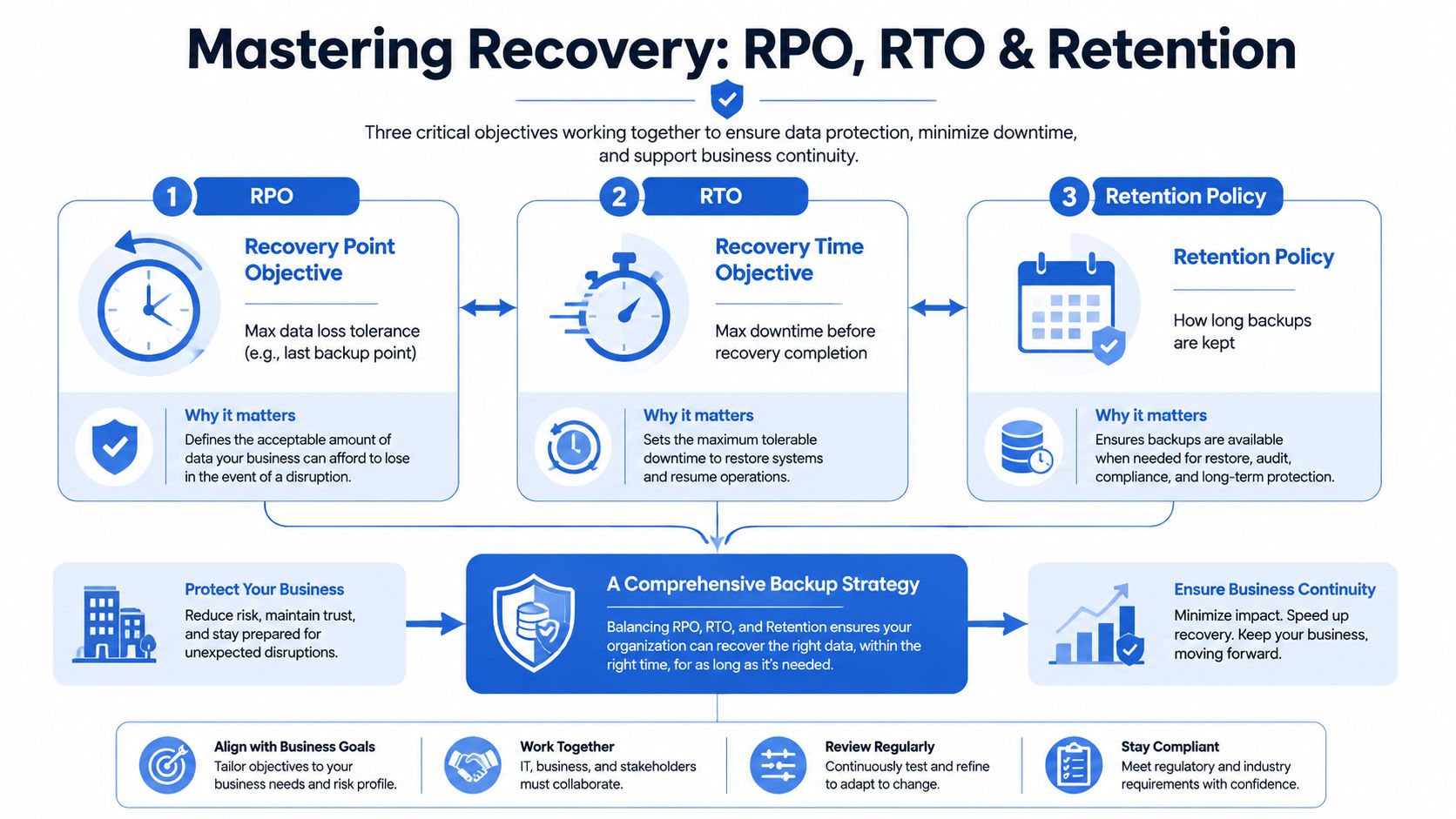
RPO, RTO, and retention answer those questions. They turn backup from a checkbox into a service with clear business outcomes, defined client expectations, and audit-ready logic.
Keep the client explanation simple. RPO is the maximum data loss the business can tolerate. RTO is the maximum downtime the business can tolerate.
Start With Business Impact
Do not start with backup schedules. Start with operational pain, contractual obligations, and compliance pressure.
Ask direct questions:
- What stops revenue or care delivery first: Email, ERP, file shares, accounting, EHR, or line-of-business apps?
- What data changes constantly: Orders, tickets, patient records, financial entries, or legal documents?
- What can wait until tomorrow: Archived data and low-value file shares should not get the same treatment as production systems.
- What must be retained and documented for audits: SOC 2, HIPAA, and client contracts all shape recovery and retention decisions.
Then document workloads by priority, assign target RPO and RTO for each one, and map those targets to backup frequency, storage location, and recovery method. Keep the 3-2-1 rule in play, but do not stop there. MSPs make money when they translate backup policy into a recovery program the client can defend to leadership and auditors.
Turn Objectives Into Service Design
Once you have tolerances, the schedule becomes a business decision instead of a technician habit.
A file server with modest daily change may only need daily recovery points. A busy application server may need more frequent snapshots or image-based protection. Long retention periods belong on systems tied to legal hold, healthcare records, or financial reporting. Storage-heavy workloads need an incremental or differential design that controls backup windows and keeps costs predictable.
Use this as a packaging opportunity. Build service tiers around recovery expectations. Faster RPOs, shorter RTOs, immutable offsite copies, and documented restore procedures justify higher monthly recurring revenue because they reduce client risk in concrete terms.
Some clients also need more than backup. If the environment has tight uptime requirements or multiple interdependent workloads, review options that compare DR services for SMBs and position disaster recovery as the next maturity step.
Retention Is a Governance Decision
Retention should never be based on default settings or storage convenience. It should be based on legal, operational, and security requirements.
A healthcare client, a law firm, and a construction company should not share the same retention policy. Your vCISO, compliance lead, or account manager should record why the policy exists, who approved it, and what business or regulatory requirement it supports. That documentation strengthens audits and supports broader conversations around data security and data protection planning.
If a client cannot explain why backup data is kept for a certain period, the policy is weak, even if every job finishes successfully.
Build a Recovery Plan You Can Defend
Your backup service should answer four questions in plain English:
- What systems and data are protected
- How much data loss is acceptable
- How quickly must each workload be restored
- How long must backup data be retained
Answer those clearly, and you give clients more than backup. You give them a recovery position they can budget for, audit against, and trust. That trust opens the door to higher-value security work, especially when backup discussions expose larger gaps in resilience, access control, and real-world attack readiness.
Verifying Backups and Proving Your Value
A completed backup job is not proof of recoverability. It's only proof that a process ran.
That distinction matters because Rocket Software reports that it becomes difficult to exceed a 98% backup success rate in large environments, and best-practice guidance recommends daily monitoring, monthly restore tests, and automated alerting and reporting to catch silent failures before recovery is needed, as explained in this backup failure and monitoring report.
What To Test Every Time
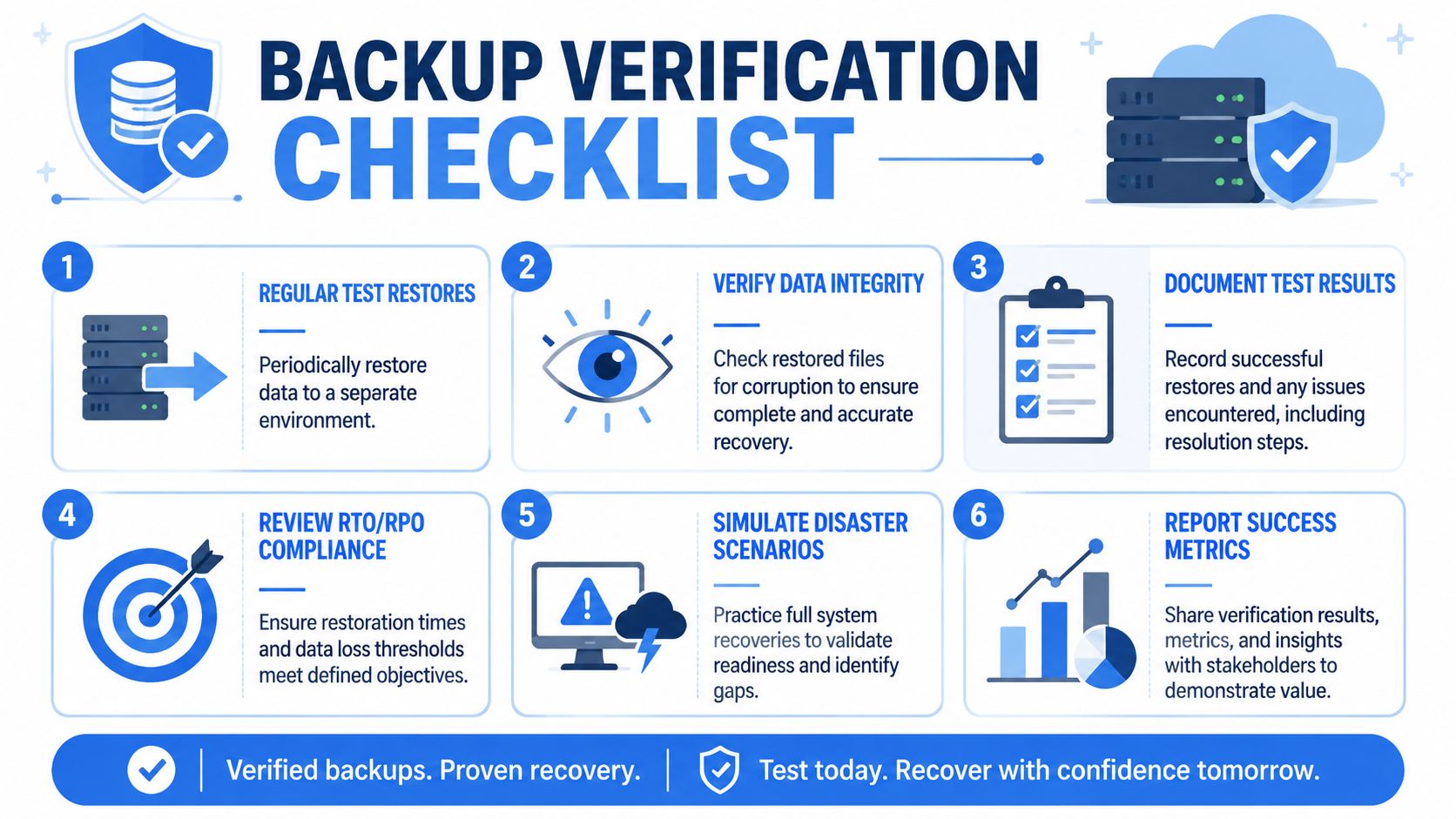
Don't overcomplicate this. Build a repeatable restore verification process and run it on schedule.
- Restore representative data: Bring back files, application data, or a full workload into a safe test location.
- Check integrity: Open files, validate application behavior, and confirm the data is usable.
- Time the process: Compare actual recovery time against the client's expected recovery window.
- Validate dependencies: Make sure credentials, storage access, and network path assumptions still hold.
One of the most overlooked failure points is access. A backup that exists but can't be restored because the team doesn't have the right credentials or network reachability is not a real safety net.
Turn Testing Into Deliverables
Most MSPs perform some restore checks. Fewer package them well.
Create a Restore Verification Report that includes:
Report itemWhy it mattersTested workloadShows scope and relevanceRestore dateSupports auditabilityRecovery resultConfirms success or flags failureTime to restoreHelps validate RTOIssues foundDrives remediationFollow-up actionsProves active management
That report gives clients something tangible. It also supports SOC 2, HIPAA, and ISO 27001 conversations because you're no longer saying, "trust us." You're showing evidence.
Backups become more valuable the moment you can prove recovery with documentation instead of opinion.
Monitor Like a Service Provider
Strong backup operations need routine discipline:
- Daily review: Catch failed jobs, storage problems, and schedule drift quickly.
- Monthly restore validation: Don't wait for a disaster to discover a broken process.
- Automated alerts: Human memory is not a monitoring system.
- Escalation standards: Know when a warning becomes a client-facing risk.
This is also where margin improves. A monitored, tested, and documented backup service is easier to price above commodity competitors because you're selling assurance, not just software.
Expand Your Services with White Label Penetration Testing
A client passes its backup review, signs off on restore documentation, and feels confident. Then you spot exposed remote access, weak privileged account controls, or an internet-facing server that would be easy to compromise. Recovery is covered. Prevention is not.
That gap is your opportunity.
If you already manage backup for Windows Server, you have earned the right to lead a broader security conversation. Clients trust you with uptime, audit evidence, and business continuity. Use that position to sell risk assessment, penetration testing, and compliance support that reduces the chance of a disruptive incident in the first place.
Why Backup Leads to Pen Testing
Backup data gives you useful security insight. Failed jobs can reveal bad credential hygiene. Restore planning often exposes flat networks, excessive admin access, and undocumented dependencies. A protected server can still be an easy target.
A pen test changes the conversation at this point. You stop sounding like a vendor that only cleans up after problems and start acting like an advisor who helps prevent them. For clients working toward SOC 2, HIPAA, PCI DSS, or ISO 27001, that shift matters because auditors and leadership teams want evidence of both recovery capability and security validation.
Why MSPs Shouldn't Build This Alone
Building an internal penetration testing team is expensive, hard to staff, and difficult to keep utilized. Most MSPs do not need full-time testers on payroll. They need a reliable way to deliver the service without adding fixed overhead and delivery risk.
A white label pentesting partner solves that problem. You keep the client relationship, control the account strategy, and add higher-value security work under your brand. This approach also improves margin because you expand revenue without carrying the cost of a full in-house testing practice.
Look for a partner model with:
- Channel-only delivery: They support your brand instead of competing for the account.
- Certified testers: Credentials such as OSCP, CEH, and CREST help during sales and compliance reviews.
- Fast turnaround: Security projects stall when reporting drags out.
- Manual penetration testing: Buyers want human validation, not an automated scan dressed up as an assessment.
- White-labeled reporting: Your team stays at the center of the client relationship.
The Business Opportunity Is Bigger Than Backup
Backup gets you into the account. Proven recovery earns trust. Pen testing increases account value and moves your firm closer to strategic advisor status.
That progression is straightforward:
Service layerClient outcomeBackup and recoveryBusiness continuityRestore testing and reportingAudit evidence and operational trustRisk assessmentClearer remediation prioritiesPenetration test servicesValidation of real-world exposureOngoing compliance supportRecurring advisory revenue
This is the correct strategy for growing average account value. Solve recovery first. Then sell the services that reduce the odds of recovery ever being needed.
If you want a channel-only partner for white label pentesting, our white-labeled pentest delivery helps MSPs, vCISOs, resellers, and GRC firms deliver affordable, manual pentests without competing for your clients. Our certified team includes OSCP, CEH, and CREST pentesters, with fast turnaround and reporting you can put under your own brand. Contact us today to learn more.

.avif)
.png)
.png)
.png)

