
You've probably seen it in a ticket, on a server, or buried in command-line logs after an alert. Someone ran Net User. Sometimes it was a help desk tech fixing a password issue. Sometimes it was an admin onboarding a user. Sometimes it was a pentest finding out just how much identity information a Windows system will hand back.
That's why Cmd Net User still matters. It sits right at the line between everyday administration and real attacker tradecraft. If you support clients as an MSP, advise them as a vCISO, or package security work as a reseller or GRC firm, you need to understand both sides.
A lot of articles stop at syntax. That's not enough. True value lies in knowing how the command affects security services, how it shows up during a pen test, and how to turn that knowledge into stronger risk assessment, compliance, and penetration testing outcomes for clients working toward SOC 2, HIPAA, PCI DSS, or ISO 27001.
Why The Net User Command Still Matters
An alert fires on a client endpoint at 2:13 a.m. The process tree shows cmd.exe, then net user. That could be a help desk technician fixing access after hours. It could also be the first low-noise step in account reconnaissance.
That dual use is exactly why Net User still matters to MSP teams.
The command survives because it solves real operational problems. It is built into Windows, works over basic shell access, and still helps when RMM tooling is unavailable, WinRM is restricted, or a GUI session is too slow to trust during an outage. In practice, admins use it because it is fast. Attackers use it for the same reason.
For security work, that overlap matters more than the syntax itself. A pentester can use net user to identify local accounts, check whether an account is active, and gather clues about how identity is managed on the host or in the domain. A defender should read the same command as a signal. It touches the control plane for user access, privilege changes, and account hygiene.
Why MSP teams keep running into it
For MSPs, this command typically appears in three contexts:
- Daily administration: Create a temporary local user, reset access during a support call, disable an account for an offboarded employee, or confirm whether a user is still enabled
- Incident response: Review command history, EDR telemetry, or process execution after suspicious account activity
- Compliance and assurance work: Show how accounts are created, changed, disabled, and monitored during client reviews tied to access control requirements
The practical lesson is simple. If your team can use a command to manage identities quickly, an intruder can use that same command to map the environment just as quickly.
Its age is part of its staying power. Many Windows environments still contain a mix of old management habits, partial PowerShell adoption, legacy scripts, and field technicians who need a dependable command line option under pressure. Newer tooling exists, but older commands remain in real client estates for years, especially in smaller environments and inherited networks.
Why security teams should care
For a penetration test, net user is often an early checkpoint. It helps validate what a compromised account can see locally, whether basic domain queries are allowed, and how exposed account information may be from a workstation or server. That makes it useful for reconnaissance, but it also makes it useful for scoping risk assessments and showing clients where identity exposure begins before privilege escalation even starts.
For MSPs selling security services, this is a useful teaching point. The same command your operations team uses to fix access issues can also support attacker enumeration. Showing that overlap helps clients understand why account reviews, endpoint logging, privileged access controls, and user lifecycle testing belong in a security program, not just in IT operations.
That ties directly to SOC 2, HIPAA, PCI DSS, and ISO 27001 work. User administration commands affect evidence for access control, account provisioning, deprovisioning, and monitoring. If a client cannot explain who ran net user, from where, and for what purpose, they have both a security gap and an audit problem.
The Complete Net User Command Syntax
Microsoft documents several supported forms of Net User, including net user [<UserName> {<Password> | *} [<Options>]] [/domain], net user [<UserName> {<Password> | *} /add [<Options>] [/domain]], and net user [<UserName> [/delete] [/domain]], along with examples that include password prompts and time-based restrictions in the Microsoft-documented overview referenced here: documented Net User syntax and examples.
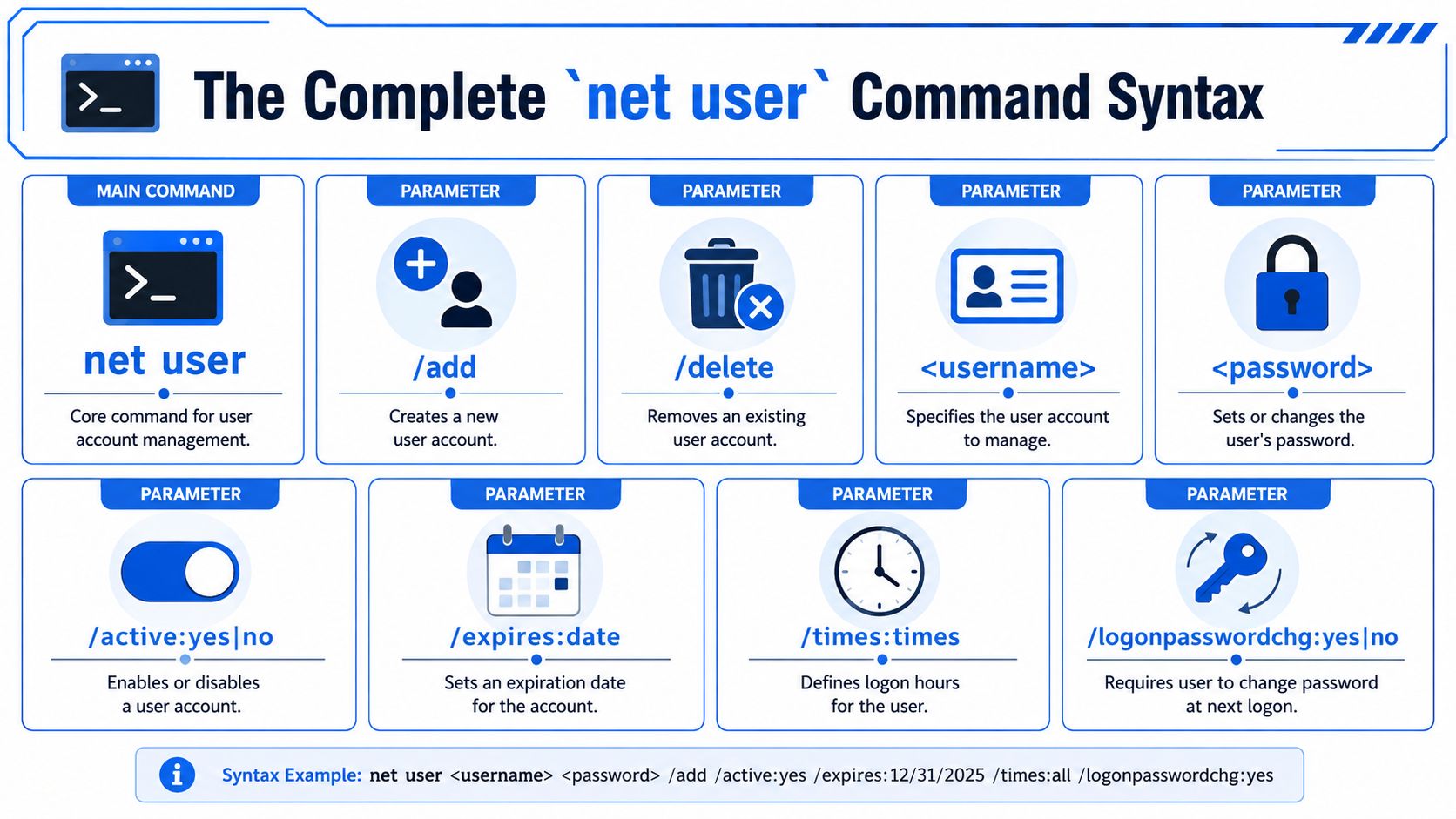
Net User command parameters
ParameterDescription<UserName>Specifies the account you want to view or modify<Password>Sets or changes the password directly*Prompts for the password instead of showing it in the command line/addCreates a new user account/deleteRemoves an existing user account/domainTargets a domain account instead of only the local machine/active:yesEnables an account/active:noDisables an account/timesSets allowed logon times for the account/passwordreq:yesRequires a password for the account
What the syntax actually means
The fastest way to think about Cmd Net User is this:
- Run
net userby itself when you want a basic list of users. - Add a username when you want details about one account.
- Add
/addor/deletewhen you want to create or remove an account. - Add
/domainwhen you want to query or change a domain-scoped account instead of a local one.
The * option is worth using whenever possible. It prompts for the password instead of leaving it visible in shell history, screenshots, notes, or monitoring tools that capture full command lines.
Use the prompt option when you can. Plaintext passwords in command history create cleanup work you didn't need.
Practical syntax examples
Here are a few examples admins use:
- List local users
net user
net user jsmith
net user jsmith * /add
net user jsmith /active:no
net user jsmith /delete
net user miked /time:M-F,8AM-5PM
net user jays Cyk4^g3B /add /passwordreq:yes /times:monday-friday,8am-5pm /fullname:"Jay Jamison"
For an MSP, the trade-off is speed versus safety. The command is quick, but careless use can expose passwords, create inconsistent local admin practices, and bypass the documentation habits that help during audits and client reviews.
Common User Management Tasks For Admins
Most technicians don't need a huge framework here. They need a few dependable commands they can use under pressure.
Create and review accounts quickly
For local account creation:
- Create a new user with a password prompt
net user newuser * /add
net user newuser
That second command is often the one people skip. Don't skip it. After account creation, always verify what the system applied.
Disable or remove access fast
When an employee leaves or a contractor no longer needs access, the fastest low-risk move is usually to disable first and delete later.
- Disable an account
net user olduser /active:no
net user olduser /delete
Disabling gives you a clean pause point. You preserve the account while you confirm ownership of files, application dependencies, or any weird line-of-business service that may still reference it.
In real environments, delete is rarely the first move. Disable first, validate impact, then clean up.
Handle password and access-policy tasks
For a password change:
- Change a password directly
net user jsmith NewPasswordHere
net user jsmith *
The prompt-based approach is usually the better habit. It keeps the secret out of tickets, screenshots, and shell logging where possible.
You can also use the command for policy-style controls that matter in regulated environments:
net user jsmith /times:M-F,8AM-5PM
That isn't a replacement for broader identity governance, but it's useful when you need to verify whether account-level controls are enforced.
Where it helps MSP workflow
A GUI is fine when you're on one system and have time. Net User is better when you're remoted into a host, troubleshooting under time pressure, or validating a client issue during a risk assessment or onboarding review.
Short list of what works well:
- Fast validation: Confirm account status without opening several management consoles
- Remote troubleshooting: Use built-in tooling when management agents are unavailable
- Script support: Fit user checks into simple remediation scripts or technician runbooks
What doesn't work well is using local account management as a substitute for proper identity design. If your client relies heavily on one-off local users across many endpoints, the command isn't the problem. The account model is.
How Pentesters Use Net User For Enumeration
A pentester on a newly obtained workstation usually starts with quiet, built-in commands. net user is one of the first checks because it shows how much identity information a low-privilege foothold can pull without dropping tools or touching PowerShell logging controls.
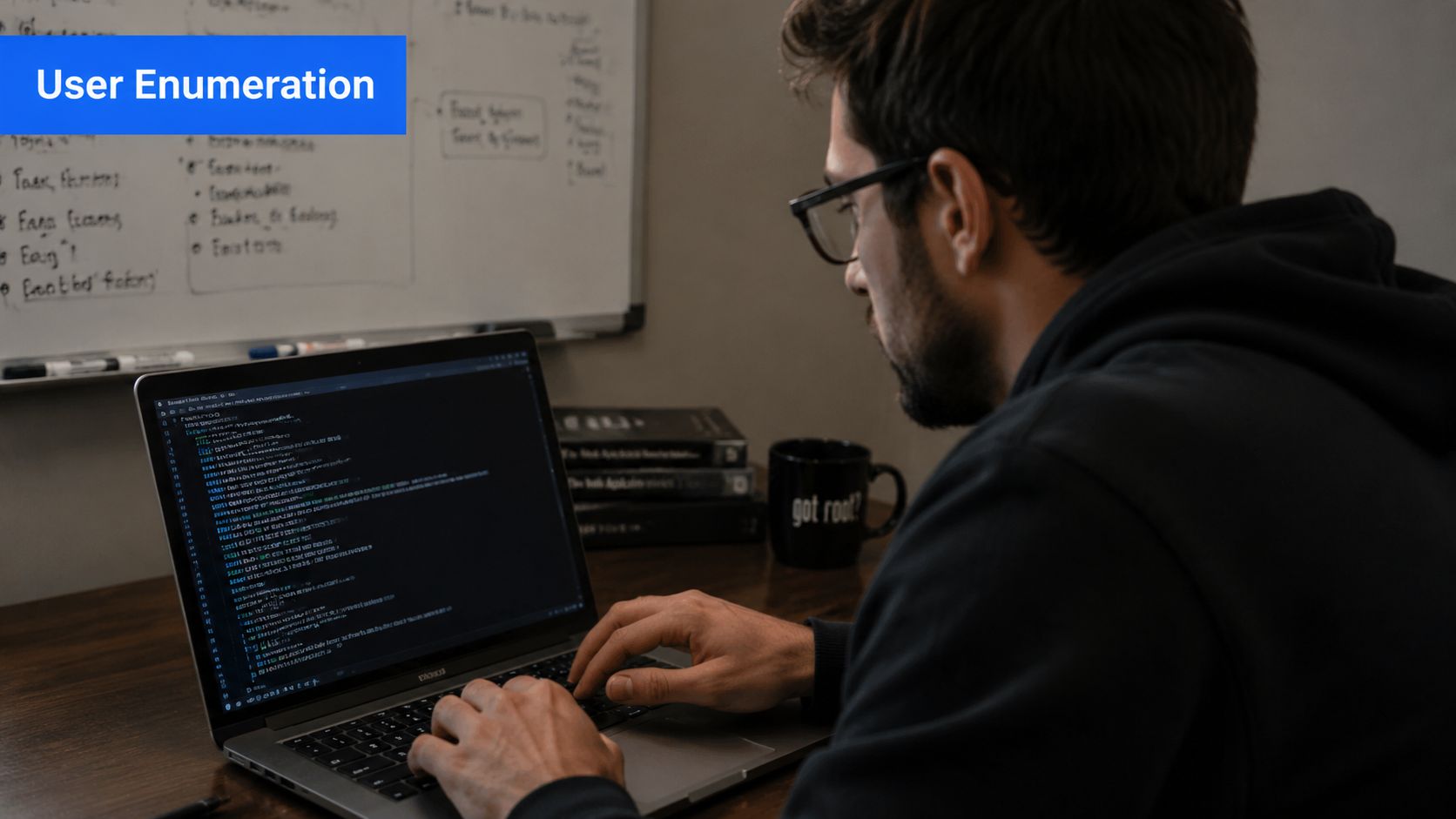
What an operator is looking for
In a pentest, the initial workflow is usually simple:
- List local users
net user
net user username
net user /domain
The value is not the command itself. The value is what the output says about account hygiene, access boundaries, and operational discipline.
A tester uses that output to identify naming conventions, dormant accounts, service-style usernames, and accounts that sound privileged before any privilege escalation attempt begins. Account details can also expose whether controls such as logon-hour restrictions exist at all, and whether they are applied consistently. In practice, inconsistency matters as much as weakness. If one administrative account is tightly restricted and another similar account is not, that gap often points to a process problem the client has missed.
Why this matters for MSPs and vCISOs
MSP teams already use net user for support and troubleshooting. Pentesters use the same command to answer a different question. How much useful identity data can an attacker collect from the access they already have?
That overlap is useful in client conversations. It turns a familiar admin command into a concrete example of why identity exposure belongs in scoping discussions, not just in post-incident cleanup. During a Active Directory audit process, this kind of enumeration often surfaces account sprawl, role-based naming that gives away too much, and lifecycle failures that create easy recon for an internal attacker.
I often frame it this way for MSP teams. If a basic shell can map user objects, spot stale accounts, and identify likely admin targets in minutes, the client does not have an advanced-tooling problem. They have an exposure problem.
What separates useful enumeration from checkbox testing
Good manual testing goes past “command executed successfully” and asks whether the result changes the attack path.
Key questions include:
- Can a standard user enumerate more accounts than policy suggests they should?
- Does
/domainreturn useful detail from a host where that visibility adds no business value? - Do usernames reveal role, privilege, department, or service function too clearly?
- Are old accounts, disabled-user patterns, or inconsistent restrictions visible enough to guide password attacks or social engineering?
That is where net user becomes more than an admin convenience. For a pentester, it is early reconnaissance. For an MSP, it is a practical way to show clients how ordinary administrative tooling can support an attack chain and why identity reviews belong in risk assessments and security service proposals.
Abusing Net User For Malicious Actions
An attacker with local admin on a workstation does not need custom malware to create a persistence problem. A built-in command is enough to add a user, reset a password, or re-enable an account that nobody expects to become active again.
That matters to MSPs because these actions sit right on the line between routine administration and obvious abuse. If your team only treats net user as a help desk or server management tool, you miss one of the simplest ways an intruder can turn a single compromised host into a longer-term foothold.
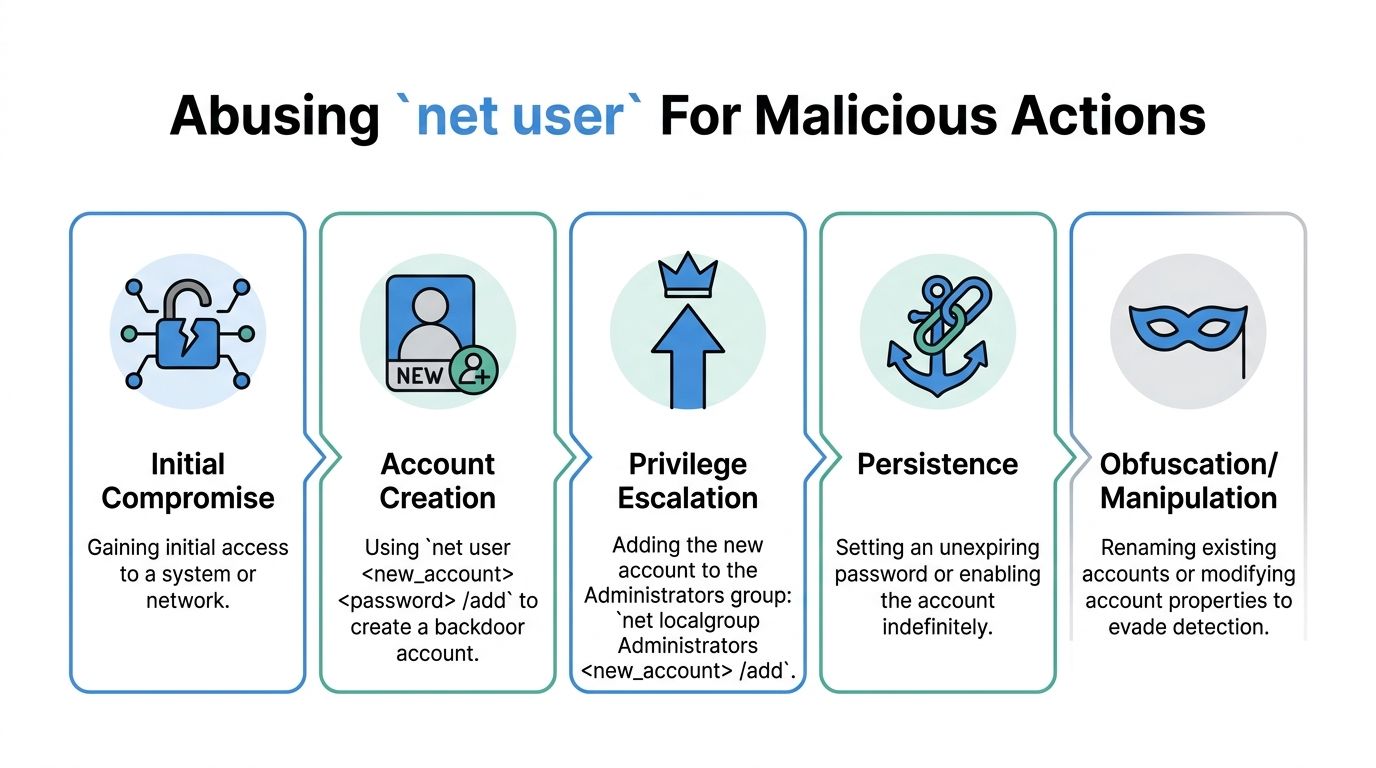
Common abuse paths after initial access
The patterns are usually straightforward.
- Backdoor account creation: An attacker creates a new local user so access survives password resets, session terminations, or removal of the original remote access method
- Account reactivation: A disabled account gets turned back on because it blends in better than a brand-new username
- Password resets: A known account is assigned a new password so the attacker can authenticate without stealing another credential
- Privilege chaining:
net userhandles the account change, thennet localgroupadds that user to Administrators or another privileged group
These actions still require the right level of access. net user does not bypass permissions. The risk is that once an attacker gets admin rights, they can use native tooling that many environments still treat as normal operational noise.
Why MSP teams should care
Unauthorized account changes create security, compliance, and service-delivery problems at the same time. The technical issue is persistence. The business issue is proving who made the change, whether it was approved, and how long it went unnoticed.
That is a useful point in client conversations. A risk assessment lands harder when you can show that an attacker did not need exploit kits or custom scripts to maintain access. They used the same command an admin might use during break-fix work.
For clients working through SOC 2, HIPAA, PCI DSS, or ISO 27001 reviews, the control questions become concrete fast:
- Who can create or reactivate local and domain accounts?
- Who can reset passwords outside the service desk process?
- Which privileged group changes are reviewed?
- Can the client tie the command execution back to a person, system, and ticket?
A pentester also looks at the authentication side of the story. Password changes, reused local admin credentials, and fallback authentication paths often connect directly to lateral movement. That is why NTLM's role in internal attack paths belongs in the same discussion when you explain identity abuse to clients.
Where defenders get this wrong
EDR by itself is rarely enough here. A command like net user can be legitimate in one case and a serious incident in another. The difference is context. Who ran it, from which host, against which account, during what change window, and what happened immediately after?
I usually advise MSP teams to treat account management commands as high-value telemetry, not background admin chatter. If a client has weak logging around user creation, account enablement, password resets, and local group membership changes, that gap is worth calling out in both security reviews and ongoing monitoring proposals.
That is also why this command shows up so often in post-exploitation work. It is simple, available almost everywhere, and effective enough to turn a short-lived compromise into persistent access.
Modern PowerShell Equivalents For Net User
Net User still works, but a lot of MSP teams are trying to modernize scripts and standardize reporting. That's where PowerShell starts to win.
Side by side task comparison
TaskNet User approachPowerShell approachList local usersnet userGet-LocalUserView one local usernet user jsmithGet-LocalUser -Name "jsmith"Create a local usernet user jsmith * /addNew-LocalUserDisable a usernet user jsmith /active:noDisable-LocalUser -Name "jsmith"Enable a usernet user jsmith /active:yesEnable-LocalUser -Name "jsmith"
PowerShell is better when you need objects instead of plain text. You can filter, export, compare, and feed results into larger automation without scraping command output.
When Net User is still the right choice
There are still times when Cmd Net User is the practical choice:
- Break-glass troubleshooting: You need something fast and built in
- Older scripts: Existing admin workflows already rely on it
- Basic checks: You just need a quick answer in a remote shell
That's normal. Modernization doesn't mean deleting every old command from your process. It means using the right one intentionally.
If the task ends with reporting, automation, or repeatability, PowerShell usually wins. If the task is a one-off check under pressure, Net User is often good enough.
Where PowerShell helps more
PowerShell becomes more useful when your MSP needs consistency across many clients. It fits better with templated onboarding, recurring access reviews, and compliance evidence collection for GRC engagements.
It also supports cleaner handoffs. A technician can run a command, save structured output, and pass it to another team without making them decode text formatting. That matters when security, service desk, and compliance teams all touch the same account-management process.
The trade-off is complexity. PowerShell gives you more control, but it also gives you more ways to build brittle scripts if your standards are weak. If your team can't maintain the automation, a simple built-in command may still be the better operational choice.
Detecting Malicious Net User Activity
net user shows up in legitimate admin work and in hands-on-keyboard intrusion activity. That overlap is why weak detection fails. A service desk technician resetting a password and an attacker creating a fallback admin account can generate similar command lines, so the useful signal is the account change, the host it came from, and whether the action fits an approved workflow.
Teams that treat net user as "just another old command" usually miss the operational risk. From an MSP perspective, this is one of the clearer examples of why identity monitoring belongs in both security services and compliance reviews. From a pentest perspective, it is also one of the fastest ways to prove whether an environment will notice unauthorized account creation.
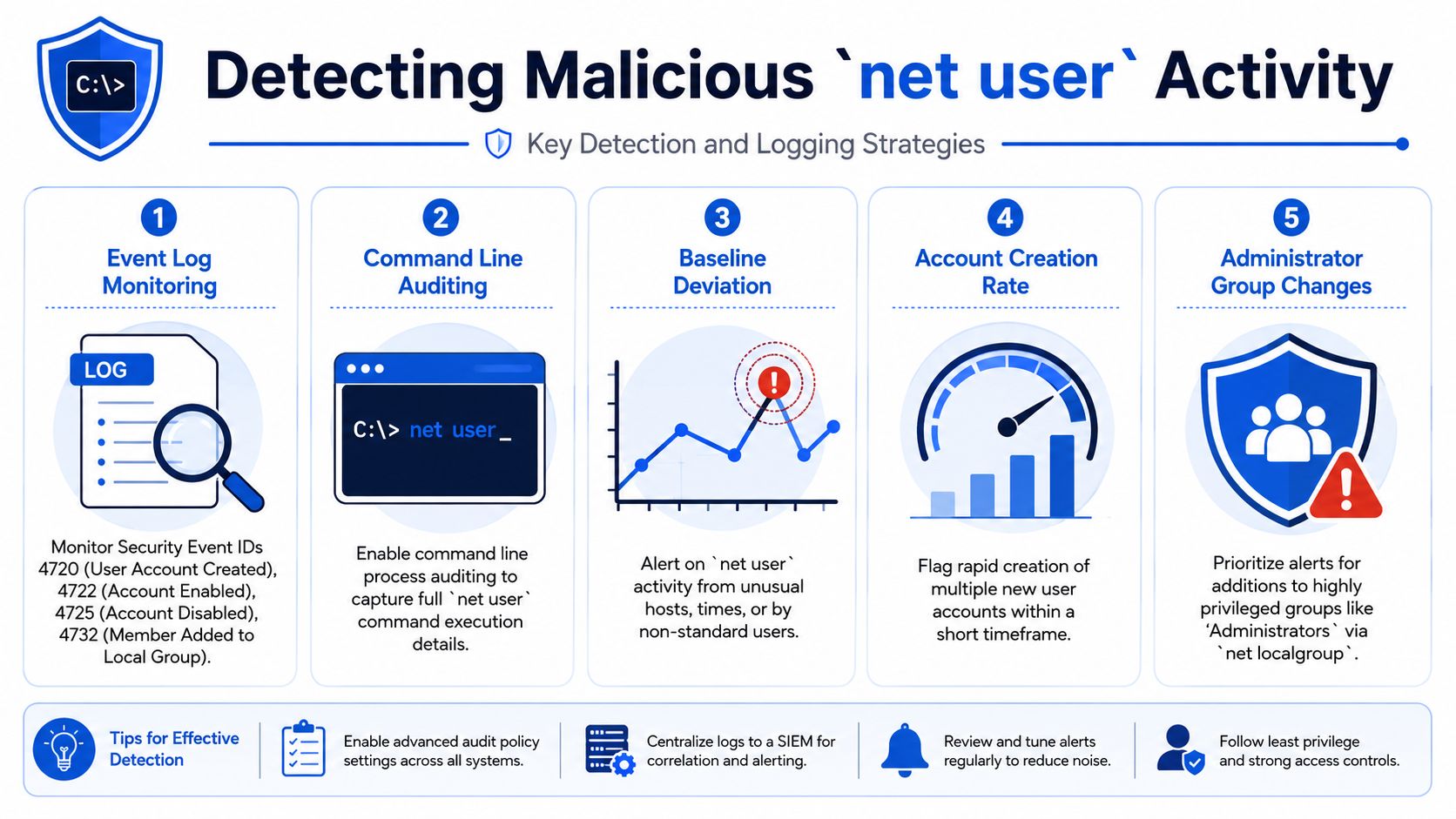
Key events to monitor
Start with Windows Security events tied to the outcome:
- 4720: User account created
- 4722: User account enabled
- 4725: User account disabled
- 4732: Member added to a security-enabled local group
Those events usually matter more than shell history because they record the change that affects access. If an attacker runs net user backupadmin P@ssw0rd! /add and then adds that account to Administrators, the group membership event often deserves the highest priority because it marks the jump from presence to privilege.
Process creation logs still matter. They help confirm whether cmd.exe, net.exe, net1.exe, or a remote administration tool triggered the action. But if forced to choose, collect and alert on the identity event first.
What useful detection looks like
Useful detection joins three things: process execution, account-change events, and business context.
- Command-line auditing: Capture process launches so analysts can see whether
net user,net localgroup, or related binaries ran - Host context: Flag account changes from workstations, jump boxes, or technician endpoints that do not usually perform identity administration
- User context: Raise severity when the operator is not part of the approved admin group or when the account has no matching ticket or change record
- Privilege review: Treat additions to Administrators or other privileged groups as higher-risk than routine account maintenance
For teams that need broader visibility, a platform for comprehensive log correlation can help connect process execution, account changes, and host context instead of leaving those signals in separate consoles.
Good detection also accounts for how admins work. Password resets during business hours from a known management server may be normal. A new local admin created on a receptionist's workstation at 2 a.m. is not. Analysts need that distinction or they will tune alerts into irrelevance.
Where MSPs usually miss it
The common failure is collecting the logs but not tying them to an approval path. If your SOC can see event 4720 but cannot answer who requested the account, which technician made the change, and whether it matches a ticket, you have telemetry without control.
This is also where hardening supports detection. If account management is supposed to happen only from approved systems, document that policy and enforce it. Guidance around Local Group Policy Editor hardening for Windows admin controls can help reduce where these commands are allowed to run, which makes suspicious executions easier to spot.
Why this matters for security services and compliance
Clients rarely buy "net user monitoring" as a line item. They buy risk reduction, audit evidence, and confidence that unauthorized access changes will be caught. This section is where those needs meet.
For SOC 2, HIPAA, PCI DSS, and ISO 27001 support, reviewers want to see that privileged account actions are logged, reviewed, and investigated. For a pentest, the same control answers a more direct question: if we create or enable an account during a controlled exercise, does anyone notice before we use it?
Baseline alerts that work for many MSP clients include:
- New local user created on a workstation
- Disabled account enabled unexpectedly
- Any addition to Administrators
- Password reset outside approved service windows
- Account changes from systems not designated for administration
That set is practical, sellable, and easy to explain during risk assessments. It also exposes a real trade-off. Tight detections create noise in loosely managed environments, but loose detections miss the exact behavior attackers use for persistence. The fix is not fewer alerts. The fix is better scoping, cleaner admin paths, and review procedures your team can sustain.
Mitigation And Security Best Practices
The best defense against Net User abuse isn't blocking one command. It's reducing who can make account changes, shrinking where those changes can happen, and testing whether the controls really hold up.
Start with identity discipline
Least privilege still does the heavy lifting here.
- Separate admin accounts: Don't let technicians use privileged identities for email, browsing, and daily work
- Limit local admin rights: Reduce the number of endpoints where account creation is even possible
- Clean up stale accounts: Old users, temp users, and forgotten local admins create easy opportunities for abuse
If a user can't create or modify accounts, the command becomes much less dangerous. That sounds obvious, but it's where many environments fall apart.
Add policy and execution controls
Application control and local policy still have a role. Teams that manage Windows fleets should review how command execution, local rights, and account policies are governed, especially in environments where support staff have broad permissions. For client environments that still lean on workstation-level controls, guidance around the Local Group Policy Editor and related hardening options can help tighten behavior before abuse becomes an incident.
Useful control areas include:
- Application control: Restrict who can run administrative utilities in sensitive environments
- Logging depth: Capture process creation and security events together
- Change control: Tie account changes to tickets and approvals, not just technician habit
Why testing still matters
Detection tells you what happened. Manual pentesting tells you what an attacker can still get away with.
That's important for MSP, vCISO, and reseller teams selling security outcomes, not just tools. A manual pentest, penetration test, or scoped risk assessment can show whether a low-privilege foothold can enumerate users, create persistence, or reach privileged groups through native Windows tooling.
For partners that need a channel-only option, MSP Pentesting provides white-labeled pentesting services across internal, external, cloud, application, mobile, physical, and social engineering scenarios, delivered by certified testers with OSCP, CEH, and CREST credentials. That fits well when you need affordable, fast-turnaround, partner-safe support for compliance-driven work without competing against your client relationships.
What does not work is relying on one control category. Least privilege without monitoring leaves blind spots. Monitoring without hardening leaves too many opportunities. Compliance checklists without real manual pentesting leave assumptions untested.
Security teams need all three. Control, visibility, and validation.
If you need a channel-only partner for manual pentesting or compliance-focused penetration testing that supports your MSP, vCISO, GRC, or reseller model, see how our white label pentesting program works.

.avif)
.png)
.png)
.png)

