
Your clients use Microsoft 365, Teams, cloud apps, VoIP, VPNs, and remote access all day. Most of that traffic depends on packet switching, even if nobody on the client side knows the term.
That’s not a trivia problem. It’s a security problem.
If you manage networks, handle SOC 2 evidence, advise on HIPAA safeguards, or sell penetration testing as a reseller, you need to understand how data moves. Attackers do. They abuse packets, headers, routing behavior, and weak inspection points. If your team only thinks in terms of “the firewall is on” or “the scan came back clean,” you’re missing how real network abuse happens.
What Packet Switching Means for Your Clients
What is packet switching? It’s the method modern networks use to move data by chopping it into small pieces called packets, sending those pieces across the network, and rebuilding them at the other end.
Imagine it as mailing a book one page at a time. Each page gets labeled, routed, delivered, and then put back in order by the recipient. That sounds messy, but it’s why the internet scales.
Packet switching exists because older communication systems were built around dedicated circuits. Paul Baran and Donald Davies independently invented packet switching in the 1960s to create something more resilient and efficient than those dedicated systems. It was doubted at first, then proved to be better, faster, and cheaper, which is why it became the foundation of the internet (Living Internet on packet switching history).
Why MSPs should care
For an MSP or vCISO, this isn’t just networking theory. It directly affects:
- Cloud app reliability when traffic takes different paths
- Security visibility when malicious traffic blends into normal packet flow
- Compliance posture for frameworks like SOC 2, HIPAA, PCI DSS, and ISO 27001
- Risk assessment quality when packet-level abuse never gets manually tested
A client sends an email, joins a Teams meeting, syncs SharePoint, or reaches a cloud ERP platform. All of that depends on packets being split, labeled, routed, and reassembled correctly. If an attacker tampers with that process, the business impact shows up as downtime, interception, trust abuse, or audit pain.
Practical rule: If your service stack runs on IP networks, packet switching is already part of your threat model.
Most MSPs already review firewall rules, VLANs, and segmentation. Good. But if you’re not also examining how traffic behaves between those controls, you’re stopping halfway. A proper network architecture review helps you see where packet flow creates blind spots that a policy spreadsheet won’t catch.
How Packet Switching Actually Works
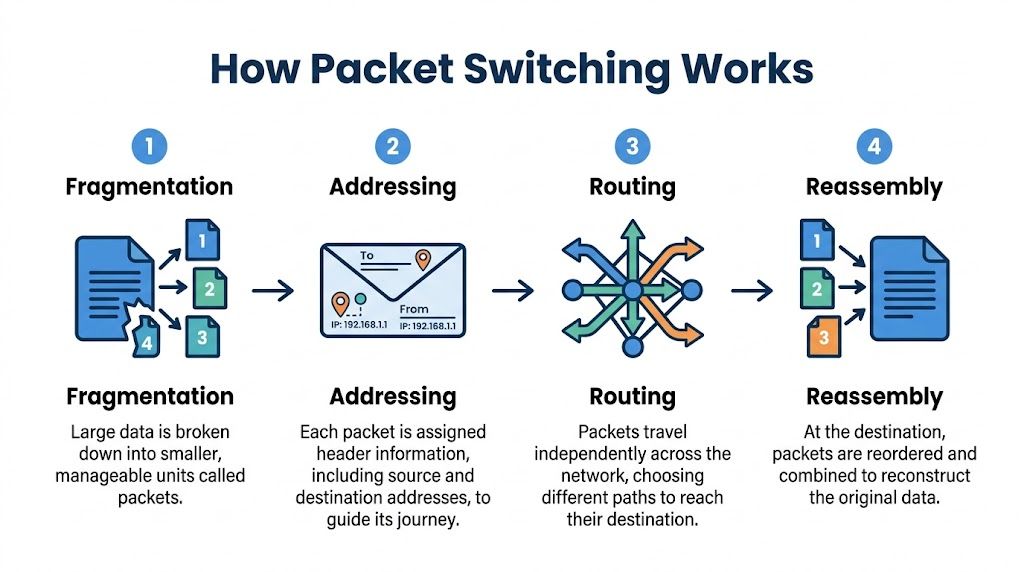
Packet switching is simple once you stop explaining it like a textbook. Four things happen. Data gets split up, labeled, routed, and rebuilt.
Data gets broken into smaller pieces
A file, voice call, or web request usually doesn’t move as one giant chunk. The network breaks it into packets so devices can send manageable pieces instead of waiting on one oversized transfer.
That’s why packet switching is efficient. Multiple conversations can share the same network paths instead of reserving one lane for one task.
Each packet gets a label
Every packet needs instructions. The header acts like the outside of an envelope. It tells the network where the packet came from, where it’s going, and enough context for the receiving side to put it back in order.
From a penetration testing angle, this matters because attackers often target what’s in the header, not just the payload. If your team never inspects that layer, you’re trusting labels you haven’t verified.
Packets can take different routes
Packets don’t all have to travel together. Routers move them along whatever path is available or efficient at the time. That flexibility is one reason packet-switched networks handle change well.
It also explains why latency and quality can vary. If you need a simple non-security explainer for clients or junior engineers, this guide to understanding packet loss is a useful reference.
When packets arrive late, out of order, or not at all, users call it “bad internet.” A pentester calls it traffic behavior worth investigating.
The destination rebuilds the original message
Once the packets arrive, the receiving device reorders them and reconstructs the original data. If that process fails, the application suffers. That can look like a dropped call, a corrupted transfer, or a stalled session.
The early history makes this real. The first packet-switched message on ARPANET was sent on October 29, 1969. The system tried to send “Login,” but crashed after the first two letters, “Lo,” were transmitted (history of the first packet-switched message). Early systems were rough. The core idea was still right.
Packet Switching Versus Circuit Switching
The easiest way to explain this to a client is with a phone call versus mail delivery.
Circuit switching is like a traditional landline call. A dedicated path is opened and held for the whole session. Even when nobody is talking, the line stays reserved.
Packet switching is different. Data only uses network resources when packets are being sent. That shared model is why modern internet access is affordable and scalable, but it also gives attackers more room to hide inside normal traffic patterns.
Packet Switching vs. Circuit Switching at a Glance
AttributePacket Switching (e.g., Internet)Circuit Switching (e.g., Landline Phone Call)Connection modelShared and dynamicDedicated for the full sessionResource useUses bandwidth as neededHolds bandwidth whether used or notScalabilityBetter for many simultaneous usersLess flexible for changing demandFailure handlingCan reroute trafficBroken circuit usually ends the sessionSecurity concernMore packet-level manipulation riskFewer routing variations, different exposure
Why this matters in a pen test
This isn’t just an engineering distinction. It changes how you test.
In a circuit-switched setup, you care more about the dedicated path itself. In a packet-switched environment, you care about what happens to traffic in motion. That includes spoofing, replay, filtering gaps, weak segmentation, and inspection failures across routers, firewalls, VPNs, and cloud edges.
If your staff wants a hands-on way to see traffic instead of just hearing about it, this walkthrough on how to capture packets with Wireshark is a useful practical starting point.
A clean vulnerability scan does not prove packet handling is secure. It only proves the scanner didn’t trip over an obvious issue.
For GRC teams, this comparison also matters during a risk assessment. Packet-switched networks are excellent for business operations. They’re also noisier, more dynamic, and easier to misunderstand during an audit or a penetration test.
See Packet Switching in Your Daily Operations
You already support packet switching every day. You just call it by product names.
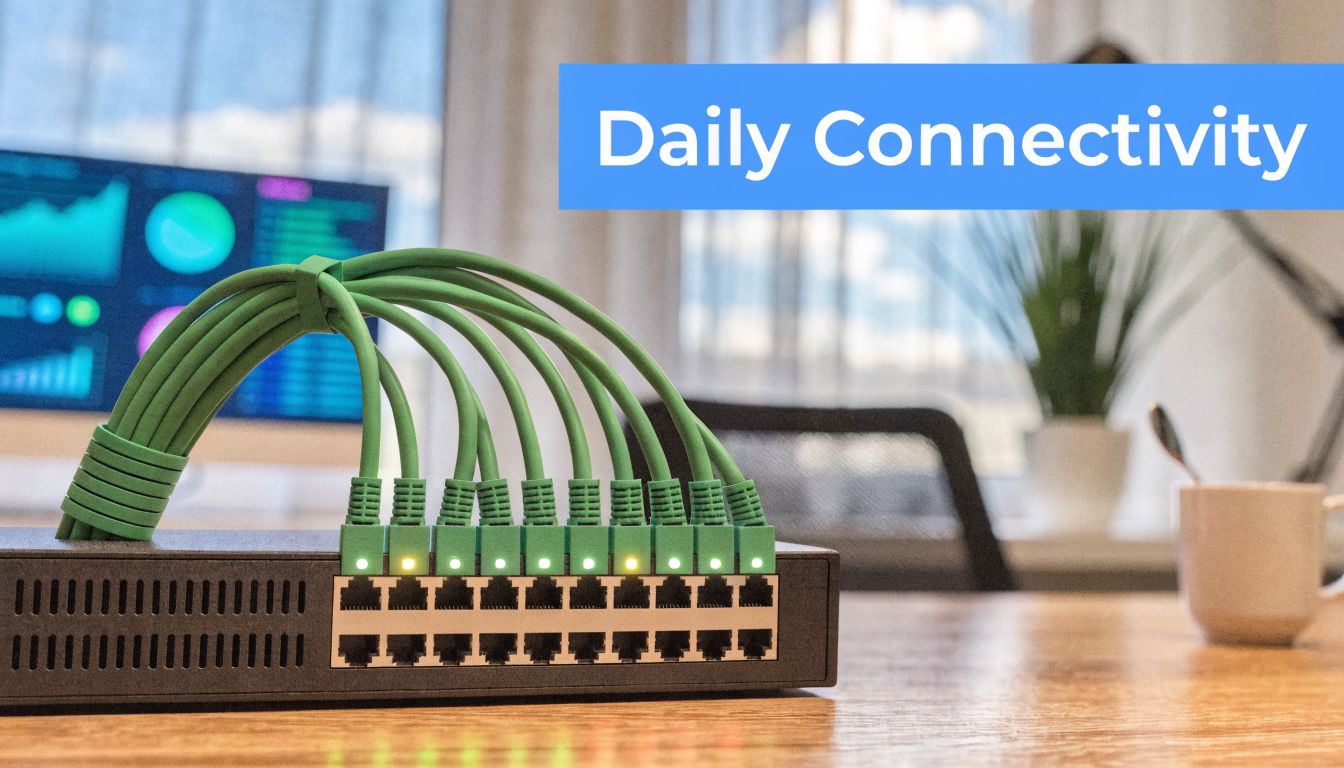
Ethernet moves packets inside local networks. IP moves packets across networks. That covers a huge part of the average client environment.
Where your clients depend on it
A few common examples make the point fast:
- Email delivery depends on packets moving between mail servers, gateways, and client devices
- Teams and VoIP calls depend on packets arriving fast enough and in the right order for usable audio and video
- Cloud file access depends on packets moving between endpoint, gateway, ISP, and application infrastructure
- Remote work depends on packets surviving VPN encapsulation, inspection, and routing changes
When a client says, “Our cloud app feels random,” they’re often describing packet behavior without using the term. When a compliance lead asks whether segmentation is effective, they’re asking whether packets can move where they shouldn’t.
For MSPs supporting segmented environments, a DMZ is a good example of packet switching in practice. It’s not just a box on a diagram. It’s a traffic-control decision. This explainer on what a DMZ means in networking is useful if you need a refresher.
The business angle
Packet switching powers the services your clients pay you to keep available. If packets slow down, leak, get replayed, or take unsafe paths, the issue becomes a help desk ticket, a security incident, or an audit finding.
That’s why network fundamentals matter to MSPs, vCISOs, CPAs involved in compliance reviews, and every reseller packaging security services. The network doesn’t care whether your client bought a premium firewall. It only cares how packets are handled.
How Attackers Exploit Packets for a Breach
Most “what is packet switching” articles lose their utility too soon. They explain efficiency and move on. Attackers don’t.
They abuse packet-switched networks because packets can be observed, replayed, disguised, redirected, or flooded at targets. That creates real risk for SOC 2, HIPAA, PCI DSS, and ISO 27001 environments where proving control effectiveness matters just as much as having controls on paper.
Three common packet-level attacks
- Packet sniffing means capturing traffic as it moves. If data is weakly protected or exposed in the wrong place, an attacker can read information that was never meant to be visible.
- IP spoofing means forging packet source information so malicious traffic looks trusted.
- Denial-of-service attacks use large volumes of packets to overwhelm a service or make a target burn resources handling junk traffic.
Those are simple definitions. The primary issue is how they manifest in client environments. A spoofed packet might slip through because a rule assumes traffic from a trusted segment is safe. A replayed packet might work because a system accepts duplicated requests. A sniffed session might reveal more than expected because encryption was misapplied or bypassed.
Why automated scans miss this
Automated scanners are useful. They are not enough.
A scanner can tell you a port is open or a software version is outdated. It usually won’t think like an attacker manipulating timing, packet order, trust boundaries, or protocol behavior. That takes manual pentesting, real traffic analysis, and an operator who knows what “normal” should look like.
If you sell external network reviews and don’t manually test packet behavior, you’re leaving a visible gap.
Operator mindset: Attackers don’t care whether a control exists. They care whether they can route around it with packet behavior.
What a pentester actually looks at
A manual pen test or penetration test often includes packet captures, route analysis, trust validation, and traffic inspection under different conditions. A certified tester may use Wireshark, tcpdump, Burp Suite, or controlled replay techniques to see how the environment reacts.
A simple capture view might look like this:
Frame 101
Protocol observed over expected path
Source appears trusted
Destination accepts repeated session behavior
Analyst question: Is the application validating the request, or only trusting packet metadata?
That’s the difference between checkbox testing and useful testing.
Why certifications matter here
Packet-level abuse is not where you want guesswork. OSCP, CEH, and CREST certified pentesters bring discipline to manual testing. They know how to validate traffic handling, confirm exploitability, and write findings that a client can remediate.
For an MSP or white label pentesting partner, that matters because your name is attached to the result. A weak test creates false confidence. A proper penetration testing engagement gives your client usable proof for compliance and a better map of actual exposure.
Secure Your Network with an Affordable Pentest
Packet switching is the engine behind modern business communication. It’s also one of the places attackers hide best.
If you support clients with cloud workloads, remote users, mixed security stacks, or compliance requirements, packet-level weaknesses can’t stay out of scope. They affect uptime, trust, segmentation, and audit readiness. They also don’t get solved by running a commodity scanner and exporting a PDF.
Forward-looking risk matters too. Emerging threats are already targeting packet-switched networks, and forward-looking pentesting needs to simulate those threats because standard vulnerability scans do not.
What strong partners should demand
- Affordable testing that makes sense for recurring client work
- Manual pentesting instead of scan-only reports
- Fast turnaround so projects don’t stall for weeks
- White label pentesting that protects the partner relationship
- Certified testers with OSCP, CEH, and CREST backgrounds
- Compliance-aware reporting mapped to real business risk
If you’re building or expanding a security program, a proper network penetration testing service should cover more than exposed ports. It should test how packets move, what trusts them, and where attackers can abuse them.
Understanding packet switching is not optional for modern service providers. It’s basic network literacy tied directly to breach prevention, risk assessment, and compliance delivery.
If you need a channel-only partner for affordable, manual pentesting, our white-label pentesting service helps MSPs, vCISOs, GRC firms, CPAs, and resellers deliver fast pentest, pen testing, and penetration testing under your own brand, without competing for your client relationship. Contact us today to learn more.

.avif)
.png)
.png)
.png)

